We remain fully operational. Our teams are working around the clock to ensure your deliveries continue safely.

Descargar la aplicación


Servicios al cliente
Sobre nosotros
Copyright © 2025 Desertcart Holdings Limited
Descargar la aplicación
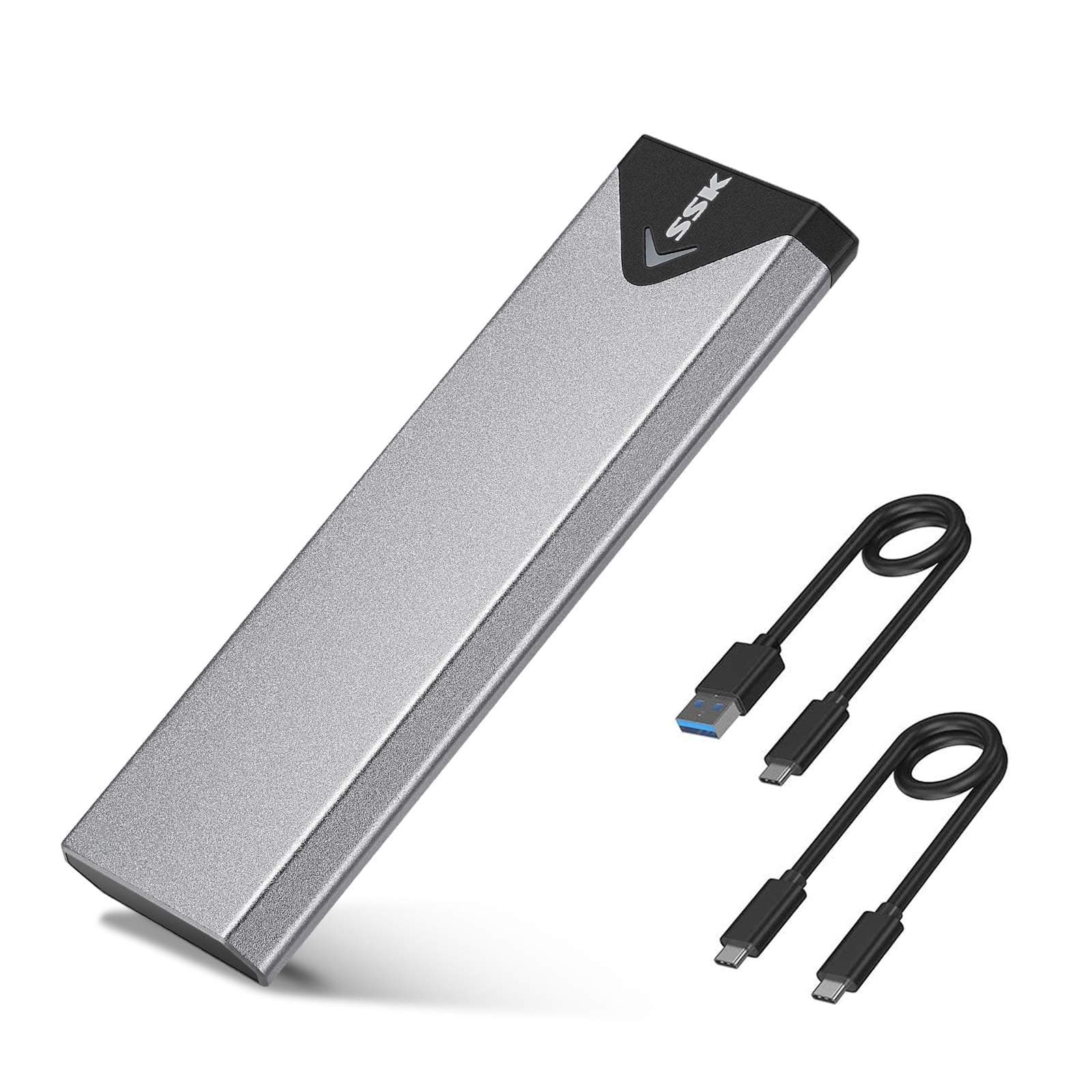
🚀 Unlock your SSD’s full potential with speed and style!
The SSK M.2 NVMe SATA SSD Enclosure leverages the advanced RTL9210B chipset and USB 3.2 Gen 2 interface to deliver blazing 10Gbps transfer speeds. Its sleek aluminum alloy body ensures excellent heat dissipation, while supporting a wide range of M-Key and B+M Key SSDs in multiple sizes. Designed for professionals who demand fast, reliable, and portable storage expansion, this plug-and-play enclosure is compatible across Windows, Mac, and Linux platforms, making it the ultimate tool to transform your internal SSD into a high-performance external drive.


| ASIN | B07MNFH1PX |
| Best Sellers Rank | #8 in Enclosures |
| Brand | SSK |
| Built-In Media | 10Gbps USB-A Cable, 10Gbps USB-C Cable, Installation Package, heating pad |
| Color | Space Gray |
| Compatible Devices | Laptop |
| Customer Reviews | 4.4 4.4 out of 5 stars (21,496) |
| Data Transfer Rate | 10 Gigabytes Per Second |
| Enclosure Material | Aluminum |
| Hard Disk Form Factor | 2280 Millimeters |
| Hardware Interface | USB 3.0 |
| Hardware Platform | Windows |
| Item Dimensions L x W x H | 4.53"L x 1.54"W x 0.43"H |
| Item Weight | 0.1 Kilograms |
| Manufacturer | SSK Corporation |
| Memory Storage Capacity | 4 TB |
| Supported Devices Quantity | 1 |
| Warranty Description | 1 Year |
G**.
Perfect for turning my old SSD into a portable drive!
The SSK M.2 NVMe SATA SSD Enclosure Adapter and similar USB‑C SSD enclosures are a great way to turn an M.2 NVMe or SATA SSD into a fast external drive with USB 3.2 Gen 2 (up to 10 Gbps) performance. Built around the advanced RTL9210B controller chip, these enclosures offer plug‑and‑play convenience without drivers while delivering quick data transfer speeds that make moving large files, backups, or media libraries fast and hassle‑free. The tool‑free design and compact aluminum body keep things simple and durable, and the included thermal pads help manage heat during prolonged use. Whether you’re expanding laptop storage or accessing drives on the go, this is a reliable, budget‑friendly solution that makes your M.2 SSD work wherever a USB‑C port is available.
D**I
How to use it best, after using it myself
It came with two sets of screws (good), but only one thermal pad with a very adhesive coating on it. If I pulled it off - especially after it was there absorbing heat for a while, it would not be like pulling off of a sticky. It seems designed for one-time SSD use, but... My advice: If the SSD needs to be used elsewhere, pulling off the adhesive pad would probably leave some hard to remove material from the SSD that you may want to use elsewhere. So: If you only want to use an SSD temporarily - just to test it, see what's on it, or re-format - DO NOT use the one-and-only adhesive pad. Use the adhesive pad ONLY if you want to use it as a more permanent SSD drive. Final comments: It works well, has a nice blinking LED that helps, it gets warm but not hot with the one-time thermal adhesive attached (like life, one-time, that's all folks), it didn't cost much, takes up very little space for such capacity, looks cool, they built it well. I give 5 stars as long as you have read everything above thus far.
J**N
High‑Speed Compact Enclosure – Excellent Build & Pocket‑Friendly
I recently picked up the SSK M.2 NVMe/SATA SSD Enclosure (model B07MNFH1PX) and I’m impressed. The build quality is superb—its slim aluminum alloy shell gives it a premium feel and excellent heat dissipation. The size (just about 11 mm thick) makes it ultra‑portable and easy to throw into a laptop bag, backpack, or even my gear rolling case. As for performance, it lives up to its promise: with the USB 3.2 Gen 2 (10 Gbps) interface it enables very fast transfer speeds (up to 1000 MB/s under ideal conditions). It handled my NVMe drive perfectly—and for a compact external enclosure I couldn’t ask for much more. Highly recommended if you want a durable, speedy, and pocket‑friendly enclosure.
C**N
Nice enclosure
Installed easily and working well
N**.
Great m.2 enclosure
This is the 2nd time I am purchasing this SSK M.2 NVME SATA SSD Enclosure and I have to say I would highly recommend it to anyone looking for an M.2 enclosure. Works great and no issues whatsoever on the prior one I purchased over a year ago. I also really appreciate that it comes with cable for BOTH usb to usb-c and usb-c to usb-c (many of the other brands come with only one type of cable and you might have to buy an adapter). Highly recommend.
M**.
Nice SSD holder!
Received when it was expected and performed as expected. Really happy with the item, did exactly what I bought it for, a low-cost reader that I can use to flash OS images.
M**D
first one didn't work but they sent new one quickly and worked really well
I got rid of an old laptop with an m.2 2800 drive inside. I took the drive and wanted an SSd enclosure. This one look great and the amazon page was really helpful with the picture of which card will work and which will not. Not all m.2 drives are the same. There is NVME or SATA and this drives works with most formats. The first unit arrived and after installing the drive did not work. Windows 10 recognized it easily but after about 20 seconds it kept disappearing and reappearing every few seconds as if I was unplugging and plugging it back in (even through I wasn't). I notified Amazon to get a replacement and one was immediately shipped out. The second product worked perfectly. Install is easy enough and Windows automatically recognized the drive immediately. No issues this time. Drive was stable! The device is made of aluminum which gives a nice feel. The install is ok. It takes some maneuvering to get the little holder in place on the m.2 drive with the screw. Not impossible but definitely awkward. You also need to push the drive pretty hard into the enclosure. I think this is so the drive contacts the aluminum body to help with heat. In terms of speed, this will vary greatly depending on what m.2 SSD you have and the PC you install it into. I was only getting about 50mbs when installed into the USB port however this went all the way up to 500mbs when I plugged into the USB C port of my PC. I transfer over a 6gb file in about 20 seconds. Much faster than any other external I have used. Very happy with the product and the company!
T**R
Easy to use. Excellent quality. Must have.
R**T
Original product and operated normal
A**R
Très bon débit de l'interface, permet d'exploiter le débit du SSD qui y est connecté.
F**O
Probada con un SSD Samsung de 3500/3200 MB/s y donde, con la carcasa conectada a un puerto USB 3.1 Gen 2 de 10Gbps, me da una lectura de 1Gb/s de lectura y 750Mb/s de escritura. Desde un puerto USB 3.1 Gen 1, funciona como cabe esperar a 5Gbps, donde los resultados han sido de 460MB/s de lectura/escritura, que tampoco está nada mal para este tipo puerto. La disipación de calor es bastante buena, ya que al tener una ligera amortiguación hacía la carcasa, la almohadilla térmica está en contacto con la carcasa de aluminio, disipando mejor el calor que otras carcasas que he visto, donde la almohadilla térmica se queda al aire. En mi caso se calienta muy poco la unidad. Escribiendo grandes cantidades de datos se calienta, pero dentro de lo normal
P**Y
SUMMARY: The enclosure worked straight out of the box. I used the unit with both a SATA and an NVME PCIe SSD. Both were recognised and accessible from my Windows machine as a USB storage called SSK Storage.. I also plugged it into my android tablet and it was recognised Both of my favourite HDD and SSD management apps (Aomei and Paragon) were able to see the SSD I have not experienced a problem with overheating or the enclosure becoming hotter than expected. This enclosure provides a nice hand sized unit which can be handled and put down after use without worrying about damage to the SSD or connecting lead VALUE: This is exceptionally good value and I will most probably purchase again MY NEED: 1) I needed a M2 socket that I could use to clone an NVME PCIe SSD with an on-board SSD 2) I had a SATA M2 SDD which I wanted to use as an external drive So the fact that this works with SATA and NVME SSDs was an advantage. PACKAGING: Packed in a cardboard box and wrapped in a white plastic bag gives the impression of a premium product CONSTRUCTION: I am impressed with the make quality. The outer case is aluminium and robust. The inner frame is plastic and also robust. Some have suggested that there are design flaws - I see no flaws. The unit is well made and the spring loaded carrier means that the SSD is pushed up against the metal of the case so aiding heat transfer. Some have commented that the leads are too short. The leads are adequately long for my use. Longer and they would clutter the bench. Also, I take the view that I am buying an SSD M2 enclosure not a set of leads. The leads are thicker than many of my other USB leads and seemingly well made. You get one USB C – USB C lead which is 20 cm long and one USB C to USB A lead which is 26 cm long. The USB A lead is colour coded as USB 3 INSTALLING THE SSD: Installing the SSD is fiddly if you have big fingers. It is easy to drop and mislay the screw and spacer if you are not careful. This means that the enclosure is not suited for regular swapping out of SSD's. For me this is not a problem. Spares screws and spacers are provided. When installing an SSD you need to take care that the spacer is placed the correct way up. Put it upside down and the unit will not slide back in to the case as it should. I found that it was easier to slide the carrier into its case when fitted with a short SDD rather than a long SSD. When a long SSD is fitted I needed to slide it in with some care to ensure that top the the SSD did not foul on the case and that the bottom of the carrier did not foul. I found that when a long SSD was in the enclosure the spring pressure was sufficient to stop the outer case sliding off and as such the small fixing screw was not needed. With a short SSD the case was looser and the small fixing screw was needed. If I was intending to fix a long SSD in the unit and leave it there I would use the small fixing screw. TYPE OF SSD and OS: I used the unit with both a SATA and an NVME PCIe SSD. Both were recognised and accessible from my Windows machine. I tried it in two different computers; a desktop and an HP Prodesk mini PC. I also plugged it into my android tablet and it was recognised BUT I was not able to access the stored files as, at the time, the SSD was formatted in NTFS not the FAT 32 needed by the Android tablet. USAGE WITH APPS: The enclosure worked straight out of the box. When in use a blue light indicates that the unit is operating. When plugged into the computer it is recognised by Windows as a USB storage called SSK Storage. Both of my favourite HDD and SSD management apps (Aomei and Paragon) were able to see the SSD storage device and format and manage both a SATA and NVME PCIe SDD device. The free version of HDD/SDD monitoring app "Hard Disk Sentinel" was also able to see the SSD and access and show some status and performance data Some have claimed the enclosure does not work with the SSD status reporting apps provided by some SSD suppliers (eg Samsung, Kingston etc) do not recognise the SSD in the carrier. I am not sure that this is a valid criticism. I would not expect a manufactures SSD status app which is typically built to work under very limited conditions and with very limited range of devices (own brand!) would necessarily interface with its SSD when installed in a third party piece of hardware such as this. Both my SSD and HDD management apps and "Hard Disk Sentinel" worked with the enclosure BE WARNED; Initially when I put the NVME PCIe SDD in the enc;losure Windows did not see it because it had not been set up with a partition and formatted or given a drive letter. But I had no problem formatting both my SATA and NVME PCIe SSD's whilst in the enclosure using my HDD and SSD management apps. If Windows etc does not see the M2 storage check that it has been partitioned, formatted, and given a drive letter - and also formatted correctly for the OS (eg NTFS or FAT etc) HEAT: I have not experienced a problem with overheating or the enclosure becoming hotter than expected. The enclose does get warm but no more than what I have experienced with USB and external HDD drives. Some have commented that the thermal conducting pad and aluminium case are thin. I cannot see that this is valid criticism or matters given the laws of physics/thermodynamics. The thermal conducing pad is to ease the heat flow from the device to the metal case. How well it does this depends on its heat conduction properties and not on its thickness. Albeit a thicker pad might even impede the transfer of heat to the case - compare the thickness of thermal paste needed to move heat from the CPU to its heat sink. The enclosure radiates heat into the environment and keeps the device cool. A thicker aluminium will not make it cool any more efficiently. The ability of the enclosure (like any heat sink) to cool depends on its surface area not on the thickness of material. The larger the surface area the more efficient the cooling process (heat sinks have fins of some type). The enclosure does not have fins but does have a much greater surface area than a naked M2 SSD so should be more effective at radiating heat into the environment than a naked M2. But it is obvious that an M2 SSD will not cool as effectively when inside the enclose as compared to when installed inside a PC or laptop which has the advantage of a FLOW of AIR through it from a fan. So my guess is that when an M2 SSD is in the enclosure it will be cooler than a naked M2 outside of the enclosure (in still air) but both will be warmer than an M2 SSD inside a PC or laptop when AIR is BLOWN over it – of course if air does not blown over the M2 when inside a PC or laptop it will probably get hotter.
Trustpilot
Hace 1 mes
Hace 5 días