We remain fully operational. Our teams are working around the clock to ensure your deliveries continue safely.

Descargar la aplicación


Servicios al cliente
Sobre nosotros
Copyright © 2025 Desertcart Holdings Limited
Descargar la aplicación

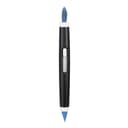
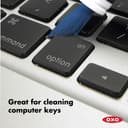

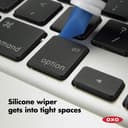

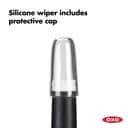
✨ Clean tech, clear mind — never miss a speck! 🧹
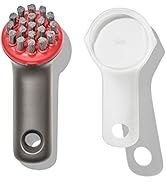
The OXO Grips Electronics Cleaning Brush is a dual-ended, portable cleaning tool featuring soft retractable bristles and a slim silicone wiper designed to remove dust and debris from delicate electronics like keyboards, screens, and camera lenses. Its ergonomic grip and protective cap ensure precision cleaning and easy storage, making it an essential accessory for maintaining pristine tech gear.





























| ASIN | B0050B6CYW |
| Best Sellers Rank | #4 in Camera & Photo Cleaning Brushes |
| Brand | OXO |
| Brand Name | OXO |
| Color | Blue |
| Customer Reviews | 4.5 out of 5 stars 12,585 Reviews |
| Global Trade Identification Number | 00719812031316 |
| Handle Material | Plastic |
| Included Components | Attachment |
| Item Dimensions L x W x H | 4.25"L x 10.5"W x 5"H |
| Item Type Name | OXO Good Grips Electronics Cleaning Brush |
| Item Weight | 1.44 ounces |
| Manufacturer | OXO |
| Manufacturer Warranty Description | Satisfaction guarantee; if for any reason you are not satisfied with an oxo product, return it for replacement or refund. |
| Material | Plastic |
| Material Type | Plastic |
| Number of Items | 1 |
| Other Special Features of the Product | Portable |
| Product Dimensions | 4.25"L x 10.5"W x 5"H |
| Product Firmness | Soft |
| Shape | Rectangular |
| Specific Uses For Product | Computer |
| Surface Recommendation | Plastic |
| Theme | Electronics Care |
| UPC | 719812031316 |
| Unit Count | 1 Count |
C**E
Nifty Computer/Electronics Cleaning Device
I got this OXO Good Grips Electronics Cleaning Brush since I needed a better way to clean the keyboard of my computer, an Apple MacBook Pro laptop. Because, while I use iKlear Spray and a soft cotton knit or flannel (since I usually HATE microfiber cleaning cloths as their texture is so weird & rough and often gets caught on the pads of my fingers or the palm[s] of my hands) scrap of cloth (usually a rag from worn-out old pajamas that were made into cutoffs) to wipe the screen, the mouse/trackpad and other areas, and that works very well, I've been finding it increasingly difficult to reach into the narrow spaces (like in/around/between the sides of the keys and the rest of the keyboard & other areas) with the just the cloth and spray. Although this Apple MacBook Pro is the FIRST Mac computer I've ever owned (though its not the first Apple product I've had -- I got an iPad Mini in 2012) it is ABSOLUTELY, POSITIVELY my FAVORITE computer. Since out of ALL the half-dozen, or dozen or so Windows PCs I've had, over the years (going all the way back to Windows 3.1 in the early 90's) it is HANDS-DOWN the BEST computer that I've ever had, I'm very careful (even go as far as to say, anal & obsessed) about keeping it clean & pristine, and running in new condition for as long as possible! So I was looking for a can of compressed air, a keyboard brush, or some other kind of device that could fit in (and clean out) the gaps between the keys and other small crevices. That was when I came across the OXO Good Grips Electronics Cleaning Brush -- and I'm glad I got it! Basically, the OXO Good Grips Electronics Cleaning Brush is a pen-like device that on one end, has a slim silicone wiper with a slanted/pointed tip and at the other end has a soft-bristle brush. After almost a month of having/using this item, on a nearly daily basis, I can say with certainty that BOTH parts (the silicone wiper AND the soft-bristle brush) are ESSENTIAL -- especially for cleaning Mac laptops, in which, as far as I can tell, the gaps between the keyboard keys & the laptop chassis are a lot more narrow & harder to clean out than any of my prior PC laptops (though in all fairness, my PC computers, lasted such a short time [usually around 2 years or less], and were so riddled with problems starting pretty much from Day 1, that I never really bothered to spend much time/energy cleaning the laptop, especially in/around/underneath the keyboard keys like I do with my MacBook Pro which has lasted 4 years as of this coming Christmas -- and is still going strong!) When I clean my laptop, which I usually do on a daily (or alternate/every-other-day) or weekly basis, I first turn the MacBook Pro upside down while open (meaning with the keyboard facing down) and VERY GENTLY tap on the bottom/back of the laptop to get out any stray dirt, crumbs, and/or lint, that might have gotten stuck inside/underneath the keyboard keys, before using the soft-bristle brush on this device, to sweep away whatever dust was loosened in the course of tapping it while holding it upside down. Then, I use the pointed tip of the silicone wiper to grab whatever dirt, crumbs, and/or lint that remain between the keyboard keys -- and finally, last but not least, I use a soft cotton knit or flannel cloth rag and the iKlear Spray to wipe down the screen, the mouse/trackpad, the laptop chassis and the keyboard. I don't usually wipe down the top (front) or bottom (back) of the laptop very often because its pretty much always covered by a hardshell protective case. Anyway, I've been using the OXO Good Grips Electronics Cleaning Brush for almost a month, and for the most part, it is a GREAT cleaning device. The silicone wiper (especially when using the pointed tip) is very flexible and TERRIFIC at being able to fit INSIDE the sides of the keys, and pick up dirt, lint, crumbs & other stuff. The silicone wiper also comes with a clear plastic cap to keep it clean & protect it from picking up dirt, crumbs, hairs, lint or whatever, when not in use. The soft-bristled brush is also pretty good, though its just a basic soft-bristle brush like any other out there, and nothing to really rave about -- at least not as much as the silicone wiper which is a real help in grabbing whatever dirt, crumbs, lint or whatever else finds its way into the keyboard keys. I love this device and really only have one quibble, which is not really a quibble actually. Its just that the silicone wiper is so GREAT at picking up stuff (dirt, lint, crumbs, etc.) that its necessary to WIPE THE WIPER several times while cleaning my keyboard because of all the gunk from underneath the keys that get stuck to it. That's the only real issue I have with this. I just wish there was a way to reduce the number of times necessary to wipe the silicone wiper clean. But I guess the only way to do that would be to make the wiper bigger, so that it can hold more gunk before needing to be wiped -- yet increasing the size of the silicone wiper would probably make it too big to fit into the narrow gaps around/inside the keys, which would totally defeat the purpose (for me anyway!) of getting this device. Other than that, this is a GREAT computer/electronics cleaner and I'm really glad I got it, and plan to continue using it to clean my laptop on a regular basis!! ★☆★☆★ 5 STARS!!!!
J**N
Detail Cleaning Brush – OXO Dual-Sided Precision Tool
I use this brush mainly in the kitchen—for cleaning between backsplash tile seams, tight drawer corners, and the trim around appliances—but it’s just as effective for tech. I’ve used it on my iPad, gimbal, and wireless mic ports without hesitation. The retractable brush side is soft but precise, perfect for dislodging dust without scratching. The silicone wedge on the other end gets into corners most tools can’t touch—whether it’s under a cabinet lip or inside a charging dock. What makes it worth keeping is how clean it stays. Even after heavy use, it washes off easily and holds its shape. The matte grip feels intentional and ergonomic, and the tool itself sits flush in a drawer system without rolling or snagging. Minimal footprint, maximum payoff—especially if your gear lives in the kitchen like mine does. — Curated by Jaded John | #OrderlyCleanDesign
M**T
Good quality but a bit overhyped—a $5 electronics "brush" with a useless rubber other end
**UPDATE several years later:** I'm bumping up my review from three to four stars. I don't disagree with any of my criticism that I've written previously (see below), but this tool never leaves my backpack, even though the rubber tip is useless and the brush has limited uses. I use the brush to clean the crack between the two parts of my laptop (the screen and the keyboard parts), and I’ll occasionally brush some dirt/dust between keys. If you're in IT or often find yourself cleaning tight spaces (e.g. a keyboard) where a paintbrush-like object might help brush out some dirt or debris, pick this, or consider buying a soft paintbrush for much less money. Otherwise, you probably don’t need this, especially since the price is no longer $5. This brush is a brush. If you are specifically looking for a brush to clean your electronics, look no farther—buy this one! This brush is well-built, fits easily into a backpack or purse, and is collapsible so the bristles don't get damaged. However, if you (like me) randomly stumbled upon this product's listing and not sure if you need it, you probably don't need this $5 paintbrush. This tool is practically marked as some universal-cleaning tool, that can remove layers of dust and dirt and make your laptop 20 years newer, but it's really not much more than a soft paintbrush with a useless rubber tip on the other end. I bought this as my MacBook Pro has some hard-to-remove dirt/etc. accumulating around the bottom of the keys that I wanted to clean. It did help clean it up some, but it's by no means spotless, and this tool is not capable of making it spotless. I also hoped it would clean some of the dirt and dust out of the vents on the bottom of my iPhone and it was completely useless for that purpose. The brush works well to clean off loose dirt and particles, but most of the dirt that is stuck in the nicks and crannies of your electronics isn't stuff that can easily be swept up with a soft-bristled brush. The silicone tip on the other end should hypothetically help in this use case, but it does nothing except leave light markings on your electronics (easily rubbed off). I honestly haven't found a real use for the silicone tip as it's not firm enough to actually scrape anything off. (EDIT: it actually is useful for cleaning the tips of my AirPods… that’s the only thing I’ve had success with it.) I'm a huge OXO fan and I've bought plenty of their products, but this one is a bit overhyped. Not worth returning and I I still use the brush side once in a while, so it stays in my backpack for now, but it's easily something I could do without (or I could get a soft paintbrush for half the price).
D**S
Perfect for cleaning keyboards! (and other delicate electronics)
This handy little tool does exactly what it's meant to! I use it to clean my Mac keyboard since dust and tiny little particles have a tendency to take shelter under the keys. I love the two different ends which you'll find many different uses for. The silicone end is great for getting in between the keys, but it won't be able to pick up everything underneath the keys because it can only go so deep. However, I find that the the bristle side does a great job of accomplishing this task. You can angle the brush to get under each key and you'd be surprised at how much gunk comes flying out. This does cause the bristles to fray a little after prolonged use but it is so worth it seeing how clean my keyboard is. Besides, at such a low price, I wouldn't mind buying another one if need be. However, I don't think I'll need to because it still works great. I also use this to clean the charging and headphone ports on my cell phone, and I'm sure you'll find many other uses for this tool. Dust does cling to the silicone side (which is kind of the point), but it comes with a cap to protect when not in use, and you can clean it easily by just rinsing with water. Same goes for the bristle side. I have been using this product for several weeks and it still works like a charm. I keep this in my pen holder on my desk and it blends right in, and I can easily access it to clean my keyboard once I see that it's getting dusty again. My keyboard has never been happier. Overall, very satisfied with the product and would highly recommend it.
Z**S
A ~GREAT~ Product! -- Ergonomic; Precise; Compact; Great for getting those hard-to-reach areas; & Safe for Delicate Finishes
The OXO Good Grips Electronics Cleaning Brush is a must-have product for cleaning electronics. It is versatile enough to work in many different applications. It is gentle enough to avoid cosmetically damaging delicate electronics that other brushes can easily scratch. And it is precise enough to work well in applications where one needs a tool of precision that is capable of reaching difficult or small areas. I purchased this because it's hard to get that dust/dirt off that can accumulate between the keys. Many brushes (including some tooth brushes) are a little too stiff and in some cases could even cause a problem. This OXO Electronics Cleaning Brush presents a solution. At about the length of your average-sized pen, and about the thickness of a highlighter, this brush is compact. Like other Good Grips products, the body is wrapped in a silicone material which gives your hand excellent traction. It has two different ends: a soft-bristled brush, and a silicone wiper with a chisel tip. The brush is retractable via a slide lock, where as the silicone wiper is fixed and protected with the included clear cap. Since this protects both sides from damage, this brush can hold up to heavier mobile usage. The uses for this product are almost endless. The brush bristles are extremely soft (think even softer than soft paint brushes) and are good for usage on finishes that can easily scratch (ex: acrylic.) The silicone wiper's chisel tip gives you incredible precision when working with smaller electronics/components. Like the brush, the silicone wiper works well on surfaces that are easily cosmetically damaged. With an excellent design, useful features, great ergos, and a reasonable price, I highly recommend this brush.
J**.
80% there, seems like it's missing rigid tools to be 100% effective.
An OXO Fan boy here, I purchased this to try to clean the nooks and crannies on my electronics and controllers. The brush pulls more than half it's weight, but the silicone wiper left more to be desired. I first tried it on the bezel of my Galaxy Watch and found it wasn't able to get as much grime out as I had hoped, good luck trying to clean the screws with this (was too flexible to be effective in most spots). Then I tried it on the seams of my Nintendo Pro controller and I found it wasn't able to get deep enough to fully clean it. (In these cases you would still need something rigid like a toothpick to fully clean). The brush on the other hand did pull it's weight, the area that this really shown was while trying to clean layers of dust off my switch dock, a microfiber towel would always leave a rectangle of dust around the USB-C connection. This worked in that scenario because it was able to get into an area that a broader tool wouldn't, same for areas of my keyboard. All in all it worked to about 80% efficiency, but I still had to go back with another tool for a final clean. The brush is nice but could probably get the same job done with an extra soft toothbrush.
M**J
The BEST little cleaning tool for keyboards, tablets, cells and cordless phone
What a cool and really helpful little cleaning tool--especially if you are the owner of a laptop. With my desktop computer, I didn't really worry about dirt getting down into my keyboard. If I suspected that some dirt had made its way under the keys, I'd just turn the keyboard over and give it a good shake and maybe a smack or two on the back to dislodge any stubborn crumbs. With my new laptop, I realized that shaking and smacking weren't really the best way to treat the host of my computer's total electronic works if I intended to have it around for awhile. When I spotted this little cleaning brush--about the size of and girth of a Magic Marker--I thought I could put it to good use. It hasn't left the side of my laptop since the day it arrived. If I spot any dirt or crumb, I just click the hidden, very soft rounded brush up and into action. Usually a sweep across the keyboard manges to clear away any problem dirt before it gets lodged under my keyboard. The soft, sharply-angled silicon tip is especially useful on my cordless phone and tablet--I use it like a mini squeegee to lift sticky dirt from the corners of my phone and tablet. I love this little tool and I would certainly recommend it for you or as a gift for someone with a number of electronic gadgets needing a little clean up now and again. The price is so reasonable you could easily buy two: one for work and one for whatever. Reminder to self: get one for each of the boys (my grandsons) for their iphones and laptops
M**N
Great Little Gadget
This little tool was as good as promised. The brush end works well on the keyboard and other places that need gentle dusting (the places on my leather handbag where dust can collect, where tabs are sewn, etc., I just noticed it recently and it works perfectly). The other end is nice, even on a surface that hasn’t been cleaned recently, like a phone touch screen, it will pick up dirt. But I’m not using it in place of actual cleaning supplies. It is just a well designed tool that is handy to get into areas other things can’t, and it stays fresh by retracting the brush and with a cap on the other end. That company thinks of some useful things. Worth $5 for sure.
Trustpilot
Hace 2 semanas
Hace 5 días