We remain fully operational. Our teams are working around the clock to ensure your deliveries continue safely.

Descargar la aplicación


Servicios al cliente
Sobre nosotros
Copyright © 2025 Desertcart Holdings Limited
Descargar la aplicación


🎮 Dominate wirelessly, game endlessly, and light up your victory.
The Logitech G903 LIGHTSPEED Wireless Gaming Mouse combines cutting-edge HERO 25K sensor technology with ultra-fast 1 ms wireless connectivity and an industry-leading 140+ hour rechargeable battery. Its ambidextrous design and customizable buttons cater to every pro gamer’s needs, while LIGHTSYNC RGB lighting offers immersive, fully customizable effects. POWERPLAY compatibility ensures you never run out of juice, making this mouse a top-tier choice for serious gamers and professionals seeking precision, endurance, and style.



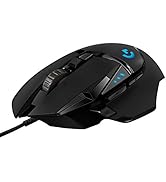



| ASIN | B07NSVMT22 |
| Additional Features | Rechargeable |
| Antenna Location | Gaming |
| Are Batteries Included | Yes |
| Are Batteries Required | Yes |
| Battery Average Life | 140 Hours |
| Best Sellers Rank | #2,190 in Video Games ( See Top 100 in Video Games ) #118 in PC Gaming Mice |
| Brand | Logitech G |
| Built-In Media | User Manual |
| Button Quantity | 11 |
| Color | Black |
| Compatible Devices | Personal Computer |
| Connectivity Technology | Radio Frequency, USB |
| Customer Reviews | 4.6 4.6 out of 5 stars (3,828) |
| Enclosure Material | Plastic |
| Global Trade Identification Number | 00097855148988 |
| Hand Orientation | Ambidextrous |
| Hardware Platform | PC |
| Item Dimensions L x W | 5.13"L x 2.62"W |
| Item Type Name | Wireless Gaming Mouse |
| Item Weight | 3.88 Ounces |
| Manufacturer | Logitech |
| Model Name | Logitech G903 LIGHTSPEED Gaming Mouse with HERO 16K sensor |
| Model Number | 910-005670 |
| Mouse Maximum Sensitivity | 25600 Dots per Inch |
| Movement Detection | Optical |
| Number of Batteries | 1 Lithium Polymer batteries required. (included) |
| Operating System | PC, Mac OS, Linux |
| Power Source | Battery Powered |
| Range | 10.0 meters |
| Style Name | G903 Lightspeed Wireless |
| Theme | Gaming |
| UPC | 097855148988 |
| Unit Count | 1.0 Count |
| Warranty Description | 2 Year Limited Hardware Warranty |
J**E
Southpaws rejoice. This is the one.
TLDR: I’ve been through a lot of mice. That’s because I’m wrong-handed with big mitts, and I’m always on the lookout for something that can compare to my dearly loved but deceased Logitech LX8. This Logitech G903 mouse is even better and hands-down the best mouse I’ve ever used. For southpaws like me, an ambidextrous mouse is about the best we can hope for. It’s a right-handed world, so it’s nice when a mouse isn’t specifically molded and curved for the right hand. This one is perfectly equal on all sides, but it’s more than that. It’s truly ambidextrous, and built with us lefty’s in mind. Size-wise, I wear XL men’s gloves, and this mouse fits my hand perfectly. Whether I want to use a full in-the-palm-of-my-hand grip or a fingertip ‘claw’ grip, it’s just right. The bottom of the mouse has six mouse feet, or skates. There’s a big one at the front and rear, as well as both sides, and it really glides well over my mouse pad. There’s even two smaller chevron-shaped skates surrounding the sensor, which I suspect also keeps dust out. The thumb wheel is outstanding. It works like any other, except that you can push a button right behind it, and it becomes freewheeling. Give it a good spin, and it’ll keep going up and down a page or an entire map of a game in the blink of an eye. Or you can use it the same as any other, albeit without any resistance. Push the button again, and you’re back to clicky resistance. There’s a DPI button, which I previously had no use for. Those buttons are usually on the bottom of a mouse, which makes them pretty useless. Out of sight, out of mind. But this one has two buttons right behind the mouse wheel resistance button and instantly changes the DPI settings up or down. What that does for me is make the mouse cursor faster or slower. There’s an on-screen pop-up when a change is made, and an LED light on the mouse shows one, two, or three lights that sort of indicate how many DPI, or how fast you’re going. I think this would be advantageous for some FPS or sniper games. The side buttons are perfect. You can use them all, on both sides, or you can use just the left or just the right and cover the others. It only takes two seconds to add or swap out because they and the covers are magnetic. When it’s all set up, the thumb buttons work exactly as I want them to. My thumbs naturally rest where they’re supposed to, on the solid part of the mouse, but it’s easy to rock them up slightly to activate either thumb button. With other mice, I was constantly clicking the buttons when I didn’t intend to; with this mouse, that’s not happening. There’s also a magnetic cover on the bottom of the mouse, which you push in hard to flip it out. From there, you can add or remove a 10-gram weight. I like a heavy mouse, so I’ve got it in. The last thing I absolutely LOVE is that although this is wireless (and has a great battery), you can plug it in and charge it while you’re using it. The cable it comes with is long, and you can keep the receiver plugged into it or use it to connect and charge the mouse. The only thing I don’t like about that is that it’s an old-fashioned USB-micro connector. Bottom line: Best mouse ever, and I’m thrilled. Well worth the money, and I hope this helps.
J**L
High-End Performance with Pro-Level Precision
The Logitech G903 Lightspeed is a top-tier wireless gaming mouse that delivers excellent performance. The Hero 25K sensor is incredibly precise and responsive, making it perfect for both gaming and productivity. The wireless connection is solid with no noticeable lag, and the battery life is impressive, easily lasting multiple days on a single charge. The ambidextrous design is comfortable and well-balanced, and the build quality feels premium. LIGHTSYNC RGB adds a nice touch without being over the top. Overall, a powerful, reliable mouse that performs exactly as expected for its class.
I**C
a great mouse that I only have a few minor complaints about
I'm on my computer for work all day long, so I'm always on the lookout for great accessories that make my life easier, and this mouse is one of them. It's a little pricey, but it's very responsive across multiple surfaces and feels great in my hand. That said, I do have a few minor complaints. First of all, I bought the charging pad with my mouse and it worked great for about 6 months. Then I lost the USB dongle in a move so I purchased a replacement mouse, but even though it's recognized and shows up in the Logitech G Hub software, the pad have never charged the mouse since and I have no idea why. That said, I can charge the mouse with a USB cable from <15% to 100% in a couple of hours and a full charge last for weeks even with heavy use so it's not a huge deal, although it might suggest that the rather expensive charging pad isn't really worth the expense. Second, there's a button next to the mouse wheel that switches the wheel from free spinning to tensioned mode where the mouse will stop moving as soon as you stop pushing it. I like the free spinning mode as it's a great way to quickly jump around a long document or web page, but the wheel on this model is very loose and tends to scroll drift the instant you lift your finger off the wheel even if you've stopped the movement several times by gently pressing down on the wheel. I've owned many different mice over the years and this is the first one where the wheel was so loose it would constantly drift like that, and I know it's specific to the model because I own 3 of these mice for my various personal and work computers and they all exhibit the same behavior. Finally, I always reassign one of my mouse buttons to double-click. I've learned over the years that if I physically double-click the little metal tab under the mouse button fatigues in less than a year and starts doing that annoying double-click when you only clicked once thing, so I always assign a button and use that instead. Now, there's no problem assigning a button to double-click, the catch is the G Hub software. It has this really obnoxious thing where it auto sleeps after like 5-10 minutes of mouse inactivity, so when you move your mouse again it plays a loud ding and for a couple seconds only basic left click and right click work before G Hub wakes up and pushes the custom button assignments into the mouse again. I've spoken with tech support at Logitech and there is no way to prevent G Hub from auto sleeping, that's just the way the software is designed, but there is a mouse memory mode. Basically, instead of communicating constantly with G Hub, you can just have the mouse "remember" its button assignments in a kind of offline mode. So no need for G Hub and no need for that annoying pause every time I move my mouse after reading for a few minutes. Except for some reason double-click is in a category of button assignments that doesn't qualify for the mouse memory mode, and according to tech support there's no way to get around that, which is kind of a bummer. Anyway, that's about it. I do like the mouse, but there is room for improvement in my book.
S**H
I am a right-handed person, the ambidextrous design bothers some people, but I find it comfortable. I use the thumb buttons for push-to-talk(PTT), one for in-game PTT, other for discord, etc, PTT. Don't bother trying to use the buttons opposite to your thumb side(at least not for gaming), it's a very awkward reach. Hyperscroll is very good for websites, the non-hyperscroll is very tactile and suitable for gaming. DPI changer is fine, but I don't really use it often. No latency. Apparently, it's supposed to be faster than wired, but honestly you can't tell the difference. Sensors are technically supposed to be more accurate than the old model, not really humanly discernible considering how accurate sensors are nowadays. I'm an original G903 owner, so the rest of the review will be in comparison to the old version of the G903, which, in my opinion, was the best mouse. Snagged this for $150, $50 cheaper than what I paid for the original G903 when it first came out. Please take into account the fact that I have lighting disabled, it really adds nothing to the experience. I'm leaving this review because it arrived at half charge and after two weeks of non-stop usage, the battery finally went down to 3 percent. Charge is really fast too. After about a minute, the battery went to 20%. Amazing. Low battery indicator is not obnoxious like it is on the old G903. The old model would flash red and would be really distracting, the new model is more like a fade in and out really slowly, so it's not annoying the crap out of me. Icons in the logitech software still don't load properly, however, a reinstall which I am too lazy to do might fix it, regardless, everything is still functional in it. The UI doesn't look like it was designed a decade ago, which is a plus I guess. Don't get the powerplay mat, it's pointless when the battery life is this good. Just charge it once a month while you're watching a TV show episode, and you're good. Off switch is pretty pointless considering it has a seamless auto-sleep function, only necessary for travelling.
M**D
طلبت نسخة 16K وصلت نسخة 12k
E**)
Lo pedí una vez y le faltó una pieza yo creo que fue un error de empaquetado, pero el mouse se veía excelente, así que lo pedí de nuevo y ahora si venía perfecto, ya lo probé y funciona muyy bien, así que satisfecha con el producto :)
F**E
This mouse gets a huge amount of use and works great, especially for this left handed user.
C**A
Se entrgo en tiempo y forma, pero este mause ya es usado se nota en los recorridos de las marcas en las almohadillas y aparte venia con marcas de dedos al abrirlo, las hojas de manual venia con escritura en pluma azul a mano.
Trustpilot
Hace 2 semanas
Hace 1 semana