We remain fully operational. Our teams are working around the clock to ensure your deliveries continue safely.

Descargar la aplicación


Servicios al cliente
Sobre nosotros
Copyright © 2025 Desertcart Holdings Limited
Descargar la aplicación


🖊️ Elevate your productivity with the pen mouse that fits your lifestyle and your pocket.
The lychee Wireless Optical Pocket Pen Mouse is a sleek, ultra-portable 2.4GHz wireless pen-style mouse designed for professionals on the go. Measuring just 5.7 inches, it offers adjustable DPI settings up to 1600 for precise control, a 33-foot wireless range, and ergonomic design for comfortable use. Compatible with multiple operating systems and requiring only one AAA battery, it’s a versatile tool perfect for presentations, meetings, and compact workspaces.


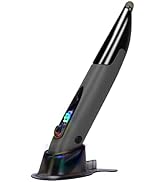

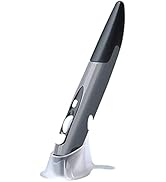


| ASIN | B07R9Z42YB |
| Additional Features | Wireless |
| Antenna Location | Laptop |
| Are Batteries Included | No |
| Are Batteries Required | Yes |
| Best Sellers Rank | #774 in Computer Mice |
| Brand | lychee |
| Built-In Media | 1 * Pen Mouse, 1 * USB 2.4GHz Receiver, 1 * Mount, 1 * English Manual |
| Button Quantity | 4 |
| Color | Grey |
| Compatible Devices | Laptop, Personal Computer, Tablet |
| Connectivity Technology | USB, Wireless |
| Customer Reviews | 3.9 out of 5 stars 826 Reviews |
| Enclosure Material | Plastic |
| Finish | Matte |
| Global Trade Identification Number | 06921279287494 |
| Hand Orientation | Ambidextrous |
| Hardware Platform | Tablet |
| Item Dimensions L x W | 1"L x 0.6"W |
| Item Weight | 29 Grams |
| Manufacturer | Lychee |
| Model Name | 6921279287494 |
| Model Number | 6921279287494 |
| Mouse Maximum Sensitivity | 1600 Dots per Inch |
| Movement Detection | Optical |
| Movement Detection Technology | Optical |
| Number of Batteries | 1 AAA batteries required. |
| Number of Buttons | 4 |
| Operating System | Windows 10 |
| Power Source | Battery Powered |
| Range | 33.0 feet |
| Special Feature | Wireless |
| Style Name | Modern |
| Theme | pen mouse |
| Unit Count | 1.0 Count |
S**N
This works great just for scrolling & clicking too
I use this pen mouse for a personal life hack I discovered. For my right hand I use a vertical handshake mouse to move the cursor around. For my left hand, I hold this pen mouse upside down and use my left thumb for scrolling and clicking. I covered the red LED with a small piece of tape so the cursor won't jump around. If you heavily utilize the mouse all day, you should definitely try this technique, especially if your hand gets sore after a while. This mouse also works just fine when using as directed. Sometimes the cursor may jump a little, but overall it works perfectly fine. I already purchased a second pen mouse as a backup because, honestly, this pen mouse feels very cheap and I've gotten so used to this mouse for my method at work, I have another new in the box for when this one breaks. But so far it's lasted at least 6 months, and it still works and clicks and scrolls like the first day I got it. And by the way it takes a single AAA.
S**X
Pen style mouse for pc.
It will take a lil bit to get used to using. But it does function just as described.
J**R
Comfortable, fairly sturdy
I don't expect this mouse pen to last me years -- it is a stopgap solution for me. The included base quickly stopped being able to keep the mouse pen upright, which means this thing took several tumbles onto hard surfaces before I got out of the habit of trying to use the base. The mouse pen itself continues to work just fine. I have not had to clean lint out of the bottom. I have not seen as much as a scratch appear after it has fallen on ceramic tile, on a hardwood desk, on the desk and bounced off to then fall onto the ceramic tile, and on cement. I have also shoved it into a thinly padded inner pocket in my computer bag and had the full weight of the laptop wind up laying atop the mouse pen; no strain marks on the seams, no separation, no damage to the buttons, no functionality problems. I wish the top had a clip so I could attach it to my sleeve when I am busy typing, or else that the tip had a hole formed in it through which I could clip a lanyard. I am right-handed, and this mouse pen was definitely designed for right-handed use. However, when I switch it to my left hand, I have no trouble pressing the side "right click" button without disrupting my hand position.
S**N
Didn't work, returning for refund.
Maybe I got a bad one but it won't turn on, laser light never came on (as one would expect from any mouse), and it never connected to my laptop (nor could I find it when I tried to connect it manually). The troubleshooting website comes back as 403 Forbidden (openresty/1.25.3.2). Remember: if it's too good to be true, it probably is. Returning for a refund.
J**E
Like the flexibility
It's still new but working great so far. Sits comfortable in my hand. I like the flexibility I have when presenting.
S**R
This pen mouse is a must-have for anyone who wants a convenient
This pen mouse is a must-have for anyone who wants a convenient and accurate way to navigate their computer. The 2.4GHz USB wireless connection is incredibly reliable and provides a smooth and seamless experience. The adjustable DPI settings of 800/1200/1600 are great for customizing the sensitivity of the mouse to match my preferences, making it perfect for both precise digital art and everyday computer tasks. One of the best things about this pen mouse is its ergonomic design. It fits comfortably in my hand and allows for a more natural and intuitive way of navigating my computer. The compact size and portable design make it easy to take with me wherever I go.
D**Y
Gives me hand cramps, but has some pros
This is a fun alternative to a traditional mouse, and I find the movement speed and pen shape design really handy for quick clicks, and especially if I don't have a flat surface to use my mouse on at the time. I keep it as a backup cursor, because I can't use it for very long as it aggravates my finger joint problems. I was looking for a mouse that would prevent carpal tunnel flare ups, but I find my hand cramping after using it for ten minutes or more. I have tried multiple different hand positions in order to make this pen more comfortable but to no avail, sadly. Also, I find the wheel to be far too close to the left click button to be usable. I'm still giving it 4 stars because it's a very sleek and fast mouse, and it also confuses the heck out of people around me when they see me moving a pen around on my thigh while at my laptop.
P**Z
Good value for the money, but it has some bugs
Like others said, your writing isn't going to be a whole lot neater than with a regular mouse, but with practice it will improve. It has a good pen feel and I don't think the buttons are awkward at all. I have found that when I write on a piece of paper rather than my smooth desk my writing is better and more controlled. Overall, for how inexpensive this is I think it's a pretty good unit. Edited to add: It still works OK, but it has a new bug. I've had it a little over a month and I thought the battery died after only one use with that battery. I thought maybe I left it turned on? I changed the battery today, but it still wasn't working. It turns out that it only works now if I leave the battery cover off. What? Now it's ugly and I'm worried about losing the battery, but it works again, which makes me happy. My battery wasn't dead, either, which also makes me happy, but it's super weird that it only works with the battery cover off. I dropped it from 4 stars to 2 because of this newfound bug.
Trustpilot
Hace 4 días
Hace 1 mes