🎶 Elevate your audio game—because your ears deserve the best.
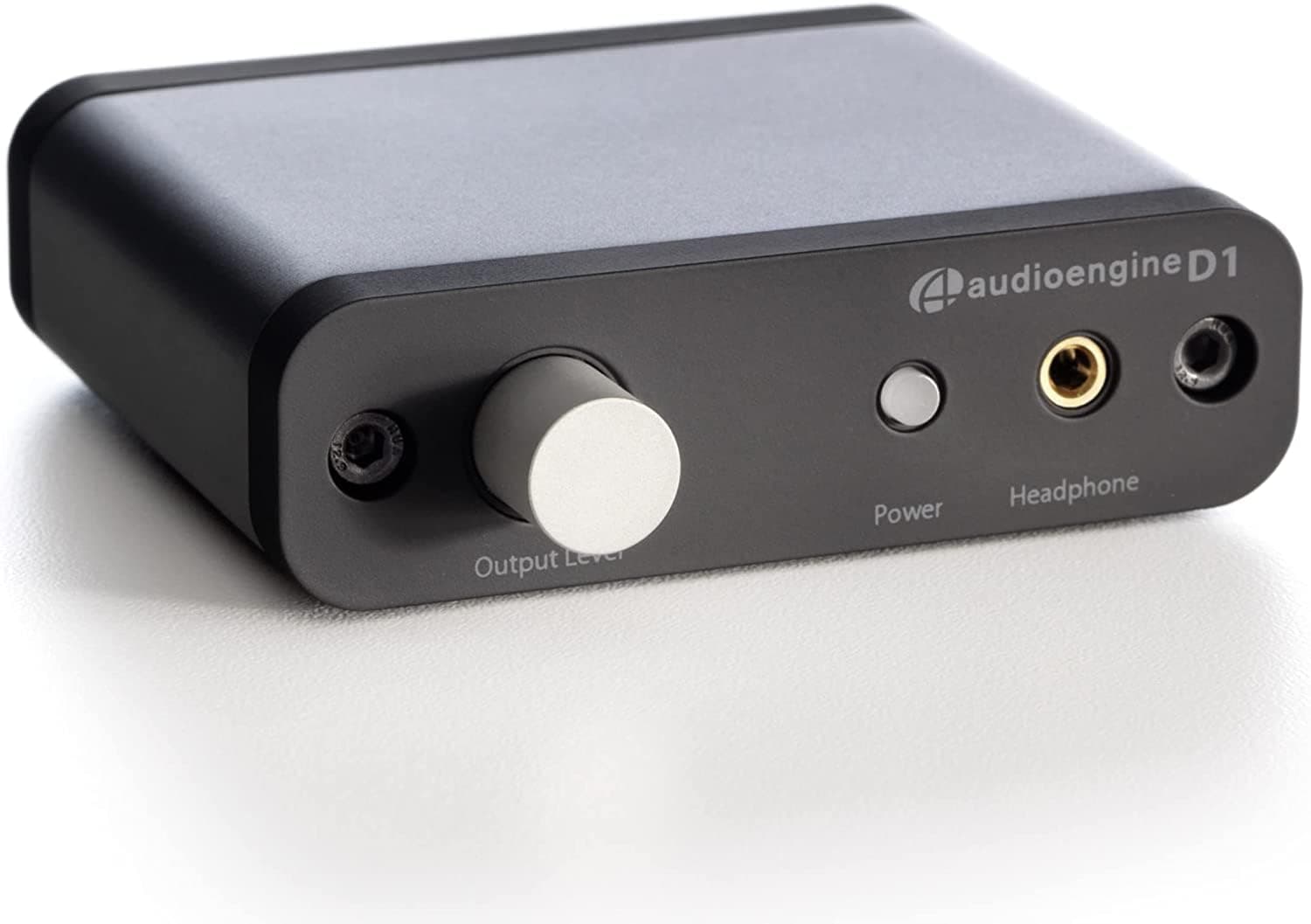
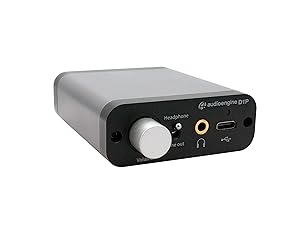
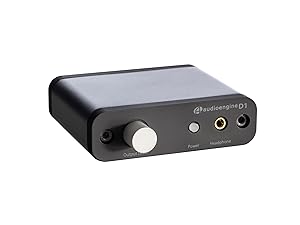
The Audioengine D1 is a premium 32-bit desktop DAC and headphone amplifier designed for audiophiles, gamers, and professionals. Its compact metal build delivers high-resolution 24-bit/96kHz audio with seamless switching between headphones and speakers. Powered via USB, it offers plug-and-play convenience and studio-quality sound in a sleek, clutter-free design.


| ASIN | B006IPH5H2 |
| Best Sellers Rank | #22,589 in Electronics ( See Top 100 in Electronics ) #41 in Headphone Amps |
| Brand Name | Audioengine |
| Customer Reviews | 4.3 out of 5 stars 1,065 Reviews |
| Global Trade Identification Number | 00819955250039 |
| Interface | USB |
| Item Dimensions L x W | 3.75"L x 3.5"W |
| Item Height | 1 centimeters |
| Item Weight | 5 Ounces |
| Manufacturer | Audioengine |
| Material Type | Metal |
| Maximum Supply Voltage | 5 Volts (DC) |
| Minimum Supply Voltage | 5 Volts (DC) |
| Mounting Type | Table Top |
| Number of Channels | 1 |
| Number of Pins | 3 |
| UPC | 819955250039 |
| Unit Count | 1.0 Count |
| Upper Temperature Rating | 95 Degrees Fahrenheit |
| Warranty Description | 3 Year Warranty |
G**L
Fantastic DAC and fair cost given the brand and build-quality
This is a very preliminary review, but I think it's still worth providing to help others. First, when I was reviewing the product info, it said it was plastic. I thought that was kinda whack given the cost and the quality of my Audioengine A5 speakers. However, upon opening the amazingly-well packaged box, it turns out most of the DAC is really metal, even the volume knob is metal. The only plastic on the outside is the edges of the box (the black in the picture; the grey is metal) and the power button. Like I said, this was very well packaged. It shipped in an Audioengine box, but a branded shipping box: inside was another box for the DAC. That box in and of itself could've survived shipping, but I appreciate that it was double boxed. Inside the DAC box was a nice piece of soft foam, and the components were snuggled inside heavier duty foam. (I don't know what the different types are called, but this isn't your typical white styrofoam like for a cooler). It also includes a carrying bag if you wanted to travel with the DAC, but the bag would mostly just protect against scratches. However, given the metal construction, I don't think you need much more than that. Setup was super easy once I realized I made a mistake: I kept thinking I needed two USB cords, one for audio input (I have optical out, but not a cable) and one for power. No, the USB cord, which is included, provides both power and audio. I was looking at picture in the manual thinking it was the front telling me that's where the USB audio input was, but after I double-checked, that was really the back of the DAC, then I read it closer and realized my mistake. It was 100% my fault. I write user manuals for a living so I can say with confidence this is one of the best I've encountered. I just didn't drink enough coffee. Compatibility: it works with my Audioengine A5s with no problem, which is part of the reason I bought this DAC. Yes, it has other great reviews, and, yes, my speakers are the bomb dot com, but having no doubts that it would work before it even arrived gave me peace of mind. To my untrained ear, everything sounds fantastic. I mostly stream music, and it sounds fantastic. I'll see what my music teacher/musician wife thinks, but she'll most definitely agree. I should note that I don't have a subwoofer, but whether it's the speakers or the DAC, the music still sounds fine. I'll put it through the paces gaming at another time, but I can't imagine anything would be different. Now, when I write my reviews, I try my best to not just gush over how great everything is so it doesn't appear as though my review is fake or paid for. The only thing I can think of from only having used the product probably no more than an hour is that I wish more cables were included. It's nice that it comes with a USB cord, but I had to dig through my box of cables for an RCA cable, and I'm not sure I even know what an optical cable looks like to see if I have one of those. I do understand the choice not to include these things because everyone's setup is different, and it minimizes waste, but it still would've been nice. I'm not deducting stars, however, because of a lack of cables. This is still a 5-star product.
E**.
Excellent Sound!
I use JRiver as my music player in WASAPI-Event Style to bypass the Windows Mixer. Even the laptop soundcard sounded very good through my headphones with this setup. Certainly better than hearing my .WAV or mp3 files in iTunes as I used to. I was intrigued by this new wave of usb dacs that are getting so much fame now, and the D1 is one of the most popular under $200. There are others that go up to $4000! But let's not talk about those. I got this DAC for my laptop as a "portable hi-fi" solution. I work a lot on the road and most of my music listening I do outside of my home where I can hook up my laptop to my system through HDMI. So, After hooking up the D1, there was a very noticeable improvement. I never thought this would happen, but as I kept using the D1, it kept sounding better. I didn't believe it when it said that it needed to be "burned in" in order to sound its best, but that seems to be case. Now it sounds fantastic through my headphones. I get a very good stereo image with a detailed, clear and welcoming sound. Listening to my 24bit/96khz tracks through here is a total pleasure. Even my 192khz files sound awesome downsampled to 96khz. Now, when I try the laptop soundcard it's a no contest, it even sounds harsh by comparison. I can see that now very easily. This thing sounds awesome!! I did notice some pops/clicks as some other people commented, specially when playing my DSD files and regular FLACs/MP3s upsampled @ 88.2khz. I played with the hardware buffer size in JRiver (using WASAPI - Event Style and 25ms buffer)and the pops went away. Also wanted to comment on its features, the optical input is a plus for me as I can connect say my PS3 and play with my headphones through it. And the analog output has high quality connectors, even better than in my Onkyo receiver. I use them to connect the DAC to external speakers and it even works as a pre-amplifier (though its really signal attenuation). When you hook up your headphones, the analog output mutes. That is a plus. All of this in such a small/portable package and its price makes this something special. Note to those who are not well versed in computer audio. In order to get the best from this or any other USB DAC, you need to use a player that can bypass the Windows mixer in order to send the untouched bit perfect music stream straight to the DAC. Otherwise you won't much better sound as it goes through the windows mixer. This is done with players like Foobar2000, MediaMonkey, or JRiver that can do it either using WASAPI, ASIO, Kernel Streaming, etc. There is a lot of info online about it. Just wanted to point that out. thanks
A**T
Excellent Upgrade in Computer Quality for the Price
I bought this after wanting a bump in sound quality and having failed with 2 different PCI-E external sound cards. I have a pair of Micca PBX bookshelf speakers attached, and now with my new TV, I can use the optical out and run the Wii and PS3 through this D1 Amp and my good speakers! Everything sounds great! The caveat is that there's no kind of automatic input switch; meaning if you want to switch back and forth from computer USB Audio to Optical TV audio, you have to attach and detach the Optical cable. Not the worst deal you could have. I took off a star off because I was having trouble for a little bit with some audio distortion and sync issues during playback. Tech support was responsive and worked with me to troubleshoot and diagnose the issue - mostly trying to replicate it on other machines. I forget if I was able to replicate the garbled sound on my laptop or not. My apologies. It was never constant, was the thing. I could watch one episode on Hulu, and audio would be fine. Then if I switched to audio editing in Premiere Pro or Audition, it would garble and slow overall A/V playback in an attempt to re-sync the video with the audio. But I let my wife try it on her computer, where only headphones were an option, and she didn't have troubles. She's not an audio-nut like me, but she's leaning - and even she could tell and identify a difference in sound quality! I took it back when I got the TV so we could use the optical out for Consoles. Using the supplied [gold-plated] USB Audio cable, I plugged it into my computer, and haven't had any troubles since! Seems like not all USB cables are alike; i.e, don't try to use a printer cable on the D1, even though they are technically the same connector type... With the included cable, there's No garbled sound; no de-synced playback. Just beautiful sound and a nice boost to my speakers! I live in a studio apartment building, so I never really get to let it explode with power - but the few times it has gotten loud, everything sounds great! [Granted that's also based on the speakers themselves, as well as their positioning in the room. An Amp/DAC is not a magic fix for "perfect audio", but it will help.] The mids are richer without being over-powering and making the mix sound tin-y. There's nice, controlled bass. Don't expect to power a lyric-less basement party with this. But I'm pretty sure no ones buying it for that reason anyway. I do lots of video work - both movies and my own song covers - so a balanced, studio-quality sound is needed to make adjustments later on. Don't think of it as "Flat", as in the typical iPod/phone EQ setting for Flat, which leaves no distinction between Low, Mid, and High tones. The D1 gives a professional sounding, clear mix of the entire audio spectrum. You get pronounced bass on songs that are meant to have it, but it's more controlled, like the artist/producer meant you to hear it - instead of nothing but ear-splitting reverb, like in lame car stereos you hear blasting down the road. Vocals are more clear in songs, and you'll be able to tell who on YouTube properly knows how to mix their sound and who doesn't ;) I love listening to all my music through this thing and spotting the clear spots that sounded compressed with the onboard computer audio. You can really hear a difference in iTunes downloads [new ones, that is. I bought one that was a poor upload to iTunes, so no fix there...] I highly recommend getting a longer replacement cable, as the included one is maybe a foot long. That said - do not just try to go to Staples and find a cable that fits. Audio transfer is much different than data.
A**.
Great sound, drives high impedance headphones with a good volume, no drivers required
The amplifier is rather tiny, but creates a big sound. I used it with Sennheiser HD-600 high impedance (350 Ohm-cm) reference headphones, as well as Sony WH1000XM4 noise cancelling headphones, but Sony headphones sound so distinctly worse than Sennheiser with a good quality headphones amplifier.... There is no comparison. The sound was very sweet and balance right out of the box. There is a (never ending) discussion about burn-in of audio equipment, even though there is not much, if any at all, data confirming that such thing as burn-in even exists. I actually think that mechanical parts of headphones may break in and headphones, if new, may sound better after some hours, but I cannot explain why transistors would change in any way. Anyhow, the manual recommends an up to 50 hours burn-in. I put together a very simple 30 Ohm per channel passive load to use instead of headphones, and played music into this passive load for two days. I did not notice any difference at all after this burn-in compared to "out of the box" sound. Plenty of power to drive HD-600. As an experiment, I plugged in a Creek headphones amplifier into line out of the motherboard, and sound was quite unpleasant, Audioengine D1 sounds way, way better! I also tested the sound with a setup with Audioengine D1 converting digital signal to analogue, and then connected Creek to Audioengine via RCA stereo cable. I found that base was a little cleaner and punchier with the Creek, but overall they were close, and this confirms that the analogue part of Audioengine D1 is also well designed. I am very happy with this purchase, HUGE improvement compared with sound directly from the computer headphones jack or motherboard line out. Of course high quality headset is a must to hear the difference. Very well packaged, nice box which projects quality. A small but good manual (although who reads it, the operation of this little unit is self-evident). I rally like it and happy with this purchase, an excellent value for the money! I need to mix some piano recordings in my home studio, and this amp will be of huge help. I'd say, it sounds cleaner and better than amp in Focusrite Scarlette and Clarette interfaces which I used until now.
M**1
NO more expensive driver problematic Dinosaur PCI soundcards for me
I had not been paying much attention to USB DAC in the past couple of yrs. I built a new desktop and had planned to use a Claro halo PCI card. However even though I did get a H170 MB with a PCI slot (dinosaur) due to the size of my graphic card there was no way to use the PCI slot. Checking my options I started looking at USB DAC, the price has dropped and thats why I hadn't been paying much attention. On the other hand the price of PCI good sound cards are ridiculous. I can compare this to my ASUS Xonar ESSENCE ST - PCI card which I have used for years on another desktop. That is a great card and I've really enjoyed it for analog from the desktop to a stand alone amp with 2 full stereo speakers. That card is also going for 250 -280 bills today, wow for a PCI bus slot! The downside to the ASUS Xonar Essence was constant snafus with the drivers, ASUS sucked at drivers for any of the soundcards I used the unified drivers. Its still a awesome soundcard as is the $$$ Clarooo Halo. At 170.00 this audio engine once dialed in with my music player (foobar2000) is every bit as great sounding as either of those 2 decent sound cards there is absolutely no way I would ditch this for a MB slotted sound card. Plug and play no drivers no issues with hum, static from the MB or other internal components. Can move it to other devices, which I haven't tried yet. I don't have any headphones that are that great but a decent set and its up there with the quality of the ASUS ST ESSENCE. Again I am running this to a 400 amp from my desktop as the preamp with the audioengine, then out to a 2 way analog full stereo speaker set. I haven't tried the optic just the RCA. I wish there was a power switch on it. I just leave it on even when I power down the pc because pulling the USB chord in and out all the time will cause that to wear out, they are delicate and always break on me anyway. I also which the volume knob had a notch in it so you could tell where you are on volume. I can see where for some using a lap top it would be a issue that there is no power cord and it strictly uses the USB port for power, but this is a desktop. There simply is no comparison to the real tech sound card integrated in the Intel MB, I mean not even close to what this DAC will do for your system. I am on windows 10 and this is plug and play. It is recognized but check your sound settings, I have made it the default sound. There are some settings and DSP features if you right click on the icons properties in sound or volume mixer on windows. I have them off other then setting for full size speakers . I've used this heavy for about a month before I wrote this so time will tell but I think its a winner seems built well. Great 2 way stereo DAC.
S**E
I gave 1⭐️ So you’ll read
I am about to order 3 of these, why? Because they work! There’s all kinds of things you can say about price and what you expect... blah blah. I am actually a professional in the A/V industry... so I can speak with just a tiny bit of experience. The 1 star reviews I’ve read here seem... meh. If you’ve got a taxed computer, old, loaded with things... lots of stuff going on. Maybe you’ve visited to many NO-NO websites..? I can tell you that I’ve used these in several installs that are demanding, they get used every day with sweaty fingers and people that know nothing about electronics. Here’s the rub, they are used on laptops that don’t surf the Internet, don’t look at questionable web pages, they don’t run printers... have thumb drives or anything else. These laptops have a network connection, ITunes and a NAS, that’s it. No problems, not one. Any problems have been environmental and easily fixed. By environment I mean, cables getting unplugged, mute buttons getting hit or the DAC getting shut off on accident. Other ones have been the laptop having issues because “user error” It’s a solid device with a small foot print, the volume knob is smooth and works very well. Lemme just check a couple of these one star reviews (I have several of these running in the field, every day 6hrs a day with 0 equipment issues) First, touchy volume knob... dude. First you have the volume on your PC, then you’ve got the volume on the D1 After that you’ve got the volume on your amplifier. I don’t know what equipment your running, I can’t guess if your volume on your amp is acting like a gain or it’s attenuating. Is it adjusting the amplifer inputs or outputs.. 🤷♀️ If you’re gonna write a one star review to be helpful, list the equipment you’re using. This device works great, for the money it’s awesome for what I am using it for. Read all of the 5 star and 4 star reviews, if you have a questionable computer... you might have a questionable outcome. This DAC is built to be robust, still you can’t blame the stereo in your car because your transmission failed. I’ve used these on mainly MacBooks and a few PC’s, all without issue. They’ve heald up and done their job.
P**L
Looking for a DAC? Look no farther.
I've been an audiophile for a little while, but have never really decided to start pouring money into a setup until now. I own a pair of AKG K240's and a pair of AKG K701's. K701's are notorious for being picky about their source and amp (being highly analytically reference headphones), and K240's shine for every day use, but also lack character without being properly driven. Unfortunately, since both lacked an amp for well over a year, I decided to invest in a DAC as a first step and slap on a headphone amp with it. Lucky for me, Audioengine's D1 was one of a few finds for DAC's, amongst FiiO, nuForce and HRT. I needed something that would be compact, as I wasn't ready to make a step towards a desktop DAC. As a college student, saving space is a prime requirement. After doing plenty of research, almost all of it positive for the Audioengine, I bought it and had it delivered overnight. It had an integrated headphone amp, a volume control, and was USB based. It had an optical toslink input (great for gaming consoles) and RCA output, for eventually working into a full system. I didn't think it would be this small! I was expecting something with the footprint of a 3.5" HDD, but instead it's as big as a stick of deodorant. Smaller, even. Aluminum housing with soft-touch ends, excellent RCA connections, and an amazing pot for the volume control only made it seem a lot better. The headphone jack in front is a little odd; they decided to go with the common 1/8" (3.5mm) TRS jack, instead of the more robust 1/4" (6.35mm) TRS jack. I suppose it's more accessible seeing as many people do not use 1/4" TRS jacks, except for audiophiles. The D1 being more of a compact unit, this makes sense. I suppose it's the same argument as buying a DAC at this price that has XLR connectors versus TRS. The markets just don't really coincide. But I digress. I plugged it into my laptop and it automatically initialized, installing drivers. I plugged in my K240's and was rather underwhelmed. All it really did at the time was tone down some of the sibilant highs in my electronic music. That said, it wasn't burned in. So, I left my headphones in and let it play at a moderate volume (note my K240's have seen hundreds of hours of use). Six hours of work later, I take a listen and something definitely feels different. I unplugged from the DAC and plugged into the laptop headphone jack, then back to the DAC. There it was. A remarkable tightening of the low end. When instruments couldn't be told apart, when the music felt almost hollow from the laptop, the D1 filled in that gap. Each hi-hat, each drum hit, each synth key. That hollow nature could be best described as if someone had put low pass filters on the music, like they were playing miles away. Now I am center stage. This was only with 6-10 hours of burn-in! I plugged in my K701's and also noticed a wonderful improvement in instrument separation and bass response. Music just felt richer and fuller! I then decided to plug in my 2.1 computer stereo system into it. I've owned this system for almost six years now, an old pair of Harman/Kardon satellites and a subwoofer that comes as a single system. I think it came with a Dell I had back in the day. The bass, which before, always felt just fine, tightened up a lot, and became much more focused and responsive. Tracks like Kanye's "Power" have a lot of bass, and normally played through the laptop, it was fine. Now through the D1, there's a notable increase in volume, but almost a noticeable balance between the heavy beats and the strong mids in the rhythm. Despite similar volume levels, though the D1, the floor shook! Electronic music picked up a lot more precision, and it helped reduce the harsh sibilance/treble in some of my drum & bass tracks. Electrohouse became quicker, almost. Dubstep beats no longer drained out all the mids and highs. Now I'm at 25 hours of use, continuous, too. It's not even warm. I'm very pleased to see how the D1 is responding to my collection of music, and how it seems to improve with every second. My headphones actually sound like they're worth the money I paid out for them! I've used them to great effect in games, what with every footstep clearly audible, and its placement more accurate. Now, some greivances I have: -- Because the D1 is strictly powered via USB, an adapter has to be used if you want to plug it into the wall. Besides the USB and the optical toslink ports, there's no other way to attach an input. You basically either NEED a computer or another powered source that has optical toslink. Unfortunately, you cannot just slap an auxiliary 3.5mm male to 3.5mm male between the D1 and say, your mobile phone, and expect it to play. -- You don't get a USB to AC adapter. -- No indication of what the DAC is getting as far as signal. The HRT has multiple LEDs which indicate incoming signal (sample frequency). If you're using this DAC, you better be pretty confident of the signal entering it. My grievances are rather petty, and being a compact system, my first gripe isn't really applicable. Some things to note that the D1 does: -- Increase bass response, while cleaning it up. Less boomy, rattly bass and more controlled, tighter bass which leads to a cleaner, efficient sound. -- Neutral/flat response. You don't get a really bass heavy feel nor do the mids or highs feel like they are overreaching. -- Play lossless audio PROPERLY. The stock Windows audio mixer downmixes channels before playing them, which is why it's possible to hear your Skype "new message pop" over your music while you shoot people in a game. Depending on how you set up your system, you can have all audio channels sent directly to the DAC, or if you're like me, have foobar2000 with kernel streaming play all my music directly to the D1. 24 bit, 96 khz vinyl rips never actually sounded like vinyl until today! If I ever get my hands on 24 bit, 196 khz audio, I'll need optical toslink. Remember to practice your Google-Fu and find out how to properly use your D1 instead of using it purely to convert downmixed digital audio to analog. Use it to play super-high quality FLAC's, AIFF's, and OGG's. Computer audio is rather complicated. Looking for a DAC? Look no farther. Your answer is right here.
B**I
OK DAC, but not a very good dedicated headphone amp.
I am very disappointed with this DAC / Headphone amp. The DAC is OK at it's very best. This headphone amp cannot drive at set of Grado SR80i headphones with any good dynamic range or impact. It cannot drive my other headphones to any level of real listening experience. The Grado SR80i's have no deep bass and the D1 makes you well aware of that problem because it lacks deep bass through the headphone amp. I am still testing but to me there is almost no difference between my M17X headphone output and this little amp. I would suggest you listen for yourself and send it back if you do not like it! Good luck, this is the third USB powered amp to disappoint me and I will not try another. There is only so much power you can get from a USB port. I have another good DAC, and powered headphone amp set up. I like my other set up better but I am not here to promote it, I am looking for better more portable set up. I plan on trying the FIIO and Creek amps. Good luck finding your way through all the hype and bias. Headphone listening is my second choice and will never equal to me a good quality speaker set up in the near future, do not spend to much trying to make them equal! LISTEN FOR YOURSELF, DO NOT LET OTHERS MAKE YOUR CHOICE. Headphones make a bigger difference than the amps, this cannot drive my other headphones. The output impedence this amp is 10 ohms (to high) which probably accounts for my dislike of the bass through my headphones. Update 1. The sound of the D1 can be put into two different categories. The DAC section is very capable, the headphone op-amp section is where the trouble starts for me. As a DAC going through the RCA's and a good headphone amp it sounds really good so I would give it 3 out of 5 stars. The head phone output is lacking power and dynamic range. I have since tried this little guy on various set ups. Low power output is the norm for this type of amp. I will give it a 3 out of 5 stars. If you listen and compare to a better set up it becomes more and more apparent of the Audio Engines D1 DAC/AMPs deficiencies. The D1 amp is not burning in, I am just listening more and can tell the difference. It sounds OK now like it did when I first got it, the same. Update 2. I am giving this to my son, the volume control is now acting up. Between 0 (which has always been off balance) and 9 o'clock position the left channel cuts out if you wiggle or turn the knob. Overall this was way over priced for what you get in my opinion.
Trustpilot
Hace 2 meses
Hace 3 semanas