We remain fully operational. Our teams are working around the clock to ensure your deliveries continue safely.

Descargar la aplicación


Servicios al cliente
Sobre nosotros
Copyright © 2025 Desertcart Holdings Limited
Descargar la aplicación
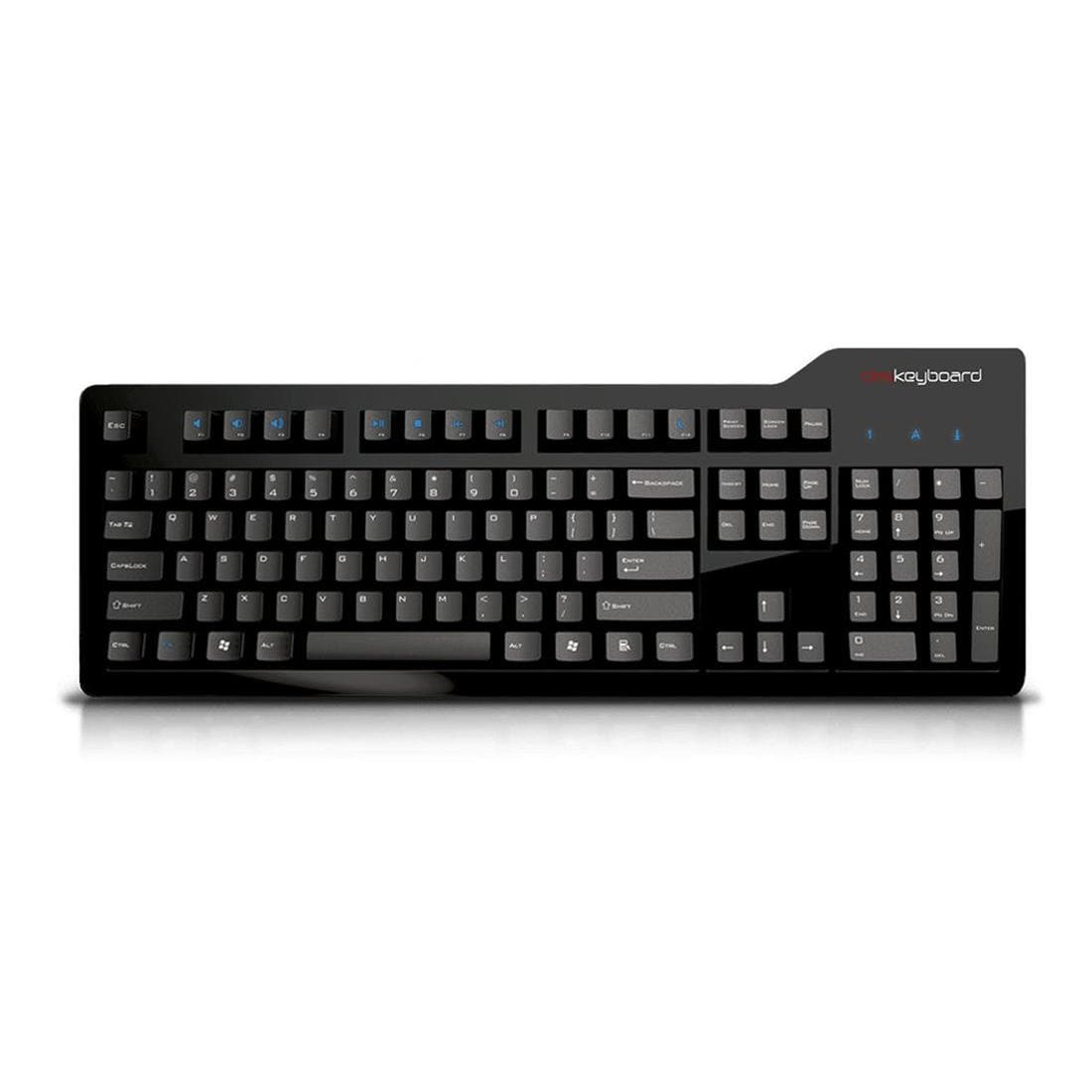

⌨️ Elevate your desk game with every keystroke — because your workflow deserves the best.
The Das Keyboard Model S Professional is a premium wired mechanical keyboard featuring 104 keys with Cherry MX Brown switches known for their soft tactile feedback and durability up to 50 million keystrokes. It includes a 2-port USB 2.0 hub, laser-etched keycaps for longevity, and dedicated media controls with a tactile volume knob, all housed in a sleek black aluminum frame designed for professional environments.


| ASIN | B008PFDUW2 |
| Additional Features | Multimedia Keyboard |
| Antenna Location | Office |
| Best Sellers Rank | #7,611 in Video Games ( See Top 100 in Video Games ) #102 in Mac Gaming Keyboards #584 in PC Gaming Keyboards |
| Brand | Das Keyboard |
| Built-In Media | USB Cable |
| Button Quantity | 104 |
| Color | Soft Tactile - Cherry MX Brown Switches |
| Compatible Devices | Devices with a compatible USB port |
| Connectivity Technology | Wired |
| Customer Reviews | 4.2 4.2 out of 5 stars (554) |
| Enclosure Material | Plastic |
| Global Trade Identification Number | 00855800001234 |
| Hand Orientation | Ambidextrous |
| Item Dimensions L x W x H | 18"L x 6.5"W x 1.5"H |
| Item Type Name | Professional Soft Tactile MX Brown Mechanical Keyboard |
| Item Weight | 3 Pounds |
| Keyboard Backlighting Color Support | Single Color |
| Keyboard Description | QWERTY |
| Keyboard Layout | QWERTY |
| Manufacturer | Das Keyboard |
| Mechanical Keyboard Switch Model | Cherry MX Brown |
| Model Name | Model S Professional Cherry MX Brown |
| Model Number | DASK3MKPROSIL |
| Number of Keys | 104 |
| Power Source | Corded Electric |
| Style Name | Professional - Standard Key Caps |
| Switch Type | Tactile |
| Theme | Office, Typing Efficiency, Professional |
| Total USB 2.0 Ports | 2 |
| UPC | 855800001234 |
| Unit Count | 1.0 Count |
| Warranty Description | 1 year limited manufacturer warranty |
J**E
Great keyboard, pricey but worth it
Great keyboard. Purchased my first in 2020, five years ago, and while it was still functional, the spacebar had gotten squeaky and the letters had worn off several keys. Decided to treat myself to a new one for Christmas, and while I'd originally tried to order a cheaper keyboard with Cherry MX Brown switches from a different manufacturer, decided that this one is worth the price - the keyboard feet/kickstand on the back allows it to be positioned for a comfortable wrist angle, the keys are large and comfortable to use, and I love the Cherry MX Brown switches - they're my favorite type of cherry switches, the perfect amount of clicky/resistance. This isn't a gamer keyboard - there are no fun lights, no backlighting at all - but it's perfect for someone who likes to write and types a lot (literally millions and millions of words typed on that keyboard over 5 years.) One weird thing, not a dealbreaker or anything, but it does require 2 usb ports to plug in. But it's easy to use, comfortable, and I'm definitely going to keep using this as my keyboard for as long as they make it.
H**N
One of the best mechanical keyboards!
So for starters, this is probably one of the first mechanical keyboards that I've own. I've used them before and always had an eye for one since I'm a game, but never really prioritized for one before. Then after a few membrane keyboards, I finally got fed up and decided to buy a mechanical keyboard. After a lot of searching around and trying different types of keyboards (gaming, ergonomics, and typist keyboards), I found that I like the Cherry MX Brown switch a lot more than the other types of MX switches. So I bought the Das Keyboard Model S Professional, because I've heard very good things about their products. So here's my general breakdown of this keyboard. Pros: - Cherry MX Brown Switches. Basically these switches are the halfway point between a Cherry MX Blue and a Cherry MX Red switch. The Blue switches are louder and requires a bit of force to actuate the key, whereas the Red (similar to the Black) has very little force require and has no tactile bump when depressing the keys. The Brown would be the halfway or a mix between the two types of switches because its relatively quieter than the Blue but can be uses for quick response tapping like the Red. - Looks of the keyboard is relatively simple but has very good functionality. - The feel of the keys are very solid, light but springy, and concave to fit in your fingers. - Media keys located on the F1-F12 keys, which is nice when you need it. However media keys only work if plugged in via USB and not by the PS/2 connector. - 2 USB port hub built on the side of the keyboard is a nice luxury feature to the keyboard. Good for plugging in phone, USB flash drive, etc. Cons: - Glossy finish on the keyboard becomes a big fingerprint/dust magnet. It's not a big deal if you maintain your keyboard because its relatively easy to clean, but could be a potential hassle. - Space bar located halfway between "C" key and the end of the "," (comma key). Something to get used to because most keyboards that I've own had the spacebar closer to the "X". This rearrangement was to fit the extra FN (function key) on the left side (next to Ctrl and Windows key). Overall its a very solid keyboard and I think I will enjoy typing with it for a long while. Very satisfied up to this point and happy I made this purchase.
E**N
Profession Keyboard for a Life-time gamer
Overall Review/Thoughts: I bought this keyboard roughly 2-3 months ago and so far it is the best overall keyboard i have used. The Day Keyboard is a Cherry MX Brown key switch so it is quiet while still giving the satisfying "click" feel that lets you know you've pressed the key. This keyboard will make you a better, faster typist bottom line. The keys are fairly light to fully depress so be warned if your coming from a Cherry Black keyboard because you will make mistakes learning not to pound on your keys (my biggest initial problem with the keyboard), but once you master a lighter touch this keyboard is a dream to type or game on. Despite being full sized keyboard with an included num pad, the keyboard is fairly slim and small. Coming from a keyboard like a Azio Levetron (the one i had directly before this one) is seems tiny in comparison and i did find it a tad cramped for about a week while my "typist stance" adjusted to a smaller keyboard but now it feels quite full. On to the actual keys; good news is they are well spaced, perfectly sized, and have a comfortable layout for typing or gaming. The function keys are offset from the number keys, but are nicely grouped into sets which makes finding them without looking much easier. This keyboard does have media keys which are accessed with a Fn+F key press which is simple and keeps the keyboard smaller than other keyboards with dedicated media keys. Overall this keyboard is very well made and is extremely comfortable. It however does have a few issues that keep it from being a true 5-star keyboard. 1)despite Das touting their "laser-etched keys" which are supposed to make it resistant to fading, my WASD keys are already starting to show minor fade after only 3 months. For such an expensive keyboard they should still be there for years to come and mine feel like in a year i wont be able to see them. 2) this is more of a personal thing but i dislike gloss keyboards and this puppy is super-high gloss. dust,dirt,fingerprints, ect show all the time and it needs cleaning almost weekly to keep it from looking like a hobo decided to sleep on it. 3) there is no macro keys on this what-so ever. i know its not technically a "gaming" keyboard but i feel like they should at least have a model that has them, as a huge gamer and someone who plays World of Warcraft a row of macro keys would be a very nice addition. 4) no wake function. you cannot wake up your computer from sleep mode by pressing a key on it, small complaint i realize but with it have a fn key to put it to sleep, why not have it wake from a space bar press? again minor complaints. Pro's: 1)very clean design 2)dream to type on 3)sturdy design 4)media keys 5)will make you a faster, better typist Con's: 1)Super high gloss 2)keys fade easy 3)sleep mode Final Thoughts: The reason i cant give this a 5 star really comes down to price, for 140 bucks is a bit plain and because the keys do seem to fade fairly fast i feel you should just get more from it, no macro keys,headphone/mic jack onboard ,ect, and yet despite this i still would recommend this keyboard over many other simply due to how well it feels to type on it.
A**O
È un piacere da usare. Ci vogliono alcuni giorni per adattarsi ed avvantaggiarsi della superiore velocità di scrittura e precisione (finché non si capisce l'esatto punto di key pressed). Non è silenziosissima (ma neanche fastidiosamente rumorosa come la versione Blue).
M**9
I love the Das Keyboard, but only ever buy the ones with the Blue switches as I prefer the clickiness. However, putting one at my desk would probably be an effective means of putting in notice. Enter this one with the brown switches. It's much quieter, but still provides a very good feel for typing. Easily the 2nd best keyboard I've used after one with Blue switches. If noise is a concern for you, this is a great product!
K**H
It is really professional. AMAZINGLY SIMPLE TO USE.
K**S
This is my first ever mechanical keyboard and probably will be the last since it wont be any reason to change it or buy another one!. The feeling is superb the quality is fantastic your fingers will truly love it and yes u will type faster and be less error-prone. As for the sound its not so bad as u may think ,my wife did not complain :) If u think that the price is high consider all the money u spend for crappy keyboards so far. Das keyboard is a must!
A**K
Très bonne finition, excellente précision, et ideal pour les développeurs. le prix est de 112 eur , c'est beaucoup moins cher que le "WASD KEYBOARDS" qui achat + livraison on dépasse très vite les 200 euro. Maintenant il me faut un autre pour chez moi.
Trustpilot
Hace 4 días
Hace 1 mes