We remain fully operational. Our teams are working around the clock to ensure your deliveries continue safely.

Descargar la aplicación


Servicios al cliente
Sobre nosotros
Copyright © 2025 Desertcart Holdings Limited
Descargar la aplicación

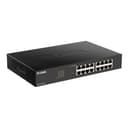
🚀 Elevate your network game with silent, smart, and sustainable speed!
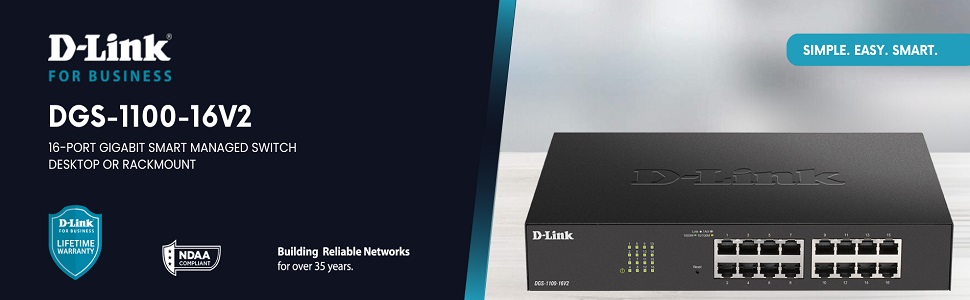
The D-Link DGS-1100-16V2 is a 16-port Gigabit Ethernet switch designed for SMBs seeking reliable, high-speed connectivity. Featuring energy-efficient technology, fanless silent operation, and advanced traffic management with QoS and VLAN, it ensures optimized network performance and security. Easy to set up and manage via the D-Link Network Assistant, this switch balances power, flexibility, and eco-conscious design for modern business environments.


| ASIN | B0876G7X18 |
| Best Sellers Rank | #1,254 in Computer Networking Switches |
| Brand | D-Link |
| Built-In Media | Switch Device, Quick Install Guide, 2 Rackmount ear 8 screw, US Powercord, Powercord retainer, 4 rubber feet |
| Case Material Type | Metal |
| Color | Black |
| Compatible Devices | Desktop |
| Current Rating | 0.01 Amps |
| Customer Reviews | 4.5 out of 5 stars 70 Reviews |
| Data Transfer Rate | 1000 Megabits Per Second |
| Global Trade Identification Number | 00790069451768 |
| Included Components | Switch Device, Quick Install Guide, 2 Rackmount ear 8 screw, US Powercord, Powercord retainer, 4 rubber feet Included Components Switch Device, Quick Install Guide, 2 Rackmount ear 8 screw, US Powercord, Powercord retainer, 4 rubber feet See more |
| Interface | RJ45 |
| Item Type Name | Switch |
| Item Weight | 2.6 Pounds |
| Manufacturer | D-Link Systems, Inc. |
| Mfr Part Number | DGS-1100-16V2 |
| Model Number | DGS-1100-16V2 |
| Number of Ports | 16 |
| Platform | Not Machine Specific |
| Switch Type | Network |
| UPC | 790069451768 790069467820 |
| Unit Count | 1.0 Count |
| Voltage | 220 Volts |
| Warranty Description | Lifetime Warranty |
A**R
Good value, but saving changes can be tricky.
Not an IT expert here, but this seems quite secure and easy to set up. Just know that when you make a change in the setup GUI and click "apply", it takes effect immediately. That said, it does NOT SAVE it to flash memory until you return and hit the "save" button. So, you have to plan your changes so that you can access the switch after you make a change (e.g., if you change the device's IP or mask, be sure you can also make a corresponding change to your terminal. Otherwise, you will not be able to access the switch post-change.).
Y**G
Plag and Play
Plag and play device, high throughput
L**S
Easy to administer VLANs
Opens up a world of advanced interconnectivity at a decent price. The software is not updated often, but it is not neglected and received some minor patching for the v2.00 firmware. You should look at the datasheet and compare the models. I think this model in the updated A2 revision covers quite a lot, even things like link aggregation, powering off idle ports and all lights even, or logging to servers. Mainly I got this for its VLAN support, which is necessary to practice building clusters with Hyper-V and experiment with protocols for the edge or hybrid cloud scenarios, which is allows me to do. You shouldn't move devices around to different ports, or should try cold booting if it is not behaving as expected after rearranging settings/ports.
Y**A
No issues thus far...
This D-link managed switch has been in operation for three months without any issues. I like the quality of this device. It's well made. It's made out of metal, not some cheap plastic. It has many useful features you would find in more expensive truly managed switches. Having said that, I hope it survives the Florida heat next summer in the attic since it uses passive cooling. My favorite feature is the VLAN wizard. All the options are on one page unlike my TP-link 8-port switch where you have to go to a second page to setup PVID. The only minor issue is maneuvering D-link's cumbersome website when it comes to upgrading the firmware. In my humble opinion... it's poorly organized. It's so confusing because there are so many files and models that seem to overlap. Otherwise, this is a solid switch working, without issues, thus far with my HP (repurposed) workstation running pfSense as my powerful router/firewall.
A**R
D-Link Manages
Top end, D-Link Routers and Switches handle collisions, weak and reestablished connections better than the others. Seems to self recover when the others just quit working. Plays well with other D-link devices and various end point devices, resulting in optimum throughput.
Trustpilot
Hace 1 mes
Hace 2 semanas