We remain fully operational. Our teams are working around the clock to ensure your deliveries continue safely.

Descargar la aplicación


Servicios al cliente
Sobre nosotros
Copyright © 2025 Desertcart Holdings Limited
Descargar la aplicación
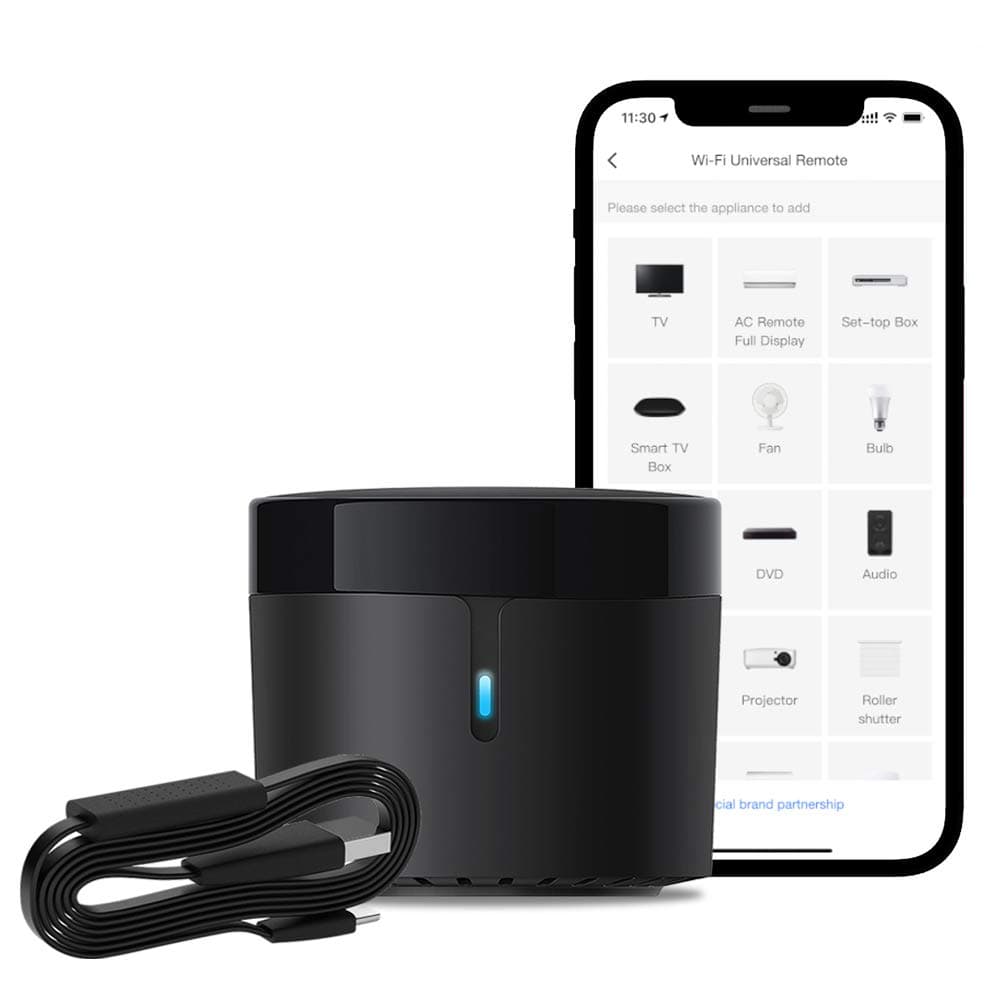
📲 Transform your dumb devices into smart essentials—control, automate, and impress effortlessly!
The BroadLink RM4 mini Smart Remote and Sensor Cable Set is a compact universal IR remote hub with integrated temperature and humidity monitoring. Operating on 2.4 GHz Wi-Fi, it supports over 50,000 IR devices and offers seamless voice control via Alexa, Google Assistant, and Siri. Its smart automation capabilities allow you to create custom routines and share control with family, making it an essential upgrade for any connected home.


| ASIN | B08JPBH1PB |
| Additional Features | Universal |
| Battery Type | Lithium-Ion Polymer |
| Best Sellers Rank | #72,066 in Tools & Home Improvement ( See Top 100 in Tools & Home Improvement ) #83 in Home Automation Hubs & Controllers |
| Brand | Broadlink |
| Button Quantity | 9 |
| Color | Black |
| Compatible Devices | Many devices (such as TVs, Air Conditioners, Fans, Amplifiers, Sound Bars, STBs, etc.), but specific models or brands not mentioned Compatible Devices Many devices (such as TVs, Air Conditioners, Fans, Amplifiers, Sound Bars, STBs, etc.), but specific models or brands not mentioned See more |
| Connectivity Technology | IR 38K Devices, Wi-Fi |
| Controller Type | Amazon Alexa, Google Assistant, HomeKit, IFTTT, Nest |
| Customer Reviews | 4.3 out of 5 stars 613 Reviews |
| Item Weight | 0.1 Kilograms |
| Manufacturer | Hangzhou BroadLink Technology Co., Ltd. |
| Max Number of Supported Devices | 9 |
| Maximum Number of Supported Devices | 9 |
| Maximum Range | 8 Meters |
| Mfr Part Number | RM4mini S |
| Model Name | RM4 mini S |
| Model Number | RM4 mini S |
| Smart Home Compatibility | Smart Home Compatible |
| Special Feature | Universal |
| UPC | 653945797377 |
A**R
Great device, slightly tricky setup process
This device essentially replicates any IR remote that you have lying around. By doing this, you can make any IR controlled appliance "smart". As an added bonus, this device can also give you accurate temperature and humidity readouts. You have to use the Broadlink app to connect this device to your wifi network. The broadlink app is a little finicky and doesn't seem to work on some devices. I tried initially on an iphone and it didn't work. When I tried it on an android phone, it instantly recognized the device and I was able to set it up. You can use the Broadlink app to learn IR codes from your existing remote and then blast them out on command through the app. The IR LED seems to be very strong and it always triggers my A/C. The device has not gone offline or dropped Wifi connection in a couple of weeks. It reconnected back to wifi seamlessly after a power outage once. Broadlink has several similar devices and this one seems to be the best value for money. It is also very small and can be discretely hidden behind a cabinet or other furniture. The real trick is to pair this device with a home assistant setup. That way, you can automate a lot of dumb devices around the house.
F**F
Useful IR blaster gave new life to older AV equipment
This device brought missing functionality to some older A/V equipment that doesn't always play nicely with smart devices. Previously I had to keep 2 remotes out to access the sleep timer, and to turn on/off my surround receiver. I appreciate the added functionality of the temperature/humidity sensor. The Broadlink app works fine to get started, although I have moved to using the integration with Home Assistant.
E**R
Hard to set up...
Tried for 6 hours. Everytime it says the device says it is connected, after a short time it comes back with 'failed to set up device.' My wifi network was on the 2.4 ghz band. The instructions included are simple quick setup, but have no trouble shooting or detailed information on what to do. Second day, I was planning to return the device, but decided to try setting it up again. I have the eero wifi mesh, this time, I didn't set my network to 2.4ghz only, I also didn't turn off my phones cellular data. What I did do was turn off the wap 3 in the eero app, which I didn't think to try the day before. It worked. The device set up right away. After it is set up, you can turn the wap 3 back on. No issues now at all. It is working good.
B**N
Thanks to this, now controlling my AC and my TV with Google Home voice commands
So far -- I just got this two days ago -- I'm very pleased. I had initially tried to save $10 by buying a somewhat similar device made by a sweet company whose name starts with an H and ends in two ll's, but I was never able to get it to pair with my WiFi, and sent it back. This Broadlink IR blaster paired -- eventually, after numerous tries, perhaps due to my ineptness -- with my phone and with my home WiFi (note, I had to go instruct my WiFi to separate the 2.4Ghz and 5Ghz bands first; the Broadlink uses 2.4Ghz). That was the hard part, everything since then has been pretty easy. First I found a location in my living room where the IR blaster would have "line of sight" both to my tv and to my AC unit's IR receiver. Then I set it up to control my five-year-old LG OLED tv, which is smart and great, but does not have Google built in. This required selecting the LG magic remote from Broadlink's list of tv's. Immediately I had full control of the tv from the app. Next, I added my Mitsubishi heat pump/AC to the Broadlink IR blaster by trying a couple of available choices. This was not so straightforward and I had to use the (very clear) instructions in the Broadlink app to use my Mitsubishi's remote to teach the IR blaster the necessary IR codes by selecting a function (e.g., turn on) and then pressing the appropriate button on the remote. It took me about 10 minutes to "program" the IR blaster in this fashion. Then I added, or paired, Broadlink with Google Home, and since then have been happily using Google voice commands to turn on, turn off, mute and unmute, etc., my tv. I have not tried controlling my AC/heat pump this way because mostly I try to leave that alone to do its job (but, see below). I had purchased the Broadlink RM4 Mini bundle that comes with a temperature and humidity sensor, and so these values show up in the app. Also, if I ask Google what those values are, it tells me -- but it insists on telling me the temperature in Centigrade, in spite of my having chosen Farenheit during setup. I sent Broadlink support an email about this and overnight, in less than six hours, received this reply: "We are sorry that currently the temperature value is only supported with Celsius degrees. The temperature scale setting in BroadLink app only changes the temperature display in app after calculation, but the actual value sent to the BroadLink server is still Celsius. In this case, the value sent to GH server is also Celsius." Now, I really like my Mitsubishi ac/heat pump, but it only uses an IR remote for control, meaning you have to use it within line of sight. Last night, however, I set up the Broadlink app to tell the RM4 Mini to instruct the AC to turn off at 9:30 pm and to turn back on again at sunrise this morning -- and both of these instructions were executed perfectly! This is great, because I often forget to turn the ac off before I come upstairs at night, and now it's set on "automatic". I know, I could set up a similar timer using the Mitsubishi's remote, but I think this way is easier. Also, using the Broadlink app or a Google voice command, I could turn the AC off/on from upstairs, which I can't do with the Mitsubishi's remote. In sum, so far I am very pleased with the RM4 Mini and the Broadlink app, which give me simultaneous control over my living room tv and AC. (Make sure you have a spare 5V power cube if you order this bundle because it does not come with one.)
B**S
Works great for my needs
I bought two of these to remotely control infrared heaters used as backup/supplemental heat at my house. They were relatively simple to set up using the app and while the heater was not in the remote database, the unit learned the remote with no problem. Since the remote is the same for both heaters, it only had to learn it once and I set up the second remote with the profile I saved in the app. I also like being able to monitor room temperatures so I can turn on and off the heaters remotely as needed. This is a much better solution than a smart plug which I wanted to avoid since it’s safer to plug heaters directly into the outlet.
R**B
Exceeded expectations.
Setup was easy. The TV codes were found, a stereo wasn't, but all the original remotes were available to teach any needed codes. Now before I even ordered this device, a few weeks ago I'd previously tested possible locations I'd place this device when I received it. I'd assumed that I'd need to place reflective items strategically to bounce IR to the equipment. Everywhere I held the original TV remote, the signal didn't reach the TV, so I definitely wasn't expecting the device to do better. Forward to now, I try to confirm that the signal would not reach from the device to the TV (as the device is definitely not nearly in front of the TV), but the TV fired up on the first go. The stereo was more picky, so I set a glass jar near the device for refraction, and that did the trick. Automations are a breeze to set up, and from simple timers to IFTTT, it's all there. I'm amazed how small the device is, and the build quality seems top-notch. You'll need a USB-A power source/charger, but many of us have plenty of those. I definitely would (and will) recommend this to anyone.
C**L
Privacy and battery issues
This little IR blaster does work, but there’s a couple of things to be aware of. (1) as others have noted, the user agreement allows Broadlink to store your WiFi AP name and password on the broadlink cloud service. This is sketchy AF. Be aware. (2) the user interface in the app is really user hostile and feels like it hasn’t been updated for 10 or more years (3) you CAN integrate scenes with Apple HomeKit via Siri Shortcuts - once you’ve set up a scene in the broadlink app, there is an “add to Siri” button at the bottom of the scene where you can assign a key phrase to trigger the scene. (4) the app on iOS at least is incredibly power hungry. It took me about an hour to set up some basic controls and scenes and during that time my iPhone 12 Pro (iOS 15) ran incredibly hot, and the settings app reported that the broadlink app had used 65% of my battery in 60 minutes. Even when it was left running in the background, it chewed through battery at an alarming rate. I was looking for an alternative to my old Harmony remote, that could be integrated with HomeKit. This really was t it for me. Yes it works and it can be done, but the user hostile app, the battery problems and the storing of my WiFi data on broadlink servers were all just a solid “nope” in the end.
L**T
Difficult to setup
Purchased for control of TV and set top box for my vision impaired Mother. Unit was difficult to setup for my equipment. Claims to have large data base for easy setup of the remote, only found 1 for one of my TV's and none for the set top box. Had to manually program to get any functionality of any kind. Use care when pushing buttons on teaching remote, must be careful to not push buttons too long. Unit has been glitchy in performance and connectivity to my network. Could not get Echo Dot to control. Had to reach out to Amazon for assistance, their Rep was very helpful and we were successful in getting Alexa to control. Control is spotty as commands must be very specific and said in a consistent manor. Maybe a user learning issue. Very little documentation available to complete setup and user instructions. Customer support was non existent. Reached out 3 times, twice through Broadlink website and once through Amazon. No response from anyone at Broadlink. Due to low price we will continue to try to work with it.
Trustpilot
Hace 1 semana
Hace 4 días