We remain fully operational. Our teams are working around the clock to ensure your deliveries continue safely.

Descargar la aplicación


Servicios al cliente
Sobre nosotros
Copyright © 2025 Desertcart Holdings Limited
Descargar la aplicación

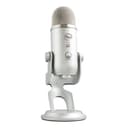
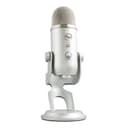



🎧 Own your sound. Stream like a pro.
The Logitech Creators Blue Yeti USB Microphone delivers professional-grade, broadcast-quality sound with four versatile pickup patterns and advanced Blue VO!CE software. Designed for content creators, gamers, podcasters, and musicians, it offers plug-and-play USB connectivity, onboard audio controls, and a positionable desktop stand for effortless setup and superior sound capture on PC and Mac.


| ASIN | B002VA464S |
| Antenna Location | Gaming, Podcasting, Recording, Streaming |
| Audible Noise | 100 Decibels |
| Audio Sensitivity | 120 Decibels |
| Best Sellers Rank | #42 in Musical Instruments ( See Top 100 in Musical Instruments ) #1 in Multipurpose Condenser Microphones |
| Brand | Logitech G |
| Built-In Media | Yeti USB mic with desktop stand, USB cable |
| Color | Silver |
| Compatible Devices | Amplifier, Headphone, Personal Computer |
| Connectivity Technology | USB |
| Connector Type | USB Type-A |
| Customer Reviews | 4.6 out of 5 stars 56,520 Reviews |
| Enclosure Material | Metal |
| External Testing Certification | Grau 1, Não aplicável |
| Frequency Range | 20Hz - 20KHz |
| Frequency Response | 22 KHz |
| Global Trade Identification Number | 00133588900544, 00836213001950, 10097855160543 |
| Hardware Platform | PC, nintendo ds |
| Impedance | 16 Ohms |
| Item Dimensions | 4.9 x 4.7 x 11.6 inches |
| Item Type Name | Microphone |
| Item Weight | 3.2 Pounds |
| Manufacturer | Logitech |
| Mfr Part Number | 988-000103 |
| Microphone Form Factor | Microphone Only |
| Model Name | YETI |
| Model Number | 988-000103 |
| Number of Batteries | 1 Lithium Ion batteries required. |
| Number of Channels | 1 |
| Polar Pattern | Multipattern |
| Power Source | Usb Microphone |
| Recommended Uses For Product | Gaming, Podcasting, Recording, Streaming |
| Signal-to-Noise Ratio | 100 dB |
| Special Feature | USB |
| UPC | 133588900544 733723132528 836213001950 097855160546 733723132597 733723132610 667977779119 |
| Warranty Description | 2-year limited warranty. |
L**Z
Great gamer or media microphone!!
I got this microphone for my gamer boyfriend and he was stoked to get it! He likes the brand itself as it is, it was easy for him to set up and change the settings to his liking. The quality of it sounds good too as I game with him and he sounds so clear compared to his last microphone. It doesn't take up too much space on his desk a there isn’t a lot of wires, just the 1. I believe it’s worth buying for the costs, it’s heavy duty, sound quality is perfect and it’s easy to use! It also looks “clean” sitting on his desk, looks professional.
N**S
A dramatic improvement
First of all, all me to state that those who wrote poor reviews for this mic must be quite privileged musicians with a load of experience or audio engineers who have an allegiance to a certain brand, because they are all sorely mistaken. The Yeti is, in my opinion as a singer/songwriter searching for decent recording equipment for the last year, a fantastic, well priced microphone for people looking to record quality sound. It seems quite versatile and craftily engineered. I have spent the last year in a hotel in the middle of London recording my guitar and vocals on garageband through the mic on my computer. It sounded like complete crap...and not because I am an awful musician, but because the microphone my MacBook Pro wasn't up to the standards I need for recording, maybe I was too close or maybe too far away, the point is that it is not possible to judge a proper distance from the mic as it is minuscule, and difficult to locate. In addition, the plosives and many harder guitar strums were enrobed in static and just sounded awful. I tweaked the equalizer as much as I could to make them sound manageable, but, alas, I no longer need to do that. Thanks to my Yeti. Of course a usb mic won't sound as thrilling as a standard microphone suited up with proper impedance cables and monitor buddies, but when you buy a mic that connects via usb, one's standards cannot be held too high. This mic, with such appropriate standards in mind, met and surpassed what I had anticipated. The vocals are clear, the guitar is clear, and because of that effects through garage band work more effectively. No longer am I struggling with shrill sounds and bassy guitar twangs, no longer am I wasting all my time clarifying the songs, I am simply recording, editing, and feeling so much better about my music. It is true, I have never played in a studio, or used thousand dollar mics, but it is also true that I do not have the money neither for time in a recording studio in London, nor for the more expensive Blue microphones, thereby, I went this route and I couldn't be any happier. If you are struggling with clarity and play more mellow/soft rock/pop rock/acoustic/ambient/coffee shop etc music, then this is a real advantage for you in the small studio you are beginning to assemble in your room or basement or apartment. If you are a heavy rocker, maybe it isn't a good choice, but I haven't attempted screaming into this mic yet...probably wouldn't be smart in a hotel in central London. As for travel, it isn't a exactly the best portable size, but in this case I don't think a quality mic will be. Maybe you can try the Snowflake, but I'll bet my insignificant income that it will not be as munificent. Also, G-Band is the only program I have used with it. It is very compatible, though I will say I was confused at first as to why there was no sound coming out of my computer, but I quickly realized that there is a headphone jack built into the mic for a good reason. It may seem like a possible flaw, but I think it makes things much easier. And do yourself a favor, toss the earbuds and buy some real recording headphones, you know? The ones that cost more than six bucks at TJ Maxx. I am not saying to buy Beats, I am just saying that everything sounds like a band of gorillas pounding on tin cans through the buds--and maybe you're saying "no, I have some stellar buds!" Well good for you, I haven't found any so don't rub it in. I gave this five stars because I don't know any better, but four stars seems stupid and awkward, its like the age of twenty, not quite twenty one but have been drunk since eighteen, it is a four in the terms of mics that I have experienced, but under the given conditions it is definitely a five. I say buy it if you meet my described criterium, but who am I but a simple singer/songwriter. Enjoy!
A**X
Perfect mic!
I couldn’t be happier with the Logitech Blue Yeti microphone—it absolutely lives up to the hype. The sound quality is crystal clear and incredibly professional, whether I’m recording videos, streaming, or hopping on Zoom calls. The custom three-capsule array really makes a difference, capturing rich, full audio that sounds like it came straight out of a studio. One of my favorite features is the versatility. The four pickup patterns (cardioid, omnidirectional, bidirectional, and stereo) make it easy to adapt to different situations without needing multiple microphones. Whether I’m recording vocals, instruments, or a group discussion, this mic handles it all effortlessly. The Blue VO!CE software is another standout—it adds a whole new level of polish with effects and enhancements that make recordings sound even more professional. Plus, the onboard controls are super convenient. Being able to adjust gain, mute instantly, and monitor audio in real time gives me full control without needing extra equipment. Setup couldn’t be easier—it’s truly plug-and-play. I had it up and running in seconds on my computer. The adjustable stand is sturdy and makes positioning simple, so I can always get the best sound possible. Overall, this microphone is a fantastic investment for anyone serious about audio quality. Whether you’re a beginner or a pro, the Blue Yeti delivers outstanding performance across the board. Highly recommend!
D**N
Reliable USB mic with great sound for price
This microphone is a big step up from using a headset or a laptop’s built-in microphone. I’ve been using a Blue Yeti for about 5 years now and have never regretted buying it. I’m planning to upgrade soon, but the Blue Yeti had served me well. For the price, this is a very capable USB microphone. Anything that feels like a meaningful upgrade from here is usually at least double the cost and often requires moving to an XLR microphone and an external audio interface. There are definitely diminishing returns with microphones, and the Yeti sits at a good point in that curve. Build quality is solid overall. It does use micro-USB, which I’m not a big fan of, but it hasn’t caused me any issues over time. In terms of use, I’ve found it works best with the gain set very low and the mic positioned fairly close (around 3–6 inches from your mouth). Since it’s a condenser microphone, it is sensitive to room noise, especially in untreated spaces, so mic placement and gain control matter quite a bit. I would also recommend getting a pop filter as the mic will be sensitive to plosives. The mic also supports multiple polar patterns. I’ve mostly just used cardioid mode, but the option is there if you want to experiment with stereo or multi-person setups. Overall, this is a great option if you want a noticeable upgrade from a headset or laptop mic without moving into more complex audio setups. It’s easy to use, reliable, and good enough that upgrading beyond it only really makes sense if you’re specifically chasing higher-end audio quality.
L**A
Get it if you don’t mind…
This is a great mic if you are looking to start using mic for voiceovers or podcast and even gaming. I would say this is the best you can get under $100 . And a great piece to start with if you are a beginner. I really like the mic. Straight out of the box it starts its job. Also, it’s a plug and play which means USB to your system and start talking.The sound is studio level clear and great. It also needs a headphone. However, if you are doing advanced professional work and have noisy setting, then this is not your mic unless you are going to do a lot of audio editing . I’m a content creator who does a lot of tutorials. I don’t do too much editing or want to spend so much time fine tuning because I also have kids. No matter where I stay , my home is always going to be noisy.. and this mic picks up every sound …even the slightest noise it will pick it up. When I’m recording, my kids stay quiet but even the slightest sound like walking around it picks up. And being that I don’t want to spend too much time editing audio, this may not be a great option for my own situation. Hence, I will be returning it. Regardless, it is still a great Mic and it comes with its own built in stand so you don’t have to purchase a stand for it…
M**N
Excellent Mic
After shopping around and experimenting with options, I found this is perfect. I'm very happy. It has excellent sound quality, monitoring, and was ultra easy to set up out of the box. I looks good on my desktop too - I love the blue. Perfect price point. I've been using it to record voice and vocals with Reaper, and plan to also record guitar and piano.
D**N
Great Mic, But Read This If Upgrading From a Cheap Mic
I'll join the long list of reviewers singing the praises of the Blue Yeti microphone. My online demo recordings have taken a big jump in quality since I started using it. (Update March 2012: two different people have asked me "Why does your video sound so good?" and "How do you get your voice to be so clear?" Most people don't understand the importance of audio quality, and thus microphone quality, when creating video.) If you are upgrading from a cheaper microphone, you will immediately discover some challenges when using a professional mic like the Blue Yeti. Because the yeti picks up so much more sound, including many types of noise, your first recording may actually sound worse than before! Here are some tips for solving these problems. There are two types of unwanted noise, contact noise (made when you bump your desk, the mic stand, or the cord) and background noise. The best way to eliminate contact noise is by using a shock mount. Be sure to get one that will handle the Blue Yeti's 3"/75mm diameter. As an alternative, find a piece of thick, dense, soft foam (or a thick pillow!), set that on your desk, and set the Yeti in its included stand on top of that. This is bulky and imperfect, but cheap. Route all the cords where you won't bump and tug them while recording. Blue Microphones also sells a shock mount for Yeti called the Radius Blue Microphones Radius Microphone Shock Mount . External noise is different. Pros record in a sound-deadened studio, which is out of most people's reach. But you can get 80% of the way there for free. Here's what I do: Start in a carpeted room, not one with hardwood or concrete floors. I use a laptop because they are quieter than desktops. Put the laptop on a pillow, and put another pillow in between the laptop and the mic, so you have to reach over it to get to the keyboard. These two pillows minimize any laptop fan noise. Now stretch a comforter over your head, so that it drapes down to the sides and front and back (the front and back are most critical). You will look silly, especially if you are at work, but the comforter will effectively deaden most of the outside noise and echos. I lean three poles up against walls and furniture, then drape the comforter over them. Turn off noisy appliances (air conditioner, heater, refrigerator), send the kids or coworkers out to play, and you will have a somewhat soundproof booth with minimal echos. Trust me, it works, but I do record at home instead of at the office. Next, play with the recording patterns on the Blue Yeti. I use cardioid, which picks up just from the front. But you may get richer sound from the stereo or bidirectional patterns. Omnidirectional will likely just pick up more noise, but give it a try. Now that you've eliminated the noise, you'll want to create the best recording possible. Here's how: First of all, stand up and face forward or even a bit upward when recording, to open up your vocal cords. Standing up has a bigger impact on your voice quality than anything else you can do. Next, take deep breaths, slow down, and pause in between sentences or at logical points. These pauses are easy to edit out later, and they give you easy places to cut out bad takes to replace with good ones. I routinely need to record each sentence or passage 2-3 times to get it right. Speak right into the mic, from just a few inches away. This boosts your volume with respect to any background noise level, and improves the quality of the recording. If you listen to the video review attached here on Amazon by the custom tailor guy, you'll hear how much better his voice sounds when he briefly moves the mic close to his face (at 4:30 on the timeline). Next, use a pop filter. This gizmo puts a piece of fabric or screen mesh in between your mouth and the mic to filter out the awful puffing sound made when you say words like "pop." Try it with your mouth close to the mic and see. I use the Blue Microphones Universal Pop Filter , which is only a few dollars more than the cheap black plastic ones, but is made of stainless steel and works great. The Blue Yeti delivers awesome sound quality. With these tips you'll be able to take full advantage of what it can do. Good luck!
A**R
Great Microphone, Adequate Recording Volume At Last
The MOST IMPORTANT feature of this microphone that made me very happy, after considerable problems with other microphones that interface with a computer via USB, is that the volume of the input recording signal sent to the computer is more than adequate for almost all recording on a computer (using for example the free program Audacity). All other solutions for finding or adapting quality microphones for use to record on a computer via USB do not have a strong enough signal sent from the microphone to the computer via a USB port for sufficient recording volume and flexibility. For example, the USB Blue Snowball microphone, which is substantially cheaper and made by the same company as the Yeti, has excellent sound quality (although not as good as the Yeti), but sends such a very weak signal to the computer that it is really only useful in recording very close to the microphone or for recording very loud sound sources. The cables that you can buy that use USB to power conventional XLR microphones such as those made by Shure and allow them to be used for recording on computers via the USB port are even worse - the signal sent to the computer is much, much, too weak and in my experience too full of static for useful recording. These other options for USB recording solutions I bought first, tested, and then returned. I am now happy with the Yeti I got as a replacement. The Yeti, unlike these other USB computer port recording solutions, also has on-microphones recording volume control that is much easier and faster to use than adjusting volume via a computer program. The Yeti has great sound quality, and also a built-in microphone jack with on-microphone volume control that allows you to hear input without the processing delay common through a computer jack - which is aids quality recording over background music quite a bit. I have a foam ball over the microphone and put it on a dense foam mousepad to isolate it from table vibration and it doesn't seem to have much problems with pickup of unwanted noise like some people have commented. I was first attracted to the Yeti primarily for the four different modes of recording possible - the highly directional cardioid pickup pattern characteristic of most microphones, as well as bidirectional, omnidirectional, and stereo modes (note that the free program Audacity makes it easy to convert any mono track to one that plays through two speakers but it does not allow recording of differential source volume like the stereo mode of the Yeti microphone). The microphone therefore serves a number of recording needs, and no other single USB microphone except those made by Blue seem to serve these multiple needs, and of those made by Blue only the Yeti seems to have sufficient recording volume. Virtually all, if not all, other single microphones of any type made by any other company: USB or XLR or jacked, also do not serve these multiple needs. The omnidirectional mode of the Yeti, in particular, was essential for my uses of recording group music, and the stereo option refines even this omnidirectional recording capability in ways that I did not anticipate and which surpassed my expectations. Very good XLR microphones such as those made by Shure can be used through a 3.5mm input jack on a computer, but only when both external power and pre-amplification is provided using an expensive box (about $90) such as the Modeling Pre-amp made by Behringer. Using the Behringer box with Shure microphones to record on a computer via the 3.5mm jack is something I have done in the past with good success, but my newer computer has only a single 3.5mm jack serving either speakers or microphone, but not both at the same time, and therefore requires a USB microphone for simultaneous connection of wired devices for microphone input and speaker output, which is why I was forced into the search that lead to me buying the USB-connected Yeti. Unfortunately, it seems there is no power supply/preamp combination, even my Behringer, that can be use between an XLR or jacked microphone and a USB port. Note that this is a BIG microphone most suited for use on a desktop or on a microphone stand (it has a screw hole for attachment). It will obscure much of your head if hand-held. Finally, I note that all my experience has been with a Windows computers, using two different Windows operating systems (XP and 10) and two different computers, and that the results for all microphones I mentioned were the same on the two computers and for all of the three USB ports built into each of those two computers.
Trustpilot
Hace 3 semanas
Hace 2 semanas