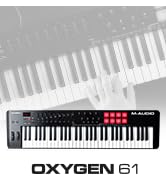
🎶 Unlock your studio’s full potential with the Oxygen 61 — where pro control meets instant inspiration!
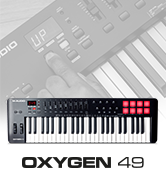
The M-AUDIO Oxygen 61 MKV is a 61-key USB MIDI keyboard controller designed for musicians and producers seeking expressive playability and deep DAW integration. Featuring velocity-sensitive keys, 16 backlit drum pads, assignable knobs and faders, and Native Kontrol Standard (NKS) support, it offers hands-on control over virtual instruments and effects. Bundled with industry-leading software including MPC Beats, Ableton Live Lite, and Komplete 15 Select, this bus-powered controller is a complete production solution for all skill levels.























| ASIN | B092XDPSXM |
| Best Sellers Rank | 13,537 in Musical Instruments & DJ ( See Top 100 in Musical Instruments & DJ ) 80 in MIDI Controller |
| Colour | black |
| Compatible Devices | Laptop, PC |
| Connector | USB |
| Customer Reviews | 4.5 4.5 out of 5 stars (926) |
| Date First Available | 28 April 2021 |
| Hardware Interface | USB |
| Hardware Platform | Windows |
| Instrument Key | Any |
| Item Weight | 3.45 kg |
| Item model number | Oxygen 61 MKV |
| Mixer Channel Quantity | 9 |
| Musical Style | Electronic |
| Number of Keyboard Keys | 61 |
| Power Source | Wired electrical |
| Product Dimensions | 9.14 x 24.38 x 97.54 cm; 3.45 kg |
| Proficiency Level | All |
| Size | 61 Keys |
| Supported Software | MPC Beats, Ableton Live Lite |
M**N
Happy.
Really good. Does what it says on the tin.
C**R
Fabulous functionality.
This keyboard has a fantastic key action for a keyboard. It is very fluent and smooth to play scales, chords and melodies and the controllers are very nice to control us nice to control as well the way that the buttons interact with the digital audio work station (stop play record etc) is is very helpful indeed and makes the work flow and makes it more efficient. (I did need to set this up manually though) It is excellent value and I would recommend it to anybody.
F**R
Great purchase if you can use different software
Supplier provides you software so you can use your item 100%. The problem is you also need to download ILOK to verify your memberships. Im getting an error every time im trying to install ILOK so i can only use 1 plug in out of 4. I find this ILOK as melware and not safe software, if yoi can skip this its all right. Only soft available without ILOK is mpc beats which is pretty cool. Delivered promptly, no damages, no issues. Only this software is secured by wrong company....
F**N
MULTI FUNCTION CONTROLLER OF GOOD QUALITY.
Great keyboard. Connects easily via USB. Build quality seems good so far. Keys are weighted, not quite like a piano but more for using with a DAW and synthesisers. As a controller all function keys are provided - volume sliders, pan controls and transport controls (loop, stop, start, record). As I use Magix Samplitude Music Studio DAW they keyboard is recognised straightaway. I understand that setting up Cubase can be a long-winded affair (plenty of help available on line on Steinberg's site). Keys are full size which is essential if you have large hands.
C**N
Good
Very good
M**E
Perfect
M-Audio are the go-to brand name when I'm looking for a new midi keyboard 👍 Looks nice in the studio and operates perfectly and as expected.
S**M
I use to Love M-audio, but this.. :(
I had the Oxygen 8 years ago & it was amazing. Plugged it in & away you went. easy as pie. I would avoid this as it has limited knobs. & thus you will mess up your settings when you touch one... but that was the least of my worries. This one on the other hand was not plug & play like it was advertised. I spent 3 days trying to get connected to Logic Pro X 10.8 with not much consistency. It took 4 days to get the firmware to actually update & that did not solve the issues. I think it may have made it worse. When I did get it working before the firmware update I could map a few of the knobs but not all! to a VST filter cutoff etc, as expected but it was not a plug and play experience. it took a LOT of faffing & restarting to get it to work.. when it did actually work it was not bad aside from not having all 8 knobs mapped.. the transport & everything aside from the shift & the octave would just play midi notes... -.- I updated the firmware hoping that maybe that would allow greater connection to Logic. OH boy was I WRONG. After following 3-4 different methods including the official guidelines to get something to work it was not looking good. off the bat the keys were no longer registering, nor were the buttons playing MIDI notes. so I redid the controller setup in Logic. that got the keys working, but no knobs..no MIDI notes on the buttons but also nothing registering in Logic's transport. MANY set ups later over 2 days got me to a point where the knobs would work but not where I wanted then.. they were all doing random things.. I reset everything all over was VERY P****d as I have wasted so much time... to top it all off. I have sent a support ticket day one letting them know the update would not work & I was having issues. nothing from them still.. I could not log into see the ticket progress as it did not like the login info... which I reset & tried again.. so I sent another ticket.. still nothing.. after nearly a week I gave up after getting something set up & feeling like I hadron the battle... it would disconnect.. I would disconnect when I switched tracks... MIDI or audio. it would disconnect for no reason as soon as I stopped interacting with it.. I had enough & sent it back.. The price, the hassle... not worth it. Maybe you won't have the issues I did. this is not my first controller. & I have over 12 years of my life in studios so this is not new territory for me. Good luck if you.. I went with MiniLab II & that I pluged in... set it up in the app.. set the controller up in Logic. & in 15 mins everything was done & I was making sounds! so far all working just as expected.
A**A
Good features
I use this with Logic Pro X and the set up was simplicity its self. One reason I chose this was I liked the feel of the keys, also it can easily be programmed for various other uses. I use a lot of Spitfire Audio libraries and setting up the sliders and knobs is really simple using the Preset Editor.
A**V
Excelent midi keyboard. Drum pad could be better. But if you buy for keys and mild drum pad this is best. Key bed is soo good.
Ç**K
Hem Garageband Hem Logic uyumlu. Direkt takınca M1 Chip üzrinde usb den cihazı görüyor. Onun dışında tuşlar çok kaliteli ve fiyatının hakkını sonuna kadar veriyor.
N**İ
Oğlum için aldım sağlam ve kaliteli fiyatı piyasa koşullarına göre oldukça uygun almanızı tavsiye ederim
C**O
Banda me encantó el midi está muy bueno y facil de usar la teclas se sienten de calidad sin duda fue una buena compra El programa no le entendí jajaja pero lo ocupo con fl y funciona exelente
P**I
Premetto che non so suonare e non sono un esperto di tastiere,ma le prime impressioni sono ottime è un buon prodotto semi professionale,unica pecca come scritto da altri, ableton non riconosce o meglio non suddivide automaticamente il pad dai tasti del pianoforte,il problema è che di default viene assegnato un unico canale midi sia per il pad che per i tasti bianconeri, procedura da fare manualmente assegnare canali midi diversi per il pad e i tasti,tenere premuti contemporaneamente il tastino shift e il tasto nero corriispondente alla scritta custom, tenendo premuti shift e custom cliccare su un quadrato degli 8 pad,poi cliccare ripetutamente il tasto bianco del piano corrispondente alla scritta channel fino a leggere il numero del chan che si vuole assegnare al tasto del pad selezionato,ripetere l'operazione per ogni quadrato del pad,se volete cambiare il chan anche della seconda mappatura del pad, premere shift e cliccare sul secondo quadrato in alto a sx del pad per passare alla pagina 2,dopo di che ripetere l'operazione descritta prima per i tasti del pad che si desidera . Consiglio,io ho assegnato ai 16 pad il chan 10 che è quello più comunemente usato per pilotare le drum, mentre il piano (tasti bianconeri) chan 2, così facendo si potranno utilizzare con la mappatura midi della daw i 4 tasti (play,stop,rec,loop) senza interferire con i tasti delle note corrispondenti sul piano, perché quei tasti non sono riuscito a trovare il modo per cambiare il canale quindi li ho lasciati sul chan 1 di default e cambiato pad e piano,altro consiglio se usate più tastiere assegnate ad esse canali midi diversi da quelli utilizzati per oxygen25 mkv. Buon divertimento
Trustpilot
Hace 1 semana
Hace 1 día