
Descargar la aplicación


Servicios al cliente
Sobre nosotros
Copyright © 2025 Desertcart Holdings Limited
Descargar la aplicación


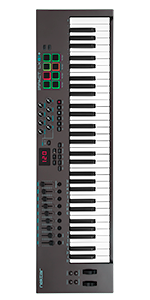
🎶 Elevate your studio game with pro control and instant DAW synergy!
The Nektar Impact LX49+ is a robust 49-key USB MIDI controller designed for producers and performers seeking tactile, expressive control. Featuring velocity-sensitive semi-weighted keys, 8 backlit drum pads, 9 faders, and 8 knobs, it integrates seamlessly with major DAWs like Bitwig, Studio One, and Ableton. Compatible with Mac, PC, and iOS, it includes a powerful software bundle to kickstart your music production journey.




| ASIN | B01HZWL64O |
| Best Sellers Rank | #19,896 in Musical Instruments ( See Top 100 in Musical Instruments ) #74 in Computer Recording MIDI Controllers |
| Color Name | Dark Grey |
| Compatible Devices | Laptop, Desktop, iPad, Mac, Windows, DAWs (Bitwig, Cubase, FL Studio, GarageBand, Logic, etc.) |
| Connector Type | USB |
| Customer Reviews | 4.5 4.5 out of 5 stars (956) |
| Date First Available | July 20, 2016 |
| Hardware Interface | USB |
| Hardware Platform | PC/Mac/iOS |
| Instrument Key | Any |
| Is Discontinued By Manufacturer | No |
| Item Weight | 7.04 pounds |
| Item model number | Impact LX49+ |
| Material Type | Plastic |
| Mixer Channel Quantity | 9 |
| Musical Style | Electronic |
| Number of Keyboard Keys | 49 |
| Product Dimensions | 31.65 x 10.51 x 3.03 inches |
| Size | 49 Keys |
| Standing screen display size | 2.35 |
| Supported Software | FL Studio |
| Voltage | 240 Volts |
R**N
Excellent 49 Key Midi Controller! Get this one.
This is a a great value and a very versatile midi controller. It works will all major DAW software including Ableton Live (despite some of the descriptions to the contrary about it being difficult to use with Ableton Live). I had no issue using it with Ableton Live or Reaper however, it works best with PreSonus Studio One Version 5 and the included license for the Bitwig DAW. The Nektar seems easier to setup completely (apart from the piano keyboard, the volume and mixing controls are easier to setup in Studio One and Bitwig but I also got them to work in Ableton. Reaper was the most difficult setup but it does work.) within those DAWs and it also has no issue with notation software like Musescore, Sibelius and Notion. The keyboard itself has semi-weighted keys so it is easier to play than a regular piano so if you're looking for a more piano-like keyboard, try a keyboard with fully-weighted keys (the Nektar is semi-weighted). The drum pads work very well as do the mixing controls. This is an excellent, feature-rich value at the <$200 range so I highly recommend this Nektar LX49.
R**G
Nice, works great!
Setup was easy and painless with Reaper. I installed some really old versions of Reaper and had to use a generic set up and still it worked great/works great. I had to delete the roaming data to reinstall it on reaper's newer version after my tinkering in old versions. It feels solidly built. I am glad I didn't go with a cheaper model or one that was harder to set up. I am able to buy Reaper for $60 and play with free VSTs to my heart's content. I looked at more expensive software and synths but really for my level of expertise and dedication, Reaper and free VSTs is where I need to stay. But the keyboard worked with lots of different software without a problem for the basic features. I am not experienced enough to comment on the extra bells and whistles this comes with as I have not played with them that much. But they seem to be working. I feel like it will last and it was not much more to buy this instead of a less well made keyboard. I'm happy with this one. The 49 key is as large as I can fit on my desk. I ended up getting a mini keyboard and mouse to use while it is out. My husband added a shelf above my desk for it when I am not using it. The shelf is 2x10 and it overhangs slightly with the cord removed. I am using a powered USB hub with it and have had no issues with power being interrupted. The keys themselves seem full size, not skinny little things. It has some weight to it. I am really happy with this product and would buy from this company again in the future if I wanted to upgrade. I love having the extra keys so I can get a range of sounds out of the synths, for me the 49 key is perfect for now.
A**R
The Software included gives Nektar a BAD REPUTATION
Great keyboard and works great with Studio One. However, don't purchase the keyboard relying upon the included Bitwig Studio software. It is terrible and actually its inclusion gives Nektar a bad reputation. It doesn't load properly on MANY computers and attempts to get it to work, to contact support are Very time consuming and didn't fix the loading problem. Again, I'd give the keyboard a 5, but they need to replace the included software!
J**R
Decent hardware, great software DAW integration at a very reasonable price
I have purchased three midi controllers from three different makers over the past 2 years. This one in particular was a gift for my son, although I did try it out with him for a while after he opened it. Thus, my opinions are on that short use. Hardware: Compared to the other two midi controllers I own (Akai MPK249 and NI Komplete S 49 MK2) the hardware of this controller is not as nice. However, it is also MUCH less expensive, so that should be expected. Compared to other midi controllers in this price range, the hardware seems about the same as others. So, more or less a wash IMHO. Software / DAW integration: This is where Nektar products shine in my opinion. If your DAW is on the list of supported DAWs, then the integration really helps make this controller far more usable than most other controllers. I have heard that Moog and other high-end controllers in the $2k price range have great DAW integration as well, but I wouldn't know. From what I saw and from what my son has told me, it automatically maps the transport and smart controls in Logic ProX to the rotary encoders, and maps the faders to the mixer controls. Very nice compared to what most midi controllers provide out of the box. Compared to my Akai MPK which has virtually no DAW integration, this is MUCH better. Compared to my Native Instruments Komplete S49 MK2, the DAW integration is about the same. (If you know about NI S49 MK2, you know the main point is integration with NI Komplete software, not really the native DAW instruments. In this regard the Nektar's integration with stock Logic instruments is better than my NI S49 MK2). Let's face it, unless you're a professional musician performing on stage, software integration is what really makes a midi controller useful, so in that case this is one of the best priced options you could make IMHO.
R**T
great device to learn to play the piano, free Bitwig software licence which was unexpected however a great surprise. happy days all round
C**.
Ce clavier MIDI Nektar IMPACT LX-49+ est un appareil vraiment impressionnant pour le prix. L'apprentissage prenant un certain temps, il est tout de même assez facile de faire de la musique. Le contrôle d'un DAW, dans mon cas Studio One, bien qu'intuitive reste à assimiler. Somme toute, un appareil que je recommande sans hésitation. Malheureusement ce n'était pas le type de clavier dont j'avais réellement besoin. Trop gros et trop large pour l'espace disponible de mon petit studio de musique maison, j'ai dû le retourner pour le remplacer par un autre beaucoup plus compact.
M**T
I'll order this midi keyboard and this keyboard quality is awesome
M**5
Très bon rapport qualité prix et solidité, pour le son ça dépend de votre logiciel
K**.
En lo que a mí respecta, estoy SÚPER SATISFECHO, por el precio, te dan un teclado realmente muy bueno, me sorprendió la calidad. Ya lo tengo hace, más o menos un año. El mío es el Nektar Impact LX49+ Este teclado tiene un ALGO que es menospreciado, a mi entender, por la gran mayoría de las personas, de los músicos, creo que es porque no lo saben. ¿De qué se trata? De la INTEGRACIÓN !!! Si lo aprendes a utilizar bien, tienes algo así como una especie de prolongación de lo que es Cubase, es increíble todo lo que puedes manejar, automatizar, rutear, es extraordinario, porque aumenta la velocidad de tu trabajo musical. Es súper liviano en cuanto al software "driver" que se instala, lo que es muy importante. Novation, por ejemplo, suele tener un software muy pesado en algunos de sus modelos, y eso hace todo más lento. los Nektar en general, se atan a tu DAW, (si es que están dentro de la lista de soportados, como Bitwig y Cubase, por ejemplo), de una manera estrechísima. El teclado, sin dudas, es mejor que, por ejemplo, el M-Audio Keystation, que tiene un precio superior y no tiene controlles MIDI casi de nada. Los pads y su tecnología, en los Nektar, son de gran calidad, diría que están en el tope de la lista. Los potenciometros y los deslizables, me sorprendió la calidad que tienen, muy buenos. Realmente, esta gente le ha puesto muchas ganas al producto, me inspiraron tanto que hasta escribí a la central agradeciéndoles por tal creación. NOTA FINAL: Si te pones las pilas, estudia cómo funciona, aprendes sobre la compatibilidad y posibilidades de manejo de tu DAW, el que sea, como en mi caso, Cubase, bueno..., ahí es donde comienza a brillar, y te darás cuenta de que no es sólo un teclado, sino, francamente, UNA GRAN HERRAMIENTA DE TRABAJO, que es lo que yo quería, que se "casa" paso a paso y parte por parte, con tus VST y con tu DAW. No podría estar más contento y más agradecido, es un teclado genial, altamente recomendado.
Trustpilot
Hace 1 semana
Hace 2 semanas