We remain fully operational. Our teams are working around the clock to ensure your deliveries continue safely.

Descargar la aplicación


Servicios al cliente
Sobre nosotros
Copyright © 2025 Desertcart Holdings Limited
Descargar la aplicación
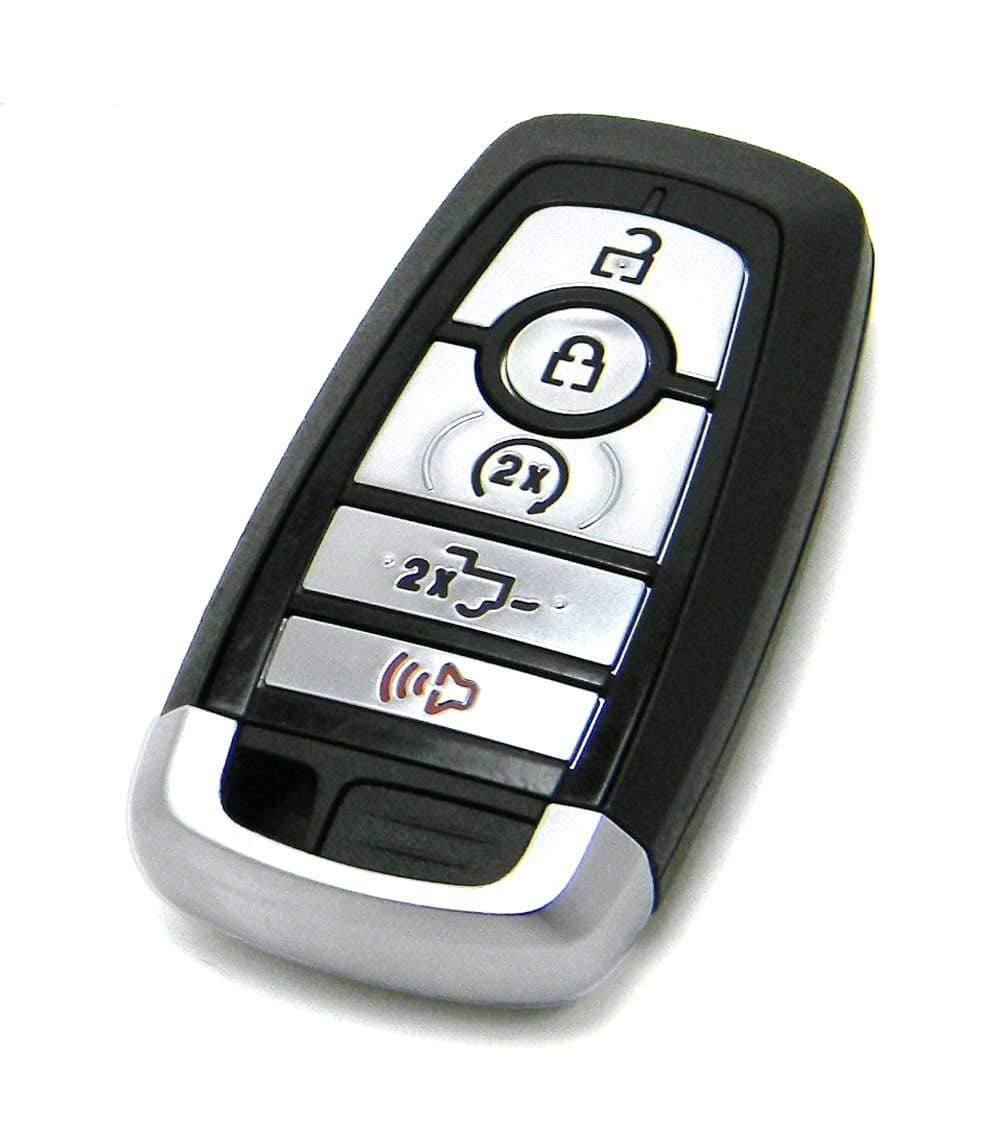

🔑 Unlock your Ford’s full potential with OEM precision and power!
This Ford OEM 5-button smart key fob remote is engineered for 2017-2020 F-Series trucks, featuring durable OEM electronics for enhanced signal range and reliability. It requires professional locksmith programming and cutting to ensure perfect compatibility and security. Backed by a money-back guarantee, it’s the ultimate replacement for maintaining your truck’s factory-grade access and control.
| ASIN | B086LHLX46 |
| Brand Name | Ford |
| Button Quantity | 5 |
| Compatible with Vehicle Type | Truck |
| Customer Reviews | 4.6 4.6 out of 5 stars (327) |
| Item Weight | 1.4 Ounces |
| Manufacturer | Ford |
| Material Type | Plastic |
F**C
Bought two of the "OEM 5-Button Smart Key Fob Remote Compatible With 2017-2020 Ford F-Series Truck (FCC ID: M3N-A2C93142600, P/N: 164-R8166, HC3T-15K601-BB)" from the DriverEdSupplies seller and since the order was fulfilled by Amazon we received it quickly. Better yet, the new key fobs work as the original key fobs that came with the truck. Programmed the new key fobs using the two original key fobs that came with the truck. To easily program a new key fob you need to have two working key fobs on that vehicle, otherwise if you have only one working key fob for that vehicle then you'd have to use something like Forscan to program additional key fobs. If you have two functioning key fobs then the instructions to program (up to two more, we're told) additional key fobs are to enter the vehicle, close all doors, then place the first of the two original/functioning key fobs in the programming slot (under the front cup holder if you have the centre console in the truck) with the key fob buttons facing towards the rear of the truck. At this poing press the "Start" button once, wait until the chimes stop (4 chimes), press the "Start" button again (once), then remove the first original key fob from the programming slot and do the same with the second original key fob. Once that is done, in fairly quick sequence (within 10 seconds) place the new (unprogrammed) key fob in the programming slot and press the "Start" button once. Here's where it got a bit confusing at first, because the programming sequence with the original key fobs is pretty straight forward up to this point: you press the "Start" button once and something happens right away, but when pressing the "Start" button once when you've reached the sequence where you've already placed the new key fob in the programming slot, you then have to wait for it to program the key fob (the "Start" button flashes on and off ), because it's not instanteneous. At first it feels like it's not doing anything or that maybe you didn't press the "Start" button (enough/properly or at all). This is we got stuck a couple of times with the programming failing, because we weren't waiting for the programming to complete before pressing the "Start" button that one last time, because for all intents and purposes it looked like we didn't press the "Start" button at all or that the programming sequence somehow completed. Don't press the "Start" button that one last time until the key is programmed, which in our case took a good 10 to 15 seconds. Once the programming is done the four-way flashers will come on and the door locks will cycle through and you should see a message on the dash display that says something like "key programmed successfully". Press the "Start" button (that) one last time at this point and your new key fob is then programmed for your vehicle. No guarantees supplied or implied with our short new key fob programming instructions included above, but can say that it worked for us. Instructions we've found on the net didn't mention that you have to wait once you've pressed the "Start" button the first time once you've reached the sequence where you've already inserted the new fob in the programming slot. Hope this helps others. The local Ford dealer wants upwards of $400 plus tax to supply and program one such key fob. Needless to say that we're very happy with this purchase.
R**N
You will need: 1. Paid Forscan license 12 bux (unpaid extended license does not include PATS key programming). 2. Approved Forscan OBD dongle such as OBDLink EX USB, available on amazon. 3. Wireless internet connection to your laptop for forscan license server check (I used my cell phone mobile hotspot). 4. New key fobs that use the same frequency as your working fob. Open the case on your existing fob (use a flat blade screwdriver to slide the button in the back while cracking the case with a guitar pick or your fingernail). Use your phone to take a zoomed image of the FCC ID which is printed with a QR code next to the internal valet key on the top side where you pull the key out. Make sure that the fobs you buy match this number or they won't program. Make sure your car battery is near full charge before doing this. Make sure you have internet/wifi on your laptop. Connect your OBD dongle to the port under the dash on the driver side. Connect it to the USB on your laptop. Launch Forscan. Hit the push button start without your foot on the brake (you can also run with the engine running if you prefer). Click the connect icon lower left. Click yes when it identifies your VIN. Wait for it to read the modules. Click on the wrench and select the Body Control Module-- PATS key programming. Hit the play button. Select program new ignition key. Remove the rubber bottom on your cupholder. Insert the NEW key you want to program into cupholder slot. Follow onscreen instructions, select the 'Ignition key' option (not spare key option), follow the rest of the on screen instructions to program the key. Car lights will blink etc. I got a 'PATS returned error, but counter of the programmed keys has been increased' error BUT at that point I stopped and tried the buttons on the new key and they worked! Key fully works including remote start button. Entire price cost less than the key shop or ford plus you get the obd and full forscan.
J**M
Not 100% sure it’s OEM but it works perfectly. I bought this, because like many others my used 2018 F150 came with just one fob, the second one having been lost along the line. I did see some differences between this Amazon key and my actual OEM key. If you look at my pics, the Amazon key has is on the right with the red key ring. As far as quality of plastic, it seems to be the same as OEM. The key blank is also the same quality as OEM with all the proper microprinting on it. The buttons look and feel the same with the same clicky-ness. The differences are minor. One, as you can see the seam on the Amazon key seems to bulge out whereas the OEM key is a tighter fit. There is also a slight difference in the Ford logo. I can’t quite put my finger on what it is. Maybe it’s the color or the depth of the embossing but it just seems a little off. The most noticeable difference is the lack of the punch pin in the removable key. The pin is present on the OEM key and from what I can tell, it secured the key blank in the cap. This pin is absent in the Aamazon key, so I’m sure the key blank is just glued in, which is fine. That could mean this is a high quality clone, or it could simply be changed in the manufacturing process and it’s genuine. No way to know for sure. But the important part is it works. I was able to use Forscan to erase the lost admin key and reprogram both of these as admin keys. Even set my wife’s memory seat setting to her key and my memory setting to mine. I got the blank cut for $20 and it works in the door and consoles. Overall, $80 total cost between the key and getting the blank cut is a great deal! Highly recommend!!
L**S
If this key isn't OEM I'll be surprised. It even has the internal stamps. Plastic feels great, the blank is a bit snug, but the quality is great. You need 2 (somewhat) working keys to begin this. If your radio is dead, but the RFID inside the key still works, you're fine - this was my scenario as one went through the wash. If you lost a key you'll need to go to the dealer. The process to reprogram is: 1) Insert programmed key #1 in the slot (this is under the front cupholder rubber pad) 2) Turn on accessory mode (on button without brake pedal) 3) Wait for chimes to stop 4) Turn off accessory mode 5) Insert programmed key #2 in the slot 6) Turn on accessory mode (on button without brake pedal) 7) Wait for chimes to stop 8) Turn off accessory mode 9) Insert this unprogrammed key in the slot 10) Turn off accessory mode - it will look like it does nothing. WAIT. 11) Hazards will flash, "Key program successful" on the dash. I tried 4 times and was going to give up, it was failing on the fob programming because I kept hitting the on button when it didn't light up. The button not lighting up was it programming the key, so if you hit the button and it does nothing, just wait, it takes 5-10 seconds. Very happy with this key, everything works properly after pairing.
G**Y
Works well.
Trustpilot
Hace 1 mes
Hace 1 día