We remain fully operational. Our teams are working around the clock to ensure your deliveries continue safely.

Descargar la aplicación


Servicios al cliente
Sobre nosotros
Copyright © 2025 Desertcart Holdings Limited
Descargar la aplicación
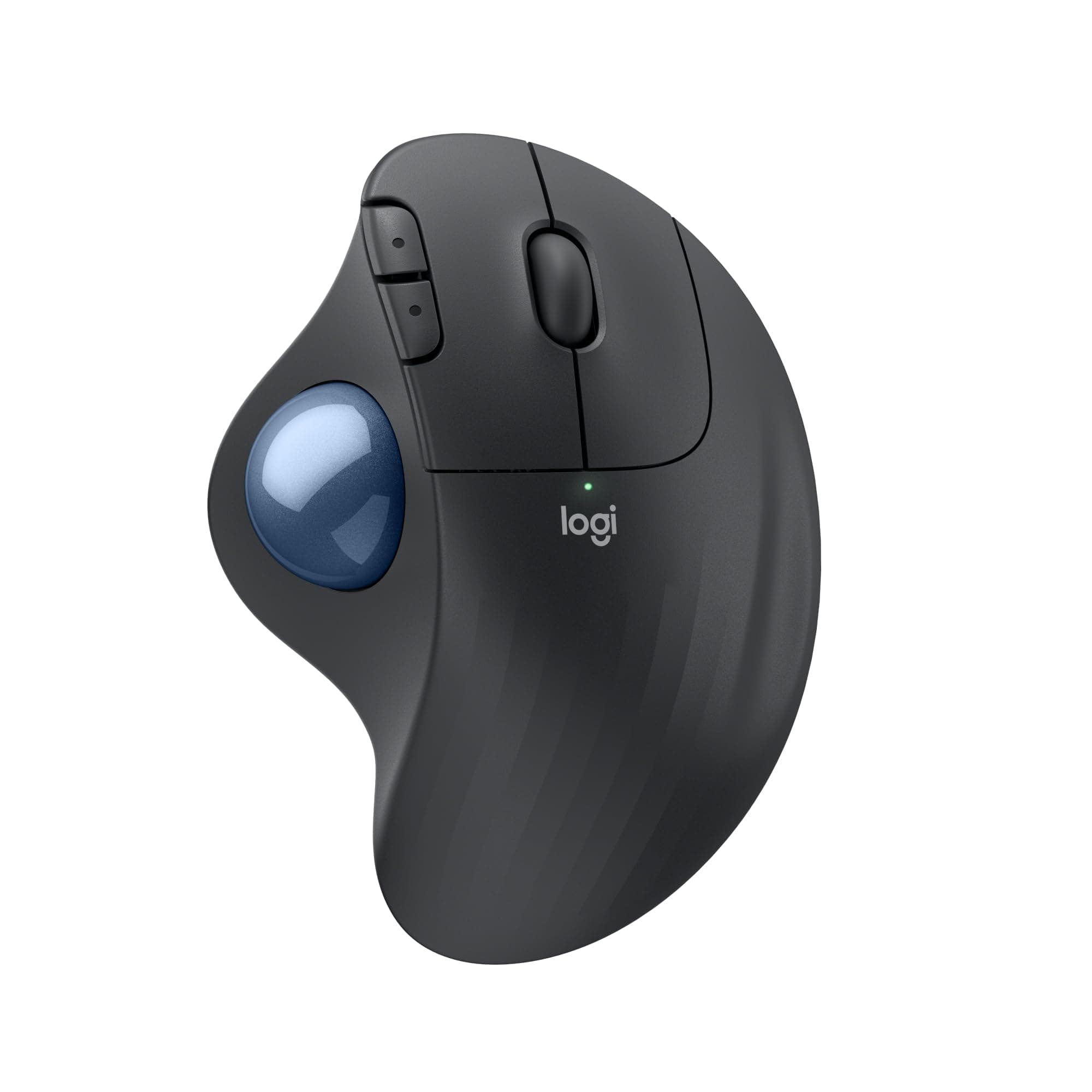






🎯 Master your workspace with precision and comfort — the Ergo M575 means business.
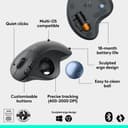
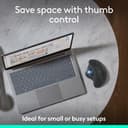
The Logitech Ergo M575 is a wireless ergonomic trackball mouse designed for professionals seeking precision and comfort. Featuring a thumb-operated trackball for smooth cursor control, it minimizes hand and arm movement to reduce strain. Compatible with Windows, Mac, Linux, and more, it offers dual connectivity via Bluetooth and USB. Built sustainably with recycled plastics and FSC-certified packaging, it delivers up to 2 years of battery life, making it ideal for tight workspaces and long hours.


| ASIN | B097TQL2ZV |
| Antenna Location | Gaming |
| Are Batteries Included? | Yes |
| Are Batteries Required | Yes |
| Battery Average Life | 24 Months |
| Best Sellers Rank | #4,581 in Computers & Accessories ( See Top 100 in Computers & Accessories ) #147 in Mice |
| Box Contents | Wireless Mouse, USB receiver, 1 AA battery (pre-installed), User documentation |
| Brand | Logitech |
| Brand Name | Logitech |
| Button Quantity | 5 |
| Colour | Black |
| Compatible Devices | Laptop, Personal Computer |
| Connectivity Technology | Bluetooth, USB |
| Country of Origin | China |
| Customer Reviews | 4.3 out of 5 stars 549 Reviews |
| Enclosure Material | Graphite,Plastic |
| Hand Orientation | Ambidextrous |
| Hardware Platform | PC |
| Importer Contact Information | Rashi Peripherals, Rashi Complex, Survey 186, Dongari Pada, Poman, Vasai (E) Thane, Maharashtra -401208, Registered Address - Rashi Peripherals Pvt Ltd, Aristo House, 5th Floor, Corner of Telli Galli, Andheri (E), Mumbai 400069, India |
| Item Dimensions L x W | 15L x 5W Centimeters |
| Item Type Name | M575 |
| Item Weight Unit of Measure | 140 Grams |
| Manufacturer | Logitech, Logitech India Customer Care Toll free Number 1800 572 4730 (9:00am to 6:00pm -Mon- Fri) |
| Manufacturer Contact Information | Logitech India Customer Care Toll free Number 1800 572 4730 (9:00am to 6:00pm -Mon- Fri) |
| Model Number | 45776 |
| Movement Detection | Trackball |
| Movement Detection Technology | Trackball |
| Network Connectivity Technology | Bluetooth, USB |
| Number of Batteries | 1 AA batteries required. (included) |
| Number of Buttons | 5 |
| Operating System | Mac,Windows |
| Packer Contact Information | Logitech Asia Pacific Ltd, Unit no. 1003, Tower 1, Cheung Sha Wan Plaza, Cheung Sha Wan Road, Kowloon, Hong Kong. |
| Power Source | Corded Electric |
| Product Features | Ergonomic Design |
| Range | 33 feet |
| Special Feature | Ergonomic Design |
| Style Name | Classic |
| Theme | Butterfly |
| UPC | 097855160652 |
| Unit Count | 1 Piece |
| Warranty Description | 1 year limited hardware warranty |
S**K
It's a good trackball mouse to transition away from the regular ones ; somewhat bad software
I've been using the Kensington Orbit trackball for a while ( 3-4 years) and got this as a replacement. Compared to the orbit, this has buttons very similar to a regular mouse (an actual middle click instead of a combination). Unlike my initial apprehensions, the thumb trackball is actually more comfortable than the index and middle finger trackball on the Orbit. The other reviewers in this product page appear to be transitioning from regular mice and I figured there is some value in a review from someone who has used trackballs for a while. I didn't care much about the ergonomic tilt feature, my main motivation in using trackballs is to reduce the strain in my shoulder and right upper back. The M575 and trackballs in general help quite a bit with this. As an added bonus you can place the unit in tight spaces where a regular mouse would be hard to move around and also on surfaces that aren't mice friendly. After a few days of use, the M575 appears to be very comfortable to use, even more than the Orbit. As for the use case, I use it for CAD on a 27 inch screen and everyday point-and-click. While it was not used for gaming, I suspect that it should be quite feasible to use for casual non-competitive gaming. For large cursor movements, you flick the ball so that it spins freely in the direction you need. For fine movements, you'd control by holding the ball with the thumb. I didn't feel any strain in my thumb, but I think it's important to not overextend your thumb while using the mouse. Keep the sensitivity high enough that fine finger movements will let you use the pointer nicely but low enough that it's not too difficult. It can connect via bluetooth as well as the Logitech dongle, which allows you to switch between computers easily. It uses a standard Logitech usb dongle, which means that if you lose it, you could reconfigure the one from another Logitech unit (doesn't have to be this mouse model). I think you can also configure the dongle to connect to a Logitech keyboard as well, simultaneously. Now, coming to the downsides: 1. It's optimized for the right hand. If you're ambidexterous or a leftie, you're SOL. 2. The 2 extra buttons are mapped to forward and back. You need to keep the logitech software running to reconfigure this. --It appears to not remember the change-- This can be an issue when you work in an environment that disallows installation of software like logi-plus that downloads additional stuff from the internet. It's also an issue on Linux where logi-plus isn't officially supported. My preference is to map these buttons to page up and down but on this mouse, it's not that viable. 3. The trackball needs to be periodically cleaned. You'd need to take it out, wipe the insides of the cavity and the ball using a damp cloth or a tissue wetted with IPA (alcohol). Then lightly lube the ball with silicone grease or maybe vaseline. 4. The trackball doesn't give you the finest of movements. It's slightly jerky. You'd need to find a sweetspot with the sensitivity settings where this is not an issue for what work you do.
R**T
Very comfortable.
This mouse is fantastic and quite easy to use. It just takes a few minutes to get used to scrolling with your thumb. Most likely I'll never go back to using a regular mouse again with all the hand movement. For work, casual usage, I highly recommend it. Since I don't game on my Mac, I don't know how it'll be for gaming. I used an app to map the buttons on the Mac.
B**C
Very Reliable Trackball - Avoid Plantar Fasciitis
I have used it for 3 years without major issues, but the Ball was not moving smoothly due to roughness inside the body, and i replaced it. (because of my daily extensive usage) Important: If you want to use it via Bluetooth, DO NOT connect the dongle to the computer/laptop.
A**D
Great product worked for me
Writing review after using it for more than a month. I was suffering from almost 10 yr from shoulder pain & never got any solution. I had a ball mouse in 1997 as my first. I threw it with out realizing it's price for a new mouse. Tried so many things but mostly pain relief creams & right position to work. But in office it's impossible. Finally thanks to work from home I setup my work station & tried this mouse. Before purchasing I checked YouTube vedios & reviews but that didn't impressed me. Infact most didn't said much positive about it. But let me say you it's a great product & my shoulder pain is gone. I was afraid that my thumb will hurt but it didn't. However it's not so good in selecting text. Or fine jobs. You can do it with touchpad. So it depends on your needs. The big pro is it's very convenient you can keep it where ever you like since you are not going to move your mouse. It's just the ball that you will use for cursor. So you can keep mouse as per your convenience. And obviously your hand don't move. Finally it depends on your needs, habit & body type.
S**R
Remove all your uncomfortness and gives better ergonomics.
Amazing one...
U**Y
Scroll not working properly it's been just 6 months. Not expected from Logitech.
The trackball performs well; however, dust tends to accumulate, necessitating regular cleaning to avoid functionality errors. There is not much of a learning curve; you will master it within hours. The precision is adequate for detailed work, though you may need to adjust the cursor speed in Windows. I purchased this product under the impression that Logitech is a reputable company, but the scrolling wheel has already stopped functioning. I feel deceived, particularly given the price.
V**Y
Works well with macbook air m2 running latest Sequoia MacOS
I have been a long time user of an older version of this mouse. The older one was lagging on my new mac, and even worse when the mac is connected to an external display. This was my concern before buying this product, but it worked surprisingly well. Connecting it to the mac was a breeze, no need for an adapter and the battery is already provided in the device. I was up and running within seconds. Highly useful for long hours on the desk, but you have limited gesture functionality compared to the magic keyboard or trackpad if you have one, so I recommend keeping both around for different types of workflows. All in all, recommend this product.
K**H
Worth the investment
Needs time for getting adjusted to it. Only for right handed folks.. excellent battery life and ergonomic. The quality is superb.
Trustpilot
Hace 2 semanas
Hace 3 días