We remain fully operational. Our teams are working around the clock to ensure your deliveries continue safely.

Descargar la aplicación


Servicios al cliente
Sobre nosotros
Copyright © 2025 Desertcart Holdings Limited
Descargar la aplicación
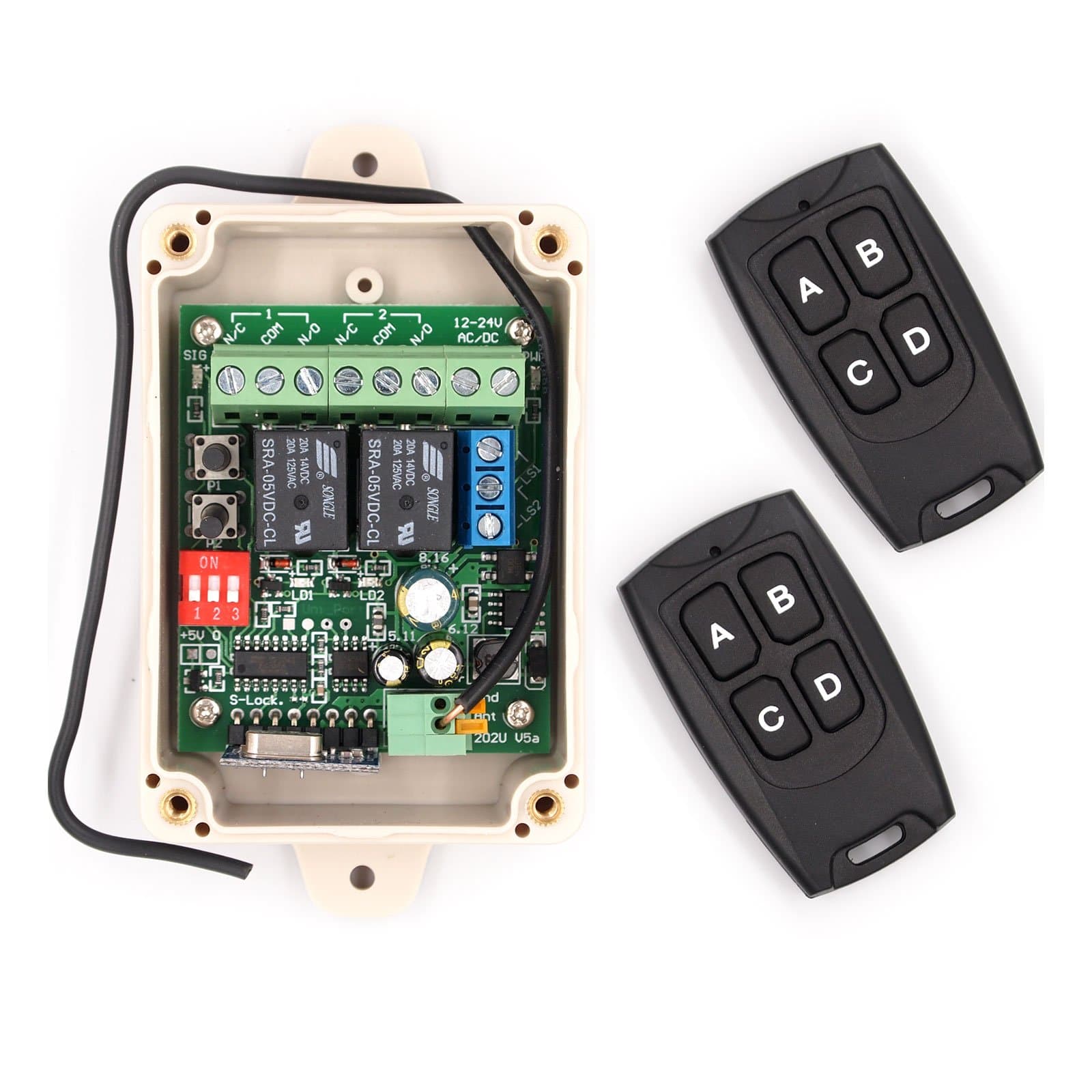
🔑 Secure your space with next-level wireless control — because your smart home deserves the best.
The Solidremote 12V-24V Secure Wireless RF Remote Control Relay Switch KIT-1 is a professional-grade, dual-channel receiver with two transmitters designed for versatile home automation. Featuring ultra-secure rolling code encryption with over 18 quintillion combinations, a highly sensitive -113dBm RF module for extended range, and robust 10A relay switching, it supports garage doors, LED lighting, and more. Its IP55-rated enclosure ensures reliable outdoor use, while easy DIP switch programming and wide voltage compatibility (12-24V AC/DC) make it ideal for millennial professionals seeking secure, flexible, and durable smart control solutions.


| ASIN | B01JGDV8UM |
| Best Sellers Rank | #50,382 in Tools & Home Improvement ( See Top 100 in Tools & Home Improvement ) #244 in Garage Door Keypads & Remotes |
| Brand | Solidremote |
| Brand Name | Solidremote |
| Coil Voltage | 12 Volts |
| Connector Type | 3-pin Terminal Block Connector |
| Contact Current Rating | 10 Amps |
| Contact Material | Steel |
| Contact Type | Electrical |
| Current Rating | 10 Amps |
| Customer Reviews | 4.5 out of 5 stars 1,721 Reviews |
| Included Components | 1 x 202U receiver + 2 x TX134 remotes + 1 x instruction sheet |
| Manufacturer | Solidremote Technologies Ltd |
| Maximum Switching Voltage | 24 Volts |
| Minimum Switching Voltage | 12 Volts (DC) |
| Model | SR-RCS-202U |
| Mounting Type | Wall Mount |
| Number of Terminals | 3 |
| Operation Mode | Automatic |
| Part Number | KIT-1 |
| UPC | 708296998994 |
| Unit Count | 1.0 Count |
| Wattage | 120 watts |
S**R
Simple but effective
I have purchased a v5, a v6 and now a pair of extra remotes. The v6 has not been installed yet so my comments are regarding v5 only w the newer remotes. One of the original v5 remotes was crushed by traffic so I purchased the v6 with the intent of using the remotes w the v5 unit and keeping the v6 unit as a backup. I then decided I would use v6 in another project so bought a pack of the spares anyway. But before the spares arrived I had already programmed the v6 remoted to my v5 and they are working fine. (More on that below.) I'm pretty sure I have an older review on the v5 so I'll just throw a few points out here. First, i have it installed inside an aluminum trailer (to turn on interior and exterior lights A=interior B= Exterior C= Both) but it still has pretty good range and reception. Batteries last a long time. Set up, even utilizing relays to handle more amperage, was very simple. This has been working flawlessly since 2019 (now Q2 2024). PROGRAMMING NEW REMOTES - I don't recall having any issues programming the original remotes, and I'm betting that would be true of the new v6 unit, however linking newer remotes to the older units may require changing the remotes 'mode'. This is not stated very clearly, if at all, in most documentation or videos. I don't have all of the details but here's the basic idea. When you press one of the buttons on an original remote does it blink once and go out, stay on for a longer moment, or blink several times? This is an indication of its 'mode'. When you get new remotes the mode is likely set to the default mode at the time of its fabrication, thus different from an older model, and you probably see the new remotes flash differently from your old remotes. You need to get the new one to match the old one. To change the mode you hold the C+D buttons at the same time until you see the remotes light come on/flash, let go of C+D and press A. You should now see a different pattern when you press a button on that remote. If you are 'lucky' that's the one that matches your base unit so you should try to pair them again following the documented (simple) process. If the unit and remote didn't pair up then try changing the remotes mode again. I had to change the modes many times before they finally linked up. Not sure if it makes a difference but I also tried pressing the B and C buttons (after C+D) in case that did anything special since the C+D> A just plain didn't work after the first few tries. It can be frustrating but after a couple minutes of feeling like I was getting nowhere it eventually worked. Overall a great product! UPDATE June 2024 - I ended up adding the additional standalone remotes to the same v5 controller and found that they were already in the correct 'mode', unlike the remotes that came with the newer v6 unit (described above). This is neither a plus nor a minus since it just depends on your situation as to whether you'll need to adjust the modes or not for pairing. If i had wanted to pair them with the newer v6 unit then I'd likely have needed to change the mode.
K**R
Works well super easy to program
This product for 17 bucks is no doubt the best buy on Amazon. It comes with 2 remotes that can handle 4 different devices. Try just buying 2 remotes. They don't ship a power supply but i just found an old brick that I had tossed the device and kept the power supply for, but the ends of measured the voltage and connected it up. Programming the remotes is so easy if i had to buy a new remote I would just buy one of these. Press the button on the controller then the remote the controller flashes and you are done. There are 2 relays in the controller so you could use it to control 2 separate garage doors, or if you wanted to get fancy you could put the power to the opener on a relay and then no one could open the door unless they pressed the relay to power up the door. I cannot say enough over how easy it was to set up. Do you need a little bit on knowledge yes each relay has 3 connectors and you only use 2 of them. But unless it dies in a year it really is a great value. The unit has a rubber gasket that goes all the way around and while the bottom of the controller is open you could seal it up pretty easily. Is this the most wiz bang thing I have purchased from Amazon nope. But has it impressed me with no issue setting up and working out of the box and lots of other features included yes. I can see where they probably cut the cost by 50% by not including a power brick and most people probably have one hanging around. I just used the 2 wires that come down to the door button on the door going into my house to test the unit. It was for my brother in law and he was also very happy he could still use his old remote too!
K**H
Replaced my old Craftsman door controller.
This was easy to install and works perfectly as a garage door controller. I followed this reviewers directions: I bought this remote control to replace the problematic remote controls built into my two aging garage door openers. It does that wonderfully. When it came to puzzling out how to wire the unit up, the instruction sheet had me scratching my head. Even the illustrations were confusing. For example, the diagram of the circuit board does not call out the P1 and P2 switches, which are used to program the unit. But when I looked at the markings on the circuit board for the terminal block, everything became clear. There are two positions for the power input, and there are three positions for each of the relays -- a normally open contact, a normally closed contact, and a common contact. The P1 and P2 switches are also clearly labeled. For garage door operation you need to wire up a 12-volt power supply. Pretty much any old wall-wart power supply that outputs 12 volts will work. (This is why you have a drawer full of old wall-wart power supplies!) You need to cut off the plug, separate and strip the wires, then connect them to the power contacts on the terminal block. Polarity doesn't matter, nor does whether the output is AC or DC. Sweet. For each garage door you need to use one relay. You can wire up to the two contacts on your existing wall switch -- one wire goes to the N/O (Normally Open) contact on the terminal block, and the other wire goes to the C (Common) contact right next to it. You don't use the N/C (Normally Closed) contacts. And you don't need to disconnect the existing wall switch -- the wall switch and the remote control can operate in parallel. Since there are two relays in this remote control you can control two garage doors independently. Just wire up the second relay like you did the first. You might notice there is a DIP switch on the circuit board. If you, like me, are using this remote control for your garage door openers just leave the DIP switch alone. Its default position is what you want. (If you don't know what a DIP switch is, don't worry. You don't need to.) You do need the instruction sheet to figure out how to program the two small hand-held remotes. Pretty simple, but not something you'd intuit. A couple of hints. I removed the circuit board from its box to make wiring the terminal block easier. You do have to remember to thread the wires for the power supply through the holes in the box first. I connected long-ish wires to N/O and C terminal block contacts, to make wiring "in the field" easier. All the wires and the antenna got threaded through the holes in the box before closing things up. And the relays make audible clicks when they operate. This helps when testing the unit under power. But good luck trying to detect which relay made the click. A length of white gasket material comes with the kit. You fit that into a groove in the box, to help create a water-tight seal. You'll probably need to trim it to length. While this gasket makes a nice seal, the three open holes in the box, used for the wiring, will let lots of water in anyway. Mount the box with the holes at the bottom to avoid that. I haven't figured out just how much range this remote setup has, but it is clearly much better than what I had before. I can stand across the street from my house and get reliable operation. I'm satisfied with that.
M**O
The good and the bad. Still better than most
I needed 100ft range to use this in a theatrical application. That limited the choices. Unobstructed, this unit works at over that distance. With an actor between the transmitter and receiver, it's usable range is right around 100ft. The ergonomics of pairing remotes is good and the dip switches make setting the button behavior easy ... as long as you don't lose the instructions. The box is well made with mounting tabs and lid screws have threaded metal inserts. You need to know how to wire electrical circuits for the various ways you can configure the relays. The space between the terminal block and where your wires come into the box is bigger than most. I found it difficult to use the terminal strip because of the depth of the box made it hard to see the opening. I ended up removing the circuit board and then cramming everything in after it was wired up. My application (LED string lights) ran on the same 12v power as the remote. This requires you to tie all your power lines to the same terminal block port as the power feed. Further, the common has to be daisy-chained with small jumper wires to the common of each relay. That space gets tight really fast. I can't imagine the wiring nightmare with power in and 4 power out lines. If you have a lot of wiring, I recommend you plan on some external way to house those connections. I was able to fit everything using power in plus one NC output using all 22ga wire. YMMV The box has bare holes and no strain relief mechanism. I used a zip tie. But if it's packed with wires, that's a tricky bit move. All the manhandling to wire it up somehow dislodged the antenna from it's solder joint on the circuit board so I had to repair that. The unit some with a gasket to waterproof the lid but there's no accessory I know of that will waterproof the holes where the wiring enters. I wanted to also use this on a lift actuator and while the remote will run on the same 24v power as the lift, the relays will not. So for that application, you'll need to stick with the 12v actuators or get external relays.
S**E
Well built and worked with hydraulic lift
UPDATE: ONE MONTH IN System is still working perfectly after a month of operation. Very VERY please will how this all worked out. This remote receiver is mounted in a reasonably warm engine room environment on the boat, so it does get exposed to heat loads in excess of 120F at times. Unit is functioning perfectly. -------------------------------------------------------------------------------------- I have a hydraulic lift on the back of a boat. The remote control receiver that came with the lift has always been a bit of a problem with reliability, signal range and a variety of key FOB failures. The OEM of the remote system for the lift is also out of business, making parts like key FOBs either stupidly expensive, or just unavailable. One vendor quoted me $50 for a single key FOB. The solution offered by the lift vendor was a new remote control system, for over $550, a fee I was not keen on paying, given the system is not that complicated. So began the search to find an alternative, and I landed on this Solidremote system. It is well constructed, compared to others I tried out, and offers many configuration options. The remote key FOBs offer excellent security, and more signal range than I will ever need. Note: my application for this remote receiver is NOT recommended for this remote control system, unless you know what you are doing! Connecting a hydraulic system like this CAN be dangerous, so make sure you know what you are doing, or get someone to help you that does. You need to have a solenoid in the circuit to ensure you are not running high current through the remote control box. The next challenge was figuring out how to wire the Solidremote into my application. I made up a new wiring harness that essentially picked up the connections of the old remote system. The use of a couple of 5A diodes to prevent current flowing back up through the Remote Receiver's relays solved the only issue --without those diodes the system will activate both hydraulic valves when you press either up or down button. The Solidremote system works like a charm, offers superb range and so far seems to do everything I need. I also like the fact I can buy additional key FOBs for $5 each!!
M**N
Excellent product, easy installation
I am extremely happy with the Solidremote Receiver and ease of installation. I still can't believe what a simple, inexpensive and easy solution this is for my needs. I had been searching for a way to add a remote capability to a garage screen which could only be opened by a single button/switch, making it very inconvenient when coming home in the car and with the screen down. I saw several reviews here and a U Tube video and bought the Solidremote receiver unit (Receiver), a 12-24v AC/DC adapter to plug into an outlet to power the Receiver (I bought mine on Amazon), a length of doorbell wire (or similar gauge), 2 strand, (if only 3 strand available cut off 3d (usually green) wire) to splice into the existing switch and connect to the Receiver, and 2 extra remotes . The directions provided are essentially useless for installation and wire hook-up. If you have done any electrical work such as adding, changing outlets, switches, etc., an absolute breeze to install-I don't know about 5 minutes as another reviewer suggests, but very simple. Even without much experience, installation is still easy. All you are doing is splicing into your existing 12 v switch for your device and using the adapter to power the Receiver, so there is no running 110 wire or anything like that. My comments relate ONLY to installing the Receiver to switch 1 device- this Receiver has several other uses. You need to figure where you will install the Receiver, accounting for access to the existing switch for your device to install a length of the bell wire from the switch to the Receiver, and a 110 outlet to plug the 12/24 v adapter from the Receiver into. Do the wiring before you screw the Receiver to the wall/device. As you look at the Receiver, remove the cover, orient the Receiver to put the Terminal Block (light green), on the bottom-on the right of the Terminal Block are #1 and #2 relays, I used the #1 'relay' (R1) since I had only the one garage screen I wanted to switch-I suggest you do the wiring before you screw the Receiver down. Take your length of bell wire, strip off 1/4-1/2 inch of each wire and install one each in to the COM and NO terminals at R1, on the far right as you look at the Terminal Block, through the right hole in the "bottom" of the Receiver-polarity (color of wire) doesn't matter. Then go to far left of the Block, look for the last 2 terminals under the designation on the Block 12-24V AC DC, which is the power part of the Terminal you will hook up to your 12/24 v adapter. Depending on your model adapter, it may already have a terminal end you can use by adding a length of the bell wire, otherwise cut the end plug off, strip the wire exposing 2 wires, strip as necessary and install into each of the 2 terminals under 12-24V AC DC designation on the Block, through the left hole on the 'bottom' of the Receiver-polarity (color) of wires doesn't matter. NOTE: Also on the Receiver there is a red block with 3 or 4 switches -totally ignore, leave as is. There is also a blue block with 3 terminals, ignore, do not use. You are ready to splice into your existing switch. Go to your in use switch for your device, take off the cover if any, note the 2 terminals on the switch; strip off the other end from the wire you installed at R1 on the Receiver, exposing the other ends of the 2 wires and combine one each existing wire on the switch with one each of the wires from the NO & COM terminals on the Receiver, on each of the terminals of the existing switch-polarity of the wires you respectively install on the existing switch terminal doesn't matter. Plug the adapter into the outlet, on the circuit board of the Receiver should see some small LED lights. The directions supplied do a good job explaining how to program the new remote(s)-I suggest you use PRG 1 to program your remote(s). I also put a mark on the Receiver at PRG 1 as a guide for future re-programming. Be sure and test the remote(s) after programming. There also is a very narrow piece of white tubing as a gasket for the receiver if installed in a wet area-I didn't use. Once the remote(s) programming is done and tested, you can then reinstall the existing switch (which will still work independent of the remote(s), and install the receiver on a solid surface. Enjoy!
J**R
Worth the Money!
This product saved me over $250.00. I did not have to purchase a new garage door opener. My garage door opener is over 30 years old and could not find replacement remote. I watched the YouTube video on how to install the relay. Works great!!! I will update this review in a year.
T**V
great unit lowest price easy set up 2 remotes w/bats 2 isolated relays no output voltage.
This receiver needs 12-24 volts a/c or dc power has 2 isolated no output voltage 2 position relays [ normal open normal closed ] includes 2 remote transmitters with choice of 4 codes. [ batteries installed] small unit nice philip or slot screw connections. [3 terminals com,no,nc, for each relay + 2 power input terminals. 2 screw mounting tabs. remove 4 screws on receiver cover reveals each relay has LED to show powered, 1 power input LED 2 relay set code LED, and 2 black round code set switches hard to find but read instructions and picture shows location, Took 5 mins to be ready to install works great,best price. 3 day ship to me nj
Trustpilot
Hace 4 días
Hace 2 semanas