We remain fully operational. Our teams are working around the clock to ensure your deliveries continue safely.

Descargar la aplicación


Servicios al cliente
Sobre nosotros
Copyright © 2025 Desertcart Holdings Limited
Descargar la aplicación


Buy anything from 5,000+ international stores. One checkout price. No surprise fees. Join 2M+ shoppers on Desertcart.
Desertcart purchases this item on your behalf and handles shipping, customs, and support to Panama.
🚀 Transform your Raspberry Pi into a powerhouse mini NAS with style and speed!
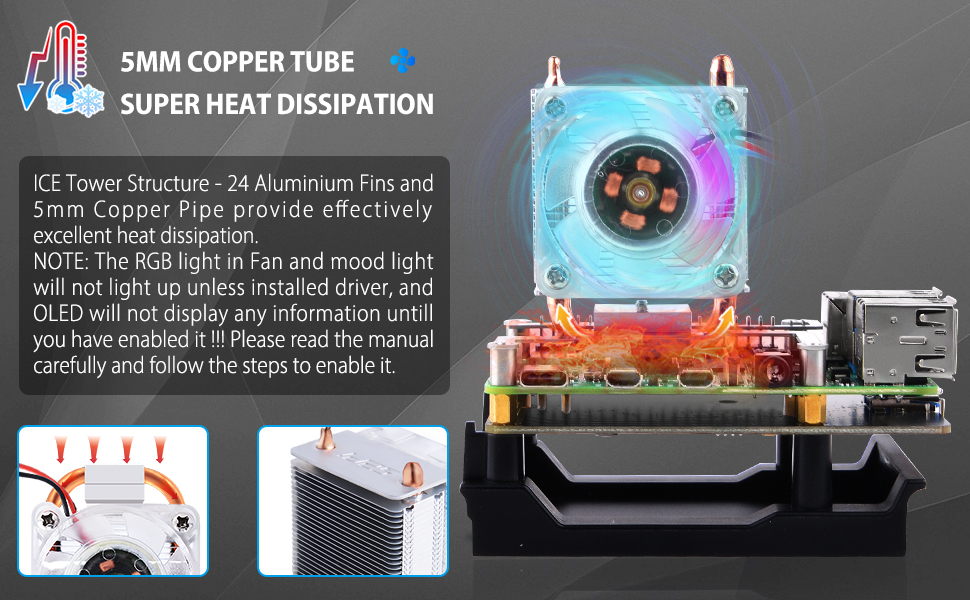
The GeeekPi Mini Tower NAS Kit for Raspberry Pi 4 is a premium upgrade kit featuring a durable ABS case, an M.2 SATA SSD expansion board supporting up to 2TB storage, a PWM RGB ICE Tower cooler for optimal thermal performance, a 0.96-inch OLED display for system monitoring, GPIO expansion, and a fast 18W QC3.0 power supply. Designed for professionals and tech enthusiasts, it turns your Raspberry Pi 4 into a sleek, high-capacity, and cool-running mini NAS server.




| ASIN | B09LD3JQGV |
| Best Sellers Rank | #3,534 in Single Board Computers (Computers & Accessories) |
| Brand | GeeekPi |
| Compatible Devices | Servers |
| Connectivity Technology | USB |
| Customer Reviews | 4.1 out of 5 stars 127 Reviews |
| Item Weight | 360 Grams |
| Manufacturer | GeeekPi |
| Memory Storage Capacity | 2 TB |
| Mfr Part Number | K-0612-EU |
| Model Name | Raspberry Pi 4 |
| Operating System | Raspberry Pi OS (Buster) |
| Processor Brand | ARM |
| Processor Count | 1 |
| RAM Memory Installed | 2 TB |
| RAM Memory Technology | LPDDR4 |
| Ram Memory Installed Size | 2 TB |
| Total Usb Ports | 2 |
| Warranty Description | 6 months |
| Wireless Compability | Bluetooth |
J**N
Amazing case for the price.
Got this for my brother in law who is a computer science major and he is in love. This case really checks a lot of boxes. Micro SD cards really aren’t great for operating systems. They aren’t rated for high levels of write operations, so the daughter board for the SSD is a great addition. It is worth noting that installing the OS on the ssd requires either an m.2 ssd adapter for your desktop, or some other storage device (usb or micro sd) to install the os on, then you can clone it to the ssd. The daughter board does not support NVME drives, only SATA drives in the m.2 format. Drive speed is limited to usb 3.0 speeds as it is connected to the raspberry pi by usb. The cooler works great. I opted to use some thermal paste instead of the provided thermal pads, and the cooler keeps the raspberry pi at great temps. Plenty of room for over clocking. The build and material quality is high, I really don’t have any complaints on this case. If you’re planning on using your raspberry pi for some more serious or intense projects, or just love the mini pc aesthetic, this case really hits a home run.
R**.
Fantastic, ice cold case
The case assembly is pretty self-explanatory. Followed instructions available online on how to set up the display. I installed the fan (has a low buzzing sound which doesn't matter if the pi lives in a corner) and the pi (8 GB variant, media server) never goes above 40 C. Neat little box. My only wish is that the ethernet and power cords run parallel to each other for a neater setup.
T**R
Good Product, Poor Instructions
My only complaint the scripts noted within the instructions are named incorrectly (e.g. "systeminfo.py" is actually "system_info.py"). Takes a little bit of extra time to get the peripherals working, but its not difficult to figure out and get everything functioning as intended.
J**A
good project for raspberry pi
good case with a built in screen for system info
J**B
USB dongle can’t not be plugged in
USB dongle can’t not be plugged in, it has wrong orientation and distance is to small to reach both USB ports
K**N
Pi4 for Kali OLED is not working
The product is great and easy to assemble, no issue with Raspbian distro, if you are running Kali, LCD, RGP, FAN Controlled, not going to work out of the box you need to modify Kali. Otherwise, i will give it 5 Stars. To save headache, here is how you fix it 1- install 3 Dependencies: sudo apt-get install python-smbus , sudo apt install libi2c0, sudo apt install python3-smbus 2 - Install Kernel Support to enable i2c sudo nano /etc/modules ---> add following line i2c-bcm2708 i2c-dev 3 - modify config.txt file located at /boot/ sudo nano /boot/config.txt ----> following line at the end dtparam=i2c1=on ------------------ dtparam=i2c_arm=on should be there if not add it as well. 4 - verify that i2c is working ---- now you should be able to see the i2c adapter └─$ sudo i2cdetect -l i2c-1 i2c bcm2835 (i2c@7e804000) I2C adapter
N**S
2 gripes overall
I do like the case. It's solidly built and looks exactly as advertised. It wasn't too hard to assemble, maybe you may need slender and more nimble fingers than mine but overall, it didn't cause issues. The included instructions and those on their wiki site are easy to understand and follow. Two gripes though: 1) the micro sd card now is too far in to remove or insert with your fingers - unless you're a concert pianist. 2) I wish the orientation of the raspberry in the case, and the cutouts in the case were reversed. Now, it sits on my desk with the little screen showing (cool) and ethernet cable and USB cables all unsightly in front.
T**S
Store previews are for older model
This product has been evolving over the years, it started as a 3D printed object and now it's injection molded without a circular hole on one side of the acrylic(good move btw). It's a lot better now but unfortunately the stores page is showing an older version of the product. At the time of this review the store page is showing the preview and wiring diagram for the ZP-0130. They seem to be shipping ZP-0130-4wire versions so I put the wiring schematic for that one in my review photos.
Trustpilot
Hace 1 mes
Hace 2 meses