We remain fully operational. Our teams are working around the clock to ensure your deliveries continue safely.

Descargar la aplicación


Servicios al cliente
Sobre nosotros
Copyright © 2025 Desertcart Holdings Limited
Descargar la aplicación
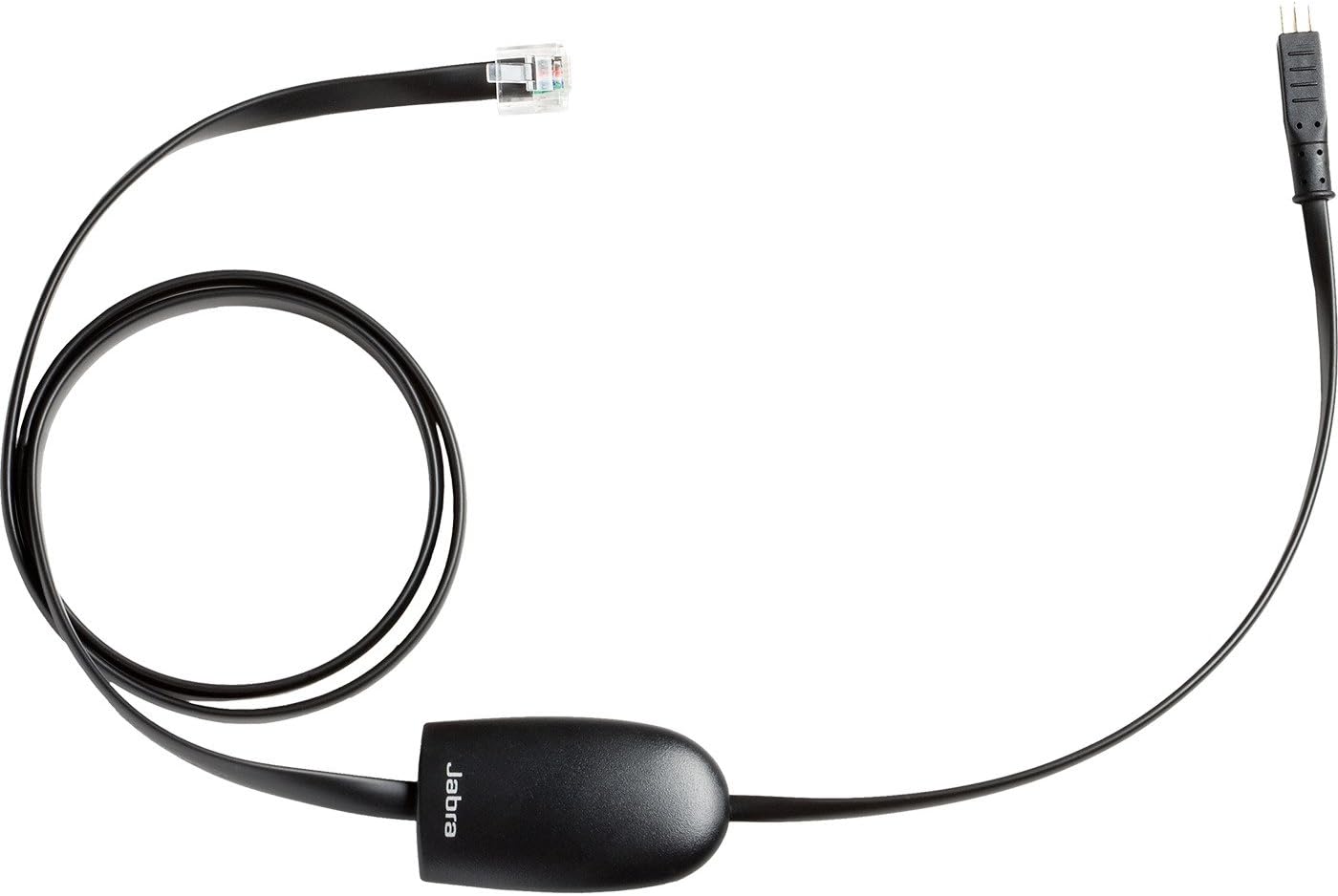

📞 Stay connected, stay ahead—wireless call control made effortless!
The Jabra Link Cable 14201-17 is a genuine EHS adapter that enables remote Electronic Hook Switch control for Polycom SoundPoint IP phones. It allows professionals to manage calls wirelessly from up to 450 feet away using compatible Jabra headsets, enhancing mobility and productivity with a simple plug-and-play RJ9 connection and easy phone configuration.











| ASIN | B0016P139K |
| Best Sellers Rank | #155 in Telephone Headsets |
| Brand | Jabra |
| Built-In Media | Link 17 EHS Adapter |
| Color | Black |
| Compatible Devices | Universal |
| Connector Type | RJ9 |
| Customer Reviews | 4.3 4.3 out of 5 stars (178) |
| Global Trade Identification Number | 00706487009429, 05706991007602 |
| Item Dimensions | 3.94 x 1.18 x 5.91 inches |
| Item Type Name | Jabra Link EHS Adapter the Polycom IP Phones Jabra Part# 14201-17 |
| Item Weight | 0.02 Kilograms |
| Manufacturer | Jabra |
| Model Number | 14201-17 |
| Number of Items | 1 |
| Number of Ports | 1 |
| Package Quantity | 1 |
| Specific Uses For Product | personal |
| UPC | 132017884851 696720445346 706487009429 |
| Unit Count | 1.0 Count |
| Warranty Description | 1 year Manufacturer |
L**S
Works great with a Jabra Pro 920 and Polycom SoundPoint IP 335 phone
This works great on my Polycom SoundPoint IP 335 phone. Just something things to know: The photo of the product is wrong. The actual product has the 5 pin connector needed to plug into the polycom phone. Another reviewer posted photos of the actual product that are correct. Once you've plugged the 5 pin connector into the phone and the modular jack into the Jabra wireless base station (or whatever headset you have), you'll need to change the configuration of your phone to tell it what sort of Electronic Hook Switch arrangement you are going to use. There is an application note on the Polycom web site that describes this. It is Technical Bulletin 35150, titled "Using an Electronic Hookswitch (EHS) with Polycom SoundPoint IP and VVX 1500 Phones" that will describe the change you need to perform. You can do this locally on your phone without any admin access required, or if you're administering a network of phone, you can update the XML configuration. I would post a link, but that usually is trouble inside of an amazon review.. If you perform a Google search for that document title, it will probably be the first hit.
V**N
They are working great! When we bought the headsets
I bought 4 of these to use with the Jabra Handsfree Pro 9470 headset that I paired with Polycom VVX 400's. They are working great! When we bought the headsets, we didn't realize that we couldn't answer a call from the headset (when away from the phone or base for the Jabra Pro). Now I can simply touch a button on the headset to answer a call or hangup. Setup for this hookswitch was fairly easy. Plug one end into the Port of the Jabro Pro base and the other into the phone. I called Jabra Support for guidance in changing the settings on the phone and base for headset. They were extremely helpful! I recommend this - it will save you a lot of stress with the installation process.
M**L
Greatest Office Product!!
LOVE this thing! I have the Jabra Pro 9470 and a Polycom 650 phone. These two products work great together... and their relationship has become even better with this product! I can remotely answer and end calls just by pushing the button on the headset. No need for a handset lifter that could stop working after long use. Highly recommend!
K**H
works great but no information about how to set up / configure.was provided.
You'll need to configure your phone. No instructions included about how to do that or even notification that you will need to do it. Thanks goodness for Google and YouTube.
C**O
Great accessory - But not well documented.
I'm a typical guy when it comes to RTFM. That said, when I exhaust my stubborn streak and need to refer to the manual, it's nice when there is one. This ships with zero documentation (at least what I received arrived with no documentation). Clearly it's made to be functional between a Polycom phone and a Jabra headset (as the item name indicates), so it shouldn't be that difficult to mention that the phone should be set to Jabra EHS (which was the easy part), the headset should be set to DHSG (wasn't overly obvious to me why that would be the case, but it is for the GN 9350e and I presume the others in the series), and finally the adjustment slider on the headset must be stepped through the clear dial tone switch settings to determine which gives you the most clear dial tone. For me, it was the A setting. These three simple steps guarantee success with this accessory.
A**R
... these cables do not work and now we own useless
The headphones that require these cables do not work and now we own useless headphones
T**R
Works as advertised, no more need for lifter!
This cord works wonderfully with my Polycom IP phones. The expensive lifter I used to use would slide around and only work as designed half the time. The other half the phone would slide off and I'd have to manually end the call. This piece gives my headset total functionality without the mechanics of using a lifter. I love it; my only regret is that I didn't toss the lifter a long time ago! I highly recommend this cable either to give your headset full functionality or to replace a mechanical lifter.
M**5
No Need for a Lifter
This works perfectly, and was set up in less than 5 minutes following the instructions by Jabra. I have the Jabra Go 6470 and a Polycom IP 450 phone. Free 2-day shipping with Amazon Prime somehow took 6 days to arrive, though, so I was suffering needlessly without a lifter or hookswitch for a few days... Never again- the call comes in, I hit the button on my headset, and Boom!- the call is live.
M**E
Acheté pour une utilisation professionnelle afin de pouvoir décrocher/raccrocher directement mon téléphone avec mon casque jabra 920. Cela fonctionne à merveille donc j ai les mains libres pour taper sur mon clavier
R**L
Works as advertised.
Trustpilot
Hace 2 semanas
Hace 2 semanas