We remain fully operational. Our teams are working around the clock to ensure your deliveries continue safely.

Descargar la aplicación


Servicios al cliente
Sobre nosotros
Copyright © 2025 Desertcart Holdings Limited
Descargar la aplicación
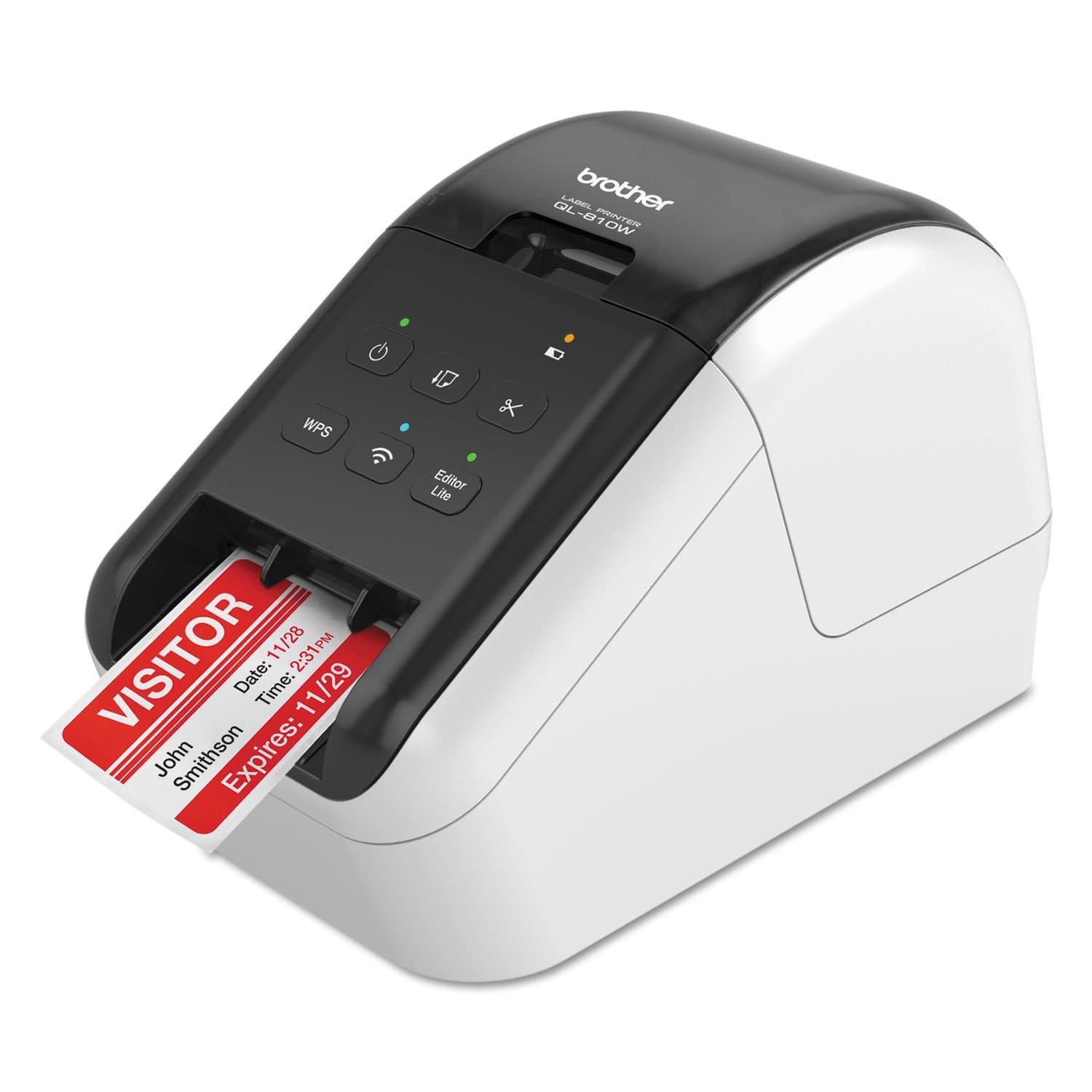
🚀 Label like a pro, anywhere, anytime!
The Brother QL-810W is a professional-grade thermal label printer delivering ultra-fast printing speeds of up to 110 labels per minute at 300dpi. Featuring dual connectivity via WiFi and USB, it supports seamless printing from Windows, Mac, and mobile devices. With vibrant black and red printing capabilities and a durable cutter life of up to 300,000 labels, it’s designed for high-volume, cost-effective labeling of packages, envelopes, badges, and more—perfect for busy professionals who demand speed, quality, and flexibility.


| ASIN | B01MTWGMRR |
| Additional Printer Functions | Print Only |
| B&W Pages per Minute | 1.0 |
| Best Sellers Rank | #10,661 in Office Products ( See Top 100 in Office Products ) #44 in Desktop Label Printers |
| Brand | Brother |
| Built-In Media | Brother QL810W Label Printer, P-touch editor software and driver, AC power adapter, USB cable, DK1201 and DK2251 starter rolls |
| Color | Black, White |
| Color Depth | 1 bpp |
| Color Pages per Minute | 40.0 |
| Compatible Devices | Laptops, PC, Smartphones |
| Control Method | App |
| Controller Type | Android, iOS |
| Customer Reviews | 4.2 4.2 out of 5 stars (1,077) |
| Dual-sided printing | No |
| Duplex | Simplex |
| Global Trade Identification Number | 00012502646334 |
| Hardware Interface | USB |
| Ink Color | Black, Red |
| Item Dimensions D x W x H | 5"D x 9.2"W x 5.7"H |
| Item Type Name | Color Laser Printer |
| Item Weight | 2.4 Pounds |
| Manufacturer | Brother |
| Maximum Copy Resolution Black and White | 300 dpi |
| Maximum Copy Speed Black and White | 1 ppm |
| Maximum Media Size | 2.4 x 1200 inches |
| Maximum Print Resolution Black and White | 300 dpi |
| Maximum Sheet Capacity | 1 |
| Model Name | Model: QL810W |
| Model Number | QL810W |
| Model Series | QL |
| Other Special Features of the Product | Ultra Fast, Wireless |
| Paper Size | Up to 2.4 Inches |
| Power Consumption | 810 Watts |
| Print media | Labels |
| Printer Connectivity Type | USB |
| Printer Output Type | Monochrome |
| Printer Type | Thermal |
| Resolution | 300 x |
| Specific Uses For Product | packages, envelopes, file folders, Name badges, postage |
| Total USB 2.0 Ports | 1 |
| Total Usb Ports | 1 |
| UPC | 012502646334 |
| Unit Count | 48.0 Ounce |
| Warranty Description | 2 year warranty |
| Warranty Type | limited warranty |
| Wattage | 810 watts |
M**R
Great printer for PCO's Check-in App
We bought three of these printers to go with PCO's Check-In system. We've been using them for almost 6 months. The only problem we had is where one of the printers is located with spotty wifi connections. There is no ability to hardwire the printer, so make sure you have good access points near the printer. Pros: - Easy set up on MacBook with Brother's driver - Connects easily with Planning Center Online's Check-In application - Quality design - Prints quickly - Cuts automatically - Large power brick with long cords - Includes printer to USB jack for a printer cable for easier setup Cons: - If you have spotty internet, you will need to make sure you set the printers up as Static IP Address - No hardwired ethernet cable option (only WiFI) - It would be nice if it has a display screen when you have an error and for set up I highly recommend this Brother printer for anyone who is looking to do digital sign-in and print sticker labels with PCO's Check-In system!
C**.
Brother Label printer
Easy to set up and works great!!
D**S
Wireless is Great
I am a big, big fan of Brother products. You call for tech support and they pick up the phone in 3 rings and really work hard to resolve the issue. I have owned to previous versions of their label makers and this was my first wireless on. I currently have 5 printers on my wireless home network. Anyway, for some reason I could not get the driver to work correctly and with a quick call to tech support we were able to get this printer working flawlessly. The wireless aspect allows me to not have to clump all my printers in one area around my one PC. I would highly recommend this printer.
S**R
Endless Network Connection Issues
I bought two of these printers for our church to use with Planning Center Check Ins to print labels for children in our programs. We had previously used two Brother QL-720NW printers which performed very well on Wifi with the check ins app. These printers have put us through 3 months of agony as they randomly disappear from connection in the Check Ins app, particularly when there is a long line of people trying to check their children in. I am no amateur when it comes to network troubleshooting. We have hired firewall experts and followed all recommendations for making this work, including port settings, firewall settings, network settings(separate VLAN), and troubleshooted all potential issues with access point radio 2.4 GHZ. Tested exhaustively. They show up in the planning center app and invariably disappear. I know about the sleep setting and it is turned off. Two times when I had the printers connected to my PC to check the settings they stopped communicating through the USB cable. I contacted Brother Support and after explaining all of this to two separate agents the result was giving me a support number to call. I will call the number soon when I have time but I don't to be honest have high hopes of getting any kind of satisfaction from this transaction because what I need is our church's money back since I have already ordered the bluetooth model, which allows me to avoid the network nightmare altogether, which is what I should have purchased in the first place, but I had no idea this would occur since the previous models were very stable on our network. I am sure this review makes me sound probably a bit crazy but this has been the worst experience with tech equipment I have ever had as far as troubleshooting and repeated failure to perform and I have been buying equipment for tech use for many years.
A**O
Great little printer
Got this printer to label product with an easy interface from phone or computer (over wifi), it delivers and works great. I've had it for a few months now and have no complains, it simply just works. I don't do heavy printing, about 600 or 700 labels a month, works like a champ!
S**.
Prints Labels Fast
I use this printer for personal use at home. It was pretty straight forward setting up the printer and connecting it to my Wi-fi network. I did have to initially connect it to my computer using the included USB cable, but once untethered the wireless features work flawlessly. The labels are easy to load and no paper is wasted when loaded correctly. The printer is very fast and the print quality is excellent. The automatic cutter is fast, however, the label is ejected out with some “force”, so placing the printer to close to the edge of a desk or stand will have you picking the labels up off the floor. I like the P-touch programs that can be downloaded from Brother and used with the printer. Although I haven’t used it yet, I do like the feature of being able to print Red and Black print on supported labels. I don’t like that I have to remove the labels when not using the printer and making sure to reinsert the protective sheet back in the printer when not in use. I wonder how many people have thrown the protective sheet away because they didn’t read the instruction sheets? Maybe Brother should print on the protective sheet not to discard or throw it away! Trying to determine which labels to use with the printer can be confusing since Brother has several label printers and the label rolls look alike. So far I have purchased a box of Brother address labels which work fine with the QL-810W. While this has nothing to do with the quality of the QL-810W printer, the iPrint&Label app for the iPad is pretty lame for printing address labels. I would give the printer five stars if I didn’t have to remove the labels and reinsert the protective sheet when not using the printer.
S**J
Great little printer
This printer was a little tricky for me, a not so tech savvy person, to set up, but works great! When you change the paper roll you have to instruct the printer in which paper you are installing but other than that, it’s a great little printer.
K**5
Good
Unit works well only issue is it doesn’t stick to my boxes very well have to use tape to hold it
O**S
El producto cumple con sus funciones y muy práctica
Z**R
Great product absolutely love it from what I use it for. Very easy to setup and configure with my WiFi
R**N
For some reason, even after using all the online troubleshooting guidelines in their website, was unable to normally install the required driver needed on my computer. Only after some "cheating" I was able to overcome this issue. Works very well.
T**A
Eficiente, bom custo beneficio.
J**Z
En ningún lugar dice que es re manufacturada y además de que tardó demasiado en llegar venía incompleta pues no trae eliminador de corriente y tiene algunos rayones
Trustpilot
Hace 2 semanas
Hace 1 mes