We remain fully operational. Our teams are working around the clock to ensure your deliveries continue safely.

Descargar la aplicación


Servicios al cliente
Sobre nosotros
Copyright © 2025 Desertcart Holdings Limited
Descargar la aplicación





Buy anything from 5,000+ international stores. One checkout price. No surprise fees. Join 2M+ shoppers on Desertcart.
Desertcart purchases this item on your behalf and handles shipping, customs, and support to Panama.
🔐 Unlock your digital world in a flash—security that keeps up with your hustle!
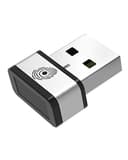
The PQI Mini USB Fingerprint Reader is a compact, plug-and-play biometric security key designed for Windows 7, 8, and 10. Featuring 360° touch recognition and sub-second unlock speeds, it integrates seamlessly with Windows Hello to provide fast, reliable, and accurate fingerprint authentication. Its sleek, lightweight design makes it an ideal security upgrade for professionals seeking quick access without compromising safety.


| ASIN | B06XG4MHFJ |
| Batteries Required? | No |
| Batteries included? | No |
| Colour | Silver |
| Customer Reviews | 3.6 3.6 out of 5 stars (1,574) |
| Date First Available | 17 Mar. 2017 |
| Item Package Quantity | 1 |
| Item Weight | 4.54 g |
| Item model number | FBA_NPL700168 |
| Manufacturer | PQI |
| Part Number | FBA_NPL700168 |
| Product Dimensions | 2.01 x 1.7 x 0.79 cm; 4.54 g |
| Size | Single |
| Special Features | Fingerprint Reader, Biometric Security, 360° Touch |
J**N
fantastic little device
I love this! its such a simple little device but works so effectively. I Originally bought this for my work laptop I work in IT and i am away from my desk a lot and have to lock my computer a lot for Security reasons and i thought this could Save me some time. I was so Impressed I ordered a second for my home Computer. this little device works seamlessly with windows hello on windows 10 and from a locked screen it does unlock the computer in under a second. i was so Impressed with this i kept locking the computer just to see how Quickly i could unlock it. I found it to also be extreamly accurate. it would be nice if you could log into Websites using it, you can download a bit of software from their website for websites but i found it a bit flackey and a bit of a gimmic that only worked with internet explorer. But Perhaps with a future windows update it may happen. But that aside this is a fantastic device that will save you time and help add that extra layer of security on your computer for a very cheap price compaired to the same devices From different manufacturers. highly Recommend
I**D
Very discrete and fast!
Many year ago, I used to have a Microsoft external fingerprint reader for logging on to Microsoft Windows. It was ok, but very slow and not always reliable....if you end up having to repeatedly keep lifting and pressing your finger on it for it to register, you might as well type a password! Anyway, they removed support of that device quite some time ago, so I thought i'd give this device a go. And I can honestly say, this is a million miles away from that old device. It is discreet in size and only lights up when you need to use it. But it is the speed and accuracy that really impresses. Within Windows 10, the functional for using it is built in. You simple go to you account page, after the device has been recognised, and register your fingerprints. Then, when you need to log on you simple press your finger on the reader and away you go. There really isn't any perceived lag from the time you touch the reader to it recognising your finger print and the logon process starting. It also feels well made. So, if you don't have a fingerprint reader built into your laptop of PC, I would certainly recommend this one. It a great little gadget.
J**N
Pretty Excellent for the price
I have owned a few fingerprint scanners so I feel I can give a balanced account of this one, The biggest positive for this item is it is the cheapest on the market I have found which is automatically recognised by Windows 10. There is no fussing with jerry fitting old drivers or some such. For this reason I would highly recommend it to normal everyday PC users. One minor flaw is that it has been built for use with laptops in mind - therefore the scanner is quite small - .this means that you have to use the exact same part of the finger each time. I got around this by registering the main finger I use twice (like two separate fingers) for different parts of the finger - now it has a 100% success rate in logging me in - before it was closer to 80%. So given the cheap price and good functionality why only 4 stars? Because I want them to design a program so I can log into a website and programs using my finger as well. Or better yet - windows needs to extend functionality of it's hello program,
B**Y
The best way to get Windows Hello on your laptop!
Why i hadn't bought one of these sooner i'll never know. Having just purchased a Razer Blade 14" gaming laptop i was hoping for some Windows 'Hello' support. Alas the laptop doesn't possess the required hardware to support it. Bugger. My other portable stand in laptop was a Microsoft Surface Pro 3 for which i'd purchased the optional keyboard 'cover' which had a built-in optional fingerprint reader. This was superb for logging into windows and doing other security based tasks like logging into accounts etc rather than remembering passwords or typing in a pin code. This go me thinking one day whilst doing what i call my amazon windowshopping (always a dangerous thing to do). A quick search revealed that my laptop could indeed have Windows Hello support, and cheaply as well. The Mini USB Fingerprint reader is packaged in an attractive cardboard sleeve with it presented behind a moulded plastic window (a bit like SD Cards). There isn't any software to install, just plug it in to a spare USB socket on your laptop near to where you're natural 'unlocking' finger would be best placed - mine is in a right side USB port. Initially nothing really happens. You have to go in to 'Windows - Settings - Accounts - Sign-In Options' where you'll then find 'Windows Hello' displayed with a prompt to set up your 'fingerprint reader'. The setup process is simple and very similar to mobile phones with the same function. Simply put your finger over the sensor multiple times and follow the onscreen instructions to register a fingerprint. You can add quite a few but i've only used one. It works perfectly
A**R
Excellent product when it works!
First if I liked the product, very nice compact design. It works really very fast only when recognizes finger. Otherwise need to try again. Sometimes even need to type password. By registering the same finger 2-3 time I found there is much improvement.
S**I
Great little fingerprint reader. The sensor is very fast and accurate. On par with other good fingerprint readers I've used on computers and mobile devices. The device itself is compact: doesn't protrude too much or block adjacent ports. It only lights up when a fingerprint is needed, which I like as this is not distracting. Hopefully, authentication using fingerprints for websites and programs will be gradually added to desktop operating systems, which will make this device even more handy and convenient.
D**.
Ich war um ehrlich zu sein zuerst etwas skeptisch beim Kauf. Aber ich habe mich bei meinem Laptop und am Smartphone so an das Entsperren per Fingerabdruck gewöhnt, dass mir das ständige Passworteingeben am Festrechner auf die Nerven gegangen ist. Daher habe ich mir dann diesen Fingerabdruckleser geholt. Die Lieferung aus Hongkong hat natürlich etwas gedauert, war aber trotzdem schneller da, als bei Amazon angekündigt. Dann habe ich den USB-Leser ausgepackt und mich schon auf eine längere Odyssee vorbereitet. Aber es hat tatsächlich sofort funktioniert. Windows 10 hat die Treiber automatisch installiert und in "Windows Hello" war die Option für den Fingerabdruck direkt verfügbar. Dann habe ich den Fingerabdruck eingerichtet und gleich mehrfach getestet. Für mich hat es aktuell den Eindruck, dass der Sensor sogar besser funktioniert, als der eingebaute Fingerabdruckleser an meinem Notebook. Sollte sich im Laufe der Zeit noch was ergeben, werde ich hier sicherlich ein Update geben. Von mir aber eine klare Kaufempfehlung. Vor allem für alle, die auch von anderen Geräten "verwöhnt" sind und einen Rechner mit dieser Funktion nachrüsten wollen.
R**O
Lo recomiendo.
G**O
Come da titolo, il lettore d'impronte s'installa molto semplicemente (ho Windows 10), basta inserirlo in una porta usb libera e dopo qualche istante di pazienza, sul desktop compare il piccolo gestionale che vi permetterà di aggiungere le vostre impronte. La registrazione è molto simile a quella del'iphone, dovete sollevare e posizionare il polpastrello sul lettore più volte finché non avrà memorizzato la vostra impronta. L'ho posizionato a destra del notebook e ho quindi memorizzato indice e medio della mano corrispondente. La lettura dell'impronta è veramente fulminea, a pari degli smartphone di oggi....basta infatti appoggiare il dito e in meno di un secondo il pc sarà sbloccato, fenomenale. La tolleranza è più che ottima, fino adesso non ho avuto alcuna difficoltà o problemi di lettura dell'impronta, indipendentemente dalla posizione del dito. ATTENZIONE: quando il lettore s'installa, sul desktop compare l'icona del software di gestione. NON cancellatela perché non è un programma installato che potete recuperare in qualsiasi momento, credo che copi proprio il file eseguibile...io l'ho cancellato perché non voglio roba sul desktop, e per aggiungere un'impronta sono dovuto andarmi a cercare in giro il programma e installarlo da capo. Il lettore s'integra perfettamente con HELLO, il sistema di gestione credenziali di windows 10. Consigliatissimo.
A**H
ممتاز جدا وسريع
Trustpilot
Hace 1 mes
Hace 1 mes