We remain fully operational. Our teams are working around the clock to ensure your deliveries continue safely.

Descargar la aplicación


Servicios al cliente
Sobre nosotros
Copyright © 2025 Desertcart Holdings Limited
Descargar la aplicación
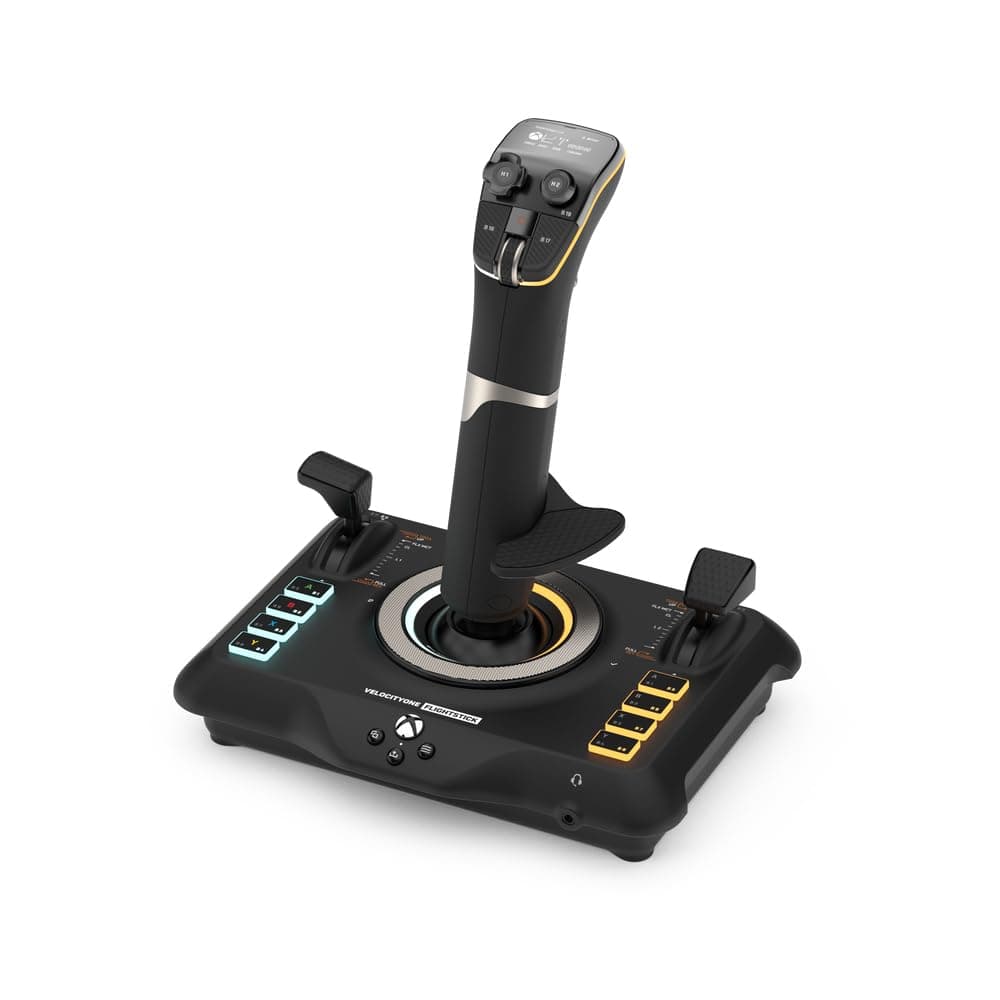
🛫 Elevate your flight sim game with precision, power, and pro-level customization!
The Turtle Beach VelocityOne Flightstick is a high-precision, durable joystick designed for air and space combat simulation on Xbox Series X|S, Xbox One, and Windows PCs. Featuring 8-axis non-contact sensors, 27 programmable buttons, and an OLED Flight Management Display, it offers extensive customization and seamless cross-platform compatibility. Its ambidextrous design and interchangeable joystick tips provide a tailored, immersive experience for both casual and serious flight sim enthusiasts.


| ASIN | B0BHTPP71M |
| Best Sellers Rank | 1,260 in PC & Video Games ( See Top 100 in PC & Video Games ) 1 in PC Flight Controls |
| Country of origin | China |
| Customer reviews | 4.1 4.1 out of 5 stars (2,194) |
| Item model number | TBS-0722-05 |
| Language | English |
| Product Dimensions | 16.41 x 21.69 x 23.04 cm; 821 g |
| Release date | 17 Nov. 2022 |
J**S
A well priced contactless flightstick!
It is difficult to make an assessment for something like a flight stick simply on the basis that all players with have different requirements for the “perfect” HOTAS. This being the case this review is judged with the Xbox One and/or Series X/S in use. First it must be accepted that most games will not accept a flight stick at all and even some flying games won’t. At this time... Ace Combat 7 for example will not see the Turtle Beach VelocityOne Flightstick, even though it will see a Thrustmaster HOTAS one. I mention the latter because of the price range only. Ace Combat 6 Ironically, not only plays on the Series X but the Turtle Beach VelocityOne Flightstick works with it rather well, although you must have current firmware and set the input of the flightstick to “Xbox compatibility mode”. Games that work with the Turtle Beach VelocityOne Flightstick include. • Air Missions HIND • Elite Dangerous • Microsoft Flight Simulator • Flying Tigers: Shadows Over China • Star Wars: Squadrons • War Thunder I would hazard a guess that there are more and hopefully new titles will see the VelocityOne Flightstick (V1F) as it does have potential. There is a mystery about this flight stick as it does have feedback motors that are not used at least on Xbox and I think also PC. I cannot find any reason why this feature is not working and I hope that a future firmware update might remedy this. But at this time don’t buy this thinking that vibration is active. Maybe Someone at Turtle Beach might have something to say if they read this. On the upside the main axis of this flight stick are non contact devices which means that they don’t wear in a physical manner. This should mean that pitch, roll and yaw will suffer less drift problems than traditional potentiometer devices. In addition there is an onboard checking system that allows the user to be sure that the full extent of the “travel” of pitch and roll is being used. There is a recalibration system also onboard but for the process it is best to go to the Turtle Beach web site. The unit also has a coloured lighting system and digital display for its customisation. If you don’t like these, all can be changed or turned off to suit yourself. Given that it is powered through the USB this would have almost no impact on power use. The overall feel of the V1F is of good quality and construction. It is however light when compared with its nearest rival the Thrustmaster Hotas One, which has added weights inside its body (a rather good idea). I guess that this is easily dealt with by most users though, and won’t really be a big issue. An issue that does get mentioned and should also be pointed out, is that the main stick axis is quite tight compared to other flight sticks and there is no outside way to reduce this nature. The internal spring could be changed but that might invalidate the warranty and might not be something that some would be prepared to do. Whether this feel will loosen in the long term is anybody’s guess, so it is worth trying to get a feel of one before purchase. So far in use I find that this is a great flight stick. The customisation alone is a great addition at this price as is the contactless main axis control. Of course as I said, something like a flight-stick is of personal opinion but I think that many would like this for its build, quality and features as well as its customisation. For me, I say well done Turtle Beach.
B**E
turtle beach at their best
I ordered this for my gaming PC but use it on both PC and Series X It arrived in branded box on removing your meet with a well made but lightweight flight stick. Now I’ve been using the Turtle Beach VelocityOne Flightstick with Microsoft Flight Simulator 2020 and 2024 on both PC and Xbox Series X,for sometime and it’s been a great addition to my setup. The flightstick is well-built, responsive, and comfortable to use, offering a much more immersive experience compared to a standard controller. The button layout is intuitive, with plenty of programmable buttons and controls that work well for managing flight functions without needing to dive into menus. The Hall-effect sensors give smooth and precise inputs, which makes a noticeable difference in handling aircraft, especially during takeoff, landing, and maneuvering. The throttle lever and hat switches add to the realism and give good control over flight operations. Compatibility was straightforward — it worked right out of the box with both Flight Sim 2020 and 2024, with minimal setup. Whether flying casual or more advanced aircraft, this flightstick strikes a nice balance between accessibility and realism, making it a solid choice for beginner and intermediate sim enthusiasts. Overall, the VelocityOne Flightstick offers great value, solid performance, and a more immersive experience for flight simulation fans on Xbox and PC.
M**P
Good build but some drawbacks
Not bad, good quality build, good ergonomy with quite a few buttons Main drawbacks: - as many have mentionned already the Stick is way to hard to move to properly simulate any type of aircrafts, it feels like a constent battle, personlly I wouldnt recommend it because of that unless you are willing to tinkier with the spring inside (otherwise to play Arcade stuff should be fine but then its kinda overkill joystick) - the base is too narrow comparing with the height of the stick and its stifness so you need to either hold the base with your hand or attach it to something with the screw (might be solved by replacing the tension spring as mentionend above) - the Trim wheel is not recognised or not working efficently at least in MSFS
C**T
✅ Perfect Hotas 👌
A significant upgrade from my Logitech X52 Pro! The joystick is more durable and precise, and the customization options are incredible—there are so many programmable buttons! The screen is a nice addition, though not essential. I received an improved version with new buttons replacing the fragile ones on the first version. In short, I'm very happy to have traded in my old Logitech for this one, which is much better. 👌 Moreover, I got it on sale for €200...there really wasn't any reason to hesitate 🤗
Q**.
Quality
C**.
Muy buen producto, va muy bien, buena construcción, muchos botones y sin sacarte un ojo de la cara. Recomendable al 100%
R**B
Super Deck, macht Spaß und ist einfach zu verstehen. Gute Verarbeitung, macht einen hochwertigen Eindruck, lediglich das Touch Sreen gefällt mir nicht so gut, ist wohl dann Geschmackssache
P**R
Great value for the price, a real bargain. Ease of setting up was really non stressing. Typical Turtle Beach Product, Quality.
M**O
Questi Flight Stick si presenta in una confezione curata e ben strutturata. Al suo interno, oltre al controller, troviamo il cavo USB c. È possibile invertire il poggia polso sul dorso dello Stick per i mancini ed è anche regolabile in altezza con relative tacche di orientamento. Il feedback è buono, forse un po' troppo resistente al suo rientro in posizione centrale. Ha un ottima compatibilità grazie all'ultimo update che consente oltre alla modalità PC e Xbox quella per terze parti, ovvero per tutte quei giochi non ottimizzati dalla casa produttrice. Si dovrà soltanto eseguire una mappatura dei pulsanti. Sostanzialmente verrà letto come un normale controller. Le impostazioni sono davvero molte, relative a trim, sensibilità, inversione assi, colore dei led, luminosità display e led ecc. Il mini touch pad sarebbe davvero utile, peccato che ad oggi soffra di una sensibilità decisamente imprecisa. Il cursore viene mosso correttamente in basso e verso l'alo l'input non è coerente con il movimento del dito. Ha molti tasti fisici personalizzabili, molti inaspettati, che rendono il controller, utilizzato da solo, molto sfruttabile per tutte le shortcut utili a chi lo usa con il simulatore e non. Con Flight simulator 2020 si comporta egregiamente, lo utilizzo prettamente su Xbox series x. Mi è bastato impostare alcuni parametri per mia comodità ed ero già pronto al volo. Unica pecca ancora non risolta è che pigiando il pulsante home dell' Xbox il cursore tenderà ad andare in basso a destra senza fermarsi, il che rende impossibile spostarsi nel menù della dashboard. A livello di feedback non ho apprezzato gli spostamenti dal punto zero, troppo rigidi e accompagnati da un ticchettio un po' fastidioso. In conclusione lo trovo un ottimo prodotto e con un buon qualità prezzo, ha tutte le comodità per chi vuole usare mfs da console e dal punto di vista estetico è veramente piacevole.
Trustpilot
Hace 5 días
Hace 2 semanas