We remain fully operational. Our teams are working around the clock to ensure your deliveries continue safely.

Descargar la aplicación


Servicios al cliente
Sobre nosotros
Copyright © 2025 Desertcart Holdings Limited
Descargar la aplicación
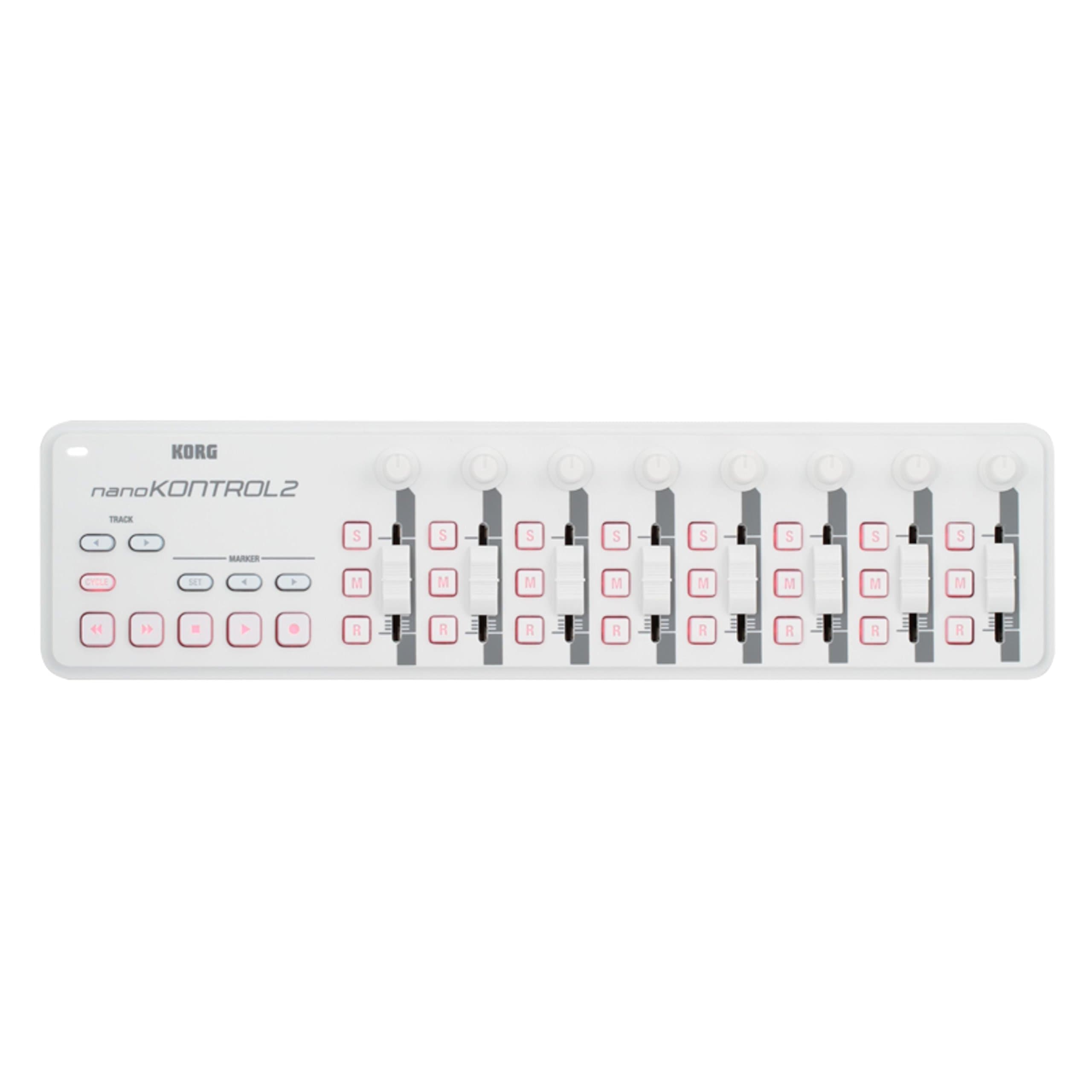
🎶 Command your mix with sleek precision — the nanoKONTROL2 keeps your creativity flowing!
The Korg nanoKONTROL2 is a slim, USB-powered MIDI controller featuring 8 channels of customizable faders, knobs, and buttons. Designed for seamless integration with PC, Mac, and iPad (via camera kit), it offers a compact footprint ideal for professional producers and performers. Bundled with free software and Ableton discounts, it’s a versatile tool that brings tactile control to your digital audio workstation.


| ASIN | B004M8UZ3S |
| Colour | White |
| Compatible Devices | Computers (Laptops, PCs), some tables and smartphones with USB port |
| Connector | USB |
| Country Produced In | china |
| Customer Reviews | 4.2 4.2 out of 5 stars (650) |
| Date First Available | 18 May 2011 |
| Hardware Interface | USB |
| Hardware Platform | PC/Mac |
| Instrument Key | Any |
| Item Weight | 440 g |
| Item model number | NANOKON2WH |
| Mixer Channel Quantity | 8 |
| Musical Style | Electronic |
| Number of Keyboard Keys | 1 |
| Product Dimensions | 37.08 x 4.06 x 9.4 cm; 439.98 g |
| Size | talla única |
| Supported Software | DAW |
T**T
Works great as a MIDI CC controller
For the price, this works great as a MIDI expression controller - e.g. to add a bit of life into VSTi performances. The bad news: the faders are a bit small - could be fiddly if you have big hands / fingers. But: other than that, its all good news. Because the unit is small and low-profile, its easy to place in a comfy location. I used the freely available Korg Kontrol Editor software to set which MIDI CC controllers are assigned to each fader and also set the buttons to switch between articulations. Great controller unit at a great price!
G**H
Korg nanokontrol 2
I bought this to use in reason with the mixer, sequencer and rack. My initial excitement on receiving the package soon turned to disappointment as it refused to work because it wasnt recognised by Reason. After looking on the internet I discovered that the Korg driver (downloadable) could not see any midi device above 10. Once I had fixed this via the registry, the kontrol worked perfectly. I am really pleased with it now as it does everything I wanted except arming record in the sequencer. One note though, the korg control software can still not find the kontrol and I always get "unable to open midi port" when trying to read or write data to it. However, this does not prevent me using the control as I want so I don't use the software. The bundled software is of no use to me except the discount on Ableton. Amazon was up to expected with delivery. Korg NANOKONTROL2-WH 8 Channel USB Controller - White
H**H
!!!-THE ONLY REVIEW YOU WILL EVER NEED FOR THIS-!!!
PRO's: 1. Great for assigning the various knobs and sliders to parameters in VST's and VSTi's (Synthesizer and audio effect plugins alike). You can do this on the fly or you can set dedicated controls to work for the same thing each time you load up your starting template in the DAW you use. I use it a lot with Serum for example. 2. can be used as a mixer controller by default if you prefer - although I personally do not as the sliders aren't very big - this is referred to as "travel" and due to the small size, moves in slightly larger dB increments when compared to a larger control surface with greater slider travel. 2. Seamless integration with Ableton Live but if you use FL Studio there is a custom script you can load into it which is arguably even better than the standard Ableton Live integration. The script for FL Studio is called Nanometer and you can find this by searching it on youtube. I use both DAW's extensively. 3. Extremely portably - As you can tell by the picture I have provided, it sits comfortably on the lower portion of any laptop surface without intruding on the keyboard (mine is a 15 inch laptop for reference) and it leaves a little space to not get in the way of your left hand when you wish to reach for keyboard shortcuts that involve the use of shift, ctrl or alt. 4. The quality and feel of the knobs and sliders is absolutely satisfactory for the price point (it is twice as expensive on amazon now for some reason, I picked it up for circa £50 from here but it was a while ago). 5. The transport controls are extensive as it has not only the usual play/stop/record but also buttons to flick through your various time markers that you set throughout the length of your project. It has fast forward and rewind which is also very uncommon but great to have. Cycle typically works as a loop button. It has track buttons to flick between your mixer channels too. I can not express enough how great this all speeds up workflow and ergonomics of any setup. 6. Korg provide a software utility to edit the CC values associated with each button/slider/knob for a setup totally specific to your own nuances. CON's: 1. Small slider travel so not excellent as a mixer controller if you are OCD about very accurate dB setting due to the larger adjustment increments or lower resolution if you prefer that term. 2. Sliders are not motorized - this feature is another mixer focused feature that this control surface lacks which basically means that the sliders would move independantly without you touching them to match the mixer settings on-screen. Conclusion - I have owned a large number of different MIDI controllers since 2008 and no matter how sophisticated my home studio gets, this will always be a part of it. Also, the picture I attached is of my portable setup that fits entirely in a backpack (minus the tower fan on the left) so it is extremely portable.
P**R
The ideal, compact, low-cost, DAW primary controller for Audition CS6
I needed a compact, low-cost, tactile way to control the functions in the multi-track view in Adobe Audition CS6. This does the job perfectly! Boot it up in 'live!' mode, and you have control of level, pan, solo, mute etc. and the transport keys too. It's brilliant! I'm happy to use it as the primary controller and am no longer hankering for 'flying' faders! It's also incredibly compact and I sit it on the apron of the desk - this side of the keyboard - full access, no problem.
M**D
Best of the nanokontrol range, but limited usage for me.
Nice unit - feels up to the job for the price range. I can see why people would break the keyboard and pad versions, but the controls on this feel ok. I accept that my review is skewed towards my own experience but I'll explain why I haven't used it much: I bought it to make mixing tracks down in Logic less fiddly, but within seconds of using this tiny device I realised that it made it harder, not easier. Unless you cover the thing in stickers and colour coding you're going to spend most of the time looking back and forth from screen to nanokontrol and trying to link the channels. I tried to lie to myself that I would use this, if only for controlling busses, but it's just WAY easier just to do it on screen. The second usage I considered was setting it up to control resonance filters etc on some of the logic instruments with the sliders and knobs, for live use. This worked ok, but actually getting Logic to UNLEARN these controls so i could go back to mixing mode ( sliders mapped to console ) proved to be anything but straightforward. The KORG plugin seems to provide options to change things but they just flatly didn't work for me. This inability to quickly change or reset control assignments became a real pain, and so i just didn't bother with it anymore. I accept there is no doubt some kind of work around for this but you get to a point in life when fiddling in music programs for hours on end loses its novelty, and it's quicker to change track and do something else. Overall a nice little idea, but not for me. I hope some people made good use of this device.
A**W
Handy Korg MIDI controller
Used with Cubase to control mixer and VST and other DAW functions, straightforward to set up using MIDI Remote in Cubase. Very handy device. Seems well enough built, hopefully will last for a few years.
H**D
Ik gebruik hem voornamelijk voor de verschillende audio kanalen te besturen van mijn Desktop. Hier is deze zeker geschikt voor. Snelle handelingen in samenwerking met Voicemeter Potato werken goed.
K**N
Ich benutze den Korg NanoKONTROL2 hauptsächlich für die Produktion von Hardtekk – und bin wirklich zufrieden. Das Teil ist super kompakt, passt auf jeden Schreibtisch und ist trotzdem voll funktional. Die Fader und Drehregler reagieren sehr präzise – genau das, was man braucht, wenn man z. B. Kick-Lautstärke, FX oder Automationen in Echtzeit anpassen will. Ich hab mir z. B. den Master, Kick-Bus, FX-Sends usw. auf die Fader gelegt – läuft absolut sauber. Das Teil ist Plug-and-Play, funktioniert direkt mit Ableton Live (nach kurzem Setup) und lässt sich easy mappen. Besonders cool: Die Transporttasten (Play, Stop, Record etc.) machen Live-Jams oder Aufnahmen viel entspannter. Verarbeitung ist stabil genug, um auch mal mit in den Rucksack zu kommen – ideal für unterwegs oder Gigs im Studio anderer Leute. Kurz gesagt: Für den Preis gibt’s kaum etwas Besseres, wenn man einen kompakten, zuverlässigen MIDI-Controller sucht. Absolute Empfehlung – gerade für elektronische Musikrichtungen wie Hardtekk oder Techno!
S**E
As a musician and producer, finding the right tools to bring my ideas to life is essential, and the Korg nanoKEY2 MIDI Controller has quickly become a staple in my setup. Sporting a sleek white design and compact form factor, this 25-key MIDI controller packs a punch in terms of functionality and versatility. Here's why it's earned a permanent place in my creative arsenal. First and foremost, let's talk about portability. The nanoKEY2's slim and lightweight design makes it the perfect companion for musicians on the go. Whether I'm working in the studio, jamming with friends, or composing on the road, this controller slips easily into my bag, allowing me to take my music wherever inspiration strikes. Plus, the USB bus power means I can plug it into my laptop or tablet and start making music without the need for an external power source. Despite its compact size, the nanoKEY2 doesn't skimp on features. The 25 velocity-sensitive keys provide a responsive and expressive playing experience, allowing me to capture every nuance of my performance with precision. Plus, the Octave Shift buttons give me instant access to a full range of musical pitches, making it easy to play melodies, chords, and basslines across multiple octaves. But where the nanoKEY2 truly shines is in its versatility. With a range of assignable controls, including knobs, buttons, and a touch-sensitive XY pad, it offers endless possibilities for creative expression and experimentation. Whether I'm tweaking synth parameters, triggering samples, or adding effects to my tracks, the intuitive layout and customizable settings make it easy to tailor the controller to my workflow and musical style. Setup is a breeze, thanks to the plug-and-play compatibility with a wide range of music production software. Whether you're using Ableton Live, Logic Pro, Pro Tools, or any other DAW, the nanoKEY2 integrates seamlessly, allowing you to start making music right out of the box. Plus, with native support for Mac, PC, and iOS devices, you can use it with all your favorite software and devices without any hassle. In conclusion, the Korg nanoKEY2 MIDI Controller is a powerful and versatile tool that's perfect for musicians, producers, and anyone looking to unleash their creativity. With its portable design, responsive keys, assignable controls, and plug-and-play compatibility, it's a must-have accessory for anyone serious about making music. Highly recommended for beginners and seasoned professionals alike!
K**N
Beautiful midi fader. Pairing this with midi mixer app for Windows app volume control.
E**O
I use my Korg NanoKontrol2 for more than just music production. I am able to use it when mixing in FL Studio, Serato DJ to macro FX and toggle samples and have found use as a stream deck to toggle scenes and trigger sound alerts when streaming through OBS. I did have a problem with a driver and Windows registry that needed a little adjusting but got it up and running with help from watching a YouTube video on how to correct the problem. Korg really made a great product with many uses beyond music production. And if you look elsewhere to find this item you will see Amazon is the place to shop!
Trustpilot
Hace 1 mes
Hace 5 días