We remain fully operational. Our teams are working around the clock to ensure your deliveries continue safely.

Descargar la aplicación


Servicios al cliente
Sobre nosotros
Copyright © 2025 Desertcart Holdings Limited
Descargar la aplicación
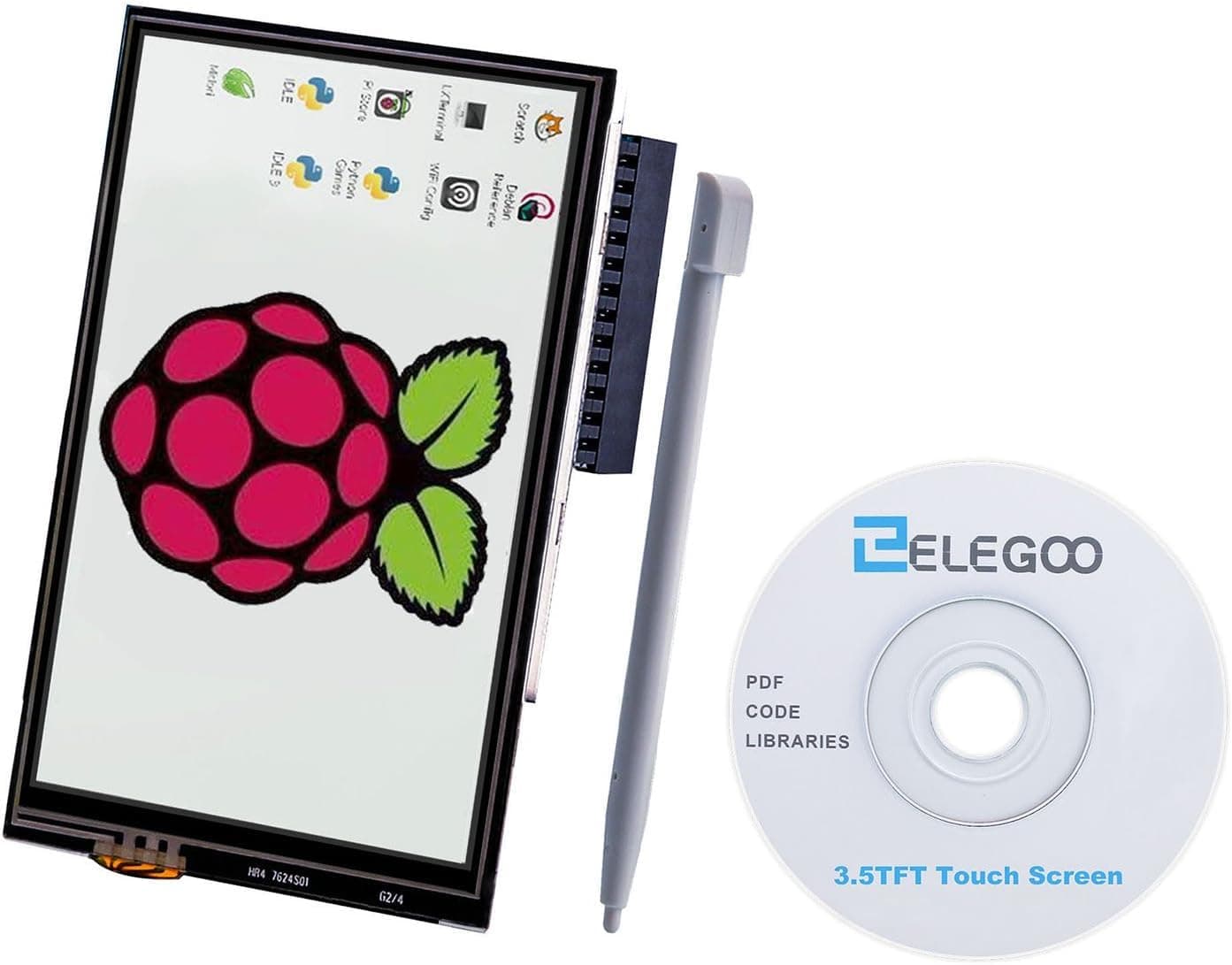
🚀 Elevate your Raspberry Pi game with touch precision and vibrant visuals!
The ELEGOO 3.5-inch TFT touchscreen is a fully compatible, plug-and-play display solution for all Raspberry Pi models, featuring a 480x320 resolution, 12 Hz refresh rate, and a built-in stylus for precise touch control. Its GPIO connector ensures seamless integration, making it ideal for DIY projects, educational tools, and portable interfaces.


| ASIN | B01MRQTMTD |
| Aspect Ratio | 5:3 |
| Best Sellers Rank | 6,609 in Business, Industry & Science ( See Top 100 in Business, Industry & Science ) 3 in LCD Touch Panels |
| Box Contents | 1 x 3.5 inch TFT LCD display for Raspberry, 1 x CD with tutorial, 1 x Input pen |
| Brand Name | ELEGOO |
| Compatible Devices | Raspberry Pi A, A+, B, B+, 2B, 3B, 3B+,3A+,4B, 5B, Zero, Zero W, and Zero 2 W |
| Contrast Ratio | 2000:1 |
| Country of Origin | China |
| Customer Reviews | 4.0 4.0 out of 5 stars (216) |
| Display Technology | TFT |
| Display Type | TFT |
| Hardware Connectivity | Unknown |
| Has Color Screen | Yes |
| Item Weight | 50 g |
| Manufacturer | ELEGOO |
| Maximum Display Resolution | 320 x 480 Pixels |
| Model Name | UK-EL-EB-007 |
| Model Number | UK-EL-EB-007 |
| Mounting Type | Wall Mount |
| Native Resolution | 480*320 Pixels |
| Network Connectivity Technology | GPIO |
| Picture Quality Enhancement Technology | Color and Contrast Enhancement |
| Pixel Pitch | 0.2 |
| Power Consumption Size | 0.65 Watts |
| Product Features | Come with Stylus, Touchscreen |
| Refresh Rate | 12 hertz |
| Resolution | 480 x 320 |
| Screen Finish Type | Glossy |
| Screen Size | 3.5 Inches |
| Shape | Rectangular prism |
| Specific Uses For Product | DIY Projects, Educational Tool, Portable Display, User Interface, Real-time Monitoring, Multimedia Playback |
| Total HDMI Port | 1 |
| Total USB Ports | 1 |
| Total Video Out Ports | 1 |
P**O
fantastic value for money
The screen was easy to install, I needed it away from the raspberry pi so I added a 40cm ribbon cable and it still works great. Touch screen didn't even require calibration. My only complaint would be the viewing angle, standing straight in front of it... perfect, but seen at a 45 degree angle from a side it looks all black. but... again... cheap screen, does the job, very satisfied with it. Fits perfectly my anycubic i3 mega printer.
J**N
not tee bad
Its not too bad got it running on ubuntu mate on the pi3 i found playing video works best in chromium it doesn't look great but it works the frame rate is not spectacular I wouldn't play any games with it but it dose for general use the touch screen works quite well and the low resolution doesn't look bad on a screen that small but dose make using some programs tedious like not being able to see the bottom of the window but most things work quite well. If you need drivers use the good tft drivers i followed the read me on the git hub to get up and running.
S**R
Very happy with this purchase.
Superb value for money. Arrived quickly and was well packaged. I set it up by downloading a pre made image from lcdwiki dot com and flashing it to a micro SD card. inserted it into the Pi and Voila, up and running. The refresh rate is slow but usable, at least for my use case it is. Very happy with Elegoo, less so with Amazon who said my original review did not meet their guidelines, I guess that's the way the world is going with AI
S**Y
Easy to setup
Setup was easy when using online resource.
M**E
It just doesn't work!
This screen doesn't work, and I don't mean to say that it's broken, it just doesn't do what it's supposed to do, because it isn't capable of it. I have tried for days to get it working with my Pi Zero WH. I have some experience with Pi's, I have 5 of them serving various different purposes across my network. I found numerous forum posts across the internet posted by users in the exact same boat, and tried everything suggested. The closest I've been able to this screen actually doing the job it's supposed to is with the 2017 image recommended by the installation instructions, and even that will only display the startup code sequence, and goes blank and unresponsive once the GUI's loaded, and that's with the image the manufacturer says should work with the screen out of the box!. This will not work with up-to-date versions of the OS. I've tried various versions of the OS, various drivers and various suggested fixes. Nothing works! I see that some people state they have been able to get it working, but I've committed as much time as I'm willing to and will have to find another screen for the project. If you are willing to put in the time, and have the required level of expertise, then you might be able get it working, it might work on other hardware. But I bought this as a neat little easy to use touch screen to pair with a Pi Zero for a simple project, and it just isn't!
A**R
Use instructions from LCDWiki
Works fine using instructions from LCDWiki. Don't try to use any other instructions as there is no mention of this on Elegoo's UK website. The Quick Start guide on the US website is out of date and points towards websites that 404.
P**B
Good screen but no touch function and terrible instructions
Very nice screen... BUT .. setup instructions are very hard to follow. I consider myself quite able, PhD in science, but they were rubbish. The supplied miniCD had lots of drivers, conflicting sets of instructions etc and seems to contain stuff for half a dozen different screens. I finally got the screen working at the 4th attempt. The only instructions which worked for me involved downloading a disk image from the web onto an sd card and so running their version of the OS not the official raspberry pi one. Now the screen works, but not as a touch screen. A week tinkering with their instructions and still no touch screen function. Also intensely annoying as the OS seems unstable and several times now the pi has ' bricked' and the only way to get it back is to reformat the sd and rewrite the disk image they supply to it. So you lose any and all files you had been created and been working on!! Overall screen quality is good, but really that is the only good point . In summary , Don't buy unless you REALLY know Linux and know what you are doing.
G**N
Good resolution and functionality.
Brilliant!! Absolutely brilliant product. Thanks.
Trustpilot
Hace 2 meses
Hace 1 mes