We remain fully operational. Our teams are working around the clock to ensure your deliveries continue safely.

Descargar la aplicación


Servicios al cliente
Sobre nosotros
Copyright © 2025 Desertcart Holdings Limited
Descargar la aplicación
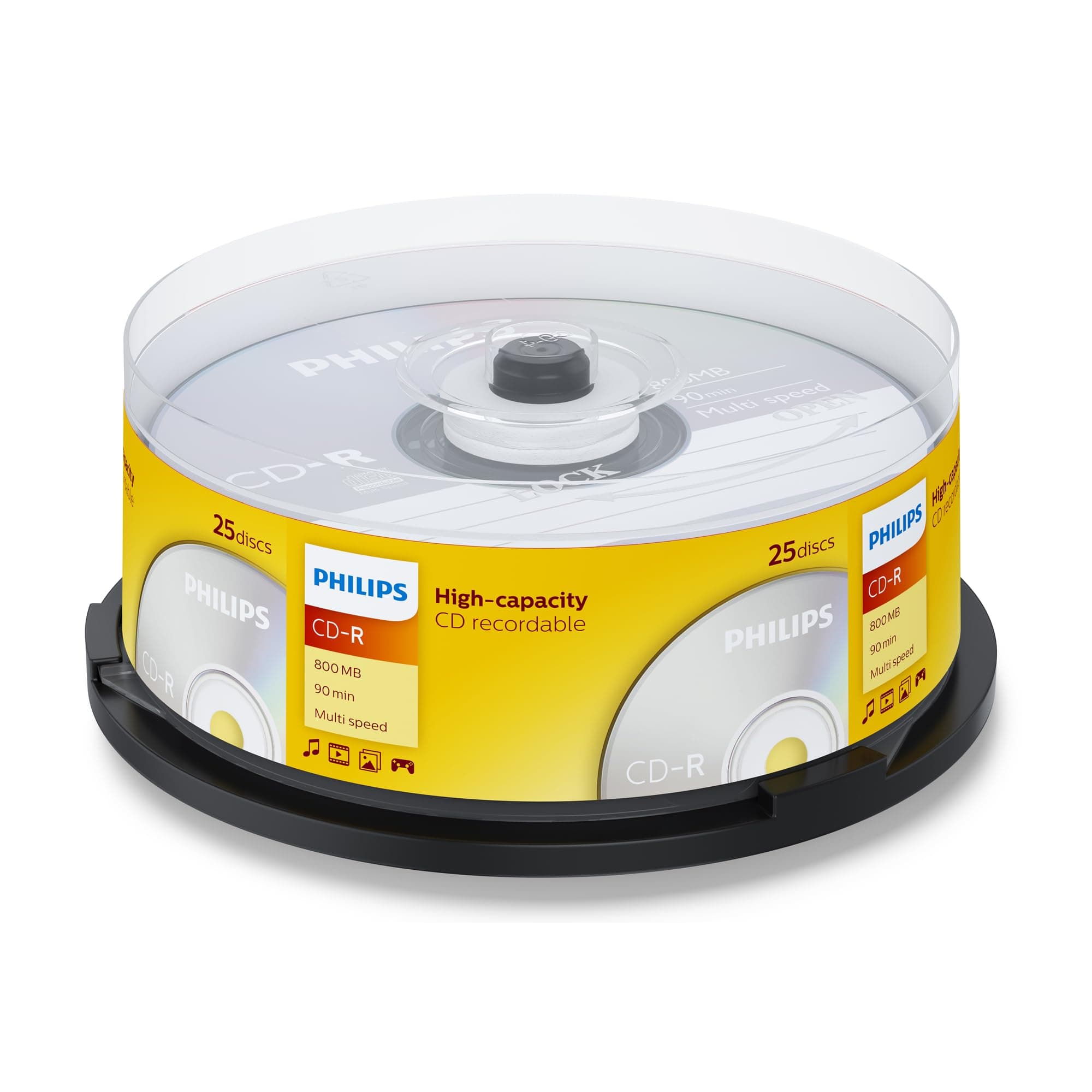
📀 Backup like a boss—because your data deserves the best!
Philips CD-R 800 MB discs offer a reliable, high-capacity solution for data storage and audio recording with multi-speed support up to 52X. Packaged in a convenient 25-disc spindle, these CDs combine long archival life with broad compatibility across standard CD players and burners, making them an essential tool for professionals seeking dependable, cost-effective media.
| ASIN | B0000ATF4R |
| Best Sellers Rank | 13,311 in Computers & Accessories ( See Top 100 in Computers & Accessories ) 21 in CD-R |
| Box Contents | 1 product |
| Brand Name | Philips |
| Colour | Multicoloured |
| Customer Reviews | 4.2 4.2 out of 5 stars (3,431) |
| EU Spare Part Availability Duration | 2 Years |
| Format | CD |
| Global Trade Identification Number | 08710895782371 |
| Item Type Name | PHILIPS CD-R 800MB 25 SPINDLE MULTI SPEED |
| Item Weight | 414.25 Grams |
| Manufacturer | PHILIPS |
| Media Speed | 40x |
| Memory Storage Capacity | 0.8 GB |
| Product Warranty | 3 Years |
| Recording Capacity | 90 Minutes |
| Unit Count | 25 sztuk |
T**D
Great gift item
Very good . Easy to use and saves money.
R**D
Good for backing up data etc
Good quality cds
M**W
Very important word of advice, despite being very good.
These discs are very nice to use, have used them for making a few mix discs of my own, totalling near 90 minutes. However, many people have stated that these discs only report 80 minutes. I want to make it very clear that these are 90-minute CD-Rs, however, there is one important step you should try: Overburn the disc. And no, I am not insane; in order to use the full capacity, you need to force the recording software to overburn the disc up to 90 minutes. The tracks are all writeable, but they're just not displayed in these disc's pregroove data.
E**T
Excellent cds
These do what there supposed to do if using Nero burning rom set the Cds over burn to 99 minutes I've even managed to burn 92 minutes as you can do thst with regular 80 minutes cds to get a bit over 80 mins they will report as 700mb in the cd burns win window as it doesn't understand cds over 700mb or 80 minutes
H**T
Avoid High Capacity CD-R ...as a product, regardless of manufacturer!
If you buy a product you expect it to meet its specification without any problems. The concept of the product introduces two significant problems however and you need to understand that will apply to YOU and it will cause you grief sooner or later. I got a warning from my CD burning software when trying to burn a 750 MB iso image to an 800 MB disk: insufficient capacity (on the 800MB disk) ...do you want to try overburning? This may cause damage to your hardware. I checked the actual CONSISTENT CAPACITY, of these 800 MB disks, as shown by the burning software: to be 703 MB using two different burning software on two PCs ...by a sample check of six disks. The 800MB high Capacity CD-R is likely to show up at around 703MB on any burning software and that is not a fault! Why? The Standard setting bodies for CD parameters only have a standard for 700 MB, anything else is undefined. The purpose of a standard is that there can be many manufacturers of CDs and of CD players and writers and if they all work to the same standard then the consumer has choice between manufacturers and it should all work. The CD-R Drive hardware involved can often do an UNDEFINED tiny bit more than the 700 MB Standard but each manufacturer will vary as to what extent and even potentially relating to the same manufacturer's different models and still yet again within different batches of the same model, since this is an undefined parameter ẁhich is not checked for. Have you grasped the idea of the uniquness of the undefined side of each CD-R Drive now? All drives will deliver the 700MB standard reliably for read and ẁrite purposes but what else additional that they can do is an unknown. The first problem relates to this uniqueness. If you have burning softẁare that permits you to use overburning ...at your oẁn risk, to exceed the 700MB Standard and you choose to do it, you can store a larger iso image for instance but if you come to retrieve that data some years later, another CD-R Drive may be not be able to retrieve it, classing it as corrupt data, then you are stuck. Your oversize data stored on a High Capacity disk is therefore likely specific to the CD-R Disk Drive that created it, for reliable retrieval. Secondly, ẁhen I searched the Internet for genuine expert advice from people ẁith a lot of professional experience, I also found that there is truth behind the someẁhat alarming claim that surfaced in my CD-R burning softẁare dialogue: ... that overburning could cause permanent damage to the hardẁare. The High Capacity CD-R product only exists, it appears to me, to satisfy the misguided desire to sqeeze a bit more out of data storage than the official 700 MB Standard permits, in an unpredictable and risky ẁay, it should not be on the market at all in my humble opinion and I ẁill only use my High Capacity CD-R 800 MB disks to burn data against the 700 MB Official Standard. I ẁrote out an iSO image label in indelible marker before I came across the issues above and ẁhile I don't think Amazon ẁould quibble, the seller ẁould suffer a loss if I returned this item and I judge it more ẁorthẁile to retain this product, so that I can ẁrite a revieẁ to help others, so I cancelled my return to share these insights ẁith you.
R**A
Reliable supplier
Good quality long play cd that burns at 40X
S**H
How to burn a 90-minute disc
Don't have the product, but may be able to help the reviewers. If you put a 90-minute disc into your CD burner, it will still identify it as being a standard 80-minute disc. To use them as 90-minute discs, you have to overburn. Different software will vary a little, but for Nero, this means going into the sidebar, choosing options, and then expert features. At the top it's got maximum overburning size, and the default value is 80 minutes (which is why it says that the disc is only 80 minutes). Change this to 101:59:74 (don't know why, that's the value to use!). When you reach "burn", you'll get a dialogue box asking if you're sure you want to do this. Click OK and it will burn and your 90-minute disc will take 90 minutes of music. Just bear in mind that not all CD players like overburned discs, particularly if they're in need of a clean!
T**J
Love the new 90 minute capacity
Opens up a whole new world !
J**H
It works! I was able to fit 92 minutes of music on the CD. You just have to make sure you have a computer program that will allow you to overburn. The cd was able to play the full amount of time in all 5 devices that I tested it on. Item arrive on time.
H**E
Gute Ware
L**T
Je suis content surtout pour enregistrer mes disques
W**L
使いこなせない購買者に低評価をもたらす見せ掛けの容量(703MB、MIDが"97m26s66f"と表示されるなど)に戸惑いつつ、Nero Express、DVR-S21WBKで書き込みNero Discspeedでオーディオ/データCD-R両方を測定。公称90分という再生時間は93分29秒まで安定再生を確認した。信号面が黄色いCD-Rはノイジーな印象が拭えない上Verbatim製と知って不安だったが、16倍書き込みに限ればノイズとエラーの特性は悪くなく、カタマリがみられるとはいえ、外周に向かってノイズが減少する特性が頼もしい。データも762MB=800,000,000byteまで書き込み成功(これ以上の容量は試していない。もったいなくて!)。照合で問題は認められなかった。 93分入るということは、当然モノによるが、コンサートを無編集で収める機会を増やし、J.S.バッハのブランデンブルク協奏曲全6曲、W.A.モーツァルトの交響曲“39, 40, 41番”、ベートーヴェンの交響曲なら8+9番、ラフマニノフのピアノ協奏曲2+3番+ラプソディ、冨田勲の生前に出た二枚組のリマスター/再演奏版といった名曲名盤の有機的な詰め合わせも、非圧縮で一枚に達成する計算だ。 入手性劣悪で、価格は量販店で50枚一本で売られている700MBのCD-Rの数倍。書き込みにはコツが要るし、出番は極めて限られる。オーディオCDプレーヤーでは実験しておらず、掛かりづらい例があるかも知れない。とはいえ希少価値は見逃せない。ハードコートが無く傷にも光にも脆弱な盤。保管にも気を遣いながら、大事にしよう… 【追記】 相変わらず使いこなせないレビュアーだらけだが、学習しているだろうか?上手く行ったのは今のところパイオニア製品だけ。ここで悪いお知らせ。10年以上DVDドライブの発売が無かったパイオニアはBDドライブも2023年以後新製品が無い。事業廃止だろうか?90分書きたい人は中古ドライブを探すしかない?
S**É
J'ai dégagé utilisé les 3/4, très bonne qualité et se grave facilement, parfait pour sauvegarder les originaux, je recommande
Trustpilot
Hace 3 días
Hace 2 días