We remain fully operational. Our teams are working around the clock to ensure your deliveries continue safely.

Descargar la aplicación


Servicios al cliente
Sobre nosotros
Copyright © 2025 Desertcart Holdings Limited
Descargar la aplicación
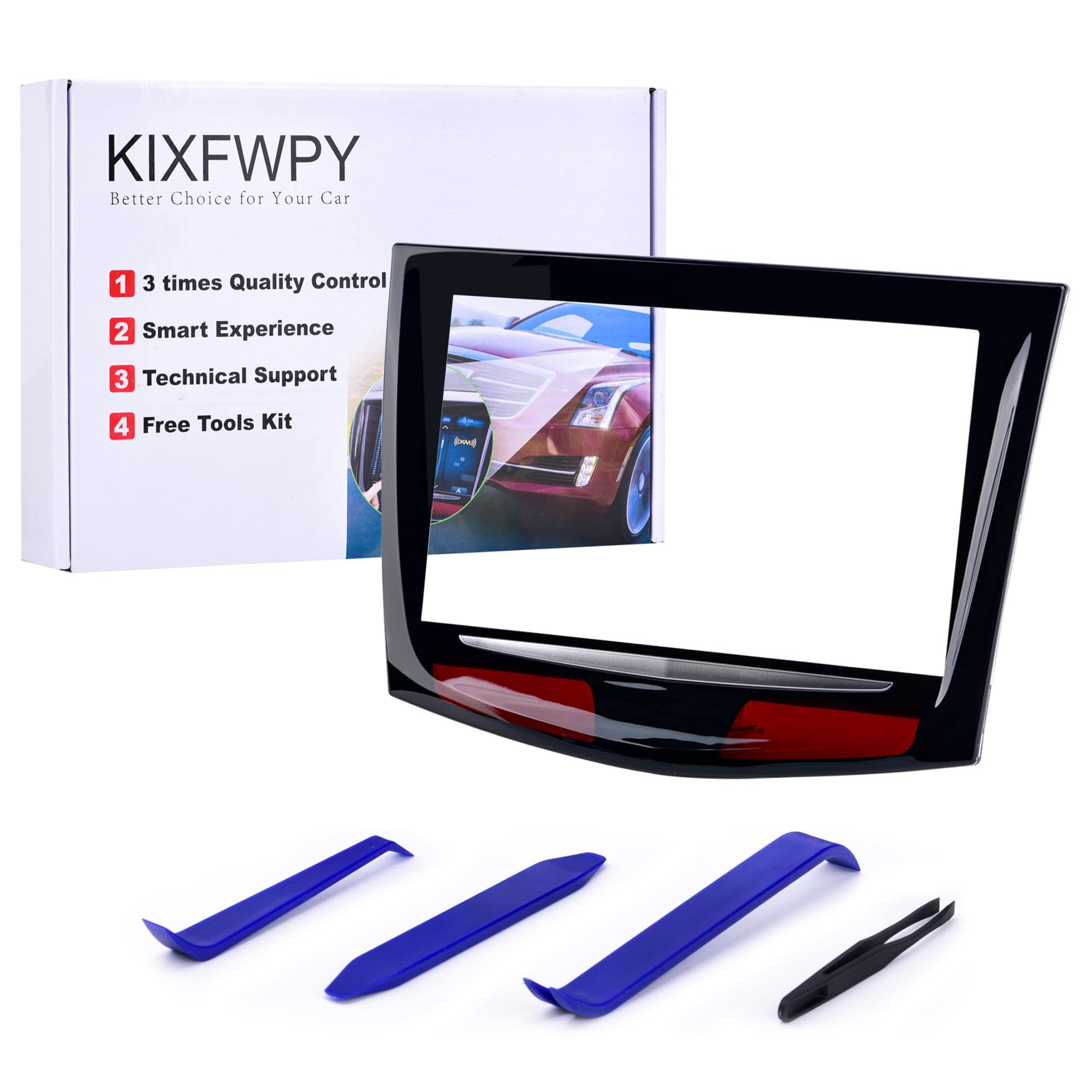
🚗 Upgrade your Cadillac’s brain with a touch of brilliance!
This Gel-free CUE Touch Screen Replacement is a premium, universally compatible upgrade for 2013-2020 Cadillac models including ATS, SRX, XTS, CTS, and Escalade. Featuring a durable, anti-glare, and sun-resistant glass frame, it delivers crystal-clear visuals and ultra-responsive touch performance. Each screen undergoes triple quality control checks to ensure flawless operation. The package includes a removal tool kit for easy DIY installation, saving you up to $1800 compared to dealer replacements.


| ASIN | B0BYDQZFM1 |
| Best Sellers Rank | #58,616 in Automotive ( See Top 100 in Automotive ) #7 in Automotive Replacement Information Display Modules |
| Brand | kixfwpy |
| Customer Reviews | 4.6 4.6 out of 5 stars (195) |
| Date First Available | March 14, 2023 |
| Exterior | Polished Anti-Glare Touch Screen |
| Item Weight | 1.25 pounds |
| Item model number | 2013-2020 CUE Touch Screen |
| Manufacturer | Kixfwpy |
| Manufacturer Part Number | KIX-01 |
| Model | KIX-02 |
| Package Dimensions | 9.84 x 6.81 x 1.93 inches |
| Special Features | Anti Glare; Not afraid of sun exposure, Crystal Clear; High Hardness, Anti-scratch, Gel-Free Screen, Touch Very Responsive, Good at Response when Navigation, Media and Controls, Upgraded CUE Touchscreen fit for 2013-2020 Cadillac Vehicles |
S**T
Good product
Perfect install. Works great, fixed that frozen screen in my 2018 Escalade. let’s hope it lasts.
S**N
great product
worked great !! Saved myself a grand doing it myself with help of a you tube video. The tools in the kit were all I needed to do the job.
T**E
Cadillac (2015) SRX Cue Screen replacement
As a non-mechanic, I was skeptical about being able to replace the screen in my 2015 Cadillac SRX. No worries. Took me less than 90 minutes, and by simply following steps from a few helpful YouTube videos, plus with the aid of the included tools, the job was a success. This product was worth every penny, was of high quality, and saved me many hundreds of dollars compared with having a Cadillac dealer do the screen replacement. I recommend laying each part , along with trays for screws, in a long line, so that when it comes time to reassemble, you simply start with the last part closest to you and move along to the first part. Check your parts alignment carefully, especially ially when reinstalling the back cover and case, as that is the key to having the Cue main unit function properly without any binding. The gold ribbon connector installation, with black clip, is a bit delicate. It’s easier to access the clip and insert the ribbon connector with the storage compartment door all the way up.
E**D
Touch screen back to normal.
This Cadillac infotainment screen works perfectly fine. After installation everything went back to normal. Touch screen works well and responds well.
D**E
Great profuct
I got a slightly used product, but it didn't even seem used, definitely recommended. Comes with all tools needed and very clear instructions to follow.
S**.
Works well
Works great! Fixed my screen issues!!
J**A
2015 Cadillac replacement touchscreen for CUE
Perfect! Read instructions several times, watch several videos first. Take your time, this is not a contest. I'm a retired professional mechanic and spent four hours start to finish. Break the process into four smaller steps, remove unit from car, disassemble unit and remove old touchscreen, install new touchscreen on unit, test for proper operation and response, then reassemble the remaining parts of the unit and re-install in car. The printed instructions are perfect, clear, highly detailed, use them. I used all manual tools, no power tools. A long12 inch #1 Phillips is a must have, along with a 7mm socket. Hint: install the new touchscreen center screws first loosely and work your way out, the screen will align on all the tabs then tighten all the screws evenly. Do this on a work bench not your lap in the car. Powered up with no problems at all. Exact fit and finish worthy of a Caddy!!!!
D**N
Seems like the right one. Easier to install than the other options
Excellent so far. One of the last reassembly steps is to place the "ribbon cable" from this screen into the CUE's connector. It is not easy because your fingers can't fit where the plug is. That's why everyone's using tweezers to get the cable in. What I found remarkable here was that the cable was pre-warped to make the difficult 90-degree bend into the connector. Another screen I tried installing (before ripping the cable by accident and having to get this one) had a cable that was biased straight ahead; imagine having to tweeze or use screwdrivers like chopsticks to twist a cable that doesn't want to be twisted 90 degrees so it'll land in a socket that you can't even see. With this screen, as I said, the cable was pre-conditioned to make that bend so I nudged it into place and it stayed there, to my delight. I primarily chose this (with some nudging from Amazon saying it is Amazon's choice) because it is a no-gel screen; it's the expansion of gel in hot weather that caused the stock ones to crack in the first place. I've had it in for a few hours. The job takes time and is not fun. It's nice when it's over. If I have any failures of the product, I'll update.
A**Y
This item works very well. I am very pleased with it. It was more of a chore to replace than I thought it would be, and had to get my son to help but we got it done and am very happy with it. Watching videos on YouTube on the procedure helped.
S**E
Elle fonctionne no1 je recommande vivement 👌
Trustpilot
Hace 2 meses
Hace 2 semanas