We remain fully operational. Our teams are working around the clock to ensure your deliveries continue safely.

Descargar la aplicación


Servicios al cliente
Sobre nosotros
Copyright © 2025 Desertcart Holdings Limited
Descargar la aplicación

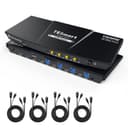
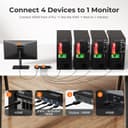


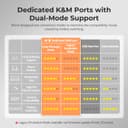
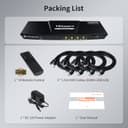
🚀 Elevate Your Workspace: One Switch, Four Devices, Zero Hassle!
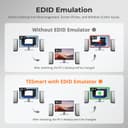
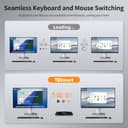
The TESmart USB 3.0 HDMI KVM Switch empowers professionals and multitaskers to control up to 4 computers or HDMI devices through a single 4K@60Hz monitor, keyboard, and mouse setup. Featuring ultra-fast USB 3.0 data sharing, integrated audio/mic support, and versatile switching options—including remote and hotkeys—this switch streamlines complex workflows while maintaining pristine video quality with EDID emulators. Ideal for office, gaming, and streaming environments, it supports wide OS compatibility and plug-and-play convenience.


| ASIN | B0C617965F |
| Actuator Type | Push Button |
| Best Sellers Rank | #74 in KVM Switches |
| Brand Name | TESmart |
| Circuit Type | 4-way |
| Color | Black |
| Connectivity Protocol | Hdmi |
| Connector Type | Plug In |
| Contact Material | Metal |
| Contact Type | Normally Open |
| Control Method | Push Button, Remote |
| Controller Type | Push Button |
| Current Rating | 3 Amps |
| Customer Reviews | 3.4 3.4 out of 5 stars (61) |
| Item Dimensions | 11.81 x 4.33 x 1.18 inches |
| Item Weight | 1 Pounds |
| Manufacturer | TESmart |
| Material Type | Metal |
| Model | HKS401-P23 |
| Mounting Type | Panel Mount |
| Number of Items | 1 |
| Number of Positions | 4 |
| Operating Voltage | 12 Volts (DC) |
| Operation Mode | ON-OFF |
| Specification Met | Hdmi 2.0, Hdcp 2.2, Hdr, Dolby Vision, Edid Emulation |
| Switch Type | Push Button |
| Terminal | Solder |
| Unit Count | 1.0 Count |
| Wattage | 36 watts |
P**Y
Great KVM at a reasonable cost for 4 computers or HDMI-based devices
Great KVM at a reasonable cost for my setup (I have 4 computers). This is the second product I bought from this company, and so far a definite improvement over the earlier version a few years back. I appreciate that the somewhat annoying beep when switching ports was removed. I mounted it underneath my desk because I use an L shaped desk and the monitor and keyboard are in the corner. Remote works great, but you can also use hotkeys to switch. So far my keyboard and mouse (both wireless) work flawlessly, including scroll-wheel etc, on both macs and windows machines. Resolution on the hdmi is crisp and without artifacts. Sounds works well, just as expected. Did not test microphone as my setup is different. I have not had a chance to test the new usb 3.0 passthrough port, but looking forward to connecting a drive to make cross-platform data sharing much easier than dealing w/ the networking between macs and windows. Great support as well from the TESmart team, they quickly responded to an issue I had with my earlier device from 4 years ago and gave me a reasonable path to resolution.
V**R
Significant issues from the start, one key feature finally failed utterly
Update after 3 months of use: The issue with the keyboard skipping characters never improved and was becoming more and more of a problem since I use this thing for work, and am on a computer a large part of the day. Transposed characters (e..g "dgo" when I meant to type "dog") happened too often to be operator error. I'd been debating moving it back to my pre-TESMart configuration (mechanical keyboard connected to a powered USB hub, and that USB hub connected to the KVM) for quite some time, but I didn't want to give up the keyboard switching feature. I put up with it for far too long. Well, keyboard switching gave up the ghost yesterday. No clue why - I had not reconfigured anything. Just ctrl-ctrl-1 (etc.) no longer did anything. Turning it off and on did not fix things. at this point, there was absolutely no reason to try to put up with the other problems any more. I moved the keyboard to the external hub, plugged that into the KVM, and suddenly typing has become massively more accurate. I've lost the ability to switch via the keyboard, but the remote works (for now.....). I'll have to Velcro it to the keyboard so it's always handy. All in all, this has been a huge waste of money. I should have gotten a less expensive KVM that did NOT claim to be compatible with mechanical keyboards, and just included a remote. Update after a week of use: The keyboard switching works just fine - ctrl-ctrl-1 / 2 / 3 / 4 switches computers quite nicely. The remote does as well. But I'm downgrading to 2 stars, because I'm having MAJOR problems with keystrokes not registering. For example "Mary Had A Little Lamb" will show up as "MaryHa A Little Lam". It also seems like more swapped letters are happening, e.g. I type "Lamb" and see "Labm". I don't know if that's an artifact of the keyboard's connection, or if it's operator error - I certainly can make such mistakes, so I don't insist that the switch is the problem. I did make sure things were plugged in correctly and securely, which has not solved the problem. My next step will be to try plugging the keyboard into a powered external USB hub, then feed that to the KVM - precisely what I did before buying the TesMart. That would also render the hotkey switching useless - and that was the main reason I bought this model! Oh well, at least the remote should still work. ******************************************************************** (Since there are several models shown: I have the 4 port, 1 monitor, USB 3.0 model) I was using another brand of KVM, but when I switched to a Corsair K70 mechanical keyboard, I found that I'd lost the ability to switch computers using keyboard hotkeys. In fact, to get it to work at all, I had to plug both cables into a powered USB hub, and feed THAT to the device - otherwise, it either didn't work at all or the computer showed garbage when I tried typing. The other device didn't have a remote, either, so when I wanted to switch, I had to lean up to where the KVM was mounted (not within easy reach) to make the switch. TESmart claimed that theirs works with mechanical keyboards, so I gave it a try. Observations after having JUST set it up: - Keyboard switching DOES work. That was the sole reason I went for this new KVM switch. - Mouse gesture switching does not (may be operator error, but I never used that before, so I'm not too worried). I'll likely play with it some more - may have disabled when I meant to enable, or something. - The included cables really are needed: the computer-to-device plug is a different one than my older device. Both are USB-B, but apparently the 3.0 version of USB-B is actually configured differently. So if, like us, you've got a pile of USB-B cables lying around, they won't help you here. - The included cables are QUITE stiff. My setup involves wire shelving, with a shallow shelf for the KVM; the cable stiffness meant that attaching them all, and shoving the whole mess back onto the shelf, was more of a challenge than it needed to be. At some point I may purchase separate USB-B 3.0 cables to see if that's easier to manage, though I don't anticipate needing to move things around all that often. I also worry a bit about the stiff cables putting stress on the computer ports they are attached to. - The product description claims there is no delay when switching. That is simply not true - I counted, and it's roughly 3 seconds before the new computer's screen shows. Not a big deal for my purposes, but if you need a truly instantaneous switch, this may not be the right device for you. - Pass-through functionality is not perfect. My keyboard has a USB port on it - which I frequently use to plug in my USB headset. This simply did not work: the computer did not detect the headset. Weirdly, it worked just fine when I tried plugging a spare mouse into the keyboard. I don't know if this has anything at all to do with the switch's audio functionality (which I have not explored, as I don't need it). The headset works fine when plugged into the port on the front of the switch, so I'll likely just do that. Still, it's annoying. I have both keyboard cables plugged into the kb/mouse USB plugs, and the mouse plugged into the other plug on the back of the device. I may try alternate configurations (e.g. moving one of the keyboard plugs to the alternate) to see if that solves the passthrough issue. If so, I'll update this review.
E**K
Well designed KVM switch with standard cables and convenient features
This is a review for the TESmart USB 3.0 HDMI KVM Switch 1 Monitor 4 Computers 4K@60Hz with audio. I gave this 4/5 stars because of a couple minor issues and a lack of information about how the internal hubs, mouse, keyboard and audio are interconnected and how they work. This is one of the best KVM switches that I have tried and it was well worth the price to avoid the hassles of less expensive products. To start with, someone thought about how a person would use the switch and designed it accordingly. Other switches that I've used had the power, power switch, connections or indicator lights in inconvenient locations, with too many on the front, and no rubber feet to keep the whole switch from being pulled off a computer desk. This switch has most of the cables on the back, with only one USB port in the front. The switch uses standard USB 3 B connectors that will work with standard USB 3 A to B cables. Many KVM switches cheat and use A connectors on the switch to connect to A ports on the computer. This leaves me always wondering if they are crossover, or straight through. There is no confusion with this KVM switch. The same goes for the HDMI cables. Although you get cables that combine the HDMI and USB, it is obvious they are simply two standard cables side-by-side. This makes using longer cables simple, and inexpensive because you don't need special cables with special wiring unique to the KVM switch. This switch comes with four 6 ft USB and HDMI cables for the computers. You only have to provide the HDMI cable to your monitor. The cables are well made and the connectors on the switch are too. The power switch is conveniently located on the front, while the power connector is on the back. The front buttons could be a bit larger, but they are big enough to find easily. The indicator lights are a nice slightly glowing blue color that won't blind you in a darker room. The remote control could also use bigger buttons, but it works fine. The back of the switch has the HDMI output and all the HDMI inputs that use standard cables. There are two USB 3 ports on the back and two USB 2 ports on the back. As I mentioned there is one more USB 3 port in the front. The USB is where I ran into a few issues. I can only guess at the internal hub configuration but it seems to be a USB 3 hub connected to the selected computer, and then a USB 2 hub connected to the USB 3 hub. The USB 2 hub seems to run the mouse and keyboard, but there also seems to be some special functionality for the USB 2 ports. I ran into two specific problems using the USB 2 ports on the switch for the keyboard and the mouse. The work around was to use USB 3 ports for the keyboard and mouse instead. The first problem was that on one of my computers, essentially a Raspberry Pi (Compute Module 4), the mouse pointer moved extremely slowly. The Raspberry Pi has a USB 3 port like the other computers, but it behaves differently. The second problem was on a very old Intel Atom server board with PS2 keyboard and mouse ports running a BIOS. To use a USB keyboard or USB mouse, it is necessary to set the BIOS for "legacy USB support" that allows the BIOS to see the keyboard and mouse as if they are connected to PS2. The problem is that the BIOS has to detect the keyboard and mouse during startup, or it is impossible to select anything in the bootloader menu or override the BIOS boot menu. The BIOS was not detecting the keyboard. It seemed to be due to having two hubs between the computer and the keyboard, the USB 3 hub and the USB 2 hub both inside the KVM switch. I moved the keyboard to a USB 3 port on the switch instead of the USB 2 port. So, in my situation the USB 2 ports were basically useless unless I wanted to connect some other USB 2 device, and even then I'm not sure if they would have worked correctly. Having to use both the USB 3 ports on the back left me with no USB 3 ports on the back, and only the one free USB 3 port on front. The good news is that the keyboard and mouse do work properly if I connect them through an external USB 3 hub to one of the two USB 3 ports on the back. That gives me some extra ports on the hub and leaves one of the USB 3 ports on the back free. Considering that I've had some sort of strange problem with almost every KVM switch, the USB 2 problems are a relatively minor problem. I absolutely love everything else about this KVM switch and I'm not sorry that I spent extra money to avoid other annoyances like cables pulling the switch off the desk every time I slightly move a computer. The last feature that I tried was the audio. I really didn't care that much about the audio because this switch is on computers where I normally don't need sound. However, it is nice to have the option. I thought that the audio would come through the HDMI ports, but it doesn't. The switch has a built-in DVD quality stereo USB device that appears on the currently selected computer. That is good if you want the audio to switch to whichever computer you have selected on the switch. You can't separately select the audio, since it is switch along with the USB ports. The USB audio in the switch is very good, and I heard no noise or distortion using headphones. I didn't verify this, but I believe that it also supports a microphone on the same connector. Just based on my experience, I recommend looking at this company's other KVM switch products too. Just keep in mind that with the huge variety of computers, monitors, USB devices and USB hubs, there may be a few issues. I didn't call support, but if that is anything like their engineering, it should be excellent.
Trustpilot
Hace 2 meses
Hace 3 semanas