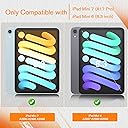
✍️ Elevate your iPad Mini experience with the screen protector that feels like paper!
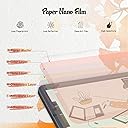
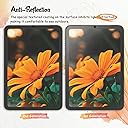
The KCT 2 Pack Paperfeel Screen Protector is designed specifically for the iPad Mini 6 (2021) 8.3-inch model, offering a precise fit with anti-glare technology to reduce screen reflections. Its unique paperlike texture enhances writing and drawing accuracy, making it ideal for professionals and creatives alike. The pack includes two protectors and installation tools, ensuring easy application and long-term screen protection.


| ASIN | B09GB4P95R |
| Best Sellers Rank | #110,014 in Computers & Accessories ( See Top 100 in Computers & Accessories ) #2,758 in Touch Screen Tablet Screen Protectors |
| Colour | Transparent |
| Customer Reviews | 4.5 4.5 out of 5 stars (1,596) |
| Date First Available | 23 September 2021 |
| Generic Name | Tablet Screen Protector |
| Importer | CEPL, New Delhi,9871555106 [email protected] |
| Item Dimensions LxWxH | 28 x 20 x 1.3 Centimeters |
| Item Weight | 15 g |
| Item model number | iPad Mini 8.3" 6th/7th A17 Pro |
| Manufacturer | 9871555106, [email protected], Shenzhen KCT |
| Net Quantity | 1 Count |
| Other display features | Wireless |
| Packer | KCT, 9871555106 |
| Product Dimensions | 28 x 20 x 1.27 cm; 15 g |
| Special features | Anti Glare |
| Whats in the box | Screen Protector |
Y**I
Sandpaper grit
too much grit, feels like sandpaper
B**L
Chegou muito antes do prazo e veio tudo perfeito. Vem com duas unidades, e todos os itens necessários para instalar. Tem vídeos no youtube ensinando e é super super simples de instalar. Fiquei surpreso com a qualidade. Minha escrita melhorou instantaneamente depois de aplicar. Ele muda levemente a qualidade da imagem porém para o meu uso é insignificante. Preço em conta pelo que oferece. Produto realmente surpreendente.
P**O
Intento escribir y no detecta el lápiz. De repente sí y de repente no. Le quité la mica y ando en búsqueda de otra marca.
M**P
Nice protector not good for drawing at all
A**R
Perfect! Comes with the covers and they work amazing. Feels great to write on, sounds great and protects from scratches!
I**E
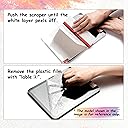
I took a chance on this product because I wanted to use my Apple Pencil for drawing on my iPad Pro and didn’t want to spend a lot of money. I was so impressed that I bought the product for my IPad mini also. Basics It comes with two screen protectors, non-skid pads to rest your iPad on during installation, stickers to act as a hinge for the screen during installation, cleaning supplies, and a squeegee. Installation: Easy Instructions are provided in the package along with a link to the video instructions. Definitely watch the video FIRST and follow them exactly for best results. I’m not good at installing screen protectors on anything larger than a standard iPhone and usually pay someone to install them on an iPad, but I was able to install this product on both an iPad Pro and iPad mini with no issues. The key is using the provided non-slip pads under your iPad and using the included stickers to hold the screen protector onto the iPad at one end, acting like a hinge. Once attached in this manner you clean off the screen and use different stickers to pick up any dust. Then with one hand, you begin peeling off the protective plastic to expose the adhesive to the screen, while using the provided squeegee with your other hand to lay it down and push out any bubbles. Some recommend installing in a bathroom with a hot shower running to reduce dust. Feel It definitely feels like paper. You will go through pencil tips more quickly if you do a lot of shading/coloring. I don’t have anything to compare it to so take that info account, I’m not a professional artist and just draw and color for funsies but I’ve done a fair bit of drawing and coloring lately and am pleased. I’ve only used it for 3 weeks so I can’t speak to its longevity, but with daily use it has held up well. I’m sure it will eventually wear out but it comes with two screens. Look It does make the screen have a matte look vs a glossy look. It isn’t extreme and doesn’t bother me when I watch YouTube videos or play games. It cuts down the glare a lot and makes it easier to use the iPad in sunlight. After using it awhile you will notice streaks or paths from drawing or shading, but cleaning takes these away. Apple Pencil It works great with the Apple Pencil and I’ve had no issues. You will need to replace your tips more frequently than using it on glass, especially if you do coloring or shading. Price I bought it for $7.99. Since it comes with two screen protectors it’s a steal. It’s nice to know that when the first one wears out I have a second one to replace it with. Overall I highly recommend the Paperfeel screen protector for the iPad. It is easy to install and makes the screen feel like paper. It works very well with the Apple Pencil for drawing, writing, and coloring. It cuts glare down significantly and has a nice feel to it. I’ve had it installed about 3 weeks and am very pleased with it. The price makes it an economical option if you don’t want to spend a lot of money or you’re not sure if you’d like a paper feel for your device.
Trustpilot
Hace 1 mes
Hace 2 semanas