We remain fully operational. Our teams are working around the clock to ensure your deliveries continue safely.

Descargar la aplicación


Servicios al cliente
Sobre nosotros
Copyright © 2025 Desertcart Holdings Limited
Descargar la aplicación
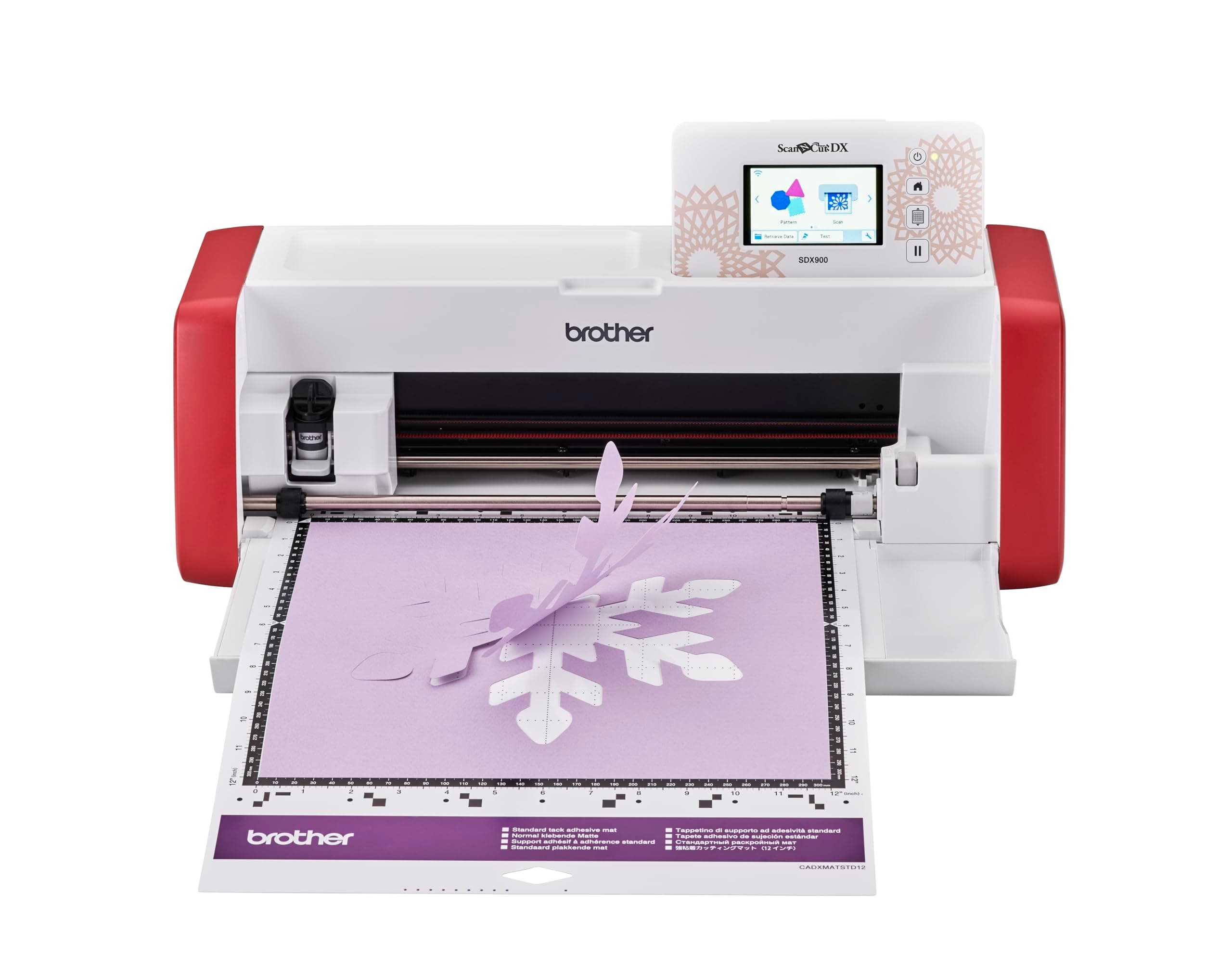
✂️ Cut Above the Rest: Create Like a Pro, No PC Needed!
The Brother ScanNCut SDX900 is a versatile home cutting machine featuring a built-in 600dpi scanner and fully automatic blade that cuts up to 3mm thick materials with precision. Its 3.47" color touchscreen allows standalone design editing, while WiFi connectivity enables wireless transfer via the free Canvas Workspace and Artspira apps. With 682 built-in designs and 7 fonts, this compact, quiet cutter empowers makers to effortlessly create professional-quality crafts without needing a PC.


| ASIN | B0CJFZY8YG |
| Active Surface Area | 297mm |
| Active surface area | 297mm |
| Best Sellers Rank | 352,630 in Home & Kitchen ( See Top 100 in Home & Kitchen ) 55 in Die-Cut Machines |
| Brand | Brother |
| Bullet Point | 3.47" (8.8cm) Colour LCD Touchscreen, 682 designs and 7 fonts, Create your own designs on screen or our free Canvas Workspace software or mobile Artspira App, Fully automatic blade, Precise, fast, quiet cutting, Scan it. Convert it. Cut it. Create it! Enter the creative world of ScanNCut, the only home and hobby cutting machine with a built-in scanner., Totally standalone - no PC or App needed, Up… |
| Colour | Red and White |
| Country Of Origin | Vietnam |
| Customer Reviews | 3.9 out of 5 stars 45 Reviews |
| Item Dimensions | 21.5 x 53.1 x 17.3 centimetres |
| Item Dimensions D x W x H | 62.5D x 30W x 29H centimetres |
| Item Package Quantity | 1 |
| Item Type Name | Paper cutting machine |
| Item Weight | 6 Kilograms |
| Manufacturer | Brother |
| Manufacturer Part Number | SDX900ZU1 |
| Material | Plastic |
| Model Number | SDX900ZU1 |
| Operation Mode | Automatic |
| Operation mode | Automatic |
| Package Weight | 7.88 Kilograms |
| Print media | Paper (plain) |
| Product dimensions | 62.5D x 30W x 29H centimetres |
| Title | Brother ScanNCut SDX900 Home Cutting Machine |
| Unit Count | 1.0 count |
H**L
Love it
An early Christmas present from my husband. I’m a bag maker and primarily wanted the scan n cut to cut out faux leather/vinyl for raw edge projects and strap connectors etc etc. I spent a week watching videos on you tube first by all brands so got to know the potential of this fab machine . It’s capable of so much..it’s very clever. I did have issues initially trying to connect the machine to canvas workspace..it wouldn’t accept the pin but my husband sorted it out. There is a lot to learn I feel, the process of doing things and understanding how the machine works and reads the data. .ive made a lot of notes! However don’t let it scare you…it’s actually easy but it’s just getting familiar with it. You get the first free project which is just a taster, very simple. So far I’ve cut fabric out as I initially intended but I’ve also tried card making and htv vinyl..it’s a lot of fun. The canvas workspace is also user friendly..I did have to buy a new laptop lol but you don’t necessarily need a computer to use this machine It’s a shame the screen is quite abit smaller then the more expensive models and probably has less pixels too but this is the cheapest sdx model. It’s still easy to see but I’m getting to an age where I’m starting to struggle to see small things. The accessories are basic with this model, a stylus, 2x standard mats, plastic spatula and the auto blade. Unfortunately there is no instruction book which really annoys me..I’m old school, I like a paper manual. You can download but it’s not the same. I recommend buying the scanning mat and the low tack..and if your cutting fabrics then a fabric mat and the rotary blade. Typically accessories aren’t cheap so keep an eye out for sales. I’ve been using it for two weeks now and I love it..I’m learning all the time. I love that I can now buy a pattern that comes with svg files so I can just import them into the scan n cut. Highly recommend it..super impressed
F**R
Easy to use
This has plenty of inbuilt designs to get you started straight away. It is easy to use as the screen tells you what to do. Come with two cutting mats and a couple of tools. It connects to the internet too to enable you to download patterns. This is a bargain at the £349 price and well worth the money. It’s an upgrade for me and it’s a brilliant piece of kit.
M**L
Don't buy this
Honestly not worth the investment at all. While good in theory, I have had a lot of issues with this since buying it. The scanner creates random lines during scan to cut and very limited in options when it comes to using scan to cut to cut specific shapes. Would not recommend it. Sent it back, though likely had a faulty machine.
M**A
I wanted to return this machine at once.
Amazon was brilliant. In fact I can return this machine until tomorrow but have decided to keep it as I would like to finish a time-sensitive kids' project for which I bought this machine in the first place. The term auto-blade is very deceiving. You still need to take it from a lower point of pressure, cut depth etc to make sure that the blade does not cut into the mat. The first 'project' in Brother's leaflet for which they have preset cutting depths etc, cut into the mat making visible cut lines (photo). I complained and after initial denials I was sent a new replacement mat. Thank you Brother. Now my own settings hardly show any cut lines and I go from much gentler setting points and do another round if the design is not perfectly separated from the main sheet. Hopefully Brother will have adjusted the preset settings now. It is a fun toy product but manipulating the preset designs is not for the faint hearted. Also the software application programmes are no where in the same league as photoshop or even the basic Pages programme on a Mac, but you can have fun with it as long as you have the time and spare cash.
C**Y
Well Worth The Wait!!
I received my wonderful SDX900 on time (the next day), I had it connected to WiFi, Brother CanvasWorkspace (free online or PC based additional software from Brother), and cutting my first project in 10 minutes. Its ease you use and so very quite compared to my Gemini machine. I love it! The price was great two! The image was the second thing i cut (see Highlight Crafts Hydrangea You Tube video for more information.
M**E
Brother Scan n Cut SDX 900
I already own sdx 1200. Bought this as a stand along. I bought it at a good price. As I already have the extras I was happy with the package of blade and two mats that came with the sdx900 Have tested it. It works. As someone had put a bad review after mine had arrived to say that it made marks on the mat. This was probably because he’d used it and when was using one of the functions he didn’t put the arrow around the area he wanted to cut. There are a lot of you tube videos to help you. One such is Highlight crafts with Mel Heaton. She does a monthly class on sdx. If you are a beginner that will help you. They are on you tube now from previous classes. She has started from basics as some people were to afraid to take out the box Would recommend sdx 900. It doesn’t have everything the sdx1200 has but it’s a good work horse and will do most everything you need.
P**N
Fantastic!
Excellent machine. I upgraded from my CM900 which I loved and I'm so glad that I did, it's an amazing machine, so quiet and the auto blade is perfect. You won't regret buying this machine.
D**H
BAD DESIGN
After reading the reviews I thought I would give this machine a try. The machine works fine, no problems. the complaint I have is the very 'sticky' mats that came with it. I tried both mats thinking that it may have been the quality of the paper/card I used but even after changing this it still suck fast (see photos) now both mats are usless to me. These are NOT cheap to replace. Think very carefully before purchasing. Very dissapointed!
Trustpilot
Hace 1 semana
Hace 2 meses