We remain fully operational. Our teams are working around the clock to ensure your deliveries continue safely.

Descargar la aplicación


Servicios al cliente
Sobre nosotros
Copyright © 2025 Desertcart Holdings Limited
Descargar la aplicación
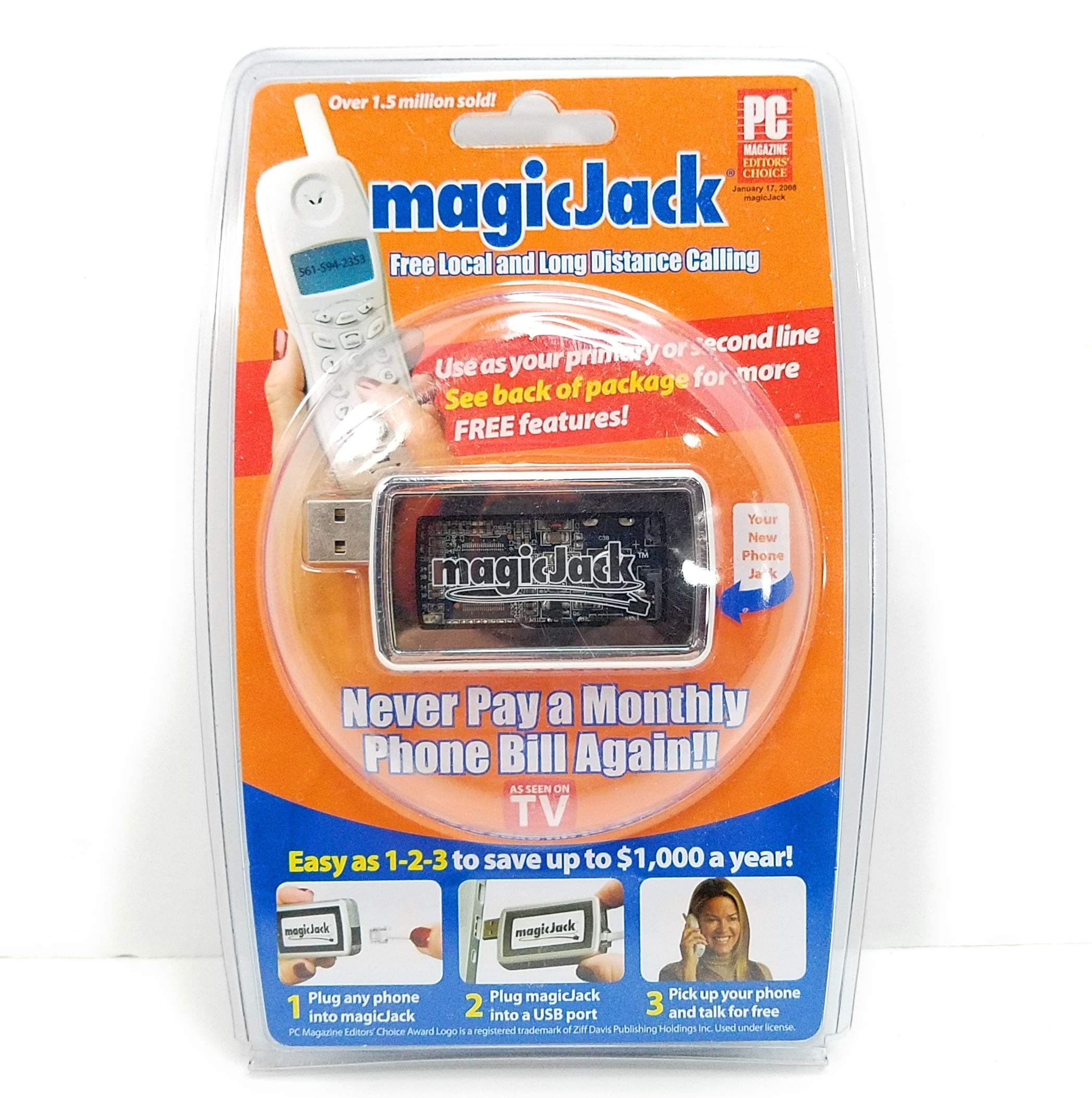

📞 Your smart switch to unlimited calls & unbeatable savings!
magicJack transforms your computer and internet into a powerful phone system offering free local and long distance calls in the US and Canada for the first year. With a quick USB plug-in setup, it provides a free US phone number, caller ID, digital voicemail accessible via phone or email, and customizable phone numbers. Ideal for professionals seeking cost-effective, reliable communication without monthly bills, magicJack delivers landline-quality sound and global connectivity with minimal setup.
| ASIN | B0011UXSHK |
| Answering System Type | Digital |
| Brand | magicJack |
| Color | SLIVER |
| Compatible Devices | Computer Systems, Internet, Telephone Networks |
| Customer Reviews | 4.0 out of 5 stars 826 Reviews |
| Enclosure Material | Plastic |
| Global Trade Identification Number | 00895034001006 |
| Is there Caller ID | Yes |
| Item Dimensions | 2 x 1 x 1 inches |
| Item Weight | 4 ounces |
| Manufacturer | magicJack |
| Material | Plastic |
| Multiline Operation | Single-Line Operation |
| Number of Batteries | Lithium Metal batteries required. |
| Power Source | Corded Electric |
| Telephone Type | Corded |
| UPC | 895034001075 895034002003 893490811672 791836766559 113448967436 895034001006 648465030967 |
A**R
Magicjack is even BETTER than advertised
I'd give the magic jack 20 stars if i could. Simply the BEST $38 I ever spent - PERIOD. Anyone complaining about it just doesn't have the right internet connection to use it, or the brains to control their bandwidth. Here's some of the highlights: 1) You get FREE VOICEMAIL that always works, even if your PC is turned OFF. Yes, you can record your own greeting for the voicemail. You can access the voicemail from ANY phone just by dialing your magicjack phone # and entering a 4 digit pin. OR better yet even, every time you get a voicemail, magicjack EMAILS you a copy of the message in WAV format so you can just play the message right on your PC - no need to dial into voicemail AT ALL. How cool is that? 2) FREE caller ID 3) Your number is UNLISTED by default - you can even make up any fake name you want when you sign up to be SURE. No more calls from ANYONE you don't want. 4) FREE alphabetized list of contacts on your PC - just enter all your important phone numbers ONCE, and you can dial anyone with ONE CLICK - no more dialing. 5) In case you are wondering, in some cases ONE MAGIC JACK can make all the phones in your house work. This will be especially easy for you to set up if you currently have phone service through your internet provider. Just find the master phone jack in your house the cable modem is plugged into, and take the plug out of your cable modem and plug it into your magic jack instead and VOILA - ALL THE PHONES in your house run off the magicjack now. 6) Amazingly, you can send a magicjack to ANYONE anywhere in the world, and they can get a local US number, so if you have family overseas you can kiss your long distance phone bills GOODBYE. 7) Another STELLAR feature - you can choose your own phone number from any available number - first you PICK the area code, and one you want, doesnt have to be local, then you choose the next 3 digit prefix, and you can choose from any available last 4 for a few extra dollars, or let them be assigned at random for free. You can also use the handy search tool to search for any available number in any area code - say for example you want a number like (area code)MER-MAID - just type mermaid in the search and you will get a list of all available choices. I paid far more money for service through my ISP and got ZERO input into the phone number. Now with magicjack I have a GREAT number that is easy to remember. 8) The sound quality is BETTER than I had before using my internet provider's phone service. Sounds as good as a landline to me. The KEY is to make sure you have the required minimum bandwidth AVAILABLE. That means you have to stop your downloads, or at least limit their speed, when you want to talk on the phone for optimal sound quality. I'd bet this is what all the bad reviews haven't quite figured out. 9) Your phone bill is almost 50% taxes if you make only local calls. You won't pay ANY of those taxes with a magicjack. I am saving $200 a year, and I use the phone less than anyone else alive. If you use the phone a lot you can save thousands. 10) You can even sign up for 5 years if you want to and magic jack will give you a 30% discount so you only pay $14 a year. BEAT THAT! 11) EASIEST install of any tech product I ever put in. Just plug it in to a USB port and off you go. If the magicjack software does not auto install, just go to their website and download and run the upgrade file (FREE). I am running Windows XP and have the LOWEST SPEED cable internet service available from COX (also the cheapest of course:)). SIMPLY PUT - An INCREDIBLE savings, a wonderful product, one of my best buys EVER. Thank you MAGIC JACK. Enjoy this party while it lasts folks because once the telco companies start wondering where all their customers went, they'll find a way to end our fun. UPDATE 1/10/11: Yes it is still a great buy overall, BUT I am slightly miffed with magicjack over several issues: #1: Upon renewal after year one, they charged an extra 4.8% to cover what they call "misc taxes etc.", so I had to pay $20.91, NOT $19.95 as advertised, and there was ZERO advance notice of this markup. #2: none of my phones ring - their tech support (which is a total joke I might add) claims this can be solved by adding a powered USB hub. Frankly I don't trust their tech support any farther than I could throw them, so I'm not going to waste money on a hub to try this out. #3: Their tech support is a total waste of time - don't bother calling them. They will make you jump through silly hoops reinstalling their software and you will still have all the same problems you had before. #4: Certain phone numbers CANNOT be called from a magicjack, and some users will find that some people have problems calling them as well. Magicjack tech always finds a way to blame other carriers for these transient issues, but it is pretty clear to me that the magicjack network availability is spotty at best. In summation, at this juncture I still endorse the product overall since you cannot beat $21 a year for unlimited domestic long distance, BUT be advised to expect some trade-offs and keep a cellphone handy for situations where magicjack will not work as promised. I would suggest you only sign up for ONE YEAR at a time even though you might find their five year offer for 30% less per year tempting. Given my experience to date, I'd expect things to deteriorate over time and I'd prefer to keep my long term options open. Same way I feel about getting married...
F**K
MagicJack - One Word: GREAT
I needed a second line into the house, and decided to check out the MagicJack. I'm not normally someone who buys things that are advertised in such a cheesy infomercial fashion, but since Clark Howard gave it a positive review I figured I'd check it out. I use the MagicJack on an Acer computer that runs Windows 7. As a way to save desk space, I decided to use MagicJack with a headset that plugs directly into my computer. Things are running smoothly now... But they didn't at first (I still rate the MagicJack with FIVE stars). When I first tried it, it would drop a call after just a few seconds. I fixed that by using a direct Internet connection instead of a wireless router. In other words, the ethernet cable runs from the cable modem directly into my computer. That fixed the drop call problem. The second problem was the voice quality was bad, and people could barely hear me. I fixed that by adjusting the default Windows 7 sound settings. In other words, this was a Windows 7 issue and not a MagicJack issue. I adjusted the sound volume and quality. You'll have to play around with it as system configurations can differ. Basically, on the relevant controls I turned the volume up and increased the quality to "studio quality." That fixed the poor voice quality problem. These settings, by the way, are outside of the volume control settings found in the MagicJack menu interface. Now, MagicJack works GREAT! When I talk to people they can't believe the terrific voice quality of the phone call. Most phone speakers are very poor quality. But, now I'm conversing in "studio quality" with everybody. I'll have to test the MagicJack for a while longer before I decide whether or not to kick my digital phone service to the curb. I am planning on fully digitizing the house. When I do that, it wouldn't surprise me at all if I go 100% with MagicJack as my landline. One other thing. I think people reading this should take all the one star ratings with a grain of salt for two reasons. 1 - It really could be that computer neophytes can not get their MagicJack to work. Mine didn't work when I first tried it. My computer configuration did require some twiddling so that the MagicJack would work. For the most part, that isn't MagicJack's fault since Microsoft Windows 7 defaults are outside MagicJack's control. I do fault MagicJack for trying to make it seem so easy when it is very likely that some people will have configuration issues. 2 - Corporations do use social media to try and influence consumer opinions. I would not be surprised at all to find that various telcomms are behind a lot of the one star ratings.
D**R
So Far So Good! WITH UPDATE! Now with 2nd Update!
We are going to be using a MajicJack as our new home phone system. You may have seen the commercials. It is a small component which plugs into a USB port of your computer. You attach a normal phone line on the other end and that's it. The unit itself cost $39.95 and includes 1 year's service. The cost after that is $19.95 a year for unlimited local and long distance calling. That's right, $19.95 a year. Sounds to good to be true? Maybe, but at that price we are more than happy to be guinea pigs. Here's what we've discovered about it so far after about 1 month's use. We are using it with Windows Vista. 1) It's $19.95 a YEAR, so you have to assume there are going to be some problems and inconveniences, but, IT'S $19.95 a YEAR! 2) In order for it to work, your computer always has to be on (for us, no big deal we usually leave ours on anyway). You are actually using the internet as your phone. The problem was when the power went out a few days ago, we had no home phone. This is OK because we had cell phones and for that matter, we had no power to our regular phone either. 3) It comes with automatic voice mail which sends .wav files to whatever e-mail you choose or you can retrieve them over the phone. It also allows your phone to use its own voice mail. It DOES allow you to enter your home address for 911. 411 is free. 4) It has a computer interface which pops up every time the phone rings, which is kind of annoying if you are using the computer, but all you have to do is click it closed again. It's about as annoying as a pop-up window. I can live with this for $19.95/year. The positive aspect of this is I can see who's calling without looking away from the computer. 5) It does have caller ID, but it only gives you the number of the person calling. You can add the number to a contacts list and add a name then it will show you whose calling just like regular caller ID. This is actually pretty common with the proliferation of cell phones. 6) It is like a cell phone and is essentially unlisted. 7) The call quality varies from just OK to fantastic. We haven't had any problems with dropped calls. The only real problem we've had is occasionally you will pick it up and you won't hear a dial tone. If you press the phone "on" button once or twice the dial tone will come on. The phone we are using is just a normal (cheap) phone. I believe there are phones designed for VoIP which will work better with this system. Need more research here. 8) From the reviews I've read online, customer service is bad (not my personal experience, but it doesn't surprise me). They do offer a deal for 5 years for $69.99, but I'll give it a year or two before I jump aboard that deal, because I'm not even going to try to deal with CS and ask about a refund if I were to ever need one. Bottom Line: If you are not incredibly impatient and you are OK with dealing with a few mild annoyances, you cannot beat this deal and MagicJack, at the very least, works. The jury is still out whether or not I am going to be an evangelist for MagicJack, but I've been pretty impressed so far. UPDATE AUGUST 9, 2011: It's been several months now and I thought I'd update with current information. First, reliability: The biggest problem we have had is call quality. It does range from perfectly alright to unlistenable. I still haven't figured out what the variable is that causes the ocassional bad calls, but I'm sure there is one somewhere, maybe the internet speed. I have become somewhat adept at interpreting the calls in spite of the call quality when it is really bad. I have also not tried to switch out phones to see if that is part of the problem. When I do I will update. I also purchased a MJ for my business which recieves some calls but is mostly conducted over e-mail and I haven't had the same problems with that unit that I've had with this one. In fact, that one works great every time. Although I am backing off from being a complete pitchman for MJ (I wouldn't recommend the product to my elderly parents, or someone whose phone is their business lifeline, for example), for my level of usage I am still impressed with what I am getting for $19.95 a year. The amount of money I've already saved is remarkable. I am still absolutely resolute that, for me, I can live with the occassional problems because of the incredible deal. UPDATE #2 JANUARY 4, 2012: We have never been able to resolve the inconsistent call quality which I mentioned in my previous update. It was not the phone and it was not the internet connection, so the only other thing is the unit itself. Calls were frequently garbled and it got so annoying that I was ready to dump the whole thing as people calling us could not understand what we were saying. The one I use at work is fine, so I think we just got a bad one for home. HOWEVER: I am not going to change my review from 4 stars because as subscribers, we were offered one of the new MAJICJACK PLUS systems at a great discount and well...in for a penny, in for a pound, I tried it. I will review the MJ+ on the appropriate product page, but I can say here that the new unit works great! We do not have any more of the quality issues we had with the first unit. The other advantage of MJ+ is you no longer need a computer to use it. The disadvantage is the annual price goes up to $29.95/year. Bummer but, oh well, it's still a great deal. The bottom line is we got a busted unit last year. When we got the replacement MJ+, the system worked as advertised.
V**R
Magicjack ok but needs work
I was happy at first when we started using Magicjack. It worked like promised. It is a cheap price for talking on the phone to anywhere. That part is very good. A few things are disappointing though. We tried to turn up the volume to be able to hear the caller better but it doesn't really help. The loudness is not enough. If you have background noise in the house, you have to strain to hear the person. We have our phone handset turned all the way up as well but still have this problem. It also takes time to load, at least on our computer, and it seems to create problems on our computer with programs like slowness or lockups. It does not work with my fax machine either so I have to try and set the settings different to see if I can get the fax to work. It may not since Magicjack says they are not necessarily set to work with faxes. Not happy about that. Sometimes if we are not using it for the phone, we just unplug it so it will not interfere with applications on the computer, which works. So, in conclusion, its ok to use because its so cheap but its got its problems. I heard from other people on the internet that they have no customer service help either, except for billing problems. Hope the service will get better as time goes on and it will become a great thing!
J**A
Not perfect, but good deal just the same.....
We finally gave the boot to Charter Cable, who was charging us in excess of 200 bucks a month for phone, internet and cable. I decided to give MajicJack a whirl for the phone portion of it: 45 dollars for the jack and the first year of service. The sound quality is a little soft; in other words the volume is a tad on the low side. I don't know if I should be faulting MajicJack for that or not, as the MajicJack is entirely dependent on your internet connection. My internet connection is DSL, so that may be the issue. But even with that, it is acceptable. I was talking to my brother (2,000 miles away) yesterday and I asked him how the sound quality was: he said it sounded fine to him. So I give MajicJack the thumbs up as far as what others are hearing. I ported my old phone number over from Charter (which is not listed in the MajicJack listing, but all you have to do is manually specify their name as CHARTER COMMUNICATIONS and you are good) to MajicJack-it cost me 20 bucks to have MajicJack do it, but even if you factor that in, my total outlay is 65 dollars for the first year. No comparison to the 40 dollars a month Charter was dinging me. Overall, I would say it is an excellent deal, but you DO give up a tad on the sound quality. But then again, you are paying about 1/20th the price! If you are on the fence, give it a try-definitely worthwhile in my book. Five stars, even with the low volume. /*-/*-/*-/*-/*- UPDATE: 9-28-11 After running MajicJack for a while now, I have a couple comments: *Volume is DEFINITELY on the low side; just barely acceptable. You have to crank your phone volume all the way to the max to hear clearly. *Sound quality does leave a bit to be desired. I do have issues with caller dropping out occasionally (very similar to what happens on your cell phone) and I also sometimes get an echo while talking. I can hear myself echoing, but the other party does not hear it. So while being annoying, it is not that big a deal. *Must leave the PC (and MajicJack software) running all the time. Occasionally we are unable to place an outgoing call, requiring us to go to the PC, force the phone to shut down, restart it, and all is good again. *Last point: I ported over my old phone number to MajicJack. They were up front about there being a 20 dollar charge. No issue there. The problem arose because they dinged my credit card TWICE. After going round and round with them, I finally just called my credit card company and had them reverse the second charge. I still haven't heard back from MajicJack. In summary, MajicJack beats the pants off any other competition, hands down. But there is indeed a price to be paid-in sound quality and lack of responsiveness. Even so, MajicJack has paid for itself after only 3 months. Would I buy it again? Knowing what I now know about the other IP phones, probably not. Other solutions are out there that are in the 200 dollar range and do not require tying up a PC. But this is ABSOLUTELY the way to go if you are planning on traveling overseas and want to call back to the states for free.
S**H
TERRIBLE
Don't waste your money!! Amazon did their job, and delivered it as promised, but the product is terrible and the customer service, if that's what you want to call it, appears to be deliberately difficult to get to, and deliberately circular. The only way to get any kind of customer care interaction is through their Live Chat. There is no phone number anywhere and was told on live chat that they don't speak to customers on the phone. I got the run around, circular "solutions" and dropped from live chat 25 times and counting. I finally gave up and ordered Vonage. My original issue was that I couldn't get Magic Jack to recognize that there was a phone attached so I tried the only avenue available which was live chat. I would get asked the same questions over and over, no solutions provided and would eventually (sometimes as quickly as within 10 seconds)got dropped from live chat. The few times I did get more than a few sentences from live chat I was told I needed to purchase the upgraded service - did that - still didn't work (that was very early on in my attempts when I actually thought they were legit and trying to help). Or when I was trying to get the RMA number to return the product they provided me a link to the page that provided the link to live chat to get the information required to get the RMA #. One giant circle. I really have to believe it is deliberate. I am calling my credit card company and having the charges removed because I don't expect to see any resolution from Magic Jack anytime soon. I am also going to report the company to my State's Attorney General for consumer fraud. Amazon shouldn't even sell this product. They fraudulently charge for services they don't provide. Here's an update: I got the RMA required to return the product from the distribution center (As Seen on TV) and got the information for them from Amazon. That was no trouble at all. I am still trying to get Magic Jack to refund the two charges for upgrades they said I needed. I can't seem to get any kind of answer on their live chat. I keep getting dropped from the live chat before I get anywhere. I gave up after 5 tries this morning. Stay as far away from Magic Jack as possible. It is not worth the time an trouble.
I**H
Magic Jack - tried and tested
CONS: It requires an active internet connectivity (to make the Voip calls), calls cannot be forwarded to the MJ assigned telephone number and a laptop/PC to power the device (USB) PROS: Can save you a lot of money if you live in a country where calls to the US and Canada are pretty expensive I have been the owner of a previous MagicJack device which got damaged and had to be replaced and all I can say is that this device is probably one of the new found discoveries of Voip telephony technology out there the best thing since Yap Jack except no top-up minutes required just an annual subscription of US $30 - $20.00. Being in my country, Guyana, it is expensive to make calls to family and friends in the US/Canada but having internet access allowed this to be solved along with a MJ device. The setup was initially difficult since it did not recognise the routing/IP number of my internet service as it apparently would run smoother if you are in the US. However I resolved this through chatting with an online rep who after a few minutes of chatting and requesting both the serial and assigned telephone numbers of the MJ device required me to just restart the device and voila instant savings !!!! Items required for MJ: (1) MJ Device (of course) (2) 512K or better internet connection (anything lower would give an echo throughout your calls) (3) Laptop or Computer (4) One length of standard telephone cable (double-sided RJ-11 connectors) (5) Telephone (to plug one end of telephone cable into and the other into the MJ device) At first installation you would required to download and install the MJ application, java-based, from the internet and this acts as telephone diary that would store the telephone numbers you dial and you can save the details to. After plugging the MJ device in you would be required to complete the registration process where you are assigned a telephone number (US) based on the state you choose within the address section. Once it assigns the telephone number to the MJ software you would notice that an error is displayed on the application window which is basically something that has to be enabled from the MJ servers (guessing here). If you live outside of the US you would then need to go to the MJ homepage and chat with and chat with a customer representative and explain what you are encountering along with the error number being displayed, the serial number of the MJ device and the telephone number assigned and in a few minutes (20 minutes or less) you would be asked to restart the program. If everything is good you would see your error cleared and once you pick up the handset of your telephone and receive a dial tone you are good to make your calls. Definitely a recommended purchase and Amazon Prime allowed me to have the device shipped to my address in two days time which they were on the ball.
B**S
Works great for me!
I have had no problems with magicJack at all! I had just been using my cell number but had wanted more of a "home" phone number for a while now but didnt want to pay the money the different places were asking per month. I decided to give magicJack a try and it definitely works for me! It was really easy to install on my computer and I used their site to find how to make sure it starts when the computer is started if I restart or something and it was really simple to use. I also used the site to change my voicemail message right away and the voicemail password, also quite easy. Thats about all I know about the customer service so far. I have had no problems with people hearing me when I call them and they say its fine and clear! I wish on my end the volume was just a tad louder on my end even when I turn the volume on my phone all the way up, but this could just be from my air conditioner running in the background and I have had this problem before when making calls on my cell phone and on regular land lines so I'm not sure if this could just be from the magicJack. When I use the speakerphone feature on the wireless phones I got to go with my magicJack the volume is just fine, nice and loud and clear. I just got a new computer, that is somewhat of a "super" computer and its energy efficient so I leave it on all the time anyways (HP TouchSmart610 with alot of upgrades). Suprisingly I was worried that my computer would have to literally running all the time to get the magicJack to work but I have found that my phones still work when my computer goes into a powersaver mode (I don't think it necessarily goes to "sleep" but the screen goes dark). From other reviews, I assumed that when this happened on my computer that my magicjack would just stop working but I am really excited that it still works for me! If you think that the magicJack might work for you, I think you should give it a try! Especially for the great price!
Trustpilot
Hace 1 mes
Hace 3 semanas