
Descargar la aplicación


Servicios al cliente
Sobre nosotros
Copyright © 2025 Desertcart Holdings Limited
Descargar la aplicación


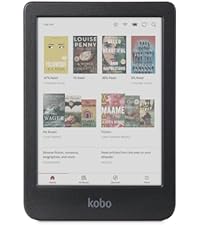
📚 Elevate your reading game with color, comfort, and confidence!
The Kobo Clara Colour is a sleek 6-inch color eReader featuring the latest Kaleido™ 3 E Ink display for vibrant, glare-free reading. It offers 16GB storage, a customizable ComfortLight PRO with Dark Mode, and an IPX8 waterproof rating for durability. Designed with eco-conscious materials and a 2-week battery life, it’s perfect for professionals seeking a premium, portable reading experience without ads or distractions.




| ASIN | B0D1KWK8WY |
| Battery Average Life | 2 weeks |
| Battery Description | Lithium-Ion Polymer |
| Best Sellers Rank | #27,970 in Electronics ( See Top 100 in Electronics ) #55 in eBook Readers |
| Bluetooth support? | No |
| Brand | Kobo |
| Built-In Media | eReader |
| Color | Black |
| Compatible Devices | [Common e-book reading devices and platforms, such as Windows, macOS, iOS, Android, and Kobo's own apps] |
| Connectivity Technology | Wi-Fi |
| Customer Reviews | 4.4 out of 5 stars 416 Reviews |
| Display Technology | Electronic Ink |
| File Format | EPUB, PDF, [possibly] MOBI |
| Human-Interface Input | Touchscreen |
| Item Weight | 6.14 Ounces |
| Manufacturer | Rakuten Kobo |
| Memory Storage Capacity | 16 GB |
| Model Name | Kobo Clara |
| Native Resolution | 1024 x 768 |
| Night vision | No |
| Other Special Features of the Product | Color Display, High-Resolution Graphics, Environmentally Friendly Design |
| Processor Speed | 2 GHz |
| Screen Size | 6 Inches |
| UPC | 681495009664 |
| Warranty Description | 1 Year Limited Warranty |
A**H
A new favorite
This is my first kobo ereader and I’m in love. Its compact design makes it effortlessly portable, which allows me to read on the go conveniently. For reference, it’s similar to the kindle basic model in terms of size and feel of material with a non flush screen, but has the performance and features of a kindle paperwhite. Unlike kindle, the kobo clara colour is ad free! When the device is in sleep mode or powered off, the book cover shows with the reading progress percent tag. However, you can easily customize that by turning that option off in settings or by creating custom lockscreens using a quick online tutorial. The color display was one of the main features that attracted me to this model and it truly enhanced my overall reading experience. I appreciate the multi color options for highlighting memorable quotes or color coding to easily reference key information. In comparison to a tablet, the coloration is not as saturated, but that’s expected and personally it doesn’t detract from my experience. The various reading settings and e-ink screen allow for longer reading times and optimal reading comfort. Dark mode and the natural lighting are my favorites and I appreciate the convenience of being able to adjust the brightness by swiping up/down on the lefthand side of the screen. The upper right corner of the screen when reading is where you’ll find the reading settings and tools (lighting, font, dictionary, navigation tips, etc). Adding books to my library can be done directly on the ereader with wifi or using another device depending on the source of the file. For kobo store and overdrive, direct sync with ereader. For anything else (cloudlibrary, bookbub, previously owned ebooks, etc), the computer. There are probably other methods, but that’s what has worked best for me. Once I’m finished, I make sure wifi is turned on and click sync and then my library is updated with the new files. For energy saving purposes, I mostly keep the wifi setting off and have noticed an improvement in battery life. Even without purchasing the kobo plus subscription, it’s very possible to read completely free with this device. The kobo store offers a wide selection of free ebooks and there are also various websites such as bookbub to stay updated on daily ebook deals for free or discounts. For borrowing library ebooks, the overdrive/libby system is built in, but if your local library utilizes cloudlibrary instead, you can still sideload those books to your ereader using adobe digital editions. Just go to the kobo website and follow the instructions. Another plus, kobo price matches as long as it meets their criteria listed online. Overall, at the price point and everything this device offers, I think the kobo clara colour is a wonderful ereader and alternative to the kindle. However, those who prefer KU or are not tech savvy may not feel the same. I have owned and used my kobo daily for 2 months and wish I had purchased it sooner. Highly recommend!
F**T
The BEST Kindle-killer, hands-down!
As a guy with a long history of reading on Kindles - my favorite being the Oasis - I decided it was still just a bit too big for comfortable holding for an hour a night, even though it was the best of the eReaders I have, or had. Which includes the latest Paperwhite, the Kindle Coloursoft, Kobo Libra, Libra Color, Kindle Basic, etcetera. The Kindle Basic was my preferred SIZE / weight of 6", because I could add a finger strap/grip to the middle of the back, and easily reach the strap with fingers of either hand. BUT... The Basic has one deal-breaker for me: NO WARM LIGHT!! Completely stupid decision not to allow that on the Basic, when the 7" PW only costs like $25 more! So you could say that for less than $10 they could have added a warm light option - and sold a ton of them. Anyway, the Kindle Colousoft was great-ish, but it had three big issues: 1). Too expensive. $130 more than the Kobo Clara Color. 2). No buttons!! This is marketed as a "premium" eReader, yet had nowhere near the premium look and feel of the Oasis. Which has buttons. I like buttons on a larger then 6" eReader. Swiping is OK for a 6" one. 3). Has no Large option for the main screen, for bigger covers and text for those less blessed than those with young and perfect vision. The Kobo Clara Color is perfect in that it has it all: 1). 6" size for lightness and fitting in pockets easily 2). Color screen to add some dimension to book covers and highlighting 3). Large print mode, (Beta Feature), similar to what the Oasis has 4). Warm Light It doesn't have Kindle Unlimited, but I found I don't read fast enough to make that worthwhile, anyway. Also, I can borrow books from the Library on either device, so... Overall, it's a high-quality device, and I'm thrilled to have finally found something like this that checks all my boxes.
N**Y
easy to use and great for hEDS folks
I'm unable to hold books by hand anymore due to hEDS making it painful. This, with the nice case I got for it, has changed that. I'm able to hold this without issue. I love that I can also expand and reduce the size of the print, and the backlighting adjusts for the lighting in the room. There's no glare on the screen either, with it being matte. A single button on the back for waking it up and turning it on/off. I also have access to Overdrive and can connect with libraries to check out books. Sometimes it gets stuck trying to connect with Overdrive, but that's only because I haven't synced it. Syncing fixes that. The long battery life means I don't have to charge it everyday, which is a plus with ADHD (I forget to charge things). It's a simple and easy device, and functions on the simplest level. A child could figure out how to use this. With the small size, even in its case, I'm able to take this whenever I leave the house. No getting bored while riding in the car or in the waiting room for doctor and physical therapy appointments. Yay! It's been worth every penny.
D**N
Fantastic functionality and comfort
This reader is the perfect size and weight for me. I love the warm light and the color is a great feature as well. I didn’t know if I was going to like it as much as my Paperwhite after receiving it, but after a few weeks with it, I love it! The Libby/Overseive functionality is a win and the device is snappy and everything works great. The lighting is a little less even than my paperwhite, but becomes unnoticeable after reading for a few minutes. The price is better than most readers and the functionality is excellent!
D**S
Better than Kindle!
This e-reader provides color at a reasonable price. The operating system and controls are quite similar to a Kindle, but NO ADS! As is true of all e-ink color screens, the colors appear a bit muted- similar to newsprint. So the color is nice for viewing book covers, photos and illustrations but is not well suited for comics or graphic novels. The screen illumination is even and can be precisely controlled. It has a "dark mode" (black background, white text), which oddly is toggled from the general settings menu, not from the screen settings or brightness menu. Two very nice features are that you can setup your Overdrive public library account to download books directly to the device, and your Pocket app to download articles directly. Battery life is superior to the Kindle. I won't be going back to the Kindle. Kindle, we hardly knew ye!
H**N
I love this thing!
This is my first ebook I have ever purchased and I’m very pleased with this. I love the activity analytics section where it tracks how fast I am reading and estimates how long it will take to finish the current chapter and the entire book and also it tracks how many pages read per minute. I dont know why but it just makes reading more fun seeing how fast I am reading and seeing my progress. The multi colour highlighter is also a very nice feature especially when reading non fiction books highlighting interesting facts making it easier to go back and find later on. The device itself is very light and nice to hold. I got the cobalt blue sleeper cover which does add a little extra weight but it is still very light. And I really love that royal blue colour. I find myself reading a lot more because of this thing and also reading a lot faster not awkwardly holding a book open. The e-reader itself is fast, downloads quick and changes pages quickly, but going on the internet sites such as google its a bit slow. As for the display it is very easy on the eyes. You can adjust the brightness easily, and theres also an automatic natural light adjustment at night time to make it even easier on the eyes when reading at night. The colours are not bright like they would be on a phone, theyre somewhat pastel, but I like that… it gives the feel of images on paper and not on a gadget. The one thing I did not like about this device is that I put a pin pass on it so my daughter wouldn’t go on and make purchases, but kids being kids when you tell them “no” they do the opposite and she attempted to open the device, and at the bottom of the pin pass screen it says “forgot password? Sign out.” And so she signed me out and in doing so it factory reset the device and I lost all data and the activity section was cleared. Kobo really needs to fix that or at least put some sort of warning there for others who might sign out not knowing. Thankfully my books purchased are saved on my kobo account but everything else on my kobo was factory reset. The cover and the reader were purchased the same day from the same seller but for some reason sent separately. The cover came fast but the reader took a bit longer. But both were delivered days before the expected delivery date. Overall I am very happy with my new kobo clara colour and I would highly recommend to anyone out there who is interested. Five stars!
T**S
The kobo clara colour is a huge disappointent
The kobo clara colour has been a huge disappointment. It is nowhere close to being an adequate replacement for a kindle, and any reviewers that said it was were not candid. *The kobo clara is abysmally slow. It takes a long time to charge fully, then drains its charge far more quickly than a kindle (contrary to the kobo's marketing claims.) It is particularly slow to sync with Overdrive, & can require repeated commands to do so. *The kobo clara's o.s. is not intutitive, and a user's time with the tablet can be spent searching through the tablet for its non-intuitive command structure, then waiting for it to grudgingly respond even as it sends the user to a screen that doesn't answer the question. *It is very difficult to ascertain if the kobo clara is fully charged; there's a charge icon at the top of the screen, but to view the actual charge amount, you have to press that tiny icon hard at a specific angle, and if your finger is a normal size, the kobo often flips to an entirely different screen (with no charge information), a screen that you did not want to view but were forced to anyway by the tablet. Getting out of that screen will likely involve several slow screen jumps. *The kobo often misinterprets user highlighting, spreading the highlight far beyond what the user aimed for, which means the entire highlight has to be deleted, attempted again, and the process repeated several times. *The pinch method to size the text is terrible and extremely difficult to control. Additionally the text often suddenly flips to a different size with no input from the user, then again requires the unwieldy sizing method. I bought this kobo clara colour because of the "good" reviews. I completely regret buying it, and I'm very sorry that I listened to reviews by online tech writers, because many weren't honest about this tablet. It is absolutely NOT equivalent or anywhere close to a kindle - it's a pathetic 4th or 5th runner-up. It's been an exercise in frustration & a waste of time & money, & is now headed to the abandoned tech-trash pile in the basement.
S**.
Kobo user interface is much better than Kindle
This is not my first Kobo, I already have the Libra 2 purchase around Feb 2024 and the Libra color purchase around June 2024. The Kobo Clara color is a solid eink reader. I like that they are not constantly trying to sell me books. I do not have to pay for ads to be removed from the lock screen. They do make it easy to purchase books if you want but it is not so in your face. Kobo Plus: similar to Kindle Unlimited (KU) except as far as I can tell there is no limit to the amount I can add to my library. I also appreciate they have a subscription level that also includes audiobooks, but the increase to me is minimal as compared to Audible. The books available is less then KU, but I have not had issues find books I want to read. This being a good option will depend on ones reading taste. The added features are a big selling point for me. Overdrive integration: I can read, borrow and places library books on hold directly on the reader. Downside to this is I can only have one library card linked and I have three currently. So that is a little annoying, but still worth it! Pocket app for article reading integration: I save articles that I want to read but do not have time in the moment. Usually when researching something online or when I am come across a news article that I cannot read right then. Added feature that I only use rarely: there is a web browser beta feature. I see this as being helpful if I want to do a quick look up of a word or concept mentioned while reading. The size is perfect for on the go reading! Only downside, but not so big I would give less stars: because the screen is inset, it is easy to get cat (or hair of other pets that shed) inside. Pet hair is not good for tech so I am not a fan of the inset screen for this reason.
Trustpilot
Hace 2 meses
Hace 2 meses