We remain fully operational. Our teams are working around the clock to ensure your deliveries continue safely.

Descargar la aplicación


Servicios al cliente
Sobre nosotros
Copyright © 2025 Desertcart Holdings Limited
Descargar la aplicación
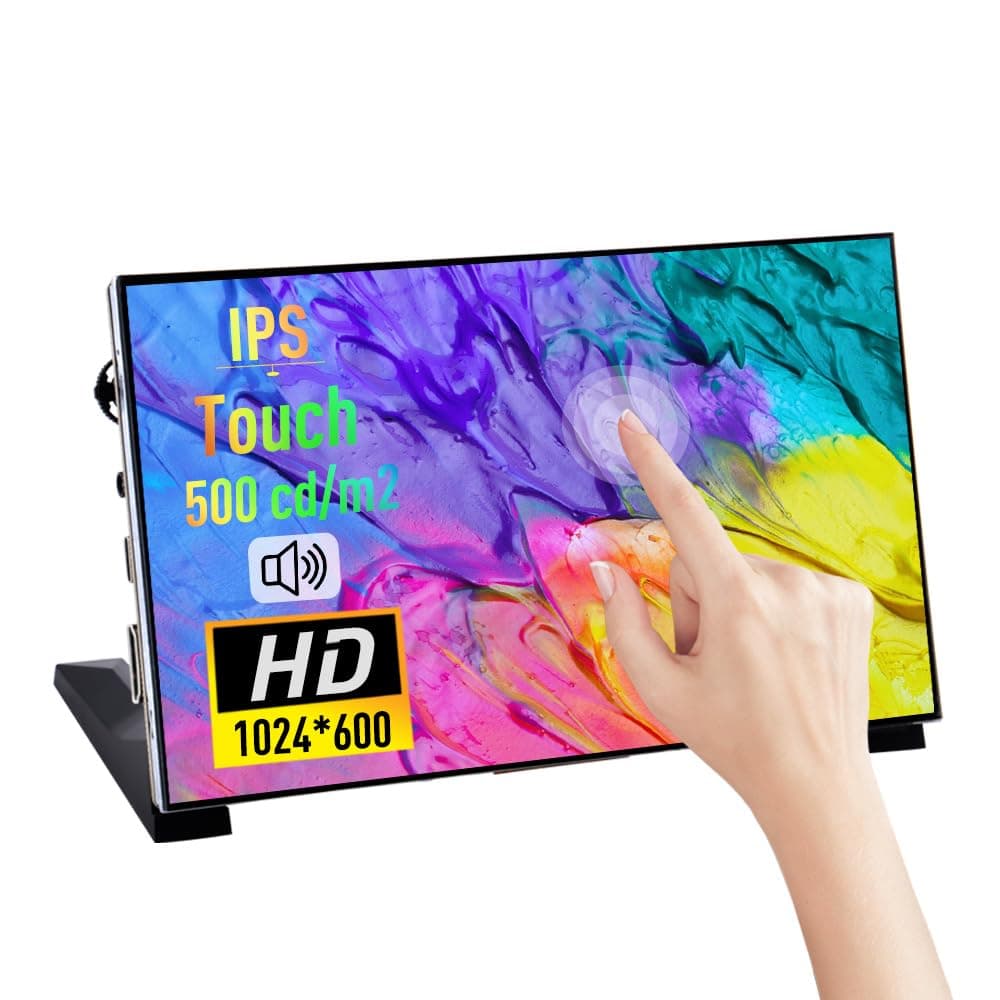
🚀 Elevate your Raspberry Pi game with vibrant visuals & sound — don’t just build, impress!
The GeeekPi 7 Inch Capacitive Touchscreen is a portable IPS LCD display with 1024x600 resolution and 60Hz refresh rate, featuring multi-touch input and dual speakers. Compatible with a wide range of Raspberry Pi models and Windows OS, it offers HDMI and USB-C connectivity. Ideal for developers and tech enthusiasts seeking a versatile secondary monitor or DIY project display with immersive visuals and sound.




| ASIN | B0CJWXWJ6K |
| Additional Features | Portable, Built-In Speakers |
| Aspect Ratio | 16:9 |
| Best Sellers Rank | #6,116 in Computers ( See Top 100 in Computers ) #250 in Computer Monitors |
| Brand | GeeekPi |
| Brightness | Medium to High |
| Color | black |
| Compatible Devices | Raspberry Pi 5/Pi 4B/3B+/3B/B+/Zero/400, Jetson Nano, Banana Pi M5/M2 Zero, VisionFive, Windows 10/8/7 |
| Connectivity Technology | HDMI |
| Contrast Ratio | 2000:1 |
| Customer Reviews | 4.1 4.1 out of 5 stars (84) |
| Display Resolution Maximum | 1024 x 600 |
| Display Technology | IPS |
| Display Type | LCD |
| Hardware Connectivity | HDMI, USB Type C |
| Has Color Screen | Yes |
| Is Electric | Yes |
| Item Dimensions D x W x H | 21.5D x 5W x 13.5H centimeters |
| Item Weight | 500 Grams |
| Manufacturer | GeeekPi |
| Model Name | 7 Inch Capacitive Touchscreen |
| Model Number | Touch Screen |
| Mounting Type | Wall Mount |
| Native Resolution | 1024x600 |
| Number of Component Outputs | 1 |
| Picture Quality Enhancement Technology | IPS |
| Pixel Pitch | 0.21 |
| Refresh Rate | 60 Hz |
| Resolution | 1024 x 600 pixels |
| Response Time | 2 Milliseconds |
| Screen Finish | Glossy |
| Screen Size | 7 Inches |
| Shape | rectangular |
| Specific Uses For Product | Portable Monitor, Secondary Monitor, DIY Projects |
| Total Number of HDMI Ports | 1 |
| Viewing Angle | 178 Degrees |
| Warranty Description | 1 |
A**B
Very good
Very good
I**D
Very Good Product Highly Recommended
Good Product really Recommend
N**R
Size
Good, but I recommend taking a bigger size.
G**X
It’s ok
The speakers don’t work.
T**N
great- as described.
L**M
I'm impressed so far with this tiny 7" monitor. It tends to look bigger in pictures than it actually is, but I like the small size. I've so far used it with a Raspberry Pi Zero 2 and an HP ProDesk Mini PC. The only setup involved is attach the included legs, being careful to put them on the correct side left/right, plug the included HDMI and USB A to C cables to your source computer and power on the monitor. For anyone having trouble with the touchscreen: make certain you have the USB cable plugged into your computer. This also powers the monitor. I'm fairly certain if a Pi Zero can power this monitor, just about any computer can. The direct USB connection also enables touch, which in my use works well. My only problem is the touch accuracy seems a little off in Windows 11. Sometimes where I'm touching on the screen will press a slightly offset location. Frustrating at times when buttons are very close together. (UPDATE: silly me, use Windows touch screen calibration tool and touch works perfectly!) I like this little monitor on my desk setup when I'm working. So far using it to have Spotify and Microsoft Teams open on a dedicated screen, for convenient monitoring. The screen is IPS and has decent viewing angles. One issue I noticed: when powered from certain USB ports on my HP Prodesk, the monitor can suffer from really noticeable flicker. I've countered this by choosing a different USB port that seems to provide more power. If you have ports on your computer dedicated to mice/keyboards, they may be lower powered and cause flicker and unstable performance. So play around with the ports if you need. The GeeekPi 7 is small enough to throw in a laptop bag, and act as a small second monitor when you're on the go. Since it only needs 2 cables, (HDMI and USB) it lends itself to portability. My improvements have been 180 degree angled HDMI and USB-C adapters that keep both cables from sticking straight out of the left side for a more compact look. I love this little thing and highly recommend it!
C**Y
Cool little screen. As advertised. Using plug and play on a rasp pi 5
A**R
Works great when connected to my laptop, and now in my server rack. Touch screen worked without drama drama on Windows 10 and Windows 11, Truly Plug and Play
S**P
great for its price works as intended
Trustpilot
Hace 2 meses
Hace 2 semanas