
Descargar la aplicación


Servicios al cliente
Sobre nosotros
Copyright © 2025 Desertcart Holdings Limited
Descargar la aplicación
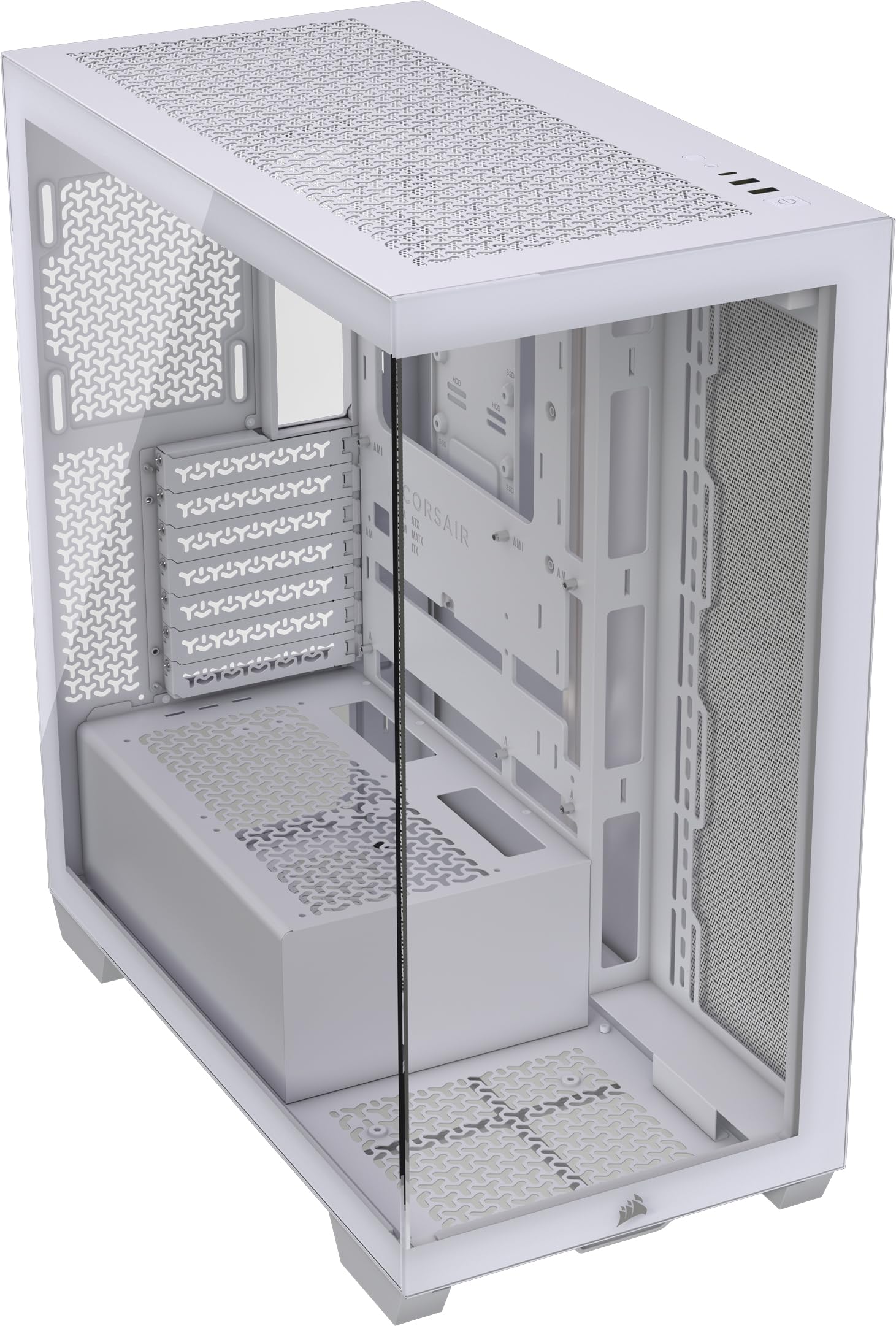
🖤 Build Bold, Cool Smart, and Show Off in Style!
The CORSAIR 3500X Mid-Tower PC Case combines premium tempered glass aesthetics with versatile cooling options, supporting a wide range of motherboard sizes including reverse connection types. Designed for professional builders and gamers, it offers tool-less panel access, extensive fan and radiator support, and spacious interiors to accommodate high-end components—all wrapped in a sleek white finish that elevates any workspace.


| ASIN | B0CZV22HDF |
| Antenna Location | Gaming |
| Best Sellers Rank | #454 in Computer Cases |
| Brand | Corsair |
| Case Type | Mid Tower |
| Color | White |
| Compatible Devices | ASUS BTF and MSI Project Zero motherboards, bottom-mounted power supply units, 3.5-inch and 2.5-inch storage drives, 7 horizontal (or 4 vertical) expansion slots, 120mm, 140mm, 240mm, 280mm, 360mm fans and radiators |
| Cooling Method | Air |
| Customer Reviews | 4.7 out of 5 stars 249 Reviews |
| Enclosure Material | Tempered Glass |
| Fan Size | 120 Millimeters |
| Global Trade Identification Number | 00840006686040 |
| Hard Disk Form Factor | 3.5 Inches |
| Internal Bays Quantity | 3 |
| Item Dimensions D x W x H | 19.92"D x 9.45"W x 18.11"H |
| Item Weight | 8.6 Kilograms |
| Manufacturer | Corsair |
| Material | Tempered Glass |
| Model Name | 3500X |
| Motherboard Compatability | ATX |
| Other Special Features of the Product | Dust Filter |
| Power Supply Mounting Type | Bottom Mount |
| Recommended Uses For Product | Gaming |
| Supported Motherboard | ATX |
| Total USB 2.0 Ports | 2 |
| Total USB 3.0 Ports | 3 |
| UPC | 840006686040 |
| Warranty Description | 2 Year Manufacturer |
W**Y
Amazing case, top tier quality
This review is for the CORSAIR 3500X in white color variation. I purchased this case to replace an old Phanteks Enthoo Evolv TG that I've had for 8 years. My goal was to modernize the look and to have a black and white/grey aesthetic. I also wanted to improve some of the airflow and reduce the total weight of the PC. The build quality of the 3500X is excellent especially taking price into consideration. I purchased mine during the holiday sales but even at the retail price, I think it is a good value. Panel removal is toolless. However, to remove the side panels, I do think it is necessary to first remove the top panel first. The front panel can be removed if you can wedge a fingernail in between the glass and frame but isn't difficult. I am impressed at the rigidity of the frame and design. The back of the motherboard side has plenty of room and tie down locations for cables. Since the side is solid, I didn't bother to do any cable management. I just tucked excess cables in the power supply chamber. There is plenty of support for fans and radiators. Aesthetically this is a great looking case to me, and it looks like a quality case. I like the fish tank style case look without having the fish tank style case width. This case is perfect for my requirements because my desk does not have the room for a wide case. The tempered glass panels are crystal clear that helps to do a "show" build. The glass is so clear that I didn't bother to remove them in my pictures. There are some slight reflections in my pictures that appear as smudges. This case is only a little bit wider than a typical mid tower ATX case yet still have side and front tempered glass with cable room behind the motherboard. The only thing I don't like about the appearance, is the blank power supply cover/chamber. It is especially noticeable in the white color, looking like a blank piece of paper. I feel like it might look better if they perforated the power supply cover with the repeating "Y" pattern like the back of the case. I didn't reduce my rating for this because it is a personal preference with the looks. Overall, I really like the value for what you get. The quality is high, and it looks really nice. The only downside is there is no included manual. It is not difficult to build in this case if you have some experience building PC's, but for a novice or first-time builder I would recommend watching some builder videos, mainly to get an idea of optimal fan and radiator placement. Also, a note for novices is to pay attention to use the right screws. The smallest/finest threaded screws are for the 2.5-inch SSD drive mounting. The mid-sized (rounded head) screws are for the motherboard and radiator mounting to the case frame. The long bolt screws are for mounting fans to the bottom of the case. There are "normal" fan screws (short flat head with bigger threads). This is where a manual would have been helpful. Noteworthy components used in my build are the AsiaHorse AMICI-5GT fans. https://a.co/d/8Vc85pz Pictured in this review are the white and black 120mm fans. The white (bottom and side) fans are reverse flow versions.
J**K
Gorgeous panoramic case with smart airflow
The 3500X was a joy to build in. Panoramic glass shows off the rig, while side intakes and bottom fan mounts feed plenty of fresh air to the GPU. Cable management is painless with wide channels, and GPU clearance is generous. Excellent value and looks.
C**S
Great case, easy to use, easy to see.
Very happy with the case. The sides and top pop off easily when you need to get to the components. The way the bottom is setup it's very easy to hide the cables so it doesn't look messy. The corsair fans are a perfect fit, and the glass front/sides makes it so attractive when you setup the fans with the colors. For the price it's one of the best cases I've ever owned. The only negative (for some people) would be the case is quite heavy. So if you are going to move it from place to place, this is not the case for you (of course if you want to do that you don't want a glass front/side case anyway since it could break). BUT if you want it for one location it's solid and stunning.
I**A
Great pc case especially if you go with the expensive icue link fan ecosystem
Nice pc case for a great price built it for my daughter for an Xmas gift she wanted a white pc build and this pc along with icue link fans worked great and looks great plenty of space to build in
R**D
Great looking and functional tower
All the parts fit perfectly inside. Great Air flow with plenty of space for extra fans. Very versatile and easy to clean. Has only a couple USB ports on the front but that's ok seeing as most your ports will be on your motherboard anyways.
V**S
Good for basic builds but may need more space
I really quite like this case for the most part. It comes with motherboard standoffs pre-installed, so it's easy to mount the motherboard and screw it down. There are even holes in the back for motherboards with ports on the rear if you happen to have one. The back space for cable routing lets you keep your wiring mostly out of the way even with a standard motherboard though. It won't hide them completely (as they still have to plug in!), but except for your GPU, you won't have a ton of cables lacing through your whole case. There's space in there for a couple of SSDs hidden nicely out of the way, too - and also maybe an HDD in theory, but I am not optimistic about how well it would fit (see below). The glass panels are beautifully clear, and though they tend to pick up fingerprints they clean off easily. I'm not really a fan of the little three-point shape they've decided to put everywhere for no clear reason, but it's harmless. The case panels remove easily (maybe even a little too easily) from the front and both sides, and you get two USB-A and one USB-C port on the case itself. However, if you plan on adding any additional PCI cards besides a graphics card, this might be inadequate if you have a modern GPU. A lot of the current-generation GPUs are absolutely gigantic, and this presents a bit of a problem with the raised spot for the PSU in the bottom of the case. If you have a big GPU as well as fans installed at the bottom, you may end up with basically only one PCI card slot anywhere remotely accessible, with all the others obstructed (and in my case, that one available slot is so close to the bottom of the PSU that I'm concerned installing anything would obstruct too much airflow). Also, the cable storage area behind the motherboard is VERY snug, particularly if you're using a Shift PSU with the ports on the side, as they stick out almost directly into the panel. It took a bit of mashing to get all the cables to fit, which often has to be redone when removing and reattaching the panel. The resulting crowding around the bottom of the case can also make wiring in that area tricky. I wouldn't say it's bad unto itself, but if you want to ensure you can make use of all your available PCI slots, especially if you plan to use all the available fan positions, I would suggest considering the 6500X case instead. It's wider, but it provides more space in back for the cables and also allows the PSU to be moved behind the motherboard, so more space is available at the bottom. It's fine for me as-is, but if I want to add any other PCI cards I may be in a bit of trouble. If you opt for the version with RX120 fans included, you may want to make sure those match the fans you want to use for the rest of the case! Corsair AIO coolers may come with a different type of fan like the QX120 that might not match. You might not care, but if you want a uniform look (which seems likely if you're buying a mostly-transparent case), it's something to watch out for.
L**Z
Funciona y el precio es genial
Es muy linda la verdad y para el precio que tiene la verdad no se puede pedir más aunque si buscas algo con complementos extras como para instalar discos duros o incluso luces tendrás que comprar por depredado pues este gabinete viene muy sencillo a comparación de versiones distintas a este modelo
B**B
Great case, simplicity and style. Would buy again.
First comp I built it many years. I love the simplicity of the case. I've always had black cases in the past, and I love the crisp white. The only issues I ran into were 1. making all the cables fit well enough to get the solid side panel to stay snapped in - eventually opting to use some clear 3m command tape. I prob could have spent more time and accomplished it without the tape, but it's for me - I can't see back there anyways. 2. There is a little movable bar positioned close to the PCI that I am pretty sure is there to support the weight of the GPU cards. If you are using a microatx board like me, this bar will not travel far enough to do it's job. I have a MSI 650 Project Zero motherboard. I havent had any issue with my GPU, but I would have enjoyed the reassurance that little bar could have given as GPU prices have gotten quite ridiculous. Also, I read reviews stating how fragile the glass panels are, but I have not had any issues. Just treat them delicately... kinda like they are glass. When popping the front panel back in place just go slow and gradually ease it in - don't just exert maximum force trying thrust it in... :)
Trustpilot
Hace 2 semanas
Hace 2 semanas