We remain fully operational. Our teams are working around the clock to ensure your deliveries continue safely.

Descargar la aplicación


Servicios al cliente
Sobre nosotros
Copyright © 2025 Desertcart Holdings Limited
Descargar la aplicación

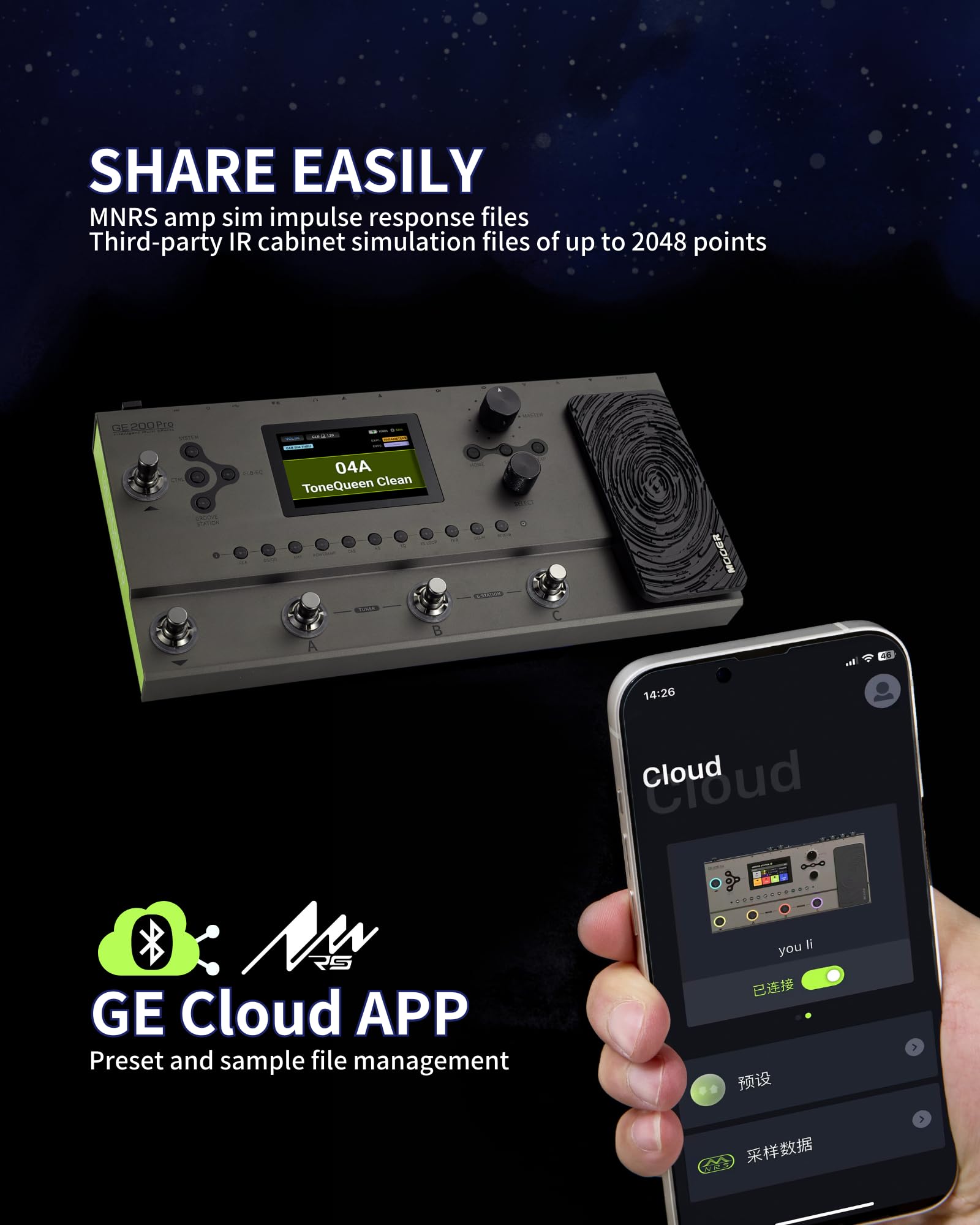

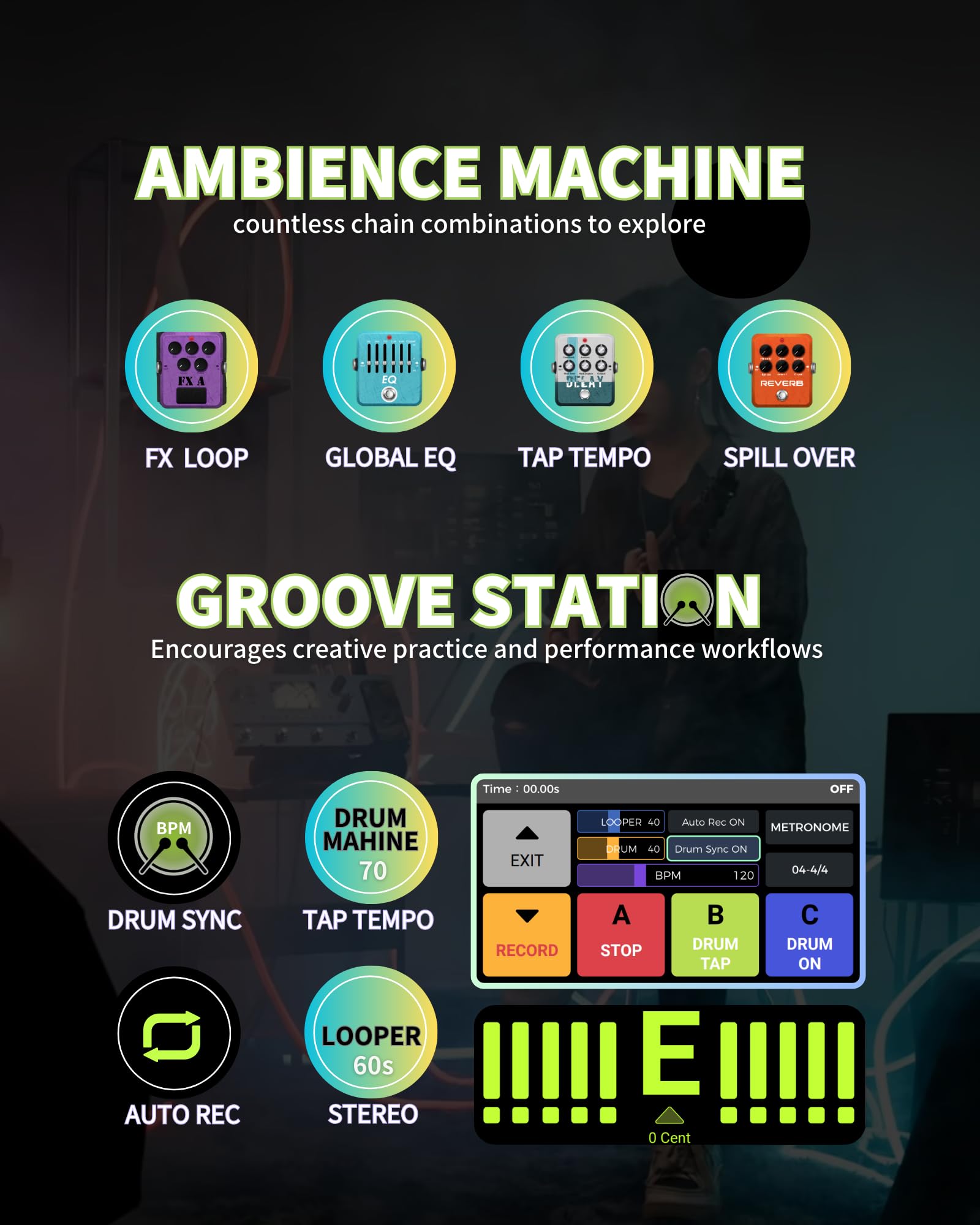


🎸 Unlock Infinite Guitar Worlds with the GE200 Pro!
The OOER GE200 Pro is a cutting-edge multi-effects pedal and amp modeling processor featuring 286 effect modules, advanced MNRS IR loading with 20 free slots, Bluetooth audio streaming, and a Groove Station drum machine. Designed for professional guitarists and tech-savvy musicians, it offers versatile I/O options including stereo XLR outputs, programmable MIDI, and a low-latency USB-C audio interface, making it an all-in-one powerhouse for live performance, recording, and creative exploration.




| ASIN | B0D7PKBQCC |
| Best Sellers Rank | #12,333 in Musical Instruments ( See Top 100 in Musical Instruments ) #19 in Multieffects Processors |
| Color Name | GE200 Pro |
| Customer Reviews | 4.4 4.4 out of 5 stars (60) |
| Date First Available | June 21, 2024 |
| Hardware Interface | Bluetooth, USB |
| Item Weight | 3.85 pounds |
| Item model number | GE200 Pro |
| Package Dimensions | 13.78 x 6.89 x 4.72 inches |
| Signal Format | Analog |
J**O
Great sound and quality
First MOOER product i ever bought. Amazing pedal would buy more. Sounds great with my cheap guitar and small amp. Worth the price and endless tones and weird sounds you can make. For less than a new amp you can make your small amp sound big. I have an 8" crate and sound great with this pedal. I dont usually write reviews either. Jam on!
M**S
Me encanta sus efectos la opción de usarlo de forma autonoma sin necesidad de tenerlo conectado a la energia
P**H
Nice but…
So, I love the look (except the green side-panel) and feel of it. The pedal is a bit small, but works well. The software is well thought out, and UI/UX great, once you understand the concept of how it has like “Banks” (groups) that allow you to setup a sound for different needs, say one for rhythm, and one for lead. Where it falls short is that you can only use a single pedal from a group such as FxA or FxB, and they group stuff together that should be in separate groups. To get more groups, you have to get the GE1000. If I had programmed it, I would have maybe limited it to two Fx groups, but allowed you to select those 2 from say 6 with proper Fx groupings. However, that said, for this price point, it does allow you to creat many different Tones, and is way easier to carry than your pedal board. I hope they update the software.
J**O
Producto de buena calidad en cuanto a la construcción, buen acabado, buen sonido, fácil de usar y configurar.
G**Z
Buen material, relacion calidad y precio. Excelente sonidos, muchas funcionalidades para ese rango de precio
J**N
Cualquier conexión en vivo o en estudio es super efectiva y el sonido 10/10
K**A
Not bad at all
The presets are hit and miss. Some I love, some I love to hate lol. The clean amps are excellent imo, and I love the JC120 sim with chorus applied. The high-gain amps are a mixed bag but the different styles/tones are all there. American-style, British-style, German-style, etc. The build quality is pretty dang good for a sub-$200 pedal. It's actually a lot easier to use than you'd think with only two knobs for parameter control; it's very thoughtfully designed. Lower knob cycles through effects blocks and press to turn on/off, upper knob moves between parameters, pressing it toggles adjusting the parameter or moving between parameters. It's honestly a pretty fast workflow and I barely thought about it after a few minutes. The included Quick Start guide doesn't tell you how to calibrate the pedal. Press EXP, then select Calibration. Move the pedal to minimum, press Select. Move it to maximum, press Select. The firmly press on the top of it, against the unit, and press Select. If it says OK then the calibration was successful. You MUST complete all three steps. You benefit greatly from making your own presets, the presets are not this thing's strong suit, imo. But there are good to great sounds in it if you spend some time with it. If you are using it in front of a guitar amp you will want to disable the speaker block; you can also set up both outputs to either be speaker sim or pass through so you can run to a mixer for front of house/PA, and also into an amp. Use the effect Return, or if in front of an amp consider disabling the amp sim and just using the effects. The tuner works well. Not a lot to say there lol. The looper is very easy to use, too. A button records or overdubs, or will start playback if you've used B to stop playback. B will stop and then will clear the recordings. C tons on/off the drum loop and there are several to choose from. In my opinion this is a good product in its price range. At the time of this posting it's $30 off, and for $150 that's a great deal. A lot of this stuff I've said is subjective, of course, but hey it's Amazon and you can always return it :) It's also smaller than you'd think it is, very easy to take it with you.
J**O
Excelente adquisición
S**I
Great value for the price. Good tool for practice.
A**M
I had heard a lot of good things about the GE200 Pro, so I was excited to have an opportunity to test it. I’ve been using modelling amps and pedals for over 20 years, and am truly impressed at how far the technology has come since I got my original Line 6 Spider back in 2001. I’ve seen a lot of products come and go in that time, so the real question I wanted to answer is whether this pedal can hang with the big boys like Helix, Fractal, etc. While those companies might not be losing any sleep just yet, it may not be too long before they sit up and take notice of what Mooer is doing. This unit has a few areas to improve upon, but it's an exceptional intermediate-level pedal. I’ve been very impressed at the depth and range of amps/effects it has to offer. I wanted to take some time to really explore this pedal before writing my review. I’ve been using it for 5-6 days now and, while there’s still plenty left to see, I feel totally confident saying this puppy rocks. I will also say that there's a bit of a learning curve, so you’ll definitely want to download the manual and read it carefully to get the most out of this. The models are impressively high quality, and it sounds like you’re standing in the room with a real amp. For example, I was amazed at how good the “Slow” (Soldano SLO-100) model sounded...it was almost like a time machine had taken me on a trip back to the 90’s. While the models don’t respond quite as realistically as I hoped (they don’t clean up the same way a tube amp does when you turn down the volume on your guitar), the huge variety of amps, power amps, and pedals makes this a very attractive unit, indeed. Sound: As I said, these models are quite something. They may not be the caliber of a Helix or Quad Cortex, but the realism is impressive. This contains models of some of the most sought after amps in history (EVH, Peavey, Diezel, Marshall, Mesa Boogie, Dumble, etc.). There are 46 classic amps, 28 boutique, and 26 “complete” amps, which appear to be modelled on the entire amp and matching cabinet rather than just the preamp. Most have three separate gain profiles included, with clean, overdrive, and distortion IRs. If you’d like to see a full list, you can download the manual from the Mooer website (be sure to get the GE200 PRO manual, not the GE200). Even better, there are TONS of pedal models, cabinets, power amps, etc., to choose from to create your perfect tone. Most parameters can be edited for each, which offers a mind-blowing sonic palette to experiment with. Grade: A Versatility: I’ve never seen a pedal that gives you as much freedom as this does. Even beyond all the amps and effects, this still has plenty more waiting under the hood. You can play around with the order of the signal chain, turn effects on or off (alone or in groups) by tapping the switches, or assign the expression pedal to particular effects and/or parameters (volume, amp gain, wah, pitch shift, or virtually anything else). You can even add an external expression pedal for extra controls if you like. Here's a little tip (because it took me a long time to figure this out on my own): assigning functions to the expression pedal is very easy, but the manual makes it sort of confusing. Instead of selecting the pedal like the manual says, you have to select the actual parameter you want to control (such as the wah range, for example) and then long-press the select button on that to open up the control menu. Grade: A- Interface: The colour screen is easy to read, and you can easily get all the info you need by just tapping a few buttons. It can be confusing at first, but it won’t take long to get the hang of it. The up and down buttons select different banks, and you simply tap the channel button you want. Once the preset is selected, tapping the button again goes into “control mode” where you can edit effects, assign functions, etc. That’s made even easier by the row of physical buttons that correspond with the different effects so you can easily select the ones you want to edit. You’ll want to get in the habit of saving your changes frequently, though. If you happen to tap another switch while editing, you’ll lose all your work and have to start over. Grade: A- Groove Station: The Groove Station offers an array of different beats and styles to jam along with. While I love that a looper is included, I was disappointed that the max duration in 60 seconds. There also doesn’t seem to be a way to save your loops on board, so they’ll disappear as soon as you turn the unit off. There’s certainly some customizability here, but it’s nothing special. I like knowing it’s there if I want to use it, but it kind of seems like an afterthought. I expected a lot more at this price. Grade: B- Software: Software is often the Achilles heel for Mooer, but this studio isn’t too bad. The PC version is a little clunkier than the Android, but they both do their job. One major issue is the firmware update, though. Make sure your pedal is plugged into a wall outlet before trying to update, otherwise things could get weird. There’s no warning until it happens, either. I didn’t have mine plugged in at first, and it got caught in a loop; I was worried that it would wipe the system without writing the new data. I plugged it in in a hurry and everything ended up okay, but avoid that if you can. Another big problem is that updates erase all of the presets you’ve written. I lost a few that I’d spent some time on, and that was pretty frustrating. Be sure to back them up to your computer regularly. Grade: C+ Pros: -Well-made -Screen is large and easy to see -Contains 90 presets and well over 100 blank slots to save your own sounds -Huge variety of some of the most sought after amps in history; 46 classic, 28 boutique, and 26 “complete” amps -Huge variety of pedals, cabinet sims, power amps, etc. -Models are generally very good; sounds like being in the room with a real amp -Impressive depth of control; can tweak virtually any parameter as desired -Great control over effects; can change signal chain, effects groups, or assign functions to the pedal -Has a lot of extra features you may not expect (such as using it as a recording interface with a computer) -Built-in battery frees you from having to worry about power cables; great for busking Cons: -Models don’t always respond like a real amp (won’t clean up when you lower the guitar volume) -Some of the pedals are disappointing (the pitch shifter sounds more like autotune) -Expression pedal needs calibration, which can be an annoying process (use your feet, not your hands) -While the screen is fine, a touch screen would have really opened up the functionality -Firmware updates will erase your personal presets; that can be heartbreaking, so be sure to back them up -The software is good in some ways, but still a bit clunky; better on Android than PC -Groove Station has a variety of beats, but it’s nothing special -Looper’s max recording time is 60 seconds, which is disappointing -Doesn’t appear to be a way to save the loops you record -Mooer website is kind of awkward to navigate; finding manuals and software can be frustrating, especially when the product names are so similar While this pedal has some faults, it really isn’t standing too far away from greatness. I’ve been having a blast with it...and it’s kind of hard to go back to my other pedals after using this one. I wish I’d had their budget version (the GE150) to test so that I could compare them and say which was the better overall deal. Even so, I think this one would be the big winner. If you’re interested in this pedal, I’d recommend going to their website, downloading the manual, and reading through it before you order. The site is kind of awkward to navigate, so it’s best to just go to the product page for this unit and download the manual from there (be sure to use the full name GE200 Pro, as they have a different pedal called the GE200, which is totally different). While this costs a pretty penny, $860 is one of the best prices I’ve seen so far; other sites are charging well over $1000. Still, it wouldn’t be a bad idea to do some price comparisons before you buy. That said, I love this pedal and wouldn’t hesitate to recommend it. 4.5 stars
T**S
The Mooer GE200 Pro is a surprisgnly compact yet powerful multi effects processor that has streamlined everything needed for performing, recording and practicing. Jammed packed with features and ease of use, it's colour coded, boasts a massive 4.3 inch touchscreen, and the rest of the buttons are backlit. Acoustically, this processor offers a wide range of sounds, effects and cover sounds from decades of legendary music. The looper feature is a lovely piece of tech built right into this and with 30 secs of recording, you've got enough time to make something real good. This also supports Micro USB, computer recording, lifetime updates and integrates seamlessly with DAWs. Overall, the look, feel, build and sound quality this can produce is professional level and since there's a built in battery, this thrives on the road. I am very impressed with this and can't wait to use this on stage! Thank you for the full service pedal!
A**M
I tested Mooer’s higher end GE200 Pro a few months ago and was very impressed with it. While the GE150 Plus doesn’t have all the bells and whistles of its big brother, it offers an awful lot of guitary goodness for the price. In fact, I think I actually prefer this one in a lot of ways. The presets sound great, and the navigation and editing are totally intuitive. It has a lot of great features under the hood, but I do have a few complaints worth mentioning. Before doing anything else, you’ll want to download the manual because the quick start guide is virtually useless. Don’t bother checking the download section of their website because you won’t find it there; instead, you’ll find a link on the pedal’s product page. Not only does it contain a lot of useful tips, but it also has a list of all the amps, pedals, cabinets, and presets on the pedal. There’s a bit of a learning curve in spots, and reading the manual will help you get the most out of this pedal. Sound Quality: The amp models are very impressive for a budget pedal, and they sound similar to the ones in the more expensive GE200. They’re much more realistic than those you usually find in a pedal at this price point, and they respond to player dynamics much like a real amp. They don’t clean up quite the same when you lower the guitar’s volume knob, but switching pickups and varying the strength of your picking creates noticeably different tones and/or gain saturations. I’m very pleased with that attention to detail. There are 55 sims (usually including a clean and dirty of its 32 different amp models) with 20 open slots. It includes some of the most sought after amps in history (EVH, Peavey, Diezel, Marshall, Mesa Boogie, Engl, etc.). There are even a number of specific presets that mimic the signature tones of particular artists or songs (“Sweet Child ‘O Mine”, “Slow Dancing in a Burning Room”, “Electric Gypsy”, etc.) I generally found most of the presets pretty inspiring. I wrote 9 new riffs just messing around with the different tones. This is a great songwriting tool that can help pull you out of ruts. There are lots of pedal models and cabinets to choose from. There are 28 drive pedals, 10 effects pedals (wah, compression, etc.), and 25 modulation effects (chorus, flanger, etc.), as well as 9 delays and 8 reverbs. That’s a lot of versatility on tap, and the intuitive controls make it easy to dial in or customize a sound. Even better, the expression pedal can be assigned to almost any parameter of a pedal or amp. I’m very impressed. Grade: A Menu/Preset Interface: The screen is easy to read, and the button layout quickly becomes second nature. There’s a lot of depth to explore, but the dual rotary knobs make navigating and editing presets very intuitive. The “System” button takes you to the main menu section, where you can customize a number of features. Whether calibrating the expression pedal (which you’ll definitely need to do sooner than later) or turning the cabinet simulation on or off, it’s all a pretty straightforward affair. Grade: A- Button Navigation: This is where the pedal has problems that will hinder it in live performances. The GE200 had separate footswitches to page up and down through the presets, which made navigating them much easier. This unit is kind of cumbersome, as you have to press A+B simultaneously to page up, and B+C to page down. You can also use the knob to scroll through presets (it’s what I usually do when messing around at home), but that’s not feasible when playing live. The arrangement of presets could also be done better, as there’s not really much of a pattern. They mainly just follow the alphabetical order of amp models. There’s also some overlapping that leaves some sequential presets (such as clean, OD, and lead for a particular amp) on different banks. That’s irritating. Grade: C+ Tuner and Looper: Both the tuner and looper work well. Long-pressing A+B opens the tuner, and I was pleased to find it’s actually quite accurate (better than the clip-on tuner on my guitar, at any rate). Long-pressing B+C opens the looper. The button controls take a little getting used to, but it’s a very useful extra. You can also use the built-in drum machine to add percussion, but be aware that your loop will disappear as soon as you turn the unit off. Grade: A- Build Quality: It feels pretty sturdy, but it’s worth noting that the casing is made from plastic. I think it could withstand basic live performances, but you might want to place it on a chair or table rather than on the floor where it could get trampled on. Grade: B _____________________________________________________________________ For all the naughty folks who always skip to the end, here's the TL:DR: The Pros: -Versatile -Sounds great -Presets are very musical and inspiring; great tool for songwriting -Perfect for noise-free practicing; your neighbours will love you (not a guarantee) -Easy menu navigation -Contains some great amp models, including Marshall, EVH, Engl, Mesa Boogie, etc. -Amp models are fairly realistic, and respond to player dynamics much like a real amp does -A variety of good quality presets with a solid balance of clean and dirty sounds -Lots of pedal and cabinet sims to experiment with; can tweak virtually any parameter if desired -EXP pedal can be assigned to virtually any amp or effect -Tuner and looper built in -Acoustic sims are substantially better than most budget pedals The Cons: -Footswitch navigation is awkward -Presets could be organized better -It would be nice if there was a way to create a favourites list for the presets -Can hear some noticeable digital artifacting in some of the presets (mostly the cleans) -Expression pedal needs to be calibrated upon arrival -Recorded loops disappear when you turn the pedal off -Finding manuals and/or software on the Mooer website can be frustrating In terms of the sound quality, I’m very pleased with this pedal. It’s an inspiring unit to play with, but the poor footswitch navigation really hampers it. The current price ($239) is the same as Mooer’s larger 4-button GE150 Pro; I don't have one to compare directly, but the features appear to be similar for both units. The compact size of this pedal results in some compromises, and I think that makes it a harder sell when both cost the same. All things considered, I really like this pedal. It’s a joy to play with, but it also has some real drawbacks. The sound quality is excellent, but it might not be a bad idea to have a look at the GE150 Pro as well. 4 stars
H**O
I used a few Mooer brand products and I have come to love them. As the others, this also has some common attributes. It has a solid body that seems to be able to handle the physical loads and be durable, even under the pressure of your foot. It has a nice user interface with the rotary knobs and a wonderful digital color screen. While it has menu options to access, the combinations of the knobs and the display make it a breeze to access what you want very quickly. It comes with a good number (and a good variety) of effects as well as a large number of presets. It is also provides great assistance for personal practice or joy through its built-in looper and drum machine capabilities. I can strongly recommend it, but I will also strongly recommend that you also check the GE150 Pro (especially Pro Li) model too. The price difference can be high in terms of percentage, but small as a sum value, and I feel like it might be better to pay the extra for the even more capable model from the same brand.
Trustpilot
Hace 4 días
Hace 1 mes