We remain fully operational. Our teams are working around the clock to ensure your deliveries continue safely.

Descargar la aplicación


Servicios al cliente
Sobre nosotros
Copyright © 2025 Desertcart Holdings Limited
Descargar la aplicación
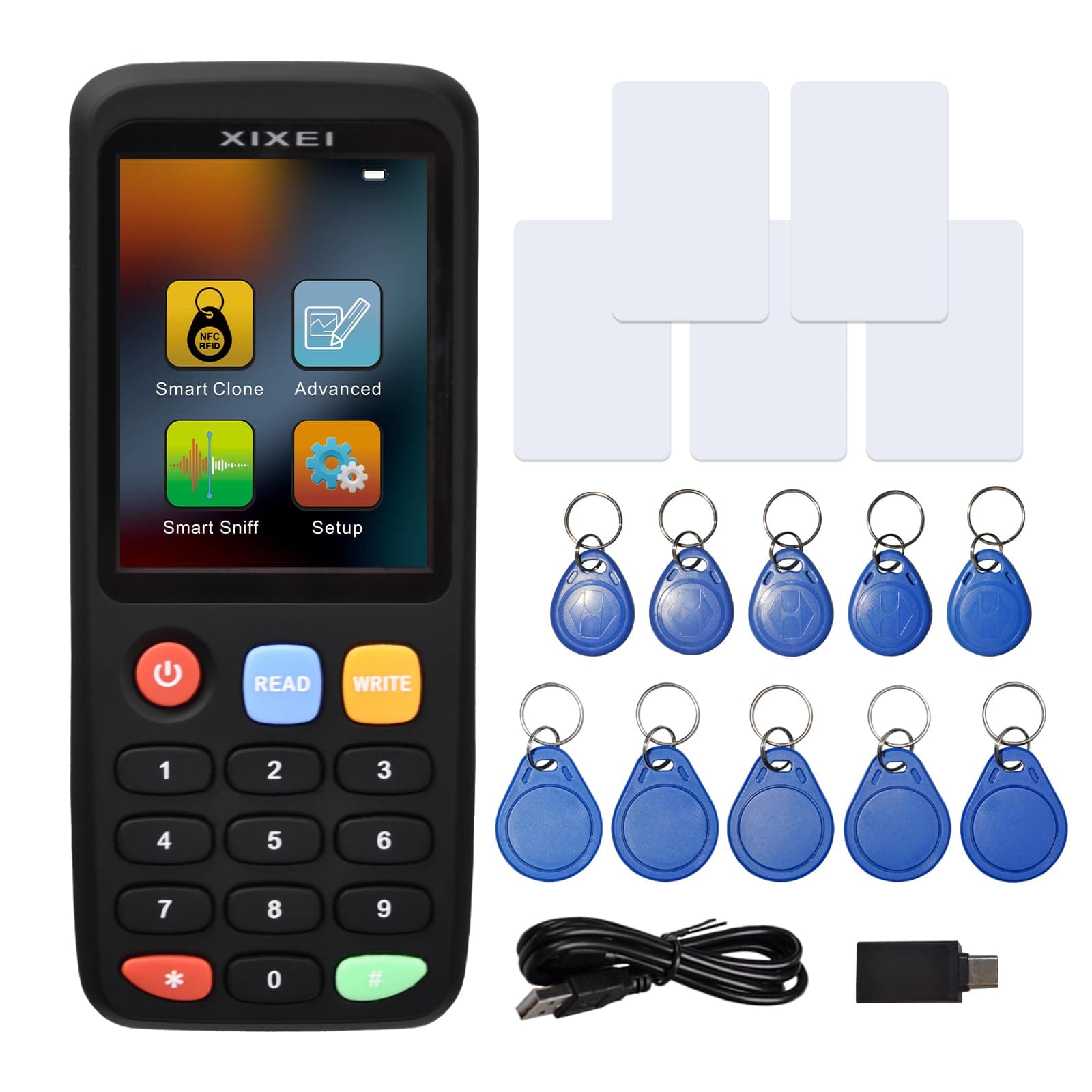
🔑 Unlock the future of card duplication with X7 — smart, sleek, and always connected.
The X7 NFC RFID Card Copier Reader Writer is a compact, multi-frequency smart duplicator supporting a wide range of card types including S50, S70, TK4100, and HID ProxCard II. Featuring a 2.8-inch TFT color screen, USB Type-C connectivity, and app-based control for iOS and Android, it offers one-touch reading and writing with built-in rechargeable battery power. Perfect for professionals needing fast, reliable, and versatile card programming on the go.


| ASIN | B0CWXS2GZW |
| Best Sellers Rank | 30,732 in Computers & Accessories ( See Top 100 in Computers & Accessories ) 350 in External Memory Card Readers |
| Brand Name | XIXEI |
| Colour | Black |
| Compatible Devices | Laptop, Personal Computer, Smartphone |
| Customer Reviews | 3.8 3.8 out of 5 stars (171) |
| Hardware Interface | USB |
| Item Dimensions L x W x H | 14L x 5.8W x 2.3H centimetres |
| Item Weight | 3.23 Ounces |
| Manufacturer | XIXEI |
| Media Type | MMC |
| Model Name | XIXEI-X7 |
| Network Connectivity Technology | USB Type C |
| Operating System | iOS, Android |
| Product Features | Compact |
R**U
Excelente produto.
C**D
déjà tester plusieurs fois et fonctionne parfaitement
S**L
Exelente producto tal y como el de la publicación lo recomiendo al 100%
M**T
Use the red "*" button at the bottom to cycle through options on the screen (it's not a touch screen). You don't really HAVE to do that---you can just use the read/write buttons for simple cloning. I didn't do that---just put a key fob badge under it and clicked the "Read" button. It failed a couple times, but I moved the fob around a little and then flipped it over and it read it. Then I did the same with "Write" button and one of the blank fobs they included. IT WORKED!!!! Then to clear the test fob I hit "Write", but didn't have the fob near it, then I typed "0000000" and then put the test fob up to it and hit "Write" again and it overwrote "00000" as the number. (We didn't want a second, usable fob floating around since this was just a test). The box and soft insert this came in was MUCH nicer than the one my Samsung phone came in, LOL! The pamphlet that comes with it mentions an "ODG" adapter---it's not, it's just a USB to USB C adapter, which is stuck on a regular USB to USB C cord. Nice of them, but all I could do was charge this device by plugging it into my phone--which is pretty cool if you don't use it often and don't want to find a wall outlet to charge this thing up in a hurry from. Maybe there is ODG possible---I don't know (***it works, just plug into Windows computer). I have over half a dozen devices like this (including the Zero Flipper) and this is probably the 3rd nicest. The build quality: it feels and looks nice in the hand too. Ease of use was easy. Immense value for the money: so many features to play with, but you can just read/write button it for simplicity. There are a zillion different types of RFID protocols out there---so you WILL need multiple devices with different frequencies/protocols for playing around. TIP: screen cap and print out the specs listed for all your RFID devices and make a nice binder--it'll make it easier to flip through and choose a device which stands a better chance of working (if you happen to know what protocol/frequency the tags you're trying to read/write actually are). ****UPDATE: you can plug this into a Windows computer (any usb cable works) and it will OTG--once you download the software. Go to the website on the pamphlet and go to X7 and there will be a LONG instruction PDF and a couple versions of the software. I downloaded the latest (2025) updated software and it worked. YOU MUST CHOOSE TO READ either the regular type of card--or on the upper right a HID card. If you get an error "reading failed" just click on the OTHER "read card" button.
E**O
Ottimo
Trustpilot
Hace 2 semanas
Hace 2 días