🚀 Compact power, triple screens, zero compromises.
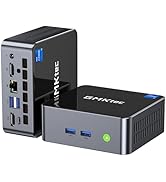
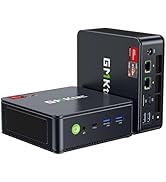
The GMKtec Mini PC 5825U M5 Plus is a sleek, high-performance desktop powered by AMD Ryzen 7 5825U (8 cores/16 threads, up to 4.5GHz), equipped with 16GB DDR4 RAM and a 512GB PCIe SSD. It features dual 2.5G LAN ports, WiFi 6E, Bluetooth 5.2, and supports triple 4K displays, making it ideal for professionals seeking a compact yet expandable powerhouse for multitasking, server use, and creative workflows—all running Windows 11 Pro.





| ASIN | B0DJLWVNHF |
| Are Batteries Included | No |
| Best Sellers Rank | #13,142 in Computers ( See Top 100 in Computers ) #53 in Mini Desktop Computers |
| Brand | GMKtec |
| Computer Memory Type | DDR4 SDRAM |
| Customer Reviews | 4.5 4.5 out of 5 stars (349) |
| Date First Available | 19 November 2024 |
| Graphics Card Description | Integrated |
| Graphics Card Interface | Integrated |
| Graphics Card Ram Size | 8 |
| Graphics Coprocessor | Integrated Graphics |
| Graphics RAM Type | GDDR4 |
| Hard Disk Description | SSD |
| Hard Disk Rotational Speed | 7200 |
| Hard Drive Interface | Solid State |
| Hard Drive Size | 128 |
| Item Weight | 1.48 Kilograms |
| Item model number | GMKtec Nucbox M5 Plus |
| Manufacturer | GMKtec |
| Maximum Memory Supported | 64 GB |
| Memory Technology | DDR4 |
| Number of HDMI Ports | 1 |
| Number of USB 2.0 Ports | 2 |
| Number of USB 3.0 Ports | 2 |
| Operating System | Windows 11 Pro |
| Package Dimensions | 18.8 x 18.5 x 10.7 cm; 1.48 kg |
| Processor Brand | AMD |
| Processor Count | 8 |
| Processor Socket | FP6 |
| Processor Speed | 4.5 GHz |
| Processor Type | AMD Ryzen 7 |
| RAM Size | 16 GB |
| Resolution | 3840x2160 |
| Screen Resolution | 3840 x 2160 |
| Series | Nucbox M5 Plus |
R**D
New pc should not restarts suddenly
After two days it restart suddenly every 1 or 2 hours .. does not worth the money
C**C
Pris pour faire un homelab. Je l'ai passé en 64 Go de ram et j'ai ajouté un 2nd disque NVME de 2 To. 100% compatible et fonctionnel avec Proxmox. Fait tourner sans sourcier un cluster K8s et une 10aine de VMs/LXC. Consomme très peu en idle. Bref parfait en utilisation serveur.
C**L
Sehr zu empfehlen.
G**R
Ik ben er blij mee. Voldoet geheel aan mijn wensen. Groot werkgeheugen. Veel aansluit mogelijkheden voor app.
E**.
Ho aspettato un po' per fare questa recensione in quanto volevo testare il prodotto, partendo dalle dimensioni minuscole si può mettere davvero ovunque, prestazioni allucinanti, oltre alla produttività, lo uso come PC da gaming e va una favola, non dico che può sostituire u PC assemblato con un 5070, ma fa veramente un bel lavoro in 1080p ho provato anche in 2k e non da il massimo ma tutto giocabile, da arena break out, Cod, e giochi del genere, oltretutto ha una porta oculink che permette di collegare una scheda video esterna, e in questo caso niente più da invidiare ad un PC assemblato. Dopo pochi giorni ho notato un fastidioso rumore che proveniva dalle ventole, ho provveduto a contattare gmktec e in meno di 10 giorni hanno inviato le due ventole incriminate, si sono scusati e sono stati gentilissimi e presenti.cosa dire consiglio sia il PC in questione sia i prodotti di quest'azienda perché sono validi e valgono più di quello che costano. Non sono pagato da nessuno questa e la mia recensione reale senza cavilli di sponsor pagamenti e robe varie, infatti mi riservo di modificare la recensione se dovesse cambiare qualcosa.
M**Y
This MiniPC (GMKtec Desktop PC Computer 5825U M5 Plus) came with really nice packaging like the last two GMKtec mini PCs I bought. Easy access to the internals, just 4 screws to remove after taking the lid off. 2 x M.2 slots so plenty of room for expansion. Great to have twin 2.5Gb network adapters if you wanted to use it as a router also. They are both Realtek NICs but you can’t have everything I guess! 😊 Comes with Windows 11 Pro, preinstalled, not bloatware at all – other than some of the crap that Microsoft includes these days! 😊 It has three performance profiles accessible in the BIOS. Performance, Balanced and Quite. It’s quite noisy in performance mode, for perhaps 12% more speed. Peak power draw in that mode seemed to be about 48W (25W TDP for the CPU). Balanced is a good compromise, not too noisy and decent performance. Quiet reduces the power available to the CPU (I think max 15W TDP) and definitely stays quiet. In PC Mark 10 I didn’t see it go above 24W draw from the plug in Balanced mode. In terms of results, I got 6145 in performance, 5231 in balanced and 4714 in quiet. If you wanted to use this as a server which is something I’m seriously considering, then it does seem to be a good candidate in terms of the idle power draw. In Windows 11 when Idle it sits at about 6W in the Balanced profile from the BIOS. I got similar results when testing out Unraid 7 on it. Obviously if you are running background services you are going to get spikes in power draw. I haven’t tested it with two NVMe SSD’s yet, but that loadout may increase it a little. I suppose the only drawback there would be the limited storage capacity, but 4TB NVMe drives are getting cheaper, and I guess you could even go for an 8TB drive, but they are still quite pricey. A shame there wasn’t a way of putting a 2.5” Sata caddy in there as well I guess. Not really a prime candidate for gaming, but still a decent iGPU (Radeon Vega 8). Certainly capable of playing less demanding games, just not at 4K! 1080p is fine though. I just tried out Mechanicus (A Warhammer 40K strategy game) and I believe that uses the unreal engine. A few years old now but it played great on here. That was at 1080p resolution. I’m sure it would play Minecraft at 1080p quite well also. My son now wants it for his bedroom as it’s definitely faster than is old Ryzen 3 laptop which is about 4 years old now. The good thing is, it’s quite flexible in what you can do with it, and can be had much cheaper if you already have some ram and an SSD to put in it, going for the barebones option. Especially good if you don’t need Windows and would rather put something like Ubuntu or Mint on it. The only negative I can think of really is the fact that GMKtec don’t make new BIOS updates available to download any more. I went for this after the good experience with the last two GMKtec mini PCs I bought (one was an Intel N100 unit) and the other was a Ryzen 3 based unit. I think the N100 NucBoxG3 definitely ran more quietly than the two Ryzen based units, but it’s quite limited in terms of RAM (single channel and only one slot) and also quite limited in terms of the PCIe lanes it has, so the storage was quite slow in comparison to these Ryzen based models. Plenty of models and options to pick from though. I’m seriously considering replacing my main PC with one of the newer high end offerings with the very good integrated RDNA 3 GPU’s though. Tiny footprint, but a hell of a lot of power! In conclusion though, I wouldn’t hesitate to buy a GMKtec Mini PC in the future.
Trustpilot
Hace 1 mes
Hace 1 mes