💻 Upgrade your storage game—fast, flexible, and fuss-free!
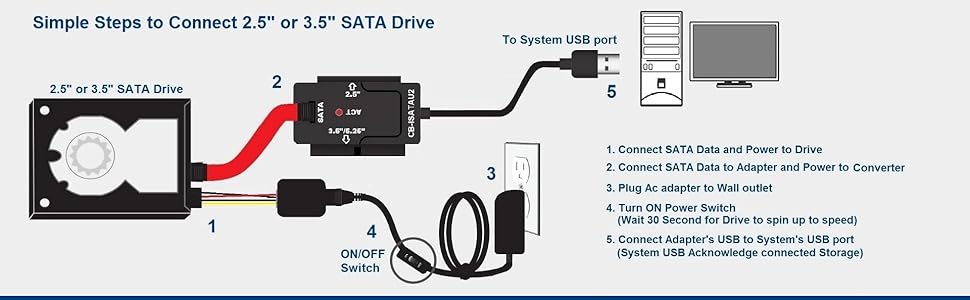
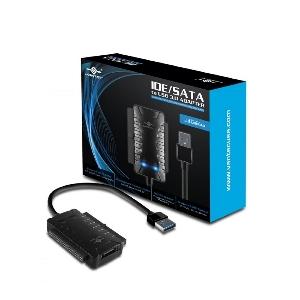
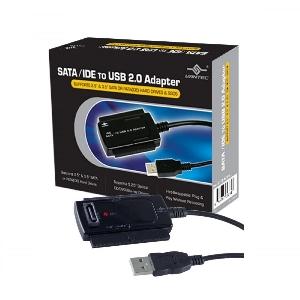
The CB-ISATAU2 adapter transforms SATA and IDE hard drives (2.5", 3.5", 5.25") into USB 2.0 external drives, supporting up to 2TB capacity with transfer speeds up to 480 Mbps. Its hot-swappable, plug-and-play design ensures instant connectivity with Windows and Mac systems without rebooting.


| ASIN | B000J01I1G |
| Guaranteed software updates until | unknown |
| Item model number | CB-ISATAU2 |
| Manufacturer | Vantec |
| Product Dimensions | 7.01 x 4.29 x 0.99 cm; 272.16 g |
H**I
I bought this to use on my 3.5" drive, but I wasnt able to use it. One - the power output was too high for my 2TB WD Caviar Green drive and so smoke started appearing from the HDD while using it. I dont know if I damaged by HDD yet, but the lack of power control is a serious issue with this. MOdern HDD's are quite efficient, so utility of this is questionable without power control. The cables are also delicate to touch and need to be handled very carefully. Overall, not an easy experience and not what was expected.
J**A
I just tested my new Vantec CB-ISATAU2 today. I have seen everything from very positive to very negative reviews on this product, but my experience so far is quite good, though I have only owned the product for one day. So I would recommend this product based on my initial experience, but I cannot vouch for its longevity. I conducted my tests using Windows XP Pro 32-bit on a Dell Inspiron E1505 laptop with USB 2.0 ports. (I did not test the transfer speed as this is very much dependent upon the particular source and destination drives used and the nature of the data transferred (sequential or random). I don't feel like doing a proper speed test.) Here are the results: 3.5" IDE Hard Drive Test ------------------------ This is an old IBM Deskstar from 2001. The connection to the IDE port and to the power were both solid and the connections were easy to make and held firmly. I initially used the Cable Select jumper configuration because that is what was already set and this worked fine. I then tried Master and Slave and both of those worked equally well. I have read in at least one review that it may be important to turn on the power to the drive before connecting the USB to the computer, but connecting the USB before the power worked just as well for me. However, disconnecting the power before the USB resulted in the operating system not recognizing that the device was no longer present, until I disconnected the USB. No problems resulted. In neither case did I bother to "Safely remove hardware". Sometimes when I connected the drive Windows gave me a "USB device not recognized" followed by a "This device can perform faster" notice. I did not determine what caused this, but the drive was still accessible in both cases. Sometimes there was a fairly long (I counted 32 secs. once) delay between the time I connected the USB and when Windows began scanning the drive and mounting it, particularly after receiving the above mentioned notices. This delay seemed to happen most consistently and for the longest time if I plugged in the USB and then unplugged it without ever powering on the drive, then powered on the drive and plugged the USB in again. Windows always recognized the drive eventually. So be patient before deciding that the device isn't working. 2.5" SATA Hard Drive Test ------------------------- This is a Hitachi drive from 2008. My experience with this drive was the same as with the other, excluding the jumper configuration tests which do not apply, and the delay problem which did not seem as bad. Everything connected well and the drive was recognized and worked properly, regardless of which order I connected the power and USB. Again, I did not "Safely remove hardware" first and no problems resulted that I am aware of. General Assessment ------------------ As I stated before, all connections were easy to make and held firmly. Just as in the case of internal molex power connections, this one, too, is very tight. The power switch on the cord works perfectly and seems to be of decent (not excellent) build quality. The build quality in general seems decent as well. The power block has what I consider to be a reasonable weight for such low wattage (12.0V @ 2000mA and 5.0V @ 2000mA). Nothing rattles and everything seems reasonably durable. The only minor exception is the molex to SATA adapter which appears cheaply constructed. But it worked, and it can be cheaply replaced if necessary. The power switch block on the cord has a small, green LED on it which indicates the status of the switch. The data adapter has a red LED which lights up when the USB is connected, and flickers between bright and dim to indicate activity.
F**N
I ran two TRANSFER TESTS using my five-year-old PC Seagate Barracuda 160GB 7200 RPM SATA 6.0Gb/s 3.5" Internal Hard Drive (I threw away the PC today finally). I "plugged in" the hard drive using this product to my Dell Inspiron 1545 running Win 7 Ultimate x64, Dual Core T4400 @ 2.2GHz, 3gb RAM. Test 1: 3gb from laptop to hard drive: 3mins. Speed: 20-22MB/s. 3gb from hard drive to laptop: 2:10mins. Speed: 22MB/s-26MB/s. Test 2: 3gb from laptop to hard drive: 2:38mins. speed: 21MB/s-24MB/s. 3gb from hard drive to laptop: 2:10mins. Speed 22Mb/s-26mb/S. Things to know about this awesome product: 1) The adapter comes with an ON/OFF switch. This is really nice because it allows you to leave the hard drive connected to your other computer but you can choose to leave it ON or OFF!! 2) Remember to always use the built-in feature of your OS to eject/unmount the hard drive before physically disconnecting it. This will prevent anything bad from happening. 3) In my case, it was "plug & play." Super easy. Took me 1-2 minutes. I didn't have to do anything whatsoever besides connecting the cables. My computer immediately detected it and I was able to immediately access my files. 4) This looks like a very SAFE device to use. I checked other products on Amazon and some people said their drives got fried. This product let me tell you it looks and feels very safe. The way everything is connected. Very happy with this! If your hard drive gets too hot then get a big fan and give it air or just stop using it for a few minutes. I highly recommend this product. UPDATE 6/21/12: I'm still extremely satisfied with this product. I use it a lot with my two super old SATA hdd and IDE hdd. Transfer speeds are great and I feel very safe with I connect my HDDs to this device. I still love the ON/OFF switch because after I eject an HDD (using windows) I can turn the hdd off and leave it plugged in, so if I want to use it again I just have to turn the switch ON and windows will recognize it again. Very neat!
M**A
my computer motherboard smoked. burned out literally. i had backed up my data but there was some i didn't back up never thinking i would need to. big mistake! almost lost it all and it was important to my business and my personal life. long story said. this linked up my hard drive and i was able to access everything and transfer to a new computer easy as plug and play! just like it says. so very grateful i ran across this option...it saved me time, money and headaches. best thing i have bought from amazon. hands down! all the extra cables they provide were exactly what was needed for my older system...14 year old computer. and it linked right up. i couldn't believe how easy it was. going to buy a 2nd kit real soon!
A**R
Good alternative to Enclosures. The cable quality is a bit cheaper and simpler (either with that price). It is easy to assemble and use (but not result contains instructions as necessary). Cons: - Very sectioned, many parts. They were able to find something that connects two or three, but they are 6 parts to connect! - Quality of supply and cables. Pros: - Price - Overall Size (box packed). - Contains SATA cables - Connected can be Off or On If you have little money, and it takes something easy, I recommend it. In a couple of months (2 approx.) Have used it 3 times and all good. ------------------------------------------------ Buena alternativa a Enclosures. La calidad de los cables es un poco barata y simple (cualquiera, con ese precio). Resulta fácil de armar y utilizar (contiene instrucciones pero no resultarán tan necesarias). Cons: - Muy seccionado, muchas partes. Pudieron dar con algo que se conecte 2 o tres, ¡pero son 6 partes a conectar! - Calidad de fuente y Cables. Pros: - Precio - Tamaño total (caja, empacado). - Contiene cables SATA - Conectado se puede Apagar o Encender Si se cuenta con poco dinero, y se requiere algo fácil, lo recomiendo. En un par de meses (2 aprox.) lo he utilizado 3 veces y todo bien.
Trustpilot
Hace 3 semanas
Hace 3 semanas