We remain fully operational. Our teams are working around the clock to ensure your deliveries continue safely.

Descargar la aplicación


Servicios al cliente
Sobre nosotros
Copyright © 2025 Desertcart Holdings Limited
Descargar la aplicación


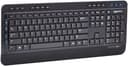
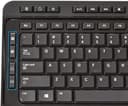
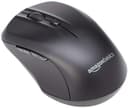
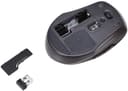
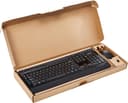

⌨️📶 Elevate your workspace—wireless freedom meets full-sized power!
The Amazon Basics Full-Sized Wireless Keyboard and Mouse Combo offers a reliable 2.4 GHz wireless connection with a compact USB receiver, a full-sized QWERTY keyboard featuring 20 shortcut keys and a numeric keypad, and a contoured wireless mouse with textured grip. Designed for easy plug-and-play setup, it comes complete with batteries included, making it a practical and stylish solution for professionals seeking a clutter-free, efficient workspace.


| ASIN | B079YQPNJS |
| Antenna Location | Security |
| Are Batteries Required | Yes |
| Best Sellers Rank | #5,947 in Our Brands ( See Top 100 in Our Brands ) #662 in Computer Keyboard & Mouse Combos |
| Brand | Amazon Basics |
| Color | Black |
| Compatible Devices | Personal Computer |
| Connectivity Technology | 2.4GHz Wireless |
| Customer Reviews | 3.9 3.9 out of 5 stars (1,656) |
| Global Trade Identification Number | 00816496012942 |
| Hand Orientation | Ambidextrous |
| Item Weight | 2.33 Pounds |
| Keyboard Description | Indoor |
| Keyboard Layout | QWERTY |
| Manufacturer | Amazon |
| Movement Detection | Optical |
| Number of Batteries | 2 AA batteries required. (included) |
| Number of Keys | 104 |
| Operating System | Windows |
| Other Special Features of the Product | Numeric Keypad |
| Power Source | Battery Powered |
| UPC | 816496012942 |
| Warranty Description | Amazon Basics 1-year limited warranty |
H**R
Practicality over compactness
Heads-up for Potential Buyers of This Bundle: Be mindful not to accidentally throw away the USB transmitter with the packaging. Instead of being stored inside the mouse or keyboard, the transmitter is attached to a small cardboard fold within the larger package, making it easy to overlook. That said, my Amazon Basics Keyboard and Mouse Bundle Review: The key presses feel smooth, almost like velvet. There's a slight resistance at the start, but it softens quickly with a bit more pressure, making it effortless to press down. It’s neither clumsy nor stiff. The spacing between the keys is well-designed. They're not cramped together, so you can easily feel the gaps, reducing typing errors and accidental multi-key presses. A standout feature of this keyboard is the inclusion of extra function keys, more than what most competitors offer. As a designer, I prefer a full-sized keyboard over compact versions that combine multiple functions into one key. I appreciate easily accessible, clearly labeled keys that don’t require extra steps to use. This keyboard meets those needs better than any other I’ve researched. It comes with four AAA batteries. One minor drawback is that it's easy to accidentally throw away the USB transmitter with the packaging. Instead of being stored inside the mouse or keyboard, the transmitter is attached to a small cardboard fold inside the larger package, making it easy to miss. The mouse, however, is compact. Personally, I don’t like small mice, since I work with design software like Illustrator and need a good grip. That said, I understand some people prefer smaller mice for portability. I do find it odd that a mini mouse is paired with a full-sized keyboard. Overall, this product maintains the quality you'd expect from one of the world’s largest companies. The materials, construction, and feel are all solid. I recommend this keyboard for designers and anyone who values practicality over compactness.
D**Y
Read before you buy
I bought this product over a year ago but only recently started using it. Two things jumped out at me initially: there's no Caps Lock indicator light, and some of the keys are very stiff. Both of those things I can live with. But after about a month of use I noticed individual keys would stop working. Then it would spread to whole sections of the keyboard. A PC reboot would clear things up, for awhile, then the problems would come back. Unlike some people, I have no issues with the mouse, it's fine. But the keyboard, ugh. I'll stick to Logitech from now on.
A**Z
Like the keyboard, hate the mouse
Keyboard is very nicely built, quiet, with smooth key strokes, a lot of extra functionality available without any drivers or setup. Very nice form factor. Both the keyboard base AND (very unusual!} the flaps to raise the back have rubber boots! So, the keyboard is definitely a keeper! Mouse is definitely a goner! too small and, most importantly, goes into power-saving mode almost right away (like 3-5 seconds) - to wake up you have to click one of the buttons or roll the wheel, which results in unpredictable selections on the screen. But, for the price, I am happy with the keyboard and already bought a bluetooth mouse to save on USB port: mouse https://www.amazon.com/gp/product/B07C2NL5HK/
J**N
don't tust what you are typing on thi keyboard
This keyboard was terrific when I first started using it. I liked the touch and some of the special features (putting cmptr in sleep mode), and the heavy weight of the board. After using it for about a week, I went into my email and my email program started acting strange in a scary way. I closed it and went to a secure web page and tried to sign on about 20 times. The curser was not moving to where it should. I could not open this web page. I then noticed that I had about 20 Google homepage screens open. I cloosed them and then shut down and re-started the computer. I entered my computer password many many times over, and the computer would not accept it and I couldn't re-start it. I spent hours thinking about this, and when I fianly connected my OLD keyboard, everything worked just fine and all the problems were gone. This is not what I would call a friendly product. I tried to report this to someone at Amazon, but all I got was happy talk and no real concern or comprehension of the problem.
R**D
The performance is depending on your expectation
Let me talk about the keyboard first. As other reviews said, the keyboard is the best wireless keyboard I have ever used (price is under 40$). I expect that this cheap wireless keyboard could delay a little bit, but the fact is that it responds much faster than my expectation. The performance is very satisfied. The point is the wireless mouse. Some reviews states that the mouse delays too much, it is small and light. If you plan to purchase a wireless mouse to instead of a cable mouse, forget this one, because this is cheap wireless set. You cannot require a cheap wireless set to perform like a cable set. In my opinion, this mouse maybe worth under 20$, if it does not respond with too much delay, I will accept it because use this wireless mouse on my mini computer which is connected to my TV in the living room. I like this one in my circumstances, if you plan to use it in a different condition, you may need to reconsider it.
ト**ン
典型的な英語配列キーボードとマウスのセットです。なかなか米英語キー配列のキーボードの安くて良いモノは、最近入手が難しくなっています。JIS規格配列のキーボードは、目障りなカナが射ってありますが、ローマ字入力が基本になって、カナを見ながら入力することは、ほとんどなくなっていますし、日本語入力のデファクトスタンダードのATOKも、英語配列キーボードとマウスのセットで、十分使えます。 自作PCやプログラム環境には、US配列が必須です。最近の言語のヘルプ呼び出しに、?キー入力が多くなって、右手人差し指で、シフトで、設定されていることが必須条件で、US配列の必要性は高くなってきています。ファイル構造の¥も、今や本来の/で表記するのも当然で、右手人差し指で入力出来るのも魅力的です。数字の2のシフトで、@マークも必要です。このあたりゲームとは、別に、大きな需要があります。 日本語配列では、メーカーによって微妙に違うことが多く、ブラインドタッチ入力の邪魔になります。このことから、英語配列キーボードとマウスは、必須です。Amazonベーシックの製品は、米国基準で作られているので、安心して購入できます。お勧めの拡張されたキーボードとマウスです。マウスは、安いながらも機能的な拡張されています。 追記:Windows11に、CoPilotキーが加えられて、US配列キーボードの標準が変わって、本国Amazon Basicのキーボードも、後継モデルが出ているようで、新しいWindows11用キーボードが、Amazonから出たら、また買い直します。 本当は、Microsoft Windows11用Microsoft純正US配列キーボード欲しいのですが、日本では、Microsoftが、日本語配列キーボードしか取り扱っていませんし、本国Amazon.comも、日本の住所に売ってくれません。自作パソコンで、トラブったとき、純正US配列キーボードは、必要なことが多々あります。Microsoftが、Windows OSに係わった開発は、標準のPCがあって、標準の周辺機器が繋がれているはずで、デファクトスタンダードのモノと考えると、日本語配列は、極東の一国日本だけですから、なにか問題がハッキリしないとき、この視点は、大切です。 昔ながらの高級キーボードは、高価で手になじみやすいのですが、今は、安価で確実にキータッチができるモノが優先されているようで、Appleでさえ、内蔵バッテリー駆動時間が長く、充電池は、交換出来ず、電池がダメになったら、交換の時代です。メカニカル・キーボードの時代は、終わって久しいように思います。 US配列の基準は、Microsoft、HP, Dell, ASUSなどの大手とAmazon Basicのような標準的サプライヤーのモノがお勧めです。トラブルシューティングには、英語配列でないと万が一の時は、システムを救えないこともあります。
D**N
Nice quality combo, I had to add some grip to the mouse to help hold it due to all plastic design and being that it is quite small for larger hands. Once I added some grip to the mouse it is fine. Happy with purchase.
P**K
Great product.
B**B
I got this for my wife and she is so happy with it. Simple to hook up and fun to use.
M**A
キーボードはとても入力しやすく快適です。 このクオリティで無線もあり、とてもお買い得でした。 JIS配列とは記号の配置や入力が若干違いますが、すぐ慣れますし個人的にはむしろ使いやすです。 例えばエクセルやプログラムなどで「=」をよく使う方はUSレイアウトの方が使いやすいと思います。 また、左右のAltキーを使ってMacのようにかなと英語を切り替えられるフリーソフトがあるのでこういったソフトを使用するとJISより快適に入力できます。 Windowsで英語キーボードへ登録変更が必要ですが、設定がわかりにくいので記載しておきます。 Windowsボタンを押しながら「I」を押して設定を開く。 「時刻と言語」をクリック→左側のバーから「言語」→優先する言語にある「日本語」をクリック→オプションをクリック→キーボードレイアウトの「レイアウトを変更する」をクリック」→英語キーボードに変更して再起動で完了です。
Trustpilot
Hace 3 semanas
Hace 3 semanas