We remain fully operational. Our teams are working around the clock to ensure your deliveries continue safely.

Descargar la aplicación


Servicios al cliente
Sobre nosotros
Copyright © 2025 Desertcart Holdings Limited
Descargar la aplicación

🚀 Own the Skies, Dominate the Game — The Ultimate HOTAS Experience
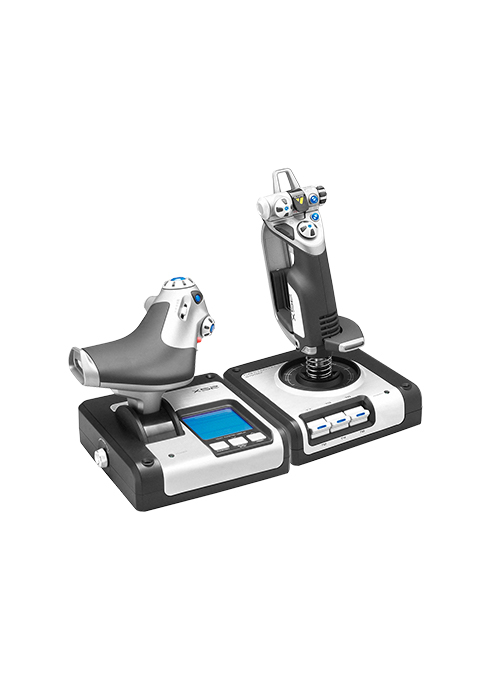
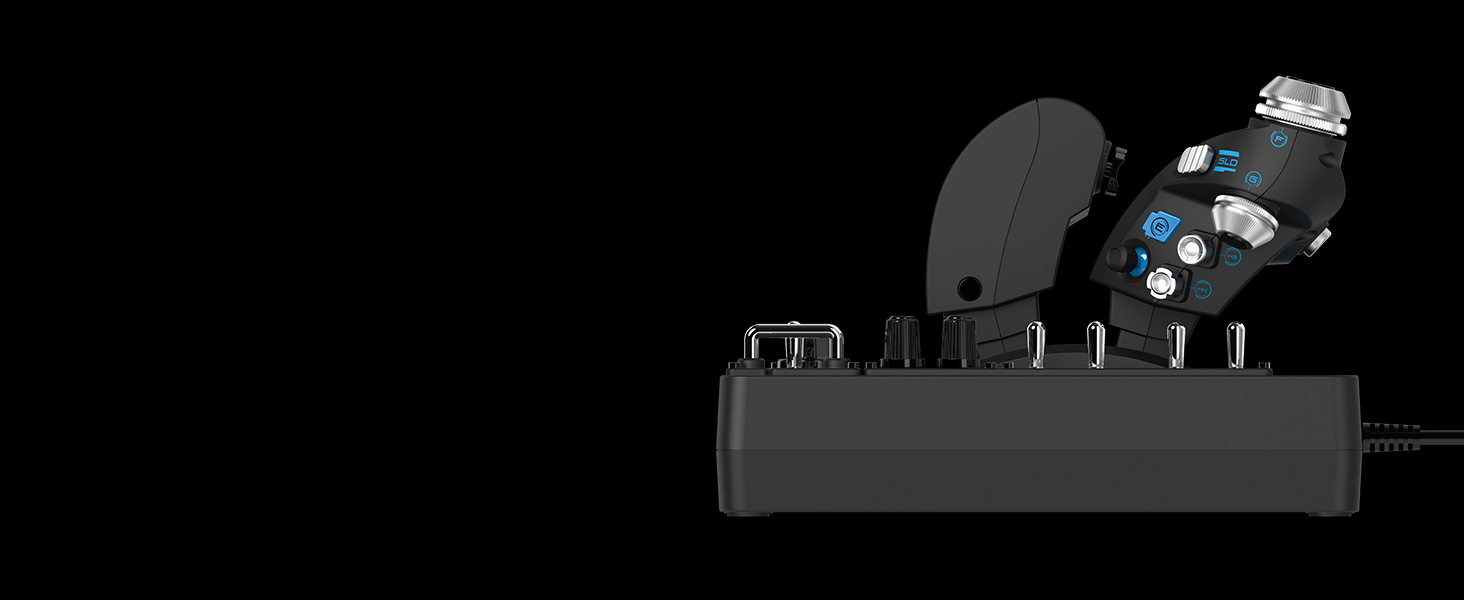
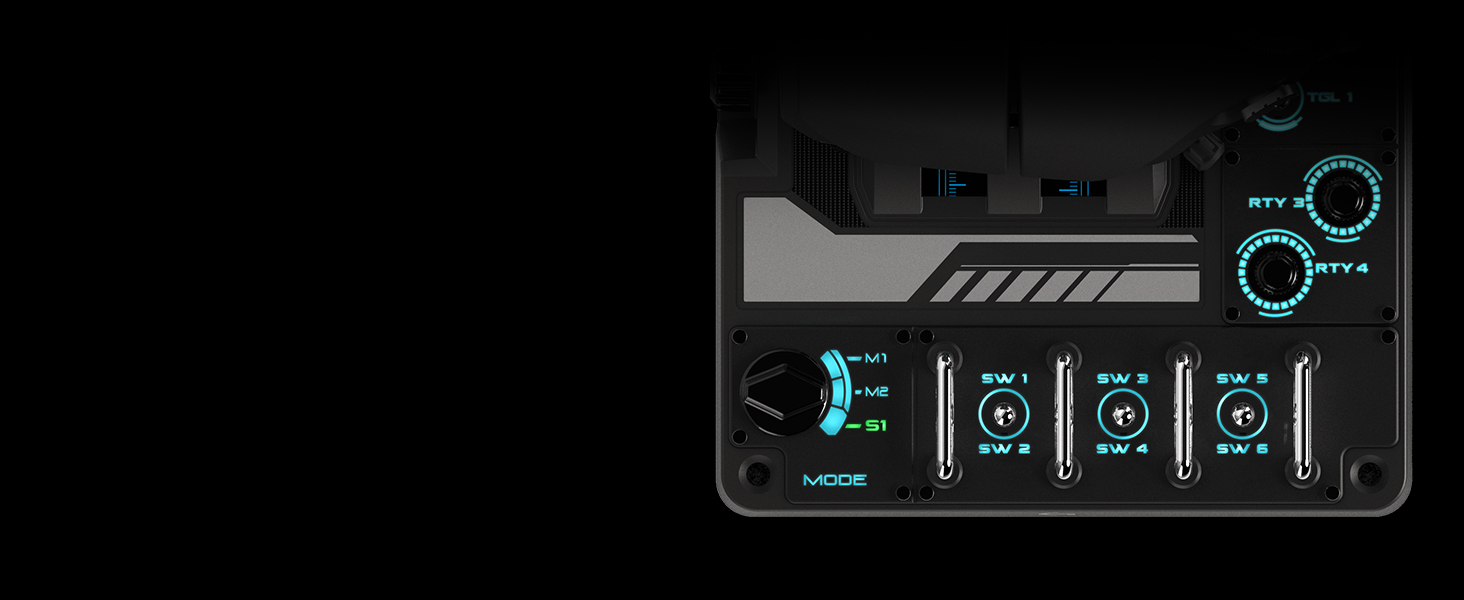
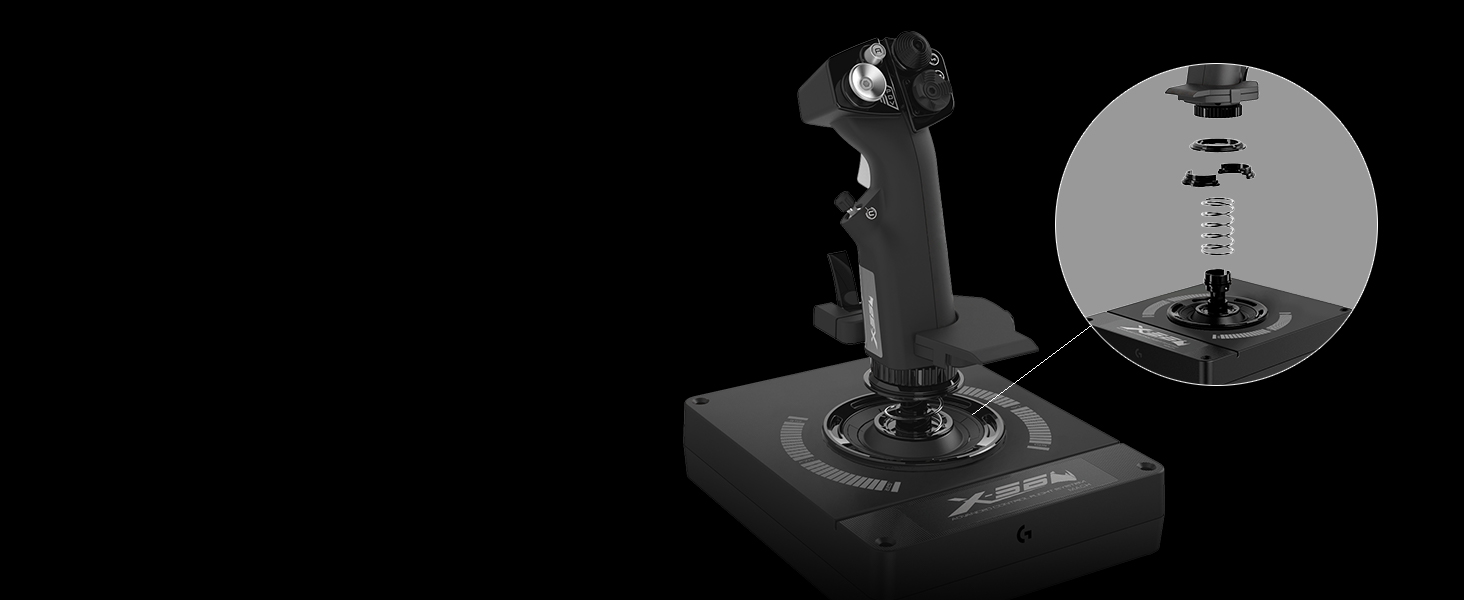
The Logitech G X56 HOTAS is a professional-grade flight simulator controller featuring over 189 programmable controls, 16-bit hall-effect sensors, and 4 adjustable spring options for precise, customizable input. Designed for VR and PC gamers, it includes dual mini analog sticks for true 6-DOF control and vibrant RGB lighting to integrate seamlessly with your gaming setup. Compatible with Windows 7 to 11, this robust, military-inspired joystick and throttle combo delivers an immersive, authentic flight experience favored by serious sim enthusiasts.





| ASIN | B079P6SSHP |
| Batteries | 1 Lithium Ion batteries required. (included) |
| Best Sellers Rank | #1,129 in Video Games ( See Top 100 in Video Games ) #8 in PC Game Flight Controls |
| Customer Reviews | 4.0 4.0 out of 5 stars (2,834) |
| Date First Available | February 20, 2018 |
| Is Discontinued By Manufacturer | No |
| Item Weight | 2.48 pounds |
| Item model number | 945-000058 |
| Language | English |
| Manufacturer | Logitech |
| Product Dimensions | 7.28 x 8.86 x 3.54 inches; 2.48 Pounds |
| Release date | June 20, 2023 |
| Type of item | Personal Computers |
S**T
If you are looking at this HOTAS read my review it is made for those of you wondering.
I normally don't write reviews but I thought it was important to write this one because like me I am sure many other people are looking at this HOTAS and wondering if this is the one for you. You are also probably looking at the x52 and x52 professional. I opted for this HOTAS (playing Elite Dangerous & X4 and various others). This one while being the most expensive option was also the most available at the time and looked the most sturdy as well. THIS IS A SAITEK PRODUCT that Logitech acquired and then branded their own. That's ok, it still works with the proper software driver download (we will get to that later in review). First off this HOTAS is rather large, but keep in mind there are also a LOT OF BUTTONS which require it to be so. Some people with smaller hands might find this to be to big for them. My hands are fairly large and this is at just about the maximum size I can comfortably control. Some reviews complain of poor button placement, well you have a million buttons they all have to go somewhere so nothing is going to be perfect. You just have to adapt to the layout of the HOTAS. The Stick: Solid feeling with the look and feel of a fighter stick, (this is not a Cessna stick here this is a space ship/fighter jet stick). You can still fly a Cessna with this but you also can fly a Boeing 747 or a space shuttle, its up to you. There are multiple HAT controls just on the stick including a smooth move all direction hat that is in fact like a miniature joystick on your joystick. What would you use something like that for? Well for example in Elite dangerous I use the smooth move hat (black to the left of the stick half way down) for which direction I want to "look". This way I can control the direction of the ship with the Stick itself while using the little HAT control to look around which has replaced the mouse for looking around. Very handy, You can effectively remove all keyboard and mouse input with these types of controls and setups. The Stick and Throttle are both coated in that nice feeling smooth PTFE feeling rubber. This makes for a comfy grip not so much of a plastic like feeling like my old Logitech Extreme 3d Pro which I upgraded from. (Had the 3d pro for 15 years excellent entry level joystick and you can still buy it!) The Throttle: This took some getting used to but in the end I am learning to really like the throttle. First off yes you are looking at a split control throttle. Either side can move independently of one another like a real plane. There is a locking mechanism to lock them both together which is how mine will always stay because none of the games I play require independent thrust input to one side of the engine or the other. You will feel that seam in the middle when moving the throttle BUT you will get used to it. Like other reviews the throttle is in fact STIFF, why? because a real throttle is also stiff. If it wasn't than when a stewardess brings the pilots their coffee and sneezes the plane would crash. You have a knob to turn to affect the tension of the throttle, even turned all the way to lowest setting the throttle will feel stiff to push but it is mimicking real life. If you are buying this thinking you are going to be able to just SLAM THE THROTTLE open, you will break this thing like a few review pictures will show. In the games I play you aren't accelerating faster then you can push the throttle so this is a non issue. In fact once again this makes it feel far more real and less chincy than other throttle designs. (for reference I wield chainsaws and buck hay all day my hand strength is above average). YES YOU HAVE A BOATLOAD OF BUTTONS ON THE THROTTLE. Once again you have to ask yourself, if you are getting this many button monster are you gonna be upset at the button placement? Or are you going to adapt (this is the correct answer ADAPTING). The metal toggle switches I would like to point out are not ON/OFF switches. They return to center after you push them up or down. So basically you have 2 buttons for every metal toggle but they still feel ultra satisfying to push and flick. .....So many buttons, if you aren't playing an actual flight sim you will be hard pressed to utilize all your button options. That's ok, better to have more options than less but then again that's why you are going to buy this monster you want them buttons don't ya? The Important: Ok I would like to address a few issues here related to some minor details and specifics I had to figure out for myself when installing this monster. PAY ATTENTION TO THIS I HOPE TO SAVE YOU TIME and maybe even help others who have bought this thing but couldn't get it to work properly. For reference I am running Windows 10 on a computer that is NOT A POTATO. OK here we go...... YOU WILL NEED TO GET THE DRIVER TO MAKE THIS THING WORK PROPERLY AND UTILIZE YOUR PRETTY COLOR FUNCTIONS. This HOTAS is not really plug and play and it is not recognized in GHUB. Listen carefully because you also get ZERO instructions with this thing but I am going to tell you right now what to do. 1. Open box and marvel at the beast you just purchased. (DO NOT PLUG IT IN YET) 2. Go to Logitechs website and go to downloads and look up this product for drivers. 3. You will have a list of about 7 or 8 drivers, go to the one on the BOTTOM not the top. (bottom newest driver circa 2018 lol) 4. If you are running 32 bit choose the driver immediately above (I am 64 bit so I believe my driver was the last one in list) 5. (DO NOT PLUG IT IN YET!) Run the driver you just downloaded. 6. You will see a screen come up that has a picture of joystick then a small picture of a USB WITH A RED X over it and then a picture of a computer. (The red X is telling you NOT TO PLUG IT IN YET there are no instructions past this I had to learn all this by rote and trial and error) 7. Click "Next" the driver will start installing ( DO NOT PLUG THINGS IN YOU BETTER NOT HAVE EM PLUGGED IN!) 8. When the first half of the install is done you will see now the image you first saw except the USB icon at center no longer has a red X over it. This is the 2018 program telling you to PLUG IN THE JOYSTICK AND THROTTLE. 9. NOW you PLUG IN THE JOYSTICK AND THROTTLE. (be advised I am very certain this requires USB 2.0 or higher not basic USB). 10. After you have plugged them both in you may now click next on the install window. 11. After the install is finished the button will now say restart. CLICK RESTART. 12. Upon desktop load you will now have a new Icon for X56 HOTAS, this is your joysticks program this is where you change the color of the lighting and also to do programming button binding etc (this is advanced button binding outside of game controls). If you are playing a game like Elite dangerous or X4 do all your binding IN GAME. Yes I had to learn all this on my own but I have shared it with you and now you know how to set this up dear god I hope this helps at least one soul. Changing the spring on the Stick: Go to Youtube, search "how to change X56 Hotas Springs" WATCH THE VIDEO! I changed to the highest spring, it was tricky but it worked I was a little spooked about breaking something make sure you watch a video on this so you understand what exactly you are doing. Once again let me remind you there is no instruction booklet on this thing in the box, you are either using the internet or reading this review or hopefully BOTH. OVERALL: I am very satisfied with the quality of construction and feel of this $250 sink of my hard earned American currency. Plays Elite Dangerous like you were IN THE SHIP ITSELF and I can't wait to try it on other games like X4 or maybe a real flight sim. Buy this product. Take the time to set it up right. Put on a pot of coffee and spend all night binding 486 gorillion buttons. Have Lots Of Fun After. I truly hope this helps clarify some things for wondering folks and helps for you to make a more informed decision on whether this is the right HOTAS for you. ::This review may be updated in the future, First draft 1/25/2025
T**Y
Build Quality
Throttle is stiff, but nothing I wouldn’t expect from a throttle controller. Good build quality. Highly recommend.
C**E
Fantastic HOTAS with a couple minor annoyances.
Well where to start... This Hotas is great in some ways, but has some small problems/annoyances in some ways. The great: The HOTAS has a nice heavy build and seems very durable. The stick is very comfortable for me and the default tension seems to be about right for me. It is nice that it came with 4 springs to adjust the stick tension. Even though for now I am using the default spring, as the stick gets some heavier usage, it may require a new or tighter spring. The buttons are in pretty good arrangements and oh man are there a lot of them. I love the 2 thumb mini-sticks (one on the throttle and one on the main stick). They are very useful in my space games because I use one to strafing left/right/up/dawn, and I use the other to strafe forward and backward when coming in for landings and take-offs. The switches are great for things like landing gear, ship and engine power, cargo bay doors, comms channel, and etc. There are so many buttons/switches that I can't fill them all up, and then there are also all the top-hats and wheels, plus 3 modes as well. I am overly pleased with all the options the HOTAS has for configurations and bindings. Also, even though I don't use it, the Logitech software for the HOTAS has some configuration templates included for various games. The accuracy so far has been great for me, but it is still early on. If it holds up as well as my other Logitech items (rechargeable keyboard, wireless rechargeable mouse, camera, gaming headset) have, I will be overjoyed. The bad/slight irritations: The throttle tension is unbelievable, even when the tensioner is loosened all the way. It is due to the grease/lube that they have used. After the throttle sits a few minutes, it stiffens. If the throttle is moved back and forth a few times it loosens temporarily. I have seen some folks say they took it apart and removed the lube, I wouldn't do that since it 1) voids the warranty and 2) the lube will eventually start breaking down on its own and lead to the throttle loosening on its own. BUT, you will probably need to mount it to your desk unless you are using a mounting bracket solution. I just used some Command Strip picture hanging strips and it is not rock solid. The base of this thing is huge and THICK so beware of that fact of you have very limited space for it. The HOTAS is kind of heavy, but since my old HOTAS had big metal plates as a base, they actually weigh close to each other in my opinion. The throttle side does use a bit of power, so if you have a really cheap motherboard, you may need to buy a POWERED USB hub or a high dollar USB card. My MSI motherboard handles it fine, but it is one of their higher-end boards. The only other point minor annoyance is that one of the toggle switches is in a place that kind of gets blocked a bit by the throttle when the throttle in a certain position, but it can still be accessed if you need to use it. Overall, I am overjoyed so far with this HOTAS. Coming from a Thrustmaster to the Logitech, this one is a vast upgrade, and the price was much better than any of the other brands. Plus, there are many more configuration options on this HOTAS than the competition.
O**D
Ürünün malzeme kalitesi inanılmaz ucuz hissettiriyor. Çok çok basit bir plastik. Bundan kaynaklı ürünün ağırlığı da çok hafif. Kesinlikle ben buna mı para verdim dedirten bi yapıya sahip. Fonksiyonel olarak işini yerine getiriyor o konuda fazlasıyla iyi. Fakat joystick üzerinde çok küçük de olsa bir deadzone mevcut. Bu fiyatta bir ürün için olmaması gerekirdi. Bütçenizi biraz daha yukarı çekip rakip ürünlerini değerlendirmenizi öneririm.
س**ن
Very good quality and fast shipping
C**S
The H.O.T.A.S. RGB Throttle and Stick Controller X56 is a game-changer for flight simulation. The build quality is top-notch, and the controls feel incredibly responsive. The RGB lighting adds a cool touch, but it’s the customizable buttons and precise throttle control that really stand out. It’s perfect for serious simmers who want realistic, immersive controls. Setup was easy, and it works flawlessly with most flight sims. Definitely worth the investment for anyone serious about their flying experience!
L**A
Muy buena compra, tengo un par de meses con él y es muy preciso además que la cantidad de botones lo hace mejor y altamente configurable
C**R
This stick and throttle combo is perfect for the MSFS 2020... Lots of programmable buttons and mini-joysticks. The X56 itself is recognized by MSFS 2020 and both joystick and throttle along with many of the buttons and one mini-joystick are already pre-mapped automatically. It comes with two spare tension springs which you can use to replace the default one on the joystick. I decided to replace the default with the shorter spring so there is less tension needed to move the stick around. You can search youtube to get a better idea how to do this as it is not really clear on the supplied manual. In addition to the FOV button, the thumb mini-joystick on the joystick are already pre-programmed to allow you to smoothly scroll your view 360 degrees around the cockpit and windows. I also mapped other functions to the available buttons, such as one button on the throttle to act as the thrust reverse toggle so I can use the throttle as a thrust reverser during landing when togged to this mode. I also remapped some of the keys and this is easily done inside MSFS 2020 itself. The software it comes with is also very useful. For example, I used it to adjust the curves to make the rudder more responsive when I twist it since I find it slightly hard to twist. Now I need to twist it less to get better response. I have had no issues such as ghost button presses, etc., that I have read people complaining online about. I have the throttle plugged directly to a USB 3.0 port on the back of my PC and the stick plugged to the powered USB 3.0 hub on my main monitor. Overall, this is a great complement to MSFS 2020.
Trustpilot
Hace 1 mes
Hace 2 meses