We remain fully operational. Our teams are working around the clock to ensure your deliveries continue safely.

Descargar la aplicación


Servicios al cliente
Sobre nosotros
Copyright © 2025 Desertcart Holdings Limited
Descargar la aplicación


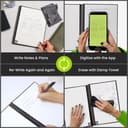
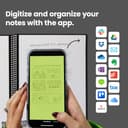
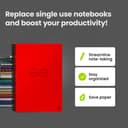

♻️ Write smart, erase waste, and own your ideas like a pro.
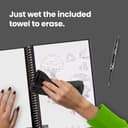
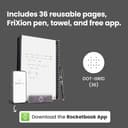
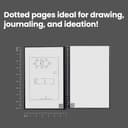
The Rocketbook Core Executive Notebook is a premium, reusable spiral notebook featuring dotted pages and a durable waterproof cover. Designed for professionals and creatives, it pairs with the Rocketbook app to digitize notes directly to cloud services like Google Drive and OneNote. Its compact 6x8.8 inch size and erasable pages, used with the included Pilot Frixion pen, make it an eco-friendly, versatile tool for organized, sustainable note-taking and creative projects.


| ASIN | B07CYZYNQH |
| Best Sellers Rank | #77,035 in Office Products ( See Top 100 in Office Products ) #1,245 in Spiral Notebooks |
| Binding | Spiral-bound |
| Brand Name | Rocketbook |
| Color | Red |
| Cover Material | Cardboard |
| Customer Reviews | 4.4 4.4 out of 5 stars (10,016) |
| Global Trade Identification Number | 00855510007151 |
| Included Components | microfiber cloth, notebook, pen |
| Item Dimensions L x W | 8.8"L x 6"W |
| Item Length | 6 Inches |
| Item Type Name | Everlast Smart Reusable Notebook, Executive Size, Atomic Red |
| Item Weight | 0.3 Pounds |
| Item Width | 8.8 Inches |
| Manufacturer | Rocket Innovations, Inc |
| Number of Items | 1 |
| Pages | 36 |
| Paper Size | 6 x 8.8 inches |
| Pattern | Notebook |
| Ruling Type | Dotted |
| Special Features | Soft Cover |
| Specific Uses For Product | Note Taking, Academic Mission, Task List, Weekly Planner, Monthly Calendar, OKR Goal Template, Ideas List |
| Style | executive |
| Theme | Book |
| UPC | 850007403959 359627453233 855510007151 |
| Unit Count | 1.0 Count |
J**R
Great Product and Great App
I've been using this for about a week now and am very happy with it. I moved away from using notepads/notebooks a long time ago just because I struggled to keep things organized. I tried a lot of different things and finally settled on an iPad, Apple Pencil and OneNote. The downside of that was carrying around 1.5 to 2.5 lbs (iPad with case) all the time and sometimes I just needed something simple to jot down post-it type notes or other quick notes that made using the iPad less than efficient. The Rocketbook has been great. Writing on it feels fine. I've got the app connected to OneNote, OneDrive and email depending on what the notes are for. I've been taking the notes by day and then uploading them to OneNote at the end of the day for regular stuff. For project specific things or if I'm looking to send notes out to a group I'll save it in OneDrive as a PDF and then send it out. The Frixion pens work fine and the pages clean off very easily. This is saving me some weight in my travel bag and have been much more convenient than using the iPad for all notes.
C**Y
Love it
Great product. Bought it for my son for school and he loves it. Does exactly what it says.
L**N
Good notebook for university students
It a good book and I love using it for notes. I like how you can scan and wipe it down. Although the product itself isn’t as easy to clean and using pilot pens i often smear my text i just written and i have to go back and rewrite it. I enjoyed using it as a university student.
V**M
I use this Rocketbook every day to take notes when researching blog ideas
I assume you know Rocketbook contains pages you write on with a water based ink pen, then scan them with your phone to send an image of each page to Evernote, email, etc. Then you erase the writing using water and a rag. The medium size is great because I use it every morning on a lapdesk with a 10" Fire tablet to watch news videos and it is convenient to take notes. Yes, I could type notes into Evernote directly, but I prefer old fashioned handwriting for this creative phase of my research. Using their app to take pictures of pages for download to the PC (or Evernote which I use) works well once you figure out the menus and workflow. The app needs some work because if you have 10 pages to photo, there are too many clicks for each single page and that process should be streamlined to make it easy to do a batch of 10-30 single pages in a row. Some issues to expect: - Rocketbook requires the use of a special Frixion pen with water-based ink that can be erased with water and a rag. DON'T forget and use a normal ink pen - it won't erase. - Don't buy Frixion colored pens because the ink is too light unless you are an artist and want to do color drawings. - New users like me will forget that you can only use the Frixion pen, and will grab another pen and write notes that then won't erase. The pages are dull in appearance. If you use regular ink, you have to use something like "Goo-be-gone" to remove the ink, and it will remove the top dull coat, leaving a shiny page - but it seems you can still erase Frixion ink from the shiny pages. For awhile, I had about six useless pages with unerasable ink on them until I took the time to find what would remove them. - You really need a way to always keep the Frixion pen with the Rocketbook. You can order an adhesive holder that attaches to the side (which I did) or to the top (which I wish I did instead). Get it for $7 which is EXPENSIVE for a piece of plastic, but it improves the convenience of always having the Frixion pen handy. Then you will find the Frixion pens have a rubber cover on the barrels which won't insert into the holder easily. So you have to use two hands and push the top of the pen into the holder to use it. - Frixion pen ink doesn't last very long, unlike G-2 pens. Also, you can't buy refill tubes (unlike G2's) and the ink tubes are BLACK so you can't see how much ink is left. Thus for the convenience of using a Rocketbook for it's features, you are stuck with using Frixion pens. I wish a lower-priced, better designed (for Rocketbooks) competitor with longer life and replaceable ink refills would come out. - The Rocketbook app creates image files of each page, but DOES have text recognition for ONLY the TOP line of each page (surrounded by double #), thus it shows up as the searchable title line if you send it to an Evernote Notebook like I do. They do have versions with full word recognition features but I haven't looked into it (yet). that would be great if you wanted to use full text searches in Email or Evernote, for instance. It would be great if they had a way to code some keywords so you could enter keywords for each section, identified by, for instance, tag names you use in Evernote, thus you categorize or can find labeled sections more easily with search. - The bottom of each Rocketbook page contains a scannable code. Nowhere did they tell me that the horizontal bottom of each page is NOT part of the image. Apparently, the section with the code cannot be part of images, so they should block it out or make it a different shade with clear info that the bottom 1" of each page will not be part of the picture images and you will lose that info once you erase it. So far, even with the above issues, I still use Rocketbook daily because I got tired of writing notes on yellow pads then retyping them into a word document. I like handwriting notes rather than typing them into a laptop, for instance. I separately ranked Frixion pens as a 3 due to the reasons above.
H**H
Totally changed my school life
Engineering student here. I went from carrying loads of mostly empty notebooks to just carrying the Everlast and one backup notebook just in case I needed some normal paper. As someone that bikes to campus every day, the lighter load was a huge plus by itself. I'm not someone that can take digital notes since the act of handwriting things is what helps me remember things best, but I'm also terrible about digging through notebooks to find information. With the Everlast I get to take my handwritten notes, then have them titled and organized digitally for quick reference when I need them. I combine it with the Cornell note-taking method for even faster reference as well. The "paper" itself is interesting. Because of the material, there isn't any real friction to speak of when writing, This leads to an almost perfectly smooth glide, which takes a bit of adjustment but I enjoy now. It uses a dot-grid layout, which has always been my preferred kind of notebook for it's flexibility. It has 32 pages total, which i think is the perfect amount. After about two days of school work, it forces me to review, notate, scan, and clear my pages. Being forced to look back through what I have a very helpful constraint. Everything wipes clean easily, as advertised. I will say that taking the time to wipe down the full 32 pages when I've been lazy about scanning does sometimes feel like a lot of work, but it's well worth it for all the other benefits mentioned. The app is simple, fast, and works great. At first some of my lighter lines weren't registering consistently, but I discovered that the app camera has a button to turn on your flashlight when you scan your pages. Doing this has only given me high quality scans ever since. I look forward to using the Everlast every day. It's become my class notebook, reading notebook, scratch paper, everything. Especially combined with a laptop, tablet, or other comfortable screen for reviewing your scans, it provides an amazing amount of flexibility and convenience. I can't recommend it enough to anyone that's struggled feeling organized working solely out of regular notebooks.
A**R
Do not buy
Do not leave writing for more than two days the ink will go on the other page if you turn it too quickly and it’s not the best pen generally.
M**A
Justo lo que promete. La sensacion es la de escribir en papel, el papel se ve satinado pero la sensación de escribir es auténtica. Mi duda era si la parte tecnológica no sería lo mismo que escanear con cualquier app, y no, no es lo mismo, esto es mucho más eficiente, rápido y productivo. Soy consultora en productividad y gestión del tiempo y lo estoy recomendando.
F**Y
J'avais acheté le petit modèle j'ai acheté l'autre modèle moyen mais la pour le prix c'est très cher pour un carnet et 1 stylo effaçable je c'est pas se qui justifie ce prix J'aurais voulu avoir des lignes sur le carnet
B**A
Si solo lo quieres para escribir, guardar con la aplicación y borrar lo que has puesto, es tu producto.
D**H
I love it Very practical
R**O
Gostei bastante.
Trustpilot
Hace 2 semanas
Hace 2 meses