We remain fully operational. Our teams are working around the clock to ensure your deliveries continue safely.

Descargar la aplicación


Servicios al cliente
Sobre nosotros
Copyright © 2025 Desertcart Holdings Limited
Descargar la aplicación


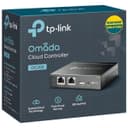
🖥️ Own your network like a pro — seamless control, zero compromises.
The TP-Link OC200 Hardware Controller is a professional-grade network management hub designed to centralize control of up to 100 Omada devices. Featuring dual power options (PoE and Micro USB), a durable metal chassis, and a powerful chipset, it delivers stable, real-time monitoring and maintenance through an intuitive dashboard. With free cloud access and app support, it enables remote management without licensing fees, making it ideal for small businesses and advanced home networks seeking seamless, scalable connectivity.













| ASIN | B07GX6GVB6 |
| Antenna Location | Business |
| Antenna Type | Internal |
| Best Sellers Rank | #34,900 in Tools & Home Improvement ( See Top 100 in Tools & Home Improvement ) #42 in Home Automation Hubs & Controllers |
| Brand | TP-Link |
| Built-In Media | Ethernet Cable, Omada Cloud Controller OC200, Quick Installation Guide |
| Color | Black |
| Compatible Devices | OC200 |
| Connectivity Protocol | Ethernet |
| Connectivity Technology | Ethernet |
| Control Method | Remote |
| Controller Type | Switch |
| Customer Reviews | 4.5 4.5 out of 5 stars (1,824) |
| Data Transfer Rate | 100 Megabits Per Second |
| EU Spare Part Availability Duration | 5 Years |
| Frequency | 5 GHz |
| Frequency Band Class | Single-Band |
| Global Trade Identification Number | 00845973084233 |
| Has Internet Connectivity | Yes |
| Has Security Updates | Yes |
| Is Electric | Yes |
| Is Modem Compatible | No |
| Item Dimensions L x W x H | 3.93"L x 3.86"W x 0.98"H |
| Item Type Name | TP-Link OC200 Omada Cloud Controller - Supports 802.3AF/At |
| Item Weight | 0.66 Pounds |
| LAN Port Bandwidth | 100 Mbps |
| Manufacturer | TP-Link |
| Maximum Upstream Data Transfer Rate | 1000 Megabits Per Second |
| Mfr Part Number | OC200 |
| Model Name | OC200 |
| Model Number | OC200 |
| Number of Ports | 2 |
| Operating System | TP-Link OS |
| Other Special Features of the Product | WPS |
| RAM Memory Installed | 256 MB |
| Router Network Type | Wired with Wireless |
| Security Protocol | WPS |
| UPC | 845973084233 840030702020 840460619905 |
| Voltage | 5 Volts |
| Warranty Description | 5 Year Manufacturer |
| Wireless Compability | Bluetooth |
C**S
The brain of the Omada network – rock solid controller
TP-Link Hardware Controller (OC200) – Omada SDN Integrated Network Controller This is the brain of my entire TP-Link Omada network. While my setup is technically a home system, it’s built more like something you would normally see in a small commercial environment. The OC200 handles everything without breaking a sweat. My network currently includes multiple components including six Omada access points, a bridge, and several switches all managed through this controller. The OC200 keeps the entire system organized and easy to manage through the Omada interface. Once everything is configured, the controller makes it very simple to monitor the network, manage devices, and make adjustments when needed. Having a centralized management system for the entire network is a huge advantage compared to trying to manage each device individually. Performance has been excellent. Even with multiple access points and network devices connected, the controller runs smoothly and has remained stable. If you’re building an Omada-based network—whether for a large home or small business—the OC200 is really the piece that ties the entire system together. Overall it has been reliable, easy to manage, and a key part of keeping the network running smoothly.
J**2
Makes AEP245 access points work better
In short, I had a lot of problems with my TP-Link AEP245 access points before getting this, and now I don't. This is a better alternative to a mesh system if you have ethernet in a few spots in the house. I have a large house and a large number of smart devices. I was having a hard time getting good wireless signal in remote corners of the house and my router kept failing because of too many wifi clients. I thought about getting a mesh system, but since I have ethernet in several spots across my house, I would have used the ethernet backhaul anyway. No need to use a mesh system, which is designed to send info wirelessly from device to device at a slower speed. Instead I decided to do what is done in commercial contexts: just use several access points. I purchased three TP-link AEP 245 access points and set them up in a way that gets coverage all over the house. It worked OK, except I kept having problems with devices that roam, like cell phones. They wouldn't let go of one and go to the other. Or something. They always said they were connected but some of the time no internet would get through. The AEP245 is supposed to work in standalone mode when you do this as long as you set them all up with the same SSID, password, and settings, but on different channels. Unfortunately, I cannot recommend them for that configuration. I decided as a last ditch effort to buy this controller. It advertises the ability to use fast roaming technology to tell certain roaming devices to go from one access point to the other as you walk around. Anyway, it did actually solve my problem. You can now walk all over my house with whatever device you want and it will always work. It never goes down, the speeds are awesome, and it was easy to configure and to maintain. To be honest, I'm not actually sure whether my system is using 802.11(k/r/v) or some other technology. All I know is that I had tons of problems with my wifi before getting this, and now I don't. It's a little hard to explain what this device does and TP-Link doesn't make it obvious. It does take control of all your access points and let you configure them from a central location instead of having to connect to each individually. I don't think of that as a huge deal. It allows you to monitor all the clients on all access points and see which is downloading how much, disconnect them, and do all sorts of other stuff. Actually, besides the monitoring of bandwidth and clients and allowing central configuration, it's hard to identify what this really does that you can't do in standalone mode without any controller. However, I can tell you that the internet experience is 100% better with this controller. I don't really understand why it's necessary or exactly how it works, but I'm really glad I got it. I recommend it to anyone who is using multiple TP-Link access points
S**S
Omada Controller, UniFies your Omada APs and enables Cloud Access, to make on Ubiquitous network.
Real Title: Omada Controller, UniFies your Omada Access Points and enabled Cloud Access, to make on Ubiquitous network solution. I've set these units up for a number of families in my neighborhoods, in conjunction with EAP225 Access Points, and a PoE Switch to power it all. The Omada setup is a great discount alternative to the Ubiquiti Networks UniFi Access Points and Switches. It's cheaper and works just as well. For a residence, I'd say it's a fantastic option. And it's a breeze to configure, assuming you have enough background in the area to know the ropes. PRO: +inexpensive! Can be run on a computer instead but, at this price, just set up the hardware controller, jeez. +PoE, with Micro USB as an alternative power option. +Super tiny! my gosh, the thing is half the size of an 8-port switch (see my photo, it's on top of a TP-Link switch and router) +Super easy cabling with a PoE Switch (1 cable to do all jobs) +Supports 100 Omada Access Points, which is more than any residence could possibly need. CON (honestly none): -Not free (but there's free software that can be equivalent to this!) -uses Micro USB instead of Type-C (holy cow is that a nitpick if ever I heard of one) -doesn't include a power cable? Only includes a short patch-cable, assuming that you already have PoE or Micro USB. -doesn't include mounting hardware to bolt to a wall? -doesn't include a sandwich to enjoy while you do your configuration? -probably impossible to properly rackmount.
T**M
I've only used this foress than a week but so far it's been pretty solid. Had a couple issues first time connecting my omada router and switch which kept not joining But after a bit of resetting and connecting I finally got it all paired and it's been solid since. Nice to have one panel to control all my omada gear and nice to have easy to read useful info taken from all gear in and placed in one spot.
K**M
The Omada software needs to be on 24x7 for certain features to work. eg: portal authorisation, AP roaming. The challenge with PC based systems is that when PCs reboot, the software javascript can't start up easily. Furthermore the cost a PC is more than the Omada hw controller and will take up more space. Worth investing in this hardware appliance.
O**O
هذا الجهاز يسهل عملية الاعدات للاجهزة المتعددة من مجموعة "ؤمادا" بحيث لا تلجأ لعمل الاعدادت لكل جهاز على حدى ويجعل الاجهزة متوافقة مع بعض
J**R
Llego muy pronto y perfectamente protegido, nuevo, sellado. Lo compre para compartir internet de una manera mas controlada y sencilla a la vez. Me ha dado buenos resultados aunque actualmente solo tengo un punto de acceso para administrar EAP650-Outdoor. Espero pronto agregar un Router, un Switch y mas equipos de la misma marca compatibles con Omada. Muchas Gracias.
L**.
Con le ultime versioni del firmware è diventato davvero un prodotto irrinunciabile per la gestione di quasi tutti i device TP-Link. Consente una gestione facilissima di reti anche molto complesse e con configurazioni non comuni. Ottima la dashboard e il sistema di monitoraggio.
Trustpilot
Hace 1 mes
Hace 5 días