We remain fully operational. Our teams are working around the clock to ensure your deliveries continue safely.

Descargar la aplicación


Servicios al cliente
Sobre nosotros
Copyright © 2025 Desertcart Holdings Limited
Descargar la aplicación


Buy anything from 5,000+ international stores. One checkout price. No surprise fees. Join 2M+ shoppers on Desertcart.
Desertcart purchases this item on your behalf and handles shipping, customs, and support to Panama.
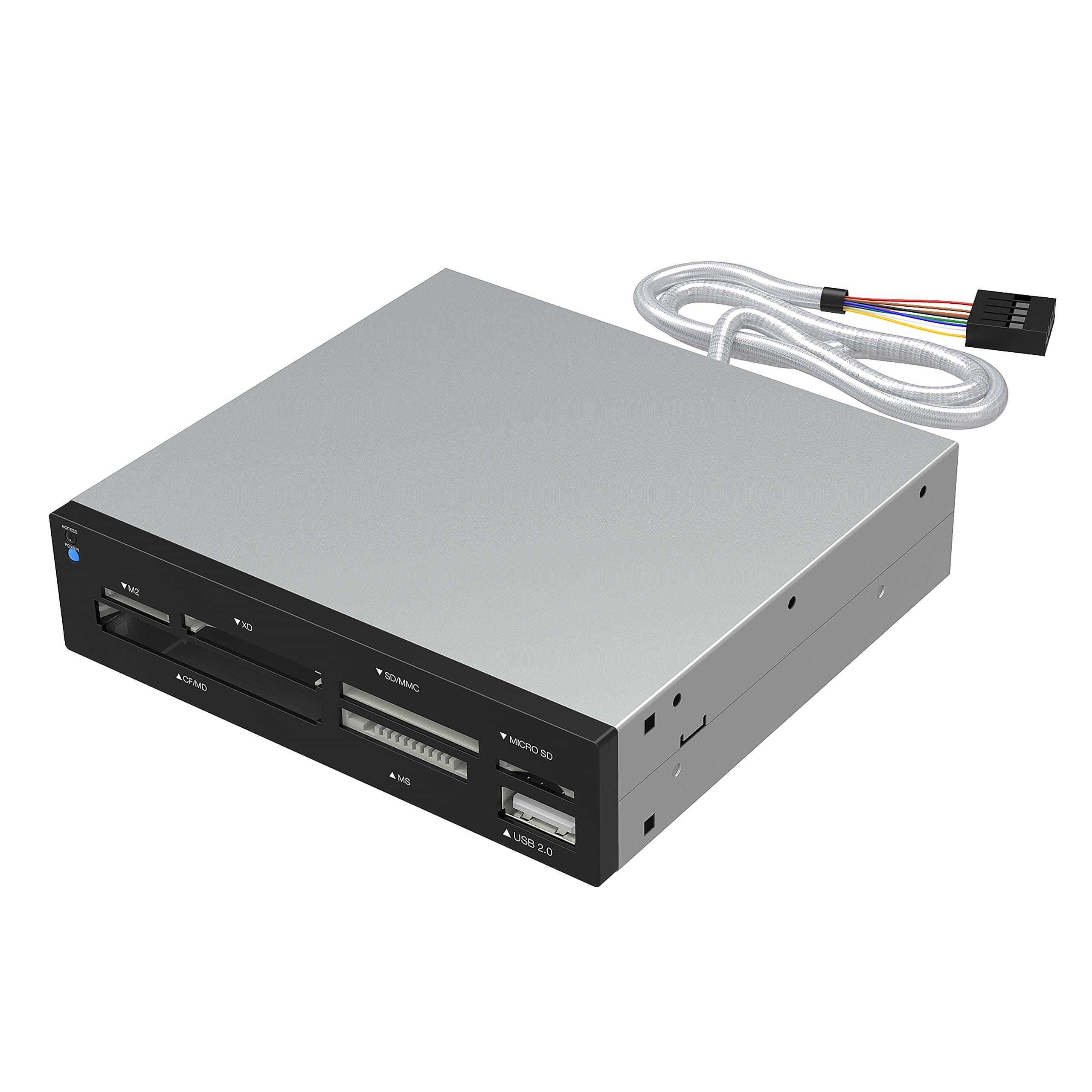
💼 Power your productivity with the ultimate 75-in-1 card reader—because your workflow deserves no limits.
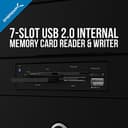
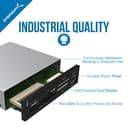
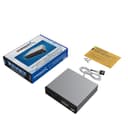
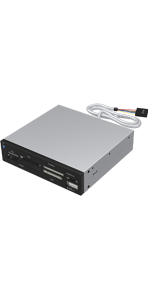
The SABRENT 75 in 1 Multi Flash Media Card Reader/Writer (CRW-UINB) is a versatile, high-speed USB 2.0 device supporting 74 memory card formats. Designed for professionals, it features an internal power connector for stable USB hub performance, broad OS compatibility including Windows, Mac, and Linux, and compact dimensions ideal for desktop setups. Its bright dual LEDs provide clear operational feedback, making it a reliable and efficient tool for managing diverse flash media with ease.






| ASIN | B000EWJYYW |
| Additional Features | Temperature Proof, X-Ray Proof, water_proof |
| Best Sellers Rank | #333 in Computer Memory Card Readers |
| Brand | SABRENT |
| Color | Grey |
| Compatible Devices | PC |
| Connectivity Technology | USB Type A |
| Customer Reviews | 4.0 out of 5 stars 4,401 Reviews |
| Data Transfer Rate | 5000 Megabits Per Second |
| Global Trade Identification Number | 00188218000453 |
| Hardware Interface | Built-in Flash Memory, CompactFlash Type I or II, MiniSD, Secure Digital Card, USB 2.0 |
| Item Dimensions L x W x H | 7.01"L x 5"W x 2.01"H |
| Item Type Name | computer-memory-card-readers |
| Item Weight | 6.2 Ounces |
| Manufacturer | SABRENT |
| Media Type | SDXC |
| Model Name | CRW-UINB |
| Operating System | Mac OS X and Higher |
| Special Feature | Temperature Proof, X-Ray Proof, water_proof |
| UPC | 188218000453 |
| Warranty Description | Parts 12 mos; Labor 12 mos |
A**S
Great
Works good. I didnt know that it was half the size of a normal drive bay, which is totally my fault. 🤦♂️ But if you want it to fit a standard 3.5 inch bay you need a mount for it. Usb works great, all cards read perfect. And its really good too cause i got one of those sony goobers that fit and read right up in there. Connects with ease. Great product
J**Y
ENABLE ErP to Extinguish Light
NOTE: To disable the power light when computer is off you must go into BIOS and ENABLE ErP Support. This may be called something similar like EUP--which again you would ENABLE. Some BIOS may have something like "USB Charge Technology"--which you would want to DISABLE. Also disable wake by mouse, wake by keyboard, wake by LAN and similar. REVIEW: I'm fond of the Sabrent brand, having used a number of their products over the years with positive results. I physically tested the usb, memory stick, sd card, and micro sd card slots and all worked. In addition, BIOS recognized and reported all adapters, and even allows me to boot from them if I choose. This product is compatible with the StarTech 3.5 to 5.25 bay adapter. You will need longer screws than what's provided. It has motherboard thread pitch--the standard mobo screws with the larger hexagonal/philips head will work. Even then they're juuuust long enough. [The StarTech adapter comes with a grab bag of different screws you can use.] Some say with the StarTech bay adapter you get a little gap, and while that's true if your eye is three inches away generally it is not noticeable--this coming from someone very OCD about these things. The other complaint I've seen is a microSD slot that goes bad. In general, microSD slots are fragile and so this doesn't surprise me. When they fail it generally comes down to user error vs a fault in the port. For mSD I'll continue to use my mSD to SD adapter, and only use the native microSD slot if the adapter breaks or goes missing. The power LED is extraordinarily bright, as others have said. I applied two coats of testor's flat black model paint *carefully* with a toothpick after *carefully* roughing up the LED lens with 1000 grit sandpaper (as best I could given the recess). Result is good, no shine through, however the LED is so bright it actually shines dimly through the adjacent access LED lens, which incidentally gives you a power indicator that isn't distracting. I took a picture of this in a very bright room--bare in mind the camera picked up the blue a bit more readily than your eye does. In a bright room you'd only notice it if looking for it, however in normal or dim conditions you can see the glow clearly. The access light itself is also quite bright and a different color, so it's obvious when you're looking at power (blue) vs access (white). The power cable could have been longer for more mounting flexibility, and again they could've included more useful screws. Other than that and working around the light I'm happy, for about the cost of a happy meal. Product fills the niche for 2.0, and seems reliable if not abused.
R**U
Works With Dell Precision
I can't believe I'm (finally) replacing my floppy drive in the 3.5" bay. I'm so old school, my first computer had 1MB RAM and a 10MB drive. So old, I didn't want to give up the floppy drive, even though I haven't used a disk in nearly 10 years. I've used USB external readers before, but since the floppy drive is gone for good, and my Kingston SD adapter went belly up, it made sense to add a permanent reader to my Dell Precision T5500 workstation. Step one, locate the USB header -- check. For the T5500, the cable is long enough, so okay. Step two, mount the reader in the 3.5" bay -- check. The reader is a little to large to fit into the front bezel, so rather than mounting flush, I have to recess it. Nevertheless, it works for what I needed -- to read and write SD and MicroSD without the use of an external adapter. Minus one star because the SD slot and the MicroSD slot share the same drive letter. What I needed to do was copy a SD card to a Micro SD, and I couldn't do that because they were both on the same path. I had to use another drive as a go-between. I'm used to troubleshooting and shuttling data, but inexperienced users will start out wondering why both their cards won't read. It's because the MicroSD slot and the SD slot are tied to the same path. If you put two cards in, neither one will show up until you remove one. On the T5500, I was getting 10MB real-world transfer rates (USB 2.0) At this price, worth every penny unless it fails prematurely, but with a 3-year warranty, I am hoping this will last as long as my floppy drives lasted (they all lasted the life of their computers). I haven't used any of the other card slots, but I will return and report if and when I do.
J**N
Shallow slots, bent pins, cheap device
received an installed this drive with an adapter to fit 5.25 bay. Worked well until two days ago. I use it as a secondary USB port (which, BTW, is manufactured upside down so you can't see the light on a thumb drive when inserted) but mostly as a CF reader for a surveying instrument. 2 days ago I inserted the CF card and a message appeared telling me to insert media into the port (L:). pulled the card, reinserted and same message. Could not figure out the issue as all the other ports appeared to be functional. Fortunately, I have a UGreen USB portable that also reads CF cards and extracted my data. Did a quick pull apart on the MOBO (disconnected all devices, save the main SSD and then began reattachment of other drives and system USB (to USB 1) and this reader to USB 2. Tried the CF card again and NO-GO. Then I did what any good tech would do. I used my magnifier app on my phone an looked at the pins in the UGreen reader (the one that works). I discovered a fine hair running from side to side inside the port and removed it with tweezers (it really had no effect on the card read just spring cleaning). But that got me to thinking. So I used my magnifier to look at the pins on the Sabrent CF port. LO and BEHOLD...the upper left pin and the the lower right pins had both bent left and right accordingly and were flat against the backside of the reader. In other words, because the depth of the port is so shallow any sideways input of the CF card pushed the pins to the side and back and the reader won't work. Used an x-acto knife and a little patience and realigned the two pins. This is a problem that I had read about before. The depth of the CF slot (and the lack of solid, durable side guides) will cause the pins to bend if the card is not inserted PERFECTLY straight into the reader. DON'T BUY THIS DEVICE!!!! I suspect that I will be doing more gizmo rigging in the future to allay the devices shortcomings. Can anyone recommend a better, deeper, well manufactured multi-card reader? I have seen a couple with dedicated USB 3.0 MOBO expansion connectors and both USB 2.0 connectors and separate MOLEX power (as an example Rosewill 2-Port USB 3.0 4-Port USB 2.0 Hub eSATA Multi-In-1 Internal Card Reader with USB 3.0 Connector (RDCR-11004). I am using an MSI Z77a-G45 MOBO that has a 3.0 connector adapter and a spare USB2.0 connector and PLENTY of molex) . I would like to get a well manufactured, deep ported 5.25 inch wide device for my system. Thanks much
O**J
Works great and no issues with it for my build
I will go into in-depth detail on any item since other popular reviews have given excellent information, so in quick summary: My Build (all components work flawlessly): 1. Zalman ATX Mid Tower Case R1 (Nice looking case, provides room for everything, adequate cooling and allows good cable management). 2. ASUS ROG STRIX Z370-H GAMING LGA1151 DDR4 HDMI DVI M.2 Z370 ATX Motherboard with Gigabit LAN and USB 3.1 for 8th Generation Intel Core Processors (Great expandability and room for future upgrades, enough USB ports for most applications). 3. EVGA GeForce GTX 1070 Ti GAMING, 8GB GDDR5, EVGA OCX Scanner OC, White LED, DX12OSD Support (PXOC) Graphics Card 08G-P4-5670-KR (Great balance of price and performance). 4. Intel Core i7-8700 Desktop Processor 6 Cores up to 4.6GHz Turbo LGA1151 300 Series 65W BX80684i78700 (Came with a thermal solution (fan) but I used the Cooler Master - see below). 5. 2 of Crucial MX500 500GB 3D NAND SATA 2.5 Inch Internal SSD - CT500MX500SSD1(Z) (Man this is fast, Win10 boots in about 5/6 secs. and programs open fast as well). 6. Crucial MX500 500GB 3D NAND SATA M.2 Type 2280SS Internal SSD - CT500MX500SSD4 7. CORSAIR TX Series TX850M 850W 80+ Gold Modular Power Supply (Adequate power supply for into the future and has ample connectors). 8. Corsair LPX 32GB DRAM 3000MHz C15 Memory Kit for DDR4 Systems (Adequate for my application for work and gaming) 9. Cooler Master Hyper RR-212E-20PK-R2 LED CPU Cooler with PWM Fan, Four Direct Contact Heat Pipes (Instructions are poor, system builders with experience will have no problem, first timers will eventually figure it out. Comes with all you need including thermal paste). 10. ASUS MX239H 23-Inch, Full HD 1920x1080 IPS, Audio by Bang & Olufsen ICEpower HDMI VGA Frameless Monitor (Really nice monitor for the price though those heavy gamers will want something far superior. Built in Audio is good enough for You Tube and regular use, but I personally find its not so good for Netflix, look at some decent speakers based on your needs). 11. Sabrent 74-In-1 3.5" Internal Flash Media Card Reader/writer with USB Port , Black (CR-USNT) (For the cost and convince you can’t go wrong). 12. Asus DRW-24B1ST-KIT 24x Internal DVD Burner + Nero 12 Essentials Burning Software + Sata Cable Kit (Obsolete in some ways but good to have at times as some persons still give work items on CD). 13. Backlit Gaming Mouse, Gaming Keyboard, Large Gaming Mouse Pad, PC Computer Gaming Headset with Microphone Combo, S101-BA Redragon RGB LED Backlit 104 Key Gaming Keyboard with Wrist Rest (No issues at all, good feel and responsiveness and mouse drivers are available on the website. The headset sounds good).
H**K
works well
I'm giving it three stars because the truth is there are a few small imperfections. However for 15 bux it's hard to complain. Installation was not bad once I found the right socket on my motherboard (cut my fingers up a bit but that's typical, my machine is a dedicated Digital Audio Workstation with 3 hard drives, two dvd burners and now this so there isn't much room for my hands) I don't mind the extra drives being listed, again I already have quite a few. The speed doesn't seem much faster than a card reader stick, but again that's not a surprise. The Pros installs easy instant access to multiple cards all the cards I use went well (SDHC, SD xD and MS), it worked with both MS alone and using the MS adapter. I have several cameras and a field recorder, each uses their own flash cards. I like being able to access more than one card at once as opposed to changing cards all the time. The Cons The USB port is poorly installed and actually crooked to the naked eye, but functional. The red led, same thing...it's not lined up proper with it's "hole" but it does function. Across the xD slot is a strange circular blemish that does not affect the performance. Very little documentation with it, in fact the paper with it did explain the installation process well. But on one side of the paper it says "included in package "card reader, instructions and screws". It did have all three, but the other side of the paper explains how to use the included software which there was none. No disk or searching for drivers was required though so I'm only pointing it out to let people know not to search for a disk. Though my machine is primarily for audio I do a lot of video and photography as well. This is hopefully going to be a good solution for replacing card reader sticks as they breakdown a lot for me. The small 'cons' do indeed give it a cheap shotty look up close. If I experience any issues in the future I will report them here, but for now I'm generally pleased with this purchase.
N**T
High quality and very functional card reader for a great price
Very good quality for this price point. I installed the unit in under 10 minutes including the time to locate an unused usb header on the motherboard. You can simply trace the cables of any existing front usb ports to the motherboard and most of the time the usb headers are next to each other. The unit has worked perfectly with all the memory cards I have tried so far and I really like that you don't have to pus the cards all the way in for them to work. Some units make you sink the card into the slot so far that getting it out is a pain but with this unit the card pushes in just far enough to be stable but still very easy to remove. The device was immediately recognized by Windows (Win7) and the drivers installed automatically. The only minor complaint i have is that the blue power indicator led is simply too bright and really not necessary at all. It lights up the whole room at night and it stays on the entire time the computer is on. I fixed the problem by using a bit of dark colored nail polish to cover all but a small portion of the led. The unit also has a single usb port to read flash drives and also supports other usb devices so it effectively adds an additional front usb port to your computer.
J**E
Works great. Amazing value.
I recently built a new computer, and wanted an internal card reader. Most of the newer, more expensive units use a USB3 header off the mobo, which seems silly considering that most boards only have 1 USB3 header (if they have one at all), and that's taken by the front USB ports on most towers. Furthermore, most can only read one card at a time. This unit uses USB2, which is plenty fast for most people's uses (simple file transfers) and there's usually several extra headers on the board. It reads SDHC (SD cards over 32 gigs), can use read from multiple cards at once, and is generally great. Cons: The blue LED light on the front is absurdly bright. That isn't an issue for me because my case has a door covering the drive bays, but it's something to keep in mind. The other thing to be aware of is that it reserves a drive letter for each card type. This allows the user of multiple cards and is a great feature, but you may have to go into disk management and reassign drive letters. My external drive wasn't plugged in when I installed it and it somehow overwrote my previously reserved drive letter (E:). It messed up some file paths until I reassigned everything. It's a 3 minute fix, but is annoying if you aren't expecting it. Also, don't make the same silly mistake I did and forget to order a 5.25-3.25 inch bay adaptor of you're sticking this in below your DVD drive. I had to wait 3 more days to install. All in all, this is an amazing value. It's cheaper and better for my needs than other products.
Trustpilot
Hace 3 semanas
Hace 3 días