🚀 Elevate your home WiFi game—because buffering is so last decade!
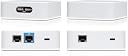
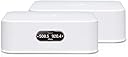
The Amplifi Instant Home Mesh WiFi System Kit (UK version) delivers dual-band wireless speeds up to 867 Mbps, combining a Mesh Router and Mesh Point to extend seamless WiFi coverage throughout your home. Designed for quick plug-and-play setup with a UK power supply, it supports the 802.11ac standard for reliable, high-speed connectivity in a sleek, compact form.
| ASIN | B07L75F9LH |
| Antenna Location | Home |
| Best Sellers Rank | 166,461 in Computers & Accessories ( See Top 100 in Computers & Accessories ) 386 in Whole Home & Mesh Wi-Fi Systems |
| Box Contents | Power supply UK |
| Brand | AmpliFi |
| Brand Name | AmpliFi |
| Colour | White |
| Compatible Devices | Laptop, Personal Computer, Smart Television, Smartphone, Tablet |
| Compatible devices | Laptop, Personal Computer, Smart Television, Smartphone, Tablet |
| Connectivity Technology | Wi-Fi |
| Control Method | App |
| Coverage | Home WiFi coverage |
| Customer Reviews | 4.3 out of 5 stars 101 Reviews |
| Data Transfer Rate | 867 Megabits Per Second |
| Frequency | 5 GHz |
| Frequency Band Class | Dual-Band |
| Frequency band class | Dual-Band |
| Global Trade Identification Number | 00817882025478 |
| Item Weight | 800 Grams |
| LAN Port Bandwidth | 1000 Mbps |
| Manufacturer | Aerials, Satellites and Cables Ltd |
| Manufacturer Part Number | AFi-INS-UK |
| Model Name | AFi-INS |
| Model Number | AFi-INS-UK |
| Model name | AFi-INS |
| Number of Ports | 5 |
| Operating System | Windows |
| Other Special Features of the Product | Guest Mode |
| Security Protocol | WPA2-PSK, WPA3, WPS |
| Special feature | Guest Mode |
| UPC | 817882025478 |
| Unit Count | 1.0 count |
| Voltage | 230 Volts |
| Wireless Compability | 802.11ac |
| Wireless communication standard | 802.11ac |
E**Y
Quite possibly the best wifi product I have ever purchased.
It does everything I'd hoped it would, really really well. Utterly stable, uninterrupted wifi at home, over two floors and part of the back garden. No buffering or network issues in the 4months its been up and running, speeds consistent all over the house. Software update took ten minutes about 2months in, but uninterrupted since then. Forgotten are the years blighted by dropouts or half speeds on signal boosters. This system rocks! V easy to install, control and personalise (both ext. illumination and within control settings). Looks great, works fantastically and is consistently s.t.a.b.l.e. and reliable. Quite possibly the best wifi product I have ever purchased. Cannot. Reccommend. Enough. Edited this 4months in to confirm the above and to edit the time it's been running. The settings and options are great and offer some good personalisation and control options of IP/mac addressing, device permissions etc. Update April 2022. Still going strong, no faults. Great kit. Update March 2025. Firmware updated, now moved on to full fibre and it's working stable and fast as ever.
G**G
Solved WiFi issues in two properties - great kit
Really great system, good range and a good price. Set up in two properties. The "two minute" claim is probably do-able, but for the best set-up I've found the following procedure to be best: First, as per instructions: 1) Two devices in box. Identify the "Router" (has a small screen), and the "Access Point" (no screen). 2) Unplug your normal home router. 3) Connect the supplied ethernet (flat, white) cable from your normal home router to the Blue port on the Amplifi Router. 4) Plug in the Amplifi Router. Then re-plug in your normal home router. 5) While you're waiting for your normal home router to warm up, download the Amplifi app. 6) Open the Amplifi app and follow the instructions there. I recommend giving the Amplifi kit the same Network Name and Password as your normal home network - this means you won't have to reconnect all your devices to WiFi. 7) Now plug in the second Amplifi device ("Access Point") in close proximity to the Amplifi Router. We will deal with optimal placement later. Wait a minute and it should show up in the app. 8) At this point there will probably be a firmware update available. Proceed with the update and wait a couple of minutes. 9) Go to the configuration page of your normal home router, normally by entering the IP address in a browser (something like 192.168.xxx.xxx - check with your ISP/router manufacturer). 10) Disable the wireless functionality of your normal home router. You don't need it anymore! 11) When this is done you may be kicked off the WiFi. Reconnect to WiFi (you're now connected directly to the Amplifi system). Now, figuring out where to place the second device (the Amplifi Access Point): 12) Unplug the Amplifi Access Point. So your WiFi signal is now only coming from the main Amplifi router. 13) Walk around your property and figure out where the WiFi signal is weak ("dead spots"). I like to use the free SpeedTest App from Ookla to get a quick reading. 14) Now you can work out a strategic place to put the Amplifi Access Point. Plug it in and check the connection strength to the main Amplifi router through the app. 15) Extra tip - Velcro tape is great for mounting the Access Point to a wall If anything goes wrong, insert a long paper clip to the "reset" port (small hole) on the bottom of the Amplifi router, and start again.
P**H
Great WiFi through house - hard to set up
This wasn’t easy to install. Setup was overly complicated and failed a number of times. Hence poor rating on setup. However once set up, it works a treat. WiFi through the house (long thin 3-bed Victorian terrace with solid walls) and almost nowhere with less than 5 bars. Can watch videos in the garden which is a long way from the router. Would have given it 5* if the setup was better.
A**P
Nice but not as good as I was expecting
Ok so the coverage on this is great and it’s simple to setup. So why haven’t I given it 5 stars? What’s wrong with it, is it’s limited. I got this to increase the Wi-fi signal in the house but also replace the pish poor BT Smart hub I had. Setup and config done in about the 2 minutes (had to set up as PPPoE) but then a firmware upgrade was needed. So there is no dynamic DNS support, not support to set custom DNS servers for your dhcp clients and the admin interface is a bit basic. Using a Raspberry Pi I managed to address a few of these limitations. For a home user it’s great, if you want to do a bit more you’ll need to look at the enterprise kit or work around using something like a Pi
K**D
Easy setup, good performance
Bought to replace a TP-Link router that hadn't received a firmware or security update for over 2 years, so I wanted something with more up-to-date support. I chose Ubiquiti because of good reviews of their other products, and was thinking about getting the Ubiquiti Amplifi, but the mesh points that come with that don't have an ethernet port - and I needed one to plug in my Freeview box. I'm on Plusnet fibre, and live in an old house with thick walls and used Powerline adapters to get WiFi in rooms that the main router wouldn't reach. This Ubiquiti Instant Mesh main unit (with the LCD display) plugged into my BT Openreach modem. I downloaded the App (you can't set this up from a computer), which I found very easy to use. It wasn't quite the 2 minute setup as advertised, as I had to set the main unit to PPPoE and enter my Plusnet account details, and specify a DNS (I used 8.8.8.8 as primary and 9.9.9.9 as secondary). I then plugged in the mesh point and the two connected. They then performed a firmware update (which bodes well). WiFi reception around the house (and down to the end of my garden) is much better than before, and speeds are more than enough for the 36Mb Plusnet package I've got. And it looks a lot neater than a big black router with multiple aerials. So far, as good as hoped. Will come back to this after a few months to report on how well it continues.
M**P
impossible to install due to software issues.
I bought this on the basis of a favourable newspaper review to boost my wifi signal. it boasted "2 minutes to install" I gave up trying after an hour, and soliciting help from others more tech savvy than I. Search on google revealed similar problems from others. Total junk. don't buy
K**1
Great value for money
Relatively low cost mesh system that is easy to install, however with only 1 mesh satellite;, it seems that the system is not designed for expansion. Greatest advantage to me is the optional ethernet backbone: If you connect your router with ethernet cable to the satellite then you have no WiFi signal loss no matter how large the distance. Router seems to have very reasonable performance. Perhaps it would not be the high-end performance choice for serious gamers, but it is fully sufficient for home office and everyday family use. Great value for money.
G**H
Great at everything except WiFi
App is really user friendly and provides a lot of control without having to mess around with portals, easy to set up and the router/mesh points look really smart as well. With the good things out of the way, it's a shame that it is pretty terrible at its main purpose, providing good connectivity. In a 2 storey medium sized property, I still had a number of black spots and the speed was considerably slower once you were a few walls away. I really wanted to like it and persisted with it but there are much better options in the market.
J**H
One of the best Mesh systems available
This mesh system is an excellent choice for small floor plans. it can easily integrate with other ubiquiti products. Offers a lot more features to segregate networks devices within a network. range extension with mesh kit is seamless. greatly improved performance of video streaming in my household. the system has proved itself from the time it was commissioned and hence I wouldnt require extended period of testing to provide a follow up update on this feedback.
M**L
Top prodotto spina UK
Prodotto molto performante, sono stato molto contento per via delle prestazioni, la qualità dei materiali e l’ottima copertura Wi-Fi. Non contento per via della spina che è arrivata UK, ma Amazon mi ha emesso un buono per un adattatore e quindi ho risolto. Arrivato nei tempi previsti.
A**A
High quality mesh at throwaway price.
Outstanding mesh network at a throwaway price. Easy set up and fantastic speeds.
Trustpilot
1 month ago
3 weeks ago