🚀 Elevate your home office game with speed, smarts, and security!
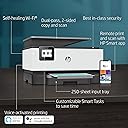
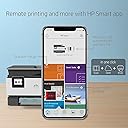
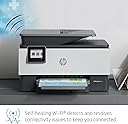
The HP OfficeJet Pro 9015 is a sleek, all-in-one inkjet printer designed for the modern professional. Delivering up to 22 ppm print speed, automatic duplexing, and a 35-page auto document feeder, it streamlines high-volume tasks. Its wireless connectivity options, including Wi-Fi, Bluetooth, and Ethernet, pair seamlessly with the HP Smart app and voice assistants like Alexa for remote and hands-free operation. Enhanced with self-healing Wi-Fi and robust security features, it ensures reliable, private printing. Ideal for home offices, it supports diverse media types and offers cost-saving Instant Ink subscription options.


| ASIN | B07N1DF9VV |
| Additional Printer Functions | Copy, Fax, Scan |
| B&W Pages per Minute | 22 ppm |
| Best Sellers Rank | #170,343 in Office Products ( See Top 100 in Office Products ) #120 in Ink Tank Printers |
| Brand | HP |
| Built-In Media | HP OfficeJet Pro 9015 All-in-One Printer, Inkjet Cartridges, Power Cord, Reference Guide, Regulatory and Flyer and Ink Caution Flyer, Setup Poster |
| Color | White |
| Color Pages per Minute | 18 ppm |
| Compatible Devices | Laptops, PC, Smartphones |
| Connectivity Technology | Bluetooth, Ethernet, Wi-Fi, Wireless |
| Control Method | App |
| Controller Type | Amazon Alexa, Vera |
| Customer Reviews | 4.1 out of 5 stars 7,254 Reviews |
| Display Type | LCD |
| Dual-sided printing | Yes |
| Duplex | Automatic |
| Global Trade Identification Number | 00193424191550 |
| Hardware Interface | Ethernet, USB 2.0 |
| Ink Color | Black, Cyan, Magenta, Yellow |
| Item Dimensions D x W x H | 10.94"D x 17.3"W x 13.48"H |
| Item Type Name | Multifunction Printer |
| Item Weight | 3.15 Pounds |
| Manufacturer | HP |
| Maximum Copies Per Run | 99 |
| Maximum Copy Resolution Black and White | 600 dpi |
| Maximum Copy Resolution Color | 600 dpi |
| Maximum Copy Speed Black and White | 22 ppm |
| Maximum Media Size | 8.5 x 14 inch |
| Maximum Print Resolution Black and White | 1200 x 1200 dpi |
| Maximum Sheet Capacity | 250 |
| Maximum print Resolution Color | 4800 x 1200 dpi |
| Model Name | 1KR42A#B1H |
| Model Number | OfficeJet Pro 9015 |
| Model Series | OfficeJet Pro |
| Number of Trays | 1 |
| Other Special Features of the Product | Auto-Duplex, Cloud print enabled, Decal-Printing, Dual-pass, 2-sided auto document feeder, Easy slide-off glass, Ethernet networking, Network-Ready, Optional HP high-yield cartridges, Print images from USB drive, Scan To E-Mail |
| Paper Size | 3 x 5, 4 x 6, 5 x 7, 8 x 10 |
| Print media | Card stock, Envelopes, Glossy photo paper, High-resolution paper, Labels, Paper (plain), Transparencies |
| Printer Connectivity Type | Bluetooth, Ethernet, Wi-Fi, Wireless |
| Printer Output Type | Color |
| Printer Type | Inkjet |
| Printing Technology | Inkjet |
| Processor Count | 1 |
| Resolution | 4800 x 1200 dots_per_inch |
| Scanner Type | Sheetfed |
| Series Number | 9000 |
| Special Feature | Auto-Duplex, Cloud print enabled, Decal-Printing, Dual-pass, 2-sided auto document feeder, Easy slide-off glass, Ethernet networking, Network-Ready, Optional HP high-yield cartridges, Print images from USB drive, Scan To E-Mail Special Feature Auto-Duplex, Cloud print enabled, Decal-Printing, Dual-pass, 2-sided auto document feeder, Easy slide-off glass, Ethernet networking, Network-Ready, Optional HP high-yield cartridges, Print images from USB drive, Scan To E-Mail See more |
| Specific Uses For Product | home office |
| Total USB 2.0 Ports | 1 |
| Total Usb Ports | 1 |
| UPC | 886389173043 193424191550 |
| Unit Count | 1.0 Count |
| Warranty Description | One-year limited hardware warranty |
| Warranty Type | Limited Warranty |
| Wattage | 30 watts |
A**N
HP OfficeJet Pro 9015 is an excellent printer
The HP OfficeJet Pro 9015 is a refreshing multi-function printer that will outperform many printers in this category. I have always purchased HP Office Jet multi-function printers over the years and each time the technology and overall quality seem to improve. The 9015 model was a beauty straight out of the box with the smooth edges and nice color display. I was able to put it all together in less than 10 minutes due to setting up wireless connections and verification of joining their Instant Ink program that is optional and you get four months free for signing up for the monthly program. It gives you the option to choose how many pages you think you will print in a month and it lets unused pages roll over in the next month to sometimes save you some money. The printer is fast and quieter than prior models while it produces up 22 pages per minute and has an automatic two-sided scan and copy features. The document feeder on this new model can handle up to 35 pages of documents at a time. I put the automatic feeder to the test and used only 15 pages and expected it to jam but it worked perfectly. One of the best aspects of this printer is that it works with the HP smart app which I put on my phones and tablets along with laptops to be able to print remotely and keep up on the latest ink levels in case one is running low. The company has keyed in on using smart tasks to simplify common tasks while using Google Drive, quick books along with voice-enabled smart devices such as Alexa and Google Assistant. Another positive change is the focus on WIFI security with the printer and has even added basic encryption along with other methods to minimize the damage of private data being hacked. The company also states that it has “Self-healing WIFI” which works behind the scenes to make sure that your printer stays connected to your password-protected WIFI network. I was pleased to be able to try out the feature since I run 2 different WIFI networks for home and business use. I have not had any connectivity issues with the printer since I purchased it. It is refreshing because in the past my printer would have WIFI access but seemed to have issues many times or there was an unreasonable wait time for everything to process. I now can relax when I go to start printing many items because the printer is online and works from all of my devices at home through the HP print app. Overall, I am pleased with the versatility and cutting-edge technology this printer provides. I find that this was an economical choice for a high-quality machine and a better way for me to manage the printing costs for my business. I am also glad I can use the HP app to integrate with other apps for keeping my receipts together or printing important appointment or meeting details. I appreciate the fact that I have the flexibility to store items on a device or in a cloud service and then print them efficiently and quickly with the HP OfficeJet Pro 9015.
M**H
HP OfficeJet Pro 9015, EASIEST SETUP IN THE HISTORY OF PRINTERS!
Oh my goodness! So, I had the HP Officejet Pro 8610 series that stopped working after one year (Exactly when my warranty was up, go figure) and after another year of trying to get it to work, I ended up purchasing The HP OfficeJet Pro 9015 and after reading a lot of the reviews, I was terrified I was going to get a defective printer. But, as one online review said...wait 6-12 months AFTER this model first comes out before buying it because all the kinks and defects will be resolved by then. It's been at least one year now since it first came out. Boy, was that so true! I panicked at first after opening the box because there were no USB cables and CD etc; I installed the ink and used the panel on the printer to select English, USA and Ink detection. It then told me to go to 123.hp.com to set up the printer. It tells you to download the app. Just go to your App store on your iphone or whatever type of cell phone you use, Install it on your phone right away! As soon as I did that, It immediately detected my printer and I went through the set up right through my HP Smart Print app! It literally took less than 5 minutes to install the driver, set preferences etc; I couldn't BELIEVE IT! It worked right away! Detected my wireless modem instantly! I didn't have to enter passwords or IP address, it was so simple I still can't believe it! I was also very was surprised this small printer prints so FAST! (FYI, The HP Smart Print App will say: HP Officejet Pro 9010, don't worry It's the driver for all HP 9000 series , It will work for your 9015 printer) I am EXTREMELY ECSTATIC I made the leap to purchase another HP Printer (due to the 8600 series being so defective.) Just FYI, PLEASE buy the four year extended warranty on this printer. I have a mind to believe that HP KNOWS if you purchase a warranty or not and if you don't...In one year or at least 1.5 for me, It will stop working. So I have peace of mind that for at least 4 years, my printer will work without flaws! BTW, Amazon is the ONLY online store that gives an actual 4 year warranty, ( everywhere else it's 2 years only) so I'm sticking with Amazon for all my electronic devices! AWESOME PRINTER!
M**O
Great small office MFP for dependability
This was an Amazon purchase to replace an HP 6970 that was only 15 months old. While disappointed that it didn't last longer when I have one at home that is a year older and still running fine, I took a chance on this HP 9015 after reading many other reviews and researching various makes and models. The features of this unit were a better fit within our small business model. Several features that are "cloud based" I have not tried or experienced yet. If they work as well as the rest of this then it to me has to be one of the best MFP devices on the market. I do highly suggest that everyone sign up for an ink replenishment plan. You will have to decide between the HP or Amazon Dash based upon your specific needs as each has their own pros and cons. Please bear in mind that my comments are with a little over a month of usage at this point, but so far, I am very impressed. Pros: o New Inkjet cartridge style. Sounds silly but they seem more robust and suited for heavy office style usage rather than the traditional small "cube" style cartridges of the past. o Clear and clean edges to fonts/lettering as well as sharp picture reproduction. o Easy WiFi setup and use especially print from phone utilizing the HP app. o Machine email address, very useful for late night or weekend orders that come in. I simply forward these directly to the HP9015 at the office and the employees at the store can immediately see the email or will see it the next morning as they come in. Very helpful to not disrupt family time for me. o Easy to use touchscreen panel on the face of the unit. o A true two-sided copy/scan capability. Simply load your documents ONCE in the top tray, select Two sided document and the let the unit handle the rest. No more flipping or then trying to match up sheets front/back when handling multiple pieces of documents. Cons: o At roughly 20" deep (with paper catcher extended) and 18" across, it does take up a good chunk of real estate on my desk. Not an issue if you have a dedicated space for it to reside, say a small table or filing cabinet. Just not a luxury that I have in my office. So really it is more of a personal issue than a fault of the unit. For everything that it does and is capable of, I can easily justify the space. o Single tray with no bypass for feeding say a single sheet of card-stock or an envelope.
G**U
Terrible Product
When will they make a printer that actually works? I got this HP Officejet Pro 9015 in January 2021 to replace a garbage Canon printer that had replaced a terrible Epson. This HP was somewhat easy to setup - not as easy as they say. But being the experience printer setup person I am, I figured it out. Once setup, the printer was just ok - nothing exciting. It's poorly made, the doors don't really line up, the printer carriage and replacing ink cartridges is subpar and the overall user interface is clunky. But it worked, which is all I need. I setup the Instant Ink account - which I thought seemed pretty cool - and I was off and running. My first major annoyance was when I had to update my credit card because of an unrelated hack. This printer WILL NOT LET YOU PRINT without an active CC. The touch screen pops up and says it needs a CC to let you print anything at all. Not hard to fix, but that really ticked me off. I own it, I should be able to print whatever I want as long as I have paper and ink. Shortly thereafter, the printer told me to replace an empty printer cartridge. I opened the door and nothing - the printer carriage doesn't move. I tried everything before finally calling HP support. Their support is alright, but having to talk to someone about a printer is the ultimate fail. After an hour long conversation on a Saturday and getting passed around from department to department, they finally agreed to just send me a new printer. Now I have to set everything back up knowing that I'll just have to do this again in another 9 months. Overall - I could not recommend this product any less. And buy a printer not connected to the internet - that active credit card requirement really annoyed me. UPDATE It's almost funny. They shipped me a new printer without a printer carriage (i.e. printer head). I called yesterday and got ghosted by HP technical support. I don't even care about the money - I plan on buying a non-HP product. I'm more concerned with both printers ending up in a landfill. I'm out of warranty now and am throwing this away. Please don't buy this garbage.
V**A
Great for printing and copying, confusing to set up advanced scanning functions
The TL;DR summary: - Easy to set up and configure on a wifi network - Print and copy quality are great - Configuring it for advanced scanning is confusing and the scanner seems to lack some functionality - Instant Ink plan seems to be a good value Longer review: Best inket printer I've used (and I've used a lot over the years) - it prints quickly and accurately. Colors and text are crisp and bold (I use HP's all-in-one 22lb paper.) Configuring WiFi on this printer was a breeze following the on-screen instructions. The HP Smart app is, well, sorta smart, sorta not. It's great for the basics, and using it to set up the printer was fast and intuitive. However, you have to download a separate set of software from HP (HP Printer Assistant, along with HP Scan) to get really "smart" scanning features like configuring the scanner for network use or to scan directly to a computer folder. Getting it to scan directly to Evernote took quite a bit of maneuvering, whereas it was easy as pie on my old Fujitsu scanner. I can't imagine why HP didn't make scanning a more complete component of the HP Smart app, with the same user-friendly experience as the rest of the functions. One last point on scanning - after configuring it, I can scan directly to my computer when using the HP Scan app to control the scanner, but I get error messages when trying to use the OfficeJet's own control panel to do the same. This error happens even though the computer is available on the screen. Luckily my main desktop computer is near the scanner, but it's still an inconvenience. I did opt for the Instant Ink program after guesstimating my average monthly usage and comparing the cost of ink cartridges. By my calculations, the Instant Ink is no worse than buying the HP cartridges directly, but may save me about 30% if my usage estimates are in the ballpark. Also, I read that I can change or cancel the subscription plan at any time, so I didn't see any downside to subscribing. Overall this seems to be a very good printer and photo copier for home office use, but the scanning functionality lacks the same ease-of-use polish that the print/copy functions have to offer. Still, I'd recommend this for anyone who doesn't need an easy-to-use, robust scanning tool.
R**.
Amazing Printer!
Gotta say, this is really a great printer. Packing was minimal so it was simple to get out of the box. Physically it is relatively large but due to the design it keeps the footprint as small as possible. Setup was a breeze! The touchscreen made it a piece of cake to get it connected to my wifi. From there it just showed up on all of my devices and I was able to print to it! The HP Smart app on your phone and computer gives you access to all of the printers functionality remotely. Smart tasks allow you to automate routine printing jobs. The printer itself can connect to your Google Drive, Dropbox, etc so you have easy access to your photos and documents. It prints edge to edge on 8x10 which is nice. I printed a bunch of photos and pictures on glossy 8x10 and 4x6 photo paper and they all look great and printed fast. I even printed out a 70 page technical manual filled with diagrams and pictures in just under 4 minutes. Most of this was from my Android phone without having to install any app or print service. It worked fine just like that! Installing the HP Smart app & print service did give me much wider access to the features of the device from my phone however. Another neat feature is ePrint. Once set up, your printer is assigned an email address. Documents sent to that email address will be printed automatically. It's a pretty cool feature that I may never use but there have been many times friends have asked me to print something for them and I can see this coming in handy for that. Nice to have! If you can't tell, I'm really a big fan of this printer. I have a bunch of printers in my life, mostly HP, and this is easily the best one I've had. Print quality is great, it prints super fast, it's pretty quiet while it does so, it's extremely easy to use, and it's super easy to use from all of my devices. It doesn't get much better than that!
S**R
Easy Set-Up and Great Performance
Set Up: I have set up many printers over the past few years so I have a lot of experience in it. This printer is in my top two for ease of setting up. You only need to remove the holding tape, take out a protector in the scanning area and plug the system in. Once plugged in the printer will tell you exactly what to do and even shows a movie if you want to see how to do what it is asking. This made things very easy, especially when scanning the alignment page as the video showed the correct orientation of the paper you need to scan. The printer heavily asks the user to go and download the computer software to complete the set up. This process is also pretty easy, however HP pushes hard for you to enroll in their ink delivery service. This put me off a little bit but it was a relatively minor inconvenience. Performance: I installed the printer on a day where I needed to print several documents. To this end I printed about 55 pages worth of documents to test the printer out. It did not disappoint. The same quality of printing that I had on the very first page printed was the same quality I had on the 55th page. There was no print alignment issues that crept up in the middle of the documents. All pages printed were black and white and the output speed was pretty fast. Faster than most others that I have tried. It was also very responsive after being in stand-by for several hours. Overall: This is a great printer to have as a personal or small business asset. The set up was super fast and relatively easy. All parts are assembled so you only need to take it out of the box and plug it in. The performance of the printer had no issues at all that I could tell and was able to maintain quality throughout the tests. I recommend this printer.
K**S
Well Worth the Money
After my father had a competitor's product for some time and professed his contentment with it I, too, bought one. Absolute rubbish – print heads never produced a decent copy and gummed up after a week or so of non-use. I hung in there, nonetheless, until the scanner suddenly stopped working. It had been horrible and inconsistent to connect to over the network regardless, so, after some research, I decided on the HP 8100 series. Until I decided to up my game a little and go for the more capable 9115. Ruggedly designed (not for battlefield use, mind you) it was easy and quick to unpack, plug in, install cartridges, and download the app and install on my well-used and oft-upgraded MacBook Pro (macOS 10.15.2 Catalina, upgraded from 10.12 with no fresh install). Set up was a doddle and before I knew it I'd scanned in the test page, added it to my wifi network, subscribed to the free trial period and $2.99 automatic ink cartridge replacement plan, tested iPhone AirPrint, Google Cloud Pint, scanned to the Mac, printed from the Mac, set up an administrator password, checked all the settings and options on the printer webpage and sat back extremely happy. Everything worked like a charm and without a single hitch. I didn't use the fax as I live in the present and don't even remember what a copper wired landline is! :-D Obviously I am very pleased and wonder what on earth could be the cause of the bad reviews here – especially the most recent ones since they are closest in environment (OS etc.) to mine. I've been in this IT game for many years and have tried many, many different printers from varying manufacturers and conclude (again) that HP is, for me, the most reliable – I've still got an 8100 LaserJet running, for heavens' sakes. A word of advice from my many years in IT: follow the instructions. No, I mean to the letter! You think familiarity gives you a bye and you can simply plough ahead as you've done it before: no – "familiarity breeds contempt", as they say, and sets you up for issues later. Maybe that's why there are so many pained responses and reviews. Maybe it's a case of the old 'ID-ten-T' error – a 'PEBCAK' problem?
Trustpilot
2 weeks ago
4 days ago