🌈 Elevate your setup with vibrant precision and zero slip—game like a pro, glow like a legend!
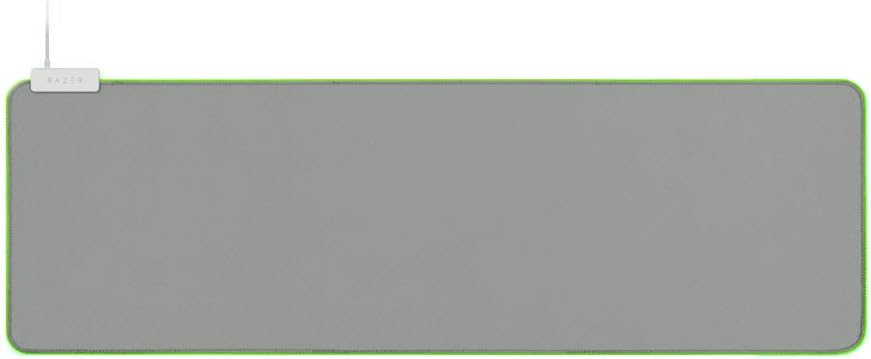
The Razer Goliathus Extended Chroma is a premium gaming mouse pad featuring fully customizable 16.8 million color RGB lighting that syncs across 30+ devices. Its micro-textured cloth surface delivers balanced control and speed for precise mouse tracking, while the natural rubber base prevents slipping. Sized at 10" x 14" with a 3mm thickness, it supports all mouse sensors and sensitivity settings, making it the ultimate desk upgrade for gamers and professionals seeking immersive performance and style.


| ASIN | B07SJ97NNF |
| Additional Features | Non-slip |
| Antenna Location | Gaming |
| Best Sellers Rank | #64,021 in Office Products ( See Top 100 in Office Products ) #1,072 in Mouse Pads |
| Brand | Razer |
| Color | Mercury White |
| Customer Reviews | 4.6 out of 5 stars 2,734 Reviews |
| Enclosure Material | Cloth (Surface), Rubber (Base) |
| Global Trade Identification Number | 00811659031761 |
| Item Dimensions L x W | 10"L x 13.98"W |
| Item Height | 0.12 inches |
| Item Thickness | 3 Millimeters |
| Item Type Name | Gaming Mouse Pad |
| Item Weight | 1.2 Pounds |
| Manufacturer | Razer |
| Material | Cloth (Surface), Rubber (Base) |
| Product Dimensions | 10"L x 13.98"W |
| Recommended Uses For Product | Gaming |
| Shape | Rectangular |
| Size | 10L x 14W inches |
| Special Feature | Non-slip |
| Theme | Gaming |
| UPC | 811659031761 |
| Unit Count | 1.0 Count |
| Warranty Description | 1 Year |
R**A
Owned for three years. Still very comfortable and great.
I love this mat and I've had it for about three years now. It's really nice, very good quality to the touch, comfortable, thick, and honestly? Surprisingly easy to clean. It's fairly big and takes up a large portion of my desk (which I like personally especially because I have a 65-inch desk - around that anyway. It is slip resistant so I never have to worry about it moving around thank goodness. The only issue that has me now looking for another desk mat is that it's definitely hit its limit. Because I don't have a wrist rest for my mouse, there's a deep stain where my wrist hovers due to the amount of sweating in video games I do (literally and figuratively) and it's hard to get out. I can't just throw it in the washing machine because of the light strips on the edges so I'm having to look for something else that isn't as flashy. The money spent definitely matches the quality and value but if you're a gamer (or if you spend most of your days at your desk like me) - maybe try something without lights fish-wired into the edges so that you can toss it into a machine or something. This mat has definitely served me well though these last three years for sure. I love it.
L**R
Perfect Match for My Razer Setup
Amazing RGB pad that syncs perfectly with my Razer gear! The lighting is vibrant with smooth effects, and it really upgrades my setup. The surface is precise for gaming, and it grips the desk well. Great quality and value for the price. Definitely worth it!!!
C**E
Great Quality
It’s laying flat for now, hoping for the best in the future months. I really love the look of this mouse pad, it definitely filled the space I needed on my desk. I’m really hopping that it’ll last (in terms of the folding edges people keep mentioning) until I get my new pc and monitors because it definitely helps break up the black/white of my desk and tv at the moment. I will however end up buying a new one if this one starts to fold or if I spill something on it, which is a high possibility. A weird thing to note; The lighting is a bit off sync with with the synapse, what I mean by this is that I have it set to go from pink - white - blue (for zero two and hiro) but the pink doesn’t pick up, it just goes from white to blue. That being said my laptop keyboard which is also using the synapse with the exact same settings, is working perfectly fine going from pink, white and then blue. I did also change the settings around and the color variations to see if my mouse pad just wasn’t projecting the pink color well, but it turned out that it just skips whatever color I have projecting first bad replaces it with white even if I move the first color placement a bit further up the bar which would usually make the color project longer. Sorry if you’re reading this and know all the correct terms for the things I’ve described thus far, I just don’t really care enough to learn what everything I’m doing is called. I could be doing something wrong since Ive never really messed with the synapse before, and have normally just ignored the colors all together.
G**T
Great mousepad..but read this review to the end. Trust me.
Even though I bought this by accident, I still decided to try it out. Here's what you might wanna know before buying it, and some pros and cons of it. Pros: From the get-go, you will notice that the mat itself is quality and is perfect if you are using any type of mouse, especially if you plan on using an optical mouse. It has a nice, thick, luxurious feel to it and it even has a little extra flair to with the added Chroma effect that is neatly stitched on the outside of the mousepad. It has (what I would consider) the perfect weight to make it feel light enough to move it when you need too, but not light enough to have it move around when you are using your mouse. The mouse pad itself even offers a cable management feature at the top left where the USB cord starts. For the brief time I had it, the chord posed no real issue and did not interfere with my mouse cord. I could see this mousepad being perfect for anyone who uses a wireless mouse since it would create a wonderful aesthetic. Pairing this with any Razer mouse will give you a feeling of fulfillment. (Wireless or not, It works well.) For $40 USD, you are getting what you pay for, and trust me, when the lights are out in your room, you will understand. However, how does it match up to the Firefly which is roughly $20 more? Cons: I would give this mousepad a 5-star rating if it wasn't for the fact that the Razer Chroma Firefly Mousepad existed. There is a difference between the two, and some argue that the Goliathus Chroma can be better. I mean, if you look, it is $20 less than the Firefly. But Razer is good at two things, one is that it delivers premium products at a slightly more expensive price point that rarely disappoints, and second, it is good at making things that are truly aesthetically pleasing and has a certain "Awe Factor" when someone sees it. The Razer Goliathus Chroma falls short on a few things when compared. One of those things I noticed immediately is that it does not work as well as the Firefly does with synapse. (Program for customizing the lighting effects to your preference) Some effects when used on the Goliathus just don't work well with it at all, whereas the Firefly can almost copy other Razer products perfect for a unison look (Keyboard, Mouse, Speakers, Hue, Etc.) And don't get me wrong, I would be happy with either, they are both AMAZING looking, but when you compare the lights on the Firefly vs the Goliathus, the Firefly wins. One other con I could think of that doesn't apply to me (More of a pro to me) is that it is a very large mousepad, and if you have a small desk, it might not fit well with your setup. Here's my conclusion. Look both mousepads are going to be better than any other just plain mousepad. If you are more a technical person that isn't really interested in having that much flair, get the Goliathus. But if you are trying to make your setup look aesthetic as possible, get the firefly. But keep in mind, both are going to look great, and your not going to be disappointed. THIS IS IMPORTANT: Let's say you want the firefly, but you don't wanna pay $60 for a mousepad. (I get it, I really do.) I ordered my Firefly used and refurbished for exactly (wait for it) $40! That's the same amount for the Goliathus and you're getting the more expensive version. And I don't know about you, but used mousepads are just pads, you don't have to worry about them just ripping apart. I would recommend buying a used Firefly or a new Goliathus. I hope this review helps. ;)
A**.
It works, it came in excellent condition, but do not expect a ton of features in the Chroma app.
I really like this mouse mat. It always stays clean, it's smooth to use, and it's just an overall great product. Though I wish that there were enough features like the Razer Firefly, but oh well. It's a very nice mat, but only buy it if you have the spare money and you want something that looks really nice with your environment. It also absorbs some spills. I spilled a can of 24oz Baja Blase Mountain Dew on it, and when I rushed to clean it up, it absorbed into the mouse mat. (It could have been worse, but I cleaned it up.) The only thing that stayed behind is a very, very, barely noticeable outline of the spill. In fact, I doubt it would be even visible had I bought this in black. You can only see the outline if there are no shadows. There is enough room on this mat to store your keyboard, have more than enough room for your mouse, and whatever else. This mat is 36", so this may work well on a 55" desk with two monitors side by side (even if one's at a slant,) and your PC is on the desk as well. I enjoy this mat more than I did the Firefly. The Firefly always made the bottom of my mouse dirty, and I would constantly have to clean both it and the mouse. The reason for that is because it was a plastic material, whereas this is fabric. Hence, it's easier to clean and the bottom of your mouse will not get dirty at all. I recommend this purchase, if you are looking to buy it.
J**T
Large and In Charge
I'm first embarrassed - I purchased the XXL thinking that whole-desk coverage was a plus, and indeed I still think that. HOWEVER, mind the measurements. I have a 24" wide desk which while certainly large enough to handle this mat in and of itself...I neglected to account for the footprint of my monitor arm. Takeaway is to be really fussy with the measurements. The border lighting is an extremely cool thing (more in a minute) but know that it absolutely prevent you from trimming this to a custom size. Now then, love the material, love that there is a special profile in Synapse to optimize my Basilisk mouse with the mat, etc. Thickness is very appropriate. And then there's the lighting... First, this WILL REQUIRE A USB PORT to function. If it were needed for power alone that'd be one thing (plug it into a wall wart instead of your computer) but the various profiles requires a data connection. Put another way...if you want to change colors, have it work with Axon, etc, you have to use a USB port. Could be a dealbreaker for some. My case, I use a hub (I know, I know...) with this attached along with my headset. The result is a pretty striking setup, especially paired with other Razer items that match the themes/colors/etc. Razer does get a little grief from going a bit overboard with Chroma, but then that's a trademark and I respect it. For this product, I love that it's Large and In Charge, with plenty of space to stretch out. Even absent that, it just makes the desk look...cool. I like it a lot.
X**.
Wonderful mousepad.
Great size, plenty of moving room for your mouse no matter what kind of game you play; if you need to move your mouse quickly and in wide directions, this pad should suit you. Any bigger and it might need its own table! I was slightly disappointed by the lack of RGB patterns, but I found a remedy for anyone who likes Razer's WaVe light pattern. Just use Synapse 3 and go into the Chroma Studio, up the speed to match your mouse and keyboard if it's got the WaVe pattern going, and you're golden. It'll cycle through the colors rapidly. Yes, it's a band-aid, but it's better than Static or the Breathing RGB options, IMO. Still, you'd never know if you didn't inform anyone of the fix for their lack of a WaVe RGB option. Another thing is, my mouse pad has a very bright sliver of light in the RGB tubing around the edge in one area, which will be shown in a picture. Not sure if that's a defect, or if every copy of this product is like that. A small eyesore, but still an eyesore. Oh well, I suppose! I'm very pleased with this mousepad, would highly recommend.
M**A
It’s big and it lights up
Pretty much as advertised. Typical mouse pad material, nothing special about the materials. The nylon stitching that affixes the led strip to the edge of the mat is really well done. Stitches are very close together and appear they will last a long time. The edge of the mat is a bit irritating to the wrists/forearms if you are one who likes to lay your wrists flat across the desk. The lighting does integrate seamlessly into the Razer app. I was surprised when I opened Diablo IV and my keyboard, mouse and this mouse pad all shifted to a sinister looking red theme all on its own. Really cool!
Trustpilot
1 month ago
3 days ago