Buy anything from 5,000+ international stores. One checkout price. No surprise fees. Join 2M+ shoppers on Desertcart.
Desertcart purchases this item on your behalf and handles shipping, customs, and support to Panama.
๐ฅ Elevate your video presenceโbecause your image deserves the spotlight!
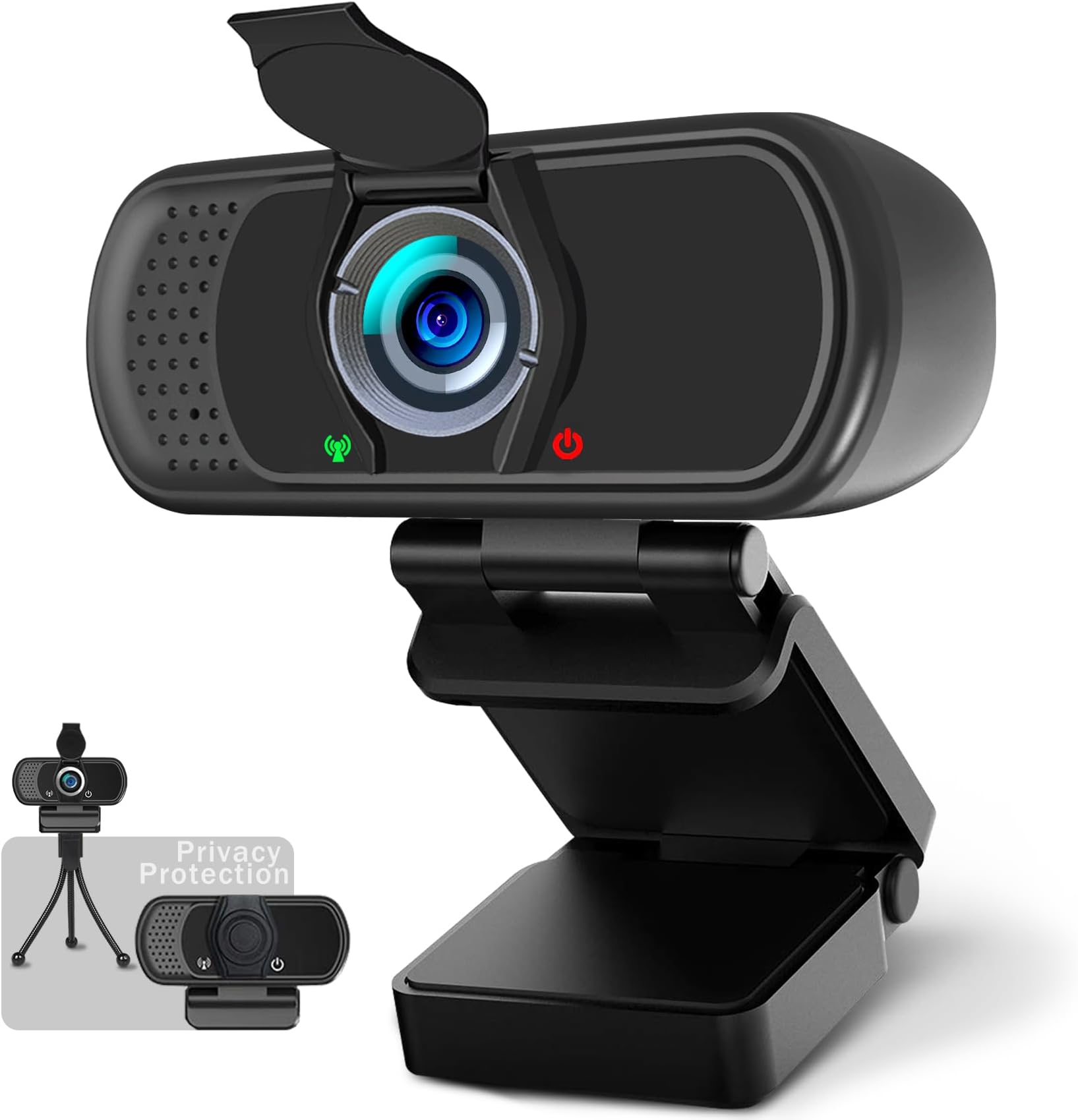
The Hrayzan 1080p Webcam delivers crisp Full HD 1920x1080 video with a wide 110-degree field of view and built-in noise-reducing microphone. Compatible across Windows, Mac, Chrome OS, and Android TV, it offers plug-and-play simplicity with no extra drivers required. Included privacy cover and tripod provide security and versatile positioning, making it ideal for remote work, streaming, and video conferencing.


| ASIN | B07T3S1TCG |
| Antenna Location | remote work, online teaching, video recording, social media streaming |
| Are Batteries Included | No |
| Best Sellers Rank | #130 in Webcams |
| Brand | Hrayzan |
| Built-In Media | Webcam Cover , Tripod Holder |
| Camcorder Type | Video Camera |
| Color | 1080P Webcam |
| Compatible Devices | Devices running Windows 7/8/10/11, Mac OS, Chrome OS, and Android TV |
| Connectivity Technology | USB |
| Customer Reviews | 4.2 out of 5 stars 11,174 Reviews |
| Digital Zoom | 2 x |
| Display Resolution Maximum | FHD |
| Effective Video Resolution | 1080 Pixels |
| Exposure Control Type | Manual |
| Features | Built in microphone, Plug and play |
| File Format | JPEG |
| Flash Memory Type | Webcam for pc |
| Focus Type | Fixed Focus |
| Form Factor | Handheld |
| Has Image Stabilization | No |
| Image Aspect Ratio | 16:9 |
| Image Capture Speed | 30 fps |
| Image stabilization | false |
| Item Dimensions D x W x H | 1.85"D x 2.8"W x 1.25"H |
| Lens Type | fixed-zoom |
| Manufacturer | Hrayzan |
| Maximum Aperture | 3.5 Millimeters |
| Maximum Focal Length | 500 Millimeters |
| Minimum Focal Length | 500 Millimeters |
| Model Name | N5 |
| Model Number | N5 |
| Number of Speakers | 1 |
| Operating System | Windows, Mac OS, Chrome OS, Android TV |
| Photo Sensor Size | 1/2-inch |
| Photo Sensor Technology | CMOS |
| Screen Size | 3 Inches |
| Sensor Type | CMOS |
| Shooting Modes | Easy, Manual |
| Style Name | 1080P Webcam |
| Supported Audio Format | AAC, MP3, PCM |
| Supported Image Format | JPEG |
| UPC | 742354711071 |
| Unit Count | 1.00 Count |
| Video Capture Format | 1080p / 2k |
| Video Capture Resolution | 1080p, 720p, 480p |
| Video Resolution | 1080p, 720p, 480p |
| Viewing Angle | 110 Degrees |
| Warranty Description | 1YEAR |
| Water Resistance Level | Not Water Resistant |
| White Balance Settings | Auto |
| Zoom | Digital |
L**O
Easy to use camera with good price
I got this camera especially for my kid's online courses for this pandemic season for the desktop. It turns out it's working properly, very easy to install and react in real time without any delays at all. In the video, I can shake the camera and by comparing the motion, it's almost exactly the same time. It can be put on top of the monitor or stand on the table, so easy to do that. The drawback is that the picture's quality is not that high resolution. With good environment light, the image seems a lot better though. I consider this as a easy, entry level camera with fast response, like a camera you can use for chatting or online courses. The price is very reasonable as well.
L**0
Excellent HD Webcam / Microphone Combo Value
Needed a HD webcam / mic for conducting computer training classes on Zoom. The Hrayzan for under $50 met all my expectations and has performed reliably for over a month. To install on Windows, just plug it in to a USB port - no drivers needed. It works great on Zoom. The automatic exposure adjustment is great; it compensates for suboptimal lighting. The HD makes my image much sharper for other participants. The USB cable is about 3 feet long, but that's plenty for mounting the camera on top of my desktop monitor. The stereo microphone is quite powerful, on Zoom I've set the volume level to about 25% and I'm still loud enough for others to hear. My only ding is that the 110 degree viewing angle causes some spherical distortion at the edges of the image. That doesn't affect video-conferencing, but might impact still photos or videos taken with the webcam. Since I only do web conferences about twice a week, when I'm not using the camera, I unplug it from the USB port to minimize the chance of being viewed or listened to by an external hacker. I'd definitely recommend this webcam.
A**N
Nice, inexpensive camera for Teams and Zoom
First, you'll need to watch the price on these as it appears to vary wildly. I've now purchased three of these at an average of about $18 or so. I have one for each computer system I do video with at home; one for work, one personal and one hobby. They are a nice little camera that can either be mounted on the included short flexible stand, or the neat little folding piece that allows me to put it on the top of my monitor and it stays pretty well. I found the foldable part to be a little loose on each of these when I received them, but I removed one of the rubber plugs to access the small phillips-head screws and tightened them appropriately. Now they stay even better. The other thing to note is the included cover that you have to put on yourself. It comes with a thin adhesive layer so you can put it on the front of the camera. However, you'll find the outside edge of the housing might stick out a bit from the face, so if you mount the cover vertically, it may not actually stick very well. In my case, I simply mounted the cover horizontally so the entire surface of the adhesive had something to stick to. This means I have to open the cover to the side instead of up, but it works fine. Do note however, that mounting it this way will partially cover the LED icons for power and connection. The picture is pretty nice. My only objection is that it is a little bit "fish-eye" which is great if you want to try and include more of your surroundings, but is a bit annoying in the distortion you get at the edges. It's not too bad, but for me reduces the overall rating to four stars as I've not found a way to adjust for that. It connects via USB and was recognized by Teams and Zoom without issue. I had started out with just one and moved it from computer to computer, but then purchased additional ones so I could just set each one up and leave it. Overall, satisfied.
C**R
Works Great . Easy to set up.
Great for meetings. Has a stand alone power button.
N**R
Camera--If it were a student it would be a C+ or B- student.
I received the Hrayzan 1080P HD Webcam today, about three days after I ordered. On the good side, I received it sooner than anticipated. I bought this brand out of necessity as all Logi Tech and Microsoft cameras were sold out. The install was easy. I plugged the USB into my Dell Desktop and worked right away. Because I'm on Zoom a lot I had to have a good microphone, and it is--clear and at lowest voice (volume) it comes across very clear. The description reads that it's 1080P. I have all my computers and TVs at 1080. This camera is not 1080--maybe 720, if that. However, the video quality is good enough for zoom, and that's all I'm looking for. It is not a Mac camera so don't expect sharp video. Again, it's passable video quality. As for life expectancy--if I get 6 month out this, and takes me through Shelter in Place, I'll be happy. Once life gets back to normal I'll begin my hunt for a good 1080P Logi Tech camera. I paid about $60 for this camera, and considering the times I paid a premium. But, hey, I needed something passible ASAP and it works. It's not auto focus but the camera focuses just fine. Any adjustment you have to do go Windows Start Menu>>Camera. If you want a camera to just get by, this is it. It's a bit expensive for the quality but you'll be pressed to find a Logi Tech camera in the less that $100 range.
E**N
Great video quality and easy to install - all for a fantastic price!
With this new work from home situation we are all in, I needed a webcam to attend meetings. I chose this one based on the number of reviews, the high average rating, and the lower price comparatively. It also helped that at the time there was a coupon available. Either way, the most pleasantly surprising thing happened - all I had to do was plug it in. Literally no set up and no downloading drivers. I did not expect this, and I couldn't be happier about it. Within a day of using it, coworkers were commenting on how clear my video was (as compared to the webcam on my laptop I was using previously) and asking for a link to buy the same one. I can't comment on the technical specifications of the webcam, but if you are looking for an easy to use, high quality video webcam, this is a true winner. As a side note, it comes with a lens cap cover if you are concerned about that type of thing. Picture is using the webcam so you can see clarity. Highly recommend!
T**S
Horrible picture quality in all lighting conditions
I bought this camera as an alternative to the built-in FaceTIme camera on a mid-2017 MacBook Pro 15โ. I have been unhappy with the built-in camera for the long time but it wasnโt a big deal. Now that I am using one daily for web conferences, I decided to get an external camera as an upgrade. Unfortunately, it was after the rush so Logitech cameras were sold out everywhere (and still are). After looking around for a week, I decided that this camera had good enough reviews and seemed like a decent option. I understand this is fairly cheap camera so I wasnโt expecting to be blown away. I received it and plugged it in. It was very easy to use since it supports UVC and requires no drivers. Thatโs where the positive things end. The picture quality is absolutely awful! 1) If you are in a room with even normal levels of ambient lighting, whites and grays will be completely over exposed & blown out. In my case, this results in my face being nothing but a white blob. 2) If you reduce the amount of light, everything switches to completely underexposed, dark, and noisy. There is no in-between. Itโs either Completely overexposed or underexposed. 3) For my use, The wide angle is terrible. It is so wide that it shows the entire room behind me which isnโt exactly ideal for web meetings. There is no way to crop it unless you are using web conference software that has video cropping built-in. I tried to tweak the image settings via third-party software (ManyCam and OBS) but there is absolutely no hope. I will be returning this camera ASAP and make due with the built-in camera until I can get a Logitech C920, C930e, or Brio. Itโs worth the wait and extra cost.
W**8
Solved some common problems
So, I had an old Logitech 720p camera and wanted something better for video conferencing during the shelter-in-place. When I installed the Hrayzan, I had both video AND audio problems. Read through all the Q&A and reviews and didn't find an answer that would work. AUDIO: It turned out somehow the microphone had gotten muted. Just opened the Sound Settings (right click on the sound icon) and ran the Troubleshooter. It un-muted the microphone and haven't had a problem since. VIDEO: The picture was great but I was getting a jumping garbled picture that was fairly random. After almost tearing out what little hair I have left, I finally just tried a different USB port and the problem instantly went away. Now the picture is perfect. The only reason I didn't give 5 stars on picture quality is because of the fish-eye distortion around the corners of the picture. But, I guess that is reasonable with the wide field of vision this camera provides. I would have rather had a narrower field with less distortion, but it works for me. I went ahead and gave 5 stars for "easy to install" even though it was a pain. But I don't think the issues I had could have been avoided in any way by the camera manufacturer. It was plug and play.
M**A
Budget webcam.
I use this to replace my really old webcam to talk to friends on Skype and Hangouts. Works pretty good even on low light without too much noise. I use the built in mic and it seems to be working pretty good. The colours on this webcam are more towards the white side and can be adjusted to your liking. No drivers are needed and it is just plug and play - which is great. Overall it is a good webcam but it would be better if it could focus better on close objects.
M**N
thanks
very good
A**R
Great mac and pc camer
Does what it says and does it well both on my mac and my work pc.
R**U
The product is just amazing
I do Zoom meetings on a daily basis, and this webcam is just awesome! I have been using it for 2 weeks, it works great. It is really easy to be placed on the top of my monitor, and it does not have a spring or clipper that you don't have to worry about aging or damaging your monitor. When I use it on a Zoom meeting, the video quality is there and it focuses on me really well. Definitely recommend. Keep it up.
L**R
Great!
For the money it is great. Picture is good. I bought it for a friend so that he and I can do business meetings. So I get to see the product in action. I have the model up from this that is double the price. The biggest different is sound quality. The microphone in the model up is much better. This one is good... like a decent lap top. The picture is good too. Mine is a bit sharper but it does not that big of a difference. So for everyday use this is great.
Trustpilot
1 day ago
1 month ago