🖱️ Glide into the future of productivity with every touch!
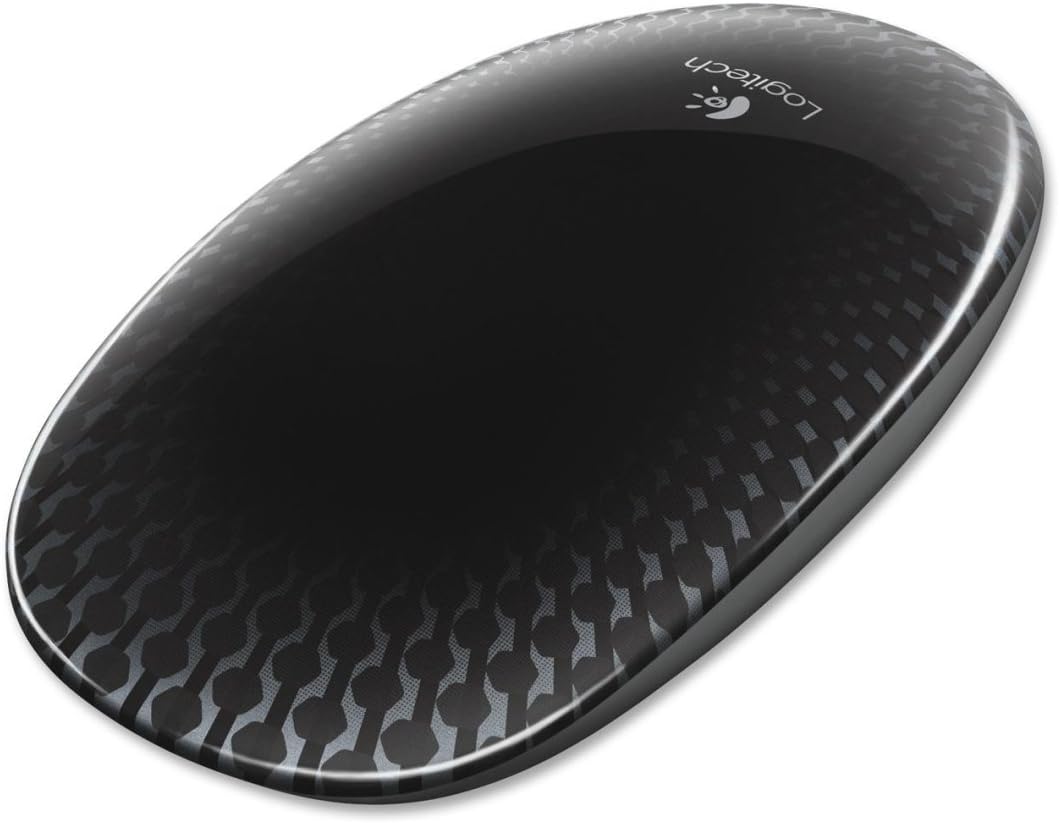
The Logitech Touch Mouse T620 features a full touch surface enabling intuitive multi-gesture control optimized for Windows 8. Its laser-grade optical sensor delivers precise tracking on almost any surface, while the unifying receiver connects up to six devices wirelessly through a single USB port. Designed with an ambidextrous, ergonomic shape and customizable controls, this lightweight mouse enhances workflow efficiency and modernizes your desktop setup.
| ASIN | B0093H4VSS |
| Additional Features | Wireless |
| Antenna Location | Office, Everyday Use, Computing |
| Are Batteries Included | Yes |
| Are Batteries Required | Yes |
| Battery Average Life | 1.0, 6.0 months |
| Best Sellers Rank | #8,532 in Computer Mice |
| Brand | Logitech |
| Built-In Media | Batteries |
| Button Quantity | 1 |
| Color | Black |
| Compatible Devices | Laptop, Personal Computer |
| Connectivity Technology | USB, Wireless |
| Customer Reviews | 3.9 out of 5 stars 328 Reviews |
| Enclosure Material | Graphite |
| Global Trade Identification Number | 00097855091222 |
| Hand Orientation | Ambidextrous |
| Hardware Platform | Laptop |
| Item Weight | 9.6 ounces |
| Manufacturer | Logitech |
| Model Number | 910-003334 |
| Movement Detection | Laser, Optical |
| Movement Detection Technology | Laser , Optical |
| Number of Batteries | 2 AA batteries required. (included) |
| Number of Buttons | 1 |
| Operating System | Windows 7, Windows 8 |
| Power Source | Battery Powered |
| Range | feet |
| Special Feature | Wireless |
| Style Name | Modern |
| UPC | 071040193311 097855091222 |
T**S
love it, makes the Win8 PC exerience much better
I've had Win8 for a few months and got by with a regular mouse but was missing the gestures to make the experience better. I went ahead and got this mouse to see if it would make a difference or not, and I love it. I read some of the other critical reviews and am frankly surprised at how critical they are over a peripheral such as a mouse. I must be really easy to please or have really been cheap on my selection of past mice, because this one is awesome. It took me about 10 mins to go through all the gestures for Windows8, the only one I found a bit tricky was the middle click, but after I found the sweet spot in the middle, I got it down. Likes: the box and presentation is excellent installation worked flawlessly appreciate the duracell batteries and not some cheapies the carbon fiberish look is cool I like the slick design, I guess if you have sweaty, sticky hands it might stick to the mouse I like that it is light and glides easy, but I can see how it might take some practice to hold it just right while swiping. Functionality wise, you cant have both a light mouse that moves effortlessly across your desk and a heavy one that stays but while using gestures. room for improvement: I suppose, to fit my hand, if the rear of the mouse was 1cm higher and if the front 1/3rd was wider than the rear 2/3rds, it would make holding the mouse steadier while gesturing (like a hammer head shark, if that makes sense). But then all the ladies or folks with smaller hands would complain. Also, and I don't know if this is possible with Win8, but being able to customize some functions like clicking 3 times to bring up all apps or a user-decided key combination would be cool and a pretty easy feature to add to the software. Overall, it is a quality product and perfect for Win8. If something changes after I spend more time with it, I will update this review. If you like large, bulky mice on the heavier side, then you probably won't like this one. If, however, you like sleek, high tech, gorgeous gadgets that work, you will love it.
B**Y
Absolutely love this mouse! Perfect for everyone!!
Absolutely love this mouse!! Works great with Windows 8 operating systems. Easy setup with set-point technology that allows the mouse to be used the same way the touch-screen function works on compatible computers/laptops WITHOUT getting fingerprints all over the screen. It has turned out to be the best accessory I have purchased for my laptop by far! Added bonus: the USB plug-in is small, preventing it from sticking out & getting in the way of working around and next to the laptop. Definitely a MUST-BUY if you are using Windows 8 systems! **REVISED REVIEW** This is still the only mouse I use for my laptop. I have recently updated to the Windows 10 operating system and was concerned that the mouse no longer functioned properly. However, I realized that it was just the small USB component that had stopped working as a result of never removing it from the USB port of my laptop. It had been shuffled around a lot in my backpack and was slightly bent. I replaced it with a new Logitech USB receiver and the mouse worked perfectly! It still functioned exactly the same with Windows 10 as it did with Windows 8. None of the features were lost or removed -- it is still capable of carrying out the wide variety of features it was intended to have (as long as you make sure the Logitech Set-point Technology is programmed so that the mouse works they way you want it to). Something else I didn't mention in the previous review: Since there are no visible buttons or scroll dials, you can set up this mouse to be used by right-hand dominant people OR left-hand dominant -- you select how each of the functions work -- how to scroll, which button does what, how to select the start menu, everything is in your control. It is easily customized to uniquely fit each individual's preferences. Perfect for everyone!
C**A
Not for intensive use
This mouse is just fine to do what it is intended to do: work with Windows 8 gestures and it simply works. But the real problem is that it might be a bit small for people with big hands, tho that's not a big deal. Real problem comes when you use it for too long periods of time (6+ hours) it becomes unstable, popping up the metro UI or the "charms" menu and it even gets worst if your hands get sweaty. Pros: great battery life with on screen level indicator. Good pointer precision. Cons: not for intensive use and easily affected by false touch events (like static sweat IFYWIM, etc)
D**T
Got more than I paid for!
I wanted something that came close to or matched the mouse on my wife's Mac but figured I was out of luck unless I just bought one and then messed with the drivers or something. found the T620 here on Amazon, less than a third of the price I was figuring to spend $24 VS $69! then I figured it wouldn't be as nice. WRONG!!! it works every bit as nice as My wife's Mac Magic Mouse, has near if not all the same functions and even appears to be able to make more settings and adjustments. nice and smooth surface, very accurate tracking and scrolling. as far as noise others talk about here, I found it maybe clicks a bit louder, maybe not. not a deal breaker for me. Setup was near automatic and was able to unify with my 520 keyboard, no problem. Attractive here on the desk and fits my hand a bit better than the MM.
P**N
Perfect mouse, great for Linux
This mouse is so great it's gotten *more* expensive over the years. I bought my first almost two years ago for thirty bucks. A new one now costs fifty. The only mouse that compares is the Apple Magic Mouse, and I like this one better. It works great under Linux (Mint/Ubuntu) perfectly detecting left/right clicks and vertical/horizontal scrolling. The Logitech unifying receiver works infinitely better than Bluetooth, which is always a pain and doubly so under Linux. I've even had two receivers plugged into the same computer sitting next two a third plugged into a second computer, on Windows and Linux. No problems, ever. It even works on my highly reflective granite desktop where the Apple mouse failed. If, like me, your wrist gets sore from a touchpad but you miss the convenience of touch-scrolling, then this is the mouse for you.
R**N
Looks cool, and feels great in the hand
Works well. no glitches in function. Plug and play... on the spot. Looks cool, and feels great in the hand....software installed first time without a glitch. software easy to understand and works properly HOWEVER:: The scroll function works opposite to the scroll wheel on my old mice. With my old mice, for the last 15 years, When I touch the wheel and pull it towards the palm of my hand: the screen moves UP. With the new mouse the screen moves DOWN. Check yours out! I never thought about it 'till now. Same for the left / right swipes. With the new mouse, the finger movements are the opposite of what I have done for the last fifteen years. I have a roller wheel at work, and the new mouse at home, so you can imagine.! It took me about 2 weeks to figure out why this mouse didn't work "right". Note: If you imagine your mouse as an extension of the touchscreen, and touch the mouse (instead of the touchscreen), this mouse works just the way Logitech planned. I wish they had said so before I bought the mouse. I will not return or replace the device, though as it is still pretty cool.
S**N
Great For Windows 8!
Great tool to help get around the computer fast with or with out a Touch Screen. Takes a bit to get use to, but once you do its fun, fast, and easy. The windows start touch is a bit weird and I don't find myself using it cause I use other functions like the app switching. That function is the best I almost always use it to get around and the computer. If you fast past functions you will LOVE this!! I have tried it with some computer games and is a bit weird(Never bought this for games, just trying) but if your looking for a gaming mouse you are in the wrong area.
R**T
Good idea, poor design
Since it is a surface device, you can't rest your fingers on it or it can't tell if you're clicking left or right. I had to hold the mouse by the edges to move it, my click fingers hovering above it. So it's very uncomfortable to use. Often, when I right click the mouse does a left click even when my index finger isn't on the mouse (or slightly touches the mouse). The only consistent way I could get a right click was to click the right side hard. Sometimes, my fingers will barely touch the surface as I'm moving the mouse no matter how careful I am. This scrolls what I'm trying to work on. I could disable the scroll but then what's the point of having the surface in the first place? There are currently no sensitivity settings in the driver so no way to tweak it. Even if some if the issues are because I got a defective mouse, it looks like a bad design to me. After 2 days of trying to make this mouse work, I returned it.
Trustpilot
3 weeks ago
2 weeks ago