Buy anything from 5,000+ international stores. One checkout price. No surprise fees. Join 2M+ shoppers on Desertcart.
Desertcart purchases this item on your behalf and handles shipping, customs, and support to Panama.
⌨️ Fold, Sync, and Conquer Your Workflow Anywhere!
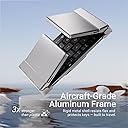
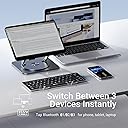
The iClever Foldable Bluetooth Keyboard is a sleek, ultra-portable tri-fold keyboard designed for professionals who demand mobility without sacrificing functionality. Featuring Bluetooth 5.1 for seamless multi-device connectivity, a durable aircraft-grade aluminum build, and a rechargeable battery with USB-C charging, it offers a premium typing experience in a compact form factor perfect for laptops, tablets, and smartphones.


| ASIN | B00YWLJNPQ |
| Additional Features | Premium aluminium frame; unfold-to-power design; USB-C rechargeable 210 mAh (≈ 90 days typing); auto-sleep after 2 h. |
| Antenna Location | Travel, mobile office, coffee-shop work |
| Best Sellers Rank | #268 in Computer Keyboards |
| Brand | iClever |
| Built-In Media | Stand Holder, USB Cable |
| Button Quantity | 64 |
| Color | Silver frame with black keycaps |
| Compatible Amazon Tablet Models | Amazon Fire 5th Generation, Amazon Fire 7 5th Generation, Amazon Fire 7 7th Generation, Amazon Fire 7 9th Generation, Amazon Fire 7 Kids 5th Generation, Amazon Fire 7 Kids 7th Generation, Amazon Fire 7 Kids 9th Generation, Amazon Fire HD 10 5th Generation, Amazon Fire HD 10 7th Generation, Amazon Fire HD 10 9th Generation, Amazon Fire HD 8 5th Generation, Amazon Fire HD 8 6th Generation, Amazon Fi… |
| Compatible Devices | Windows 10/11 PC & laptop; macOS 10.15+; iPadOS 13.4+; iOS 13+; Android 9+; ChromeOS (BT 4.0+) |
| Compatible Operating System Family | iPadOS |
| Compatible Tablet Computer Models | Amazon Fire 5th Generation, Amazon Fire 7 5th Generation, Amazon Fire 7 7th Generation, Amazon Fire 7 9th Generation, Amazon Fire 7 Kids 5th Generation, Amazon Fire 7 Kids 7th Generation, Amazon Fire 7 Kids 9th Generation, Amazon Fire HD 10 5th Generation, Amazon Fire HD 10 7th Generation, Amazon Fire HD 10 9th Generation, Amazon Fire HD 8 5th Generation, Amazon Fire HD 8 6th Generation, Amazon Fi… |
| Connectivity Technology | Bluetooth Low Energy; pairs with up to 3 devices |
| Customer Reviews | 4.4 out of 5 stars 3,031 Reviews |
| Enclosure Material | Aluminium alloy frame with ABS key deck |
| Generation | 1st Generation |
| Hand Orientation | Ambidextrous |
| Is Electric | Yes |
| Item Dimensions L x W x H | 5.8"L x 3.6"W x 0.63"H |
| Item Weight | 6.56 ounces |
| Keyboard Backlighting Color Support | Single Color |
| Keyboard Description | 64-key tri-fold, 13 mm low-profile scissor switches (< 50 dB) |
| Keyboard Layout | QWERTY |
| Manufacturer | iClever |
| Mechanical Keyboard Switch Model | Scissor Switch |
| Mfr Part Number | IC-BK03 |
| Minimum Required Operating System Version | Windows 10 |
| Model Name | iClever BK03 Bluetooth Keyboard |
| Model Number | IC-BK03 |
| Number of Batteries Required | 1 |
| Number of Keys | 64 |
| Number of Sections | 1 |
| Power Source | Battery Powered (Rechargeable via USB-C) |
| Recommended Uses For Product | Travel, mobile office, coffee-shop work |
| Series Number | 3 |
| Special Feature | Premium aluminium frame; unfold-to-power design; USB-C rechargeable 210 mAh (≈ 90 days typing); auto-sleep after 2 h. Special Feature Premium aluminium frame; unfold-to-power design; USB-C rechargeable 210 mAh (≈ 90 days typing); auto-sleep after 2 h. See more |
| Style Name | Contemporary |
| Switch Type | Scissor Switch |
| Theme | Portability and Productivity |
| Unit Count | 1.0 Count |
| Warranty Description | 30-day money back |
| Water Resistance Level | Not Water Resistant |
L**A
Perfect size, perfect fold, great durability, great battery life
I am absolutely loving this keyboard! Once I decided I didn't need backlighting, this was the choice for me! The dimensions are perfect for fitting it in my purse so I can write whenever the mood strikes. The bluetooth is strong enough to connect to my device from 60 feet away, and the battery lasts an incredible amount of time; I have not run it down yet and the longest I've had it on was about 6 straight hours of use. The ergonomics could only be improved by switching the backslash and backspace, which isn't traditional, but is where my finger reaches. I find that any surface with a wrist rest is best for me, though this keyboard is stable enough to work just propped on my lap. The little stick-on feet do seem to be integral though, given that the joints in the center of the keyboard make the center sit higher than the sides when unfolded. No complaints here; they stick on well and the bag protects them when sliding it in and out of my purse. My only caution is that this might be slightly small for very manly hands, but I advise you to do like I did before purchasing and measure the keyboards you are used to using before purchasing a foldable one. Update 2024: This keyboard has lived in my purse for 3 years and would still be going strong if I had not had to have it mailed back to me after I lost it while traveling. It was packaged in a small box with bubble wrap, but the flip-out and "/" key had a slight catch to them. I thought I gently fixed the problem, but a little while later keys on the right flip-out portion started failing to respond. I absolutely love this product and will be ordering another one shortly! Highly recommend, 5/5 stars for sure!!! - Battery has never shortened life; i use it a few hours a day and because of the auto shutoff only charge it every month or two. - the stick-on feet have never come off - no loose keys or joints, otherthan the extraneous damage that you hopefully won't experience - stand still works well and pivots/locks as expected Just an overall great product.
J**O
Finally, a folding bluetooth keyboard that delivers!
I tend to have anxiety if I don't have the ability to type a significant-length email quickly, and my phone/tablet keyboards just don't cut it if I want to type more than a paragraph or so. So I usually carry around a big, relatively bulky bluetooth keyboard in my bag, because up until now the folding bluetooth keyboards were either hard to use or prohibitively expensive. This is the time, friends -- this is the time to get a folding bluetooth keyboard. Here are some thoughts: Manage your expectations about usability. It's tiny, so it's not going to be as comfortable and easy a typing experience as your full-size laptop keyboard. I've attached a picture of the iclever next to an old-school (circa 2000) iMac keyboard. As you can see, it is quite a bit smaller! So your typing will not, I repeat WILL NOT, be the same as on a standard keyboard. Even if your hands are tiny, the keys themselves are closer together and somewhat smaller than those on a standard keyboard. This is what you want, if you want a keyboard that can fold up to roughly the size of a large-format phone (iphone plus, samsung galaxy note, etc.). If you want a full-size, standard issue keyboard, get a full-size bluetooth keyboard. It's a little wonky to type on, which means you'll need to adapt. Wonky? Well, the backspace is way out of range. If you're used to a backspace key that's double size like on most keyboards, you're going to accidentally press the adjacent key a lot at first. Adapt. Learn. Or get a full-size keyboard. As others have noted, the right shift key isn't where you'd expect. Again, the issue here is that you're trying to get every key from a keyboard onto something much smaller than a standard keyboard. Think about it like those little 9-inch netbooks from ten years ago -- yes, that was a tiny keyboard, but it was attached to a tiny laptop computer that was smaller than anything you'd ever seen before. Manage your expectations. Know what you're getting. Oh, another weird thing that I've noticed with this and every other bluetooth keyboard I've used: if I accidentally hold down the shift key before pressing the space bar, it won't type a space and instead will just pop up a notification that says something like, "English, US," which is a reference to the type of bluetooth keyboard layout I'm using. I haven't found a way to disable it. It's going to slide around on a smooth, flat surface like a table -- unless, of course, you look in the box it came in and find the little silicone rubber feet that you can stick onto the bottom of the keyboard. Then it's going to slide around a lot less. To be clear, these are NOT stuck to the keyboard when you get it -- they kindly offer you the option of using them or not. If you want to keep your keyboard totally smooth on the outside so you can more easily slide it into pockets, you can do that. Or if you have big ham-hands like me, you'll want to attach the silicone nubbins to keep it from skittering around under your fingers while you type. Another thing I noticed is that the more I use this keyboard in the way that my typing teacher told us to type (I'm showing my age here -- 20 years ago, I had to take a class in how to type!), the better I am at using it. That means not resting my wrists on the table in front of the keyboard, but rather elevating my wrists slightly so that my fingers hang slightly to reach the keys. The upside is that there are no asymmetries in the alignment of the keys. The seams in the keyboard are so cleverly designed that you barely notice them. I am somewhat an aggressive typer (probably using more force than is necessary), and I have yet to make the keyboard buckle or fold on its own -- but keep in mind I'm using it on a counter/table surface. I wouldn't want to use this on my lap, because that's really not what it's designed for. That said, if you had a book or clipboard to put it on, you could hold it on your lap! One bluetooth tip for you: if you're having issues with a bluetooth device dropping its connection repeatedly, you can test whether it's a problem with the bluetooth device itself by turning off the wifi on the device it is connected to (phone, tablet, etc.). If your bluetooth connectivity issues disappear, it has something to do with the interaction between the wifi and bluetooth. I don't understand it, but a friend of mine who worked for AT&T for a long time told me to try this at one point, and it worked like a charm. He said I should try to move closer to my wifi source, if I need to use the bluetooth and wifi at the same time. With the increasing availability of generous data plans in the US, I've taken to just leaving my wifi off unless I'm doing something very data-intensive. I realize I'm kind of going on and on here, but I'm really happy to finally have a portable, compact, usable bluetooth keyboard option in my life. I don't have to lug around a laptop when I travel anymore -- I can bring a tablet or even just my phone. This product brings some measure of freedom to my life -- though arguably it's the fault of my job that makes me anxious about not being able to quickly and easily type lengthy emails on the go! Okay, so who does not want this keyboard? 1. If you are really a stickler about the layout of keys on a keyboard, you will probably be driven mad by this keyboard. Just drag your laptop around, or get a full-size bluetooth keyboard. 2. Clumsy typers -- the aforementioned oddness of the backspace key's location, the closeness of the keys to each other, and the general weird idiosyncrasies of a bluetooth keyboard will probably make you crazy. 3. People who are totally comfortable typing at length on a touchscreen keyboard. This drives me crazy, but some people are totally fine with it. 4. People who don't really want a super-portable keyboard. You can get a cheaper, more easily-used bluetooth keyboard. The big selling point of this one is that in its folded up state, it's about the size of a large-format phone. If that's not a feature that matters to you, keep looking. Finally: I cannot speak for how this works with apple/ios devices. I assume it does, and I've never had a compatibility issue between a bluetooth keyboard and any ios/mobile device. That doesn't mean other people won't, but I never have.
L**N
This has been a dandy little travel keyboard, with one little frustating issue....
When I purchased the Iclever Bluetooth keyboard, I didn’t purchase the keyboard I liked the best. I chose Iclever to replace the keyboard that came with my e-Tab because so many of the buttons have stopped working in the last year; it’s unusable. Despite the criticisms of the Iclever, the backspace being out of reach, it fails to connect or stay connected or that it has several moving parts. It folds down into thirds. After reading twenty or more reviews, I begin with 1 & 2-star reviews, I chose the Iclever over my first choice. All of the negatives were overcome by the metal components rather than plastic. In fact, the buttons have metal springs under the buttons which I hope will give it a longer life than my last keyboard. The idea that the keyboard has two joints that could break was a real turn off. But the entire frames, including the joints, are made of aluminum. It’s very sturdy. The buttons themselves actually feel like they are higher quality buttons than my laptop; probably are better. I received the Iclever in one day on April 9thth. I have not charged it yet. The little blue light at the top center is strong and bright still and is supposed to blink when it needs charging rather than simply shutting off without warning. It connects to my laptop right away, every time and hasn’t dropped yet. Keep in mind this is NOT a full-size keyboard. It’s a three-quarter size or so folding travel keyboard. To date, it is doing a fantastic job. More than I expected when I ordered the Iclever Bluetooth travel keyboard. My regular frustration and biggest complaint, so far, is that the shift key is small and outside the up arrow. I regularly hit the up arrow and type in the sentence above. For example, reaching far enough to depress the shift key, pressing the down key to go to the end, and generally getting more familiar has made it much easier to use. The left shift is twice the size of the right. I never notice it at all. Now that I’ve had it a few days to get accustomed to its peculiarities I think it’s a great little buy.
B**S
Solid, Small, Portable, and Perfect with iPad Air 2
I love this keyboard, because it is almost full size (in other words, easy and comfortable to use, ergonomically), AND it GETS SMALL, very cleverly with its folding feature. I use it with a new iPad Air 2, and since we like the compactness form factor of the iPad, then it stands to reason that we want the same small form in a keyboard, which does not sacrifice functionality and user friendly benefits. This one fits the bill perfectly, since I have a small EveCase to carry my iPad and any accessories. The EveCase is perfect since it has side pockets for small accessories. But most small keyboards will not fit and I don't want a big "lunky" case to carry my iPad around. This is so compact that it takes up very little room in my EveCase and still leaves room for my iPad charger and some accessory cords and misc items. When I unfold this keyboard, it is solid in its tactile feel and very well built with casing that feels and appears to be brushed metal, but I suspect that it is a hard plastic (hard to tell, so I think this speaks well for the keyboard). Since most of the "mode and function" button features are pretty clearly explained in the product description on Amazon, I won't bore with those details since you can read that for yourself. I will say that there are no functions missing on this keyboard. It has full functionality and compatibility with Android devices, Mac OS and iOS, and PC's, so there are no compatibility issues to worry about. It turns itself on by unfolding it. And it talks to my iPad and wakes it up automatically when I unfold/open the keyboard. That's kind of cool. The only thing I wish they had done was make the Backspace and Delete keys larger. They are nested in the far upper right corner of the keyboard, and you have to rather purposely "single finger" keystroke them, since they are a bit too small to use in full touch typing mode, using your pinky finger to navigate to that upper corner. And with them being so small and next to one another, if you try to hit one with the pinky finger, you will likely hit the wrong one. However, this in no way detracts from the overall benefits of this keyboard, and I would absolutely purchase it again, in spite of this very minor inconvenience. This charges with a mini USB to USB cord (included). And a small green indicator light flashes briefly when you open the keyboard, to acknowledge that it is on. It is claimed to have a fairly long battery life, but I can't speak to that issue, since i have not tested it to its limits in actual use with my iPad. I don't think that will be an issue, and I heartily encourage its purchase. I went to BB and checked out the available small keyboards there, and had zeroed in on Logitech, and Microsoft folding keyboards, and after some diligent searching for reviews and handling them first hand to see how they felt and viewed how small and useful they might be (in conjunction with fitting into my carry case), this keyboard won the race "hands down". And some of the computer review sites, such as PC Magazine, gave it outstanding reviews. So don't hesitate to purchase. I see no flaws and it is very well built and solid "in hand".
A**S
Excellent portable device!
Exccellent device. I recently got a Bring Your Own Keyboard as a gift and then needed, obviously, a keyboard! this one is perfect. It's very small, but not so small that it can't be typed on easily. So lightweight and portable! I can be out the door and working with both in my purse and get lots of work done.
J**H
This is a nice keyboard, I'm still not used to it due ...
This is a nice keyboard, I'm still not used to it due to it's size but for the price point it is well worth it. I would imagine that a large portion of my difficulty adjusting to this keyboard is because of it being too small for my hands, but probably with some more consistency, I would be able to adjust. Switching from a normal keyboard to this one can make for a pain, so I wouldn't count that against this product. It functions well enough and serves the purpose of general word processing needs. One problem I have come across is getting the FN or Function Key to work. It could be I'm not doing it right (didn't read the directions yet so probably should go back to that) or it may be a bad key. Not sure since I don't use it enough to warrant me trying to fix it or find an answer as to why this happens. I also would not hold this against the keyboard itself, not until I learn more about how to operate the Function Key. Now I'm not sure if it is my phone or the keyboard, but when I am typing out something, it does not enter the spaces that I put in while I'm holding down the shift key. I'll often get something like this "Here is the the end of the sentence.I believe that this product is good." As a result I can't type very quickly and I have to really be paying attention to what I'm typing or I have to go back and proof read the entire paragraph that I wrote by adding spaces where they are needed. So not sure if that is my phone (mostly what I use this with) or the keyboard but it has become a nuisance. Additionally as of late, my keys get stuck OR the last letter I type just keeps being added to the document that I'm writing up. If not careful I'll end up with a sentence composed of a single letter. This also could be just with my particular product so you can take that for what it's worth. Unless this is common with this particular product then it may be a flaw with the design. Again it could simply be my phone! In conclusion, this is a nice keyboard for what you pay for. It is durable (which I forgot to mention above) and can meet the needs of anyone who needs a quick means of typing something out on a word processing program (Word, Google Docs, etc). It is smaller than I expected and I may not know how to operate the Function Key, neither of which I would hold against the keyboard. However the space anomaly that I mentioned above and the random typing of a single letter are the primary reasons why I give this a 3 star review.
A**.
If you asked me, "Should I buy this?," I'd reply with, "Yes, of course!"
I've been using this product for a few days and am impressed. I labored over the decision on which foldable bluetooth keyboard to purchase. It came down to this or the iWerkz Universal Foldable Bluetooth Keyboard, Black/White (44652BW) universal foldable keyboard. The differences: this one is tri-fold, has about 300-some reviews, and comes in at 4.6 stars. That one is bi-fold, has about 700-some reviews, comes in at 3.7 stars and is $5 cheaper. I made the right choice with this purchase. The main hangup with the iWerkz (and it seems the great majority of the other bi-fold keyboards) is weird key placement, particularly the "b" key appearing on the left half of the keyboard in order to accommodate the fold. Well, I wondered how a keyboard that has two folds instead of one could possibly avoid having the same problem (or several problems). The bi-fold is a straight line down the middle. This keyboard, however, is engineered in such a way that the folds are not a straight line, but they jut in and out around each key. It works perfectly. It folds up well (meaning nothing about it seems weak or like I need to be extraordinarily careful handling the product while folding it). By the way, for what it's worth, I am a touch-typist, and I sometimes accidentally hit the Caps Lock button, but after using the keyboard 3-4 times, I'm pretty much done with that and only have to look down at the keys to put in an ! or @. The makers of the iClever tossed some magnetized edges in, and some aluminum alloy joints (as seen in the photo) to support the keyboard when it folds up, and as a result, we have a pretty solid (literally and figuratively) to use. The bluetooth pairs with my iPhone with zero issues, which is the main reason I was looking for a foldable portable. I have not had luck using it with my Kindle Fire. The Fire says it is paired with the keyboard, but I have yet to be able to connect the two (whereas the Logitech Bluetooth Multi-Device Keyboard K480 for Computers, Tablets and Smartphones, Black (920-006342) keyboard I have does connect when tuned into Android). For me, this doesn't matter so much because I use the Kindle mostly for content consumption, whereas I use my phone while on the go nearly every day. This comes with a nice little protective bag to put it in when you take it somewhere. A hard cover would have been nice, but it's a sturdy little piece of hardware and I've carried it in my backpack on crowded busses throughout the city and it's never been in any danger. If you are looking for something portable, easy to use, and without an exorbitant price tag, buy this. Also, I'm not being compensated in any way and I purchased this product.
P**S
Great, with a few small issues
Almost perfect. Let me start by saying that I love having this keyboard. Together with a small phone stand, this turns my iPhone 7 plus into a replacement for my iPad mini. If I need to take notes in a meeting, I whisk this out, and within seconds, I'm ready to go. The keyboard connects quickly every time. After going into power saving mode, a few key presses will bring it back almost immediately. The construction feels solid, the keys have good travel and feedback. I love the ability to switch OS support on the fly. I sometimes remote into a Windows server, and always ran into the issue that iOS keyboards don't have an ESC key. No problem now: after logging in, I just switch the OS support and I'm ready to go Windows. Since I only had this for a week, I can't speak to its reliability yet. Will update if there are any issues. Here are the small details that keep it from being a perfect product: 1. No locking it in the open position. While it has magnets to keep it open, those aren't strong enough to keep it open when placed on your lap. 2. The keys are a bit loud (minor) and also have a tendency to miss a keystroke if you are too fast or send double characters if you're just a tad too slow. You have to find just the right typing speed. 3. The layout. This is the hardest for me to deal with. I touch type, and the layout is killing me (although I know I will be able to adapt): The "?" key is wider than usual, next to it is the arrow-up key, and to the right of that is the Shift key. Which means that every time I want to hit right Shift, I hit arrow-up and start typing in the line above. While I understand the preference to arrange the arrow keys in the usual inverted-T pattern, exchanging arrow-up and right Shift (and keeping the "?" at normal size while making Shift bigger) would have been the better solution for touch typists. If you're part of the 90% who type with two fingers, this will not be an issue for you. If you want to touch type 60+ words per minute, this may not be for you (although I believe it can be done). But if you are looking for a super small and light keyboard that fits inside a jacket pocket and that you can take everywhere, I highly recommend this.
M**I
Buen producto
Buen producto. Es pequeño, pero muy práctico para llevarlo a todos lados, resistente y tiene buena calidad de mteriales
X**X
My iPad's New Best Friend
The iClever tri-folding keyboard is the latest in my line of tools of the trade, and I have a very strong feeling that it's going to stay on that list for a very long time. I work on the go and my iPad is my work companion. I rely on physical keyboards to avoid neck and back problems from hunching over my device. My last unit, Zagg's universal tablet keyboard, broke and I had to find a replacement. A quick search led me to the iClever keyboard and it especially appealed to me due to its space-saving design. (Also, it was on sale.) After a day with this new keyboard, here are my findings: PROS: • Slim design makes it space-saving and portable. • Unfolds super smoothly. I have to restrain myself from constantly opening and closing it. It's just that smooth. • Tactile keyboard makes it satisfying to use. • Easy to set up with device. • It doesn't slide around much and stays in place when in use. CON (yes, just one): • Reconfigured keyboard takes a while to get used to (especially the tab, backspace and right shift button). Expect typos while your fingers learn to adjust. OTHER OBSERVATIONS: • CTRL and FN buttons are reversed, compared to a Mac keyboard. • The base of the keyboard is not level when unfolded. Hit the left or the right side of the keyboard hard enough and it'll tilt. Overall, this is an excellent keyboard. If you take your work with you on the road, or just like the ability to use your keyboard from the couch, then look no further than this sweet baby, right here. It's slick, sexy, slim, and it's one of those gadgets which will have people in the coffee shop asking you where you got it from.
C**E
Light-weight, very portable and works like a gem
I have a 12.9” iPad Pro, which is quite heavy, so I avoid adding bulk with a keyboard case. A lightweight, foldable keyboard like this is a gem. It’s compact enough to slip into my bag and only take out when needed. After using it for a few days, here’s what I’ve found: Pros: • Feels sturdy and well-made. • Lightweight and compact—roughly the size of an iPhone 15 Pro when folded. • Full-size alphabet keys with even spacing and a tactile feel, making typing fast and comfortable. • Unlike some foldable keyboards, there are no gaps between the keys at the folding hinge. • Supports multi-device connections, which is especially useful at work when switching between my iPad and iPhone for emails, texts, etc. • Automatically powers on when opened and connects instantly—no need to press a power button. Closes to power off. Super convenient. • Battery level is visible in the Battery widget. • Comes with a carrying pouch that fits easily in my bag. • Can be used while charging. Cons: • The number keys and backspace key (on top row) are quite small, making them tricky to get used to. I still occasionally mistype numbers. • It includes optional stoppers to improve stability, but they detract from the sleek design. It would have been better if they were built-in rather than an afterthought. Overall, it’s a great little keyboard that makes typing on the go much easier!
H**R
The worst was to come
I trolled the net to find a portable keyboard that would allow me to use my I Pad on trips to send emails, create excel sheets, sales force review documents and I know it's a tough job for anyone who wants to use an I Pad for work on trips in India as well as while I'm out of the Country. It's a major task for me to lug around a 5 KG trolley bag with all that goes in with a laptop. My earlier order from Amazon was for an exact looking keyboard that was actually a one to one exact copy of i Clever. The price seemed very attractive as well as the delivery, so I ordered it. Once it arrived, it had a flimsy packing, some kind of xerox copy instructions so small that you would need a microscope to see what's written. The worst was to come. I followed the instructions and when I tried to connect it with Fn +iOS and the Fn+Bluetooth, no pairing at all.Then just having it for two days one of the hinges came off!!! I retured it to Amazon and thank Amazon for their excellent way of refund. I looked and found it to match this iClever keyboard as a one to one copy. Called up the seller and asked him if this too is fake, and they clearly told me NO. Once I got the iClever keyboard - there is only one word- WOW!!!!!! It performed exactly as I expected and the tactile feel of the keyboad is simply awesome. This is a keyboard I will keep fr a long time. i Cleaver and other do some hard seiiling of the back light same keyboard, but unless your a DJ or a young person who likes to change the colur of the Keyboard, OK- you can but it at an additional price. Pro's- Everyting works as described Cons- Nothing to complain. Harshad
P**R
Great deal
Satisfied
Trustpilot
3 weeks ago
2 months ago