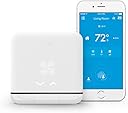


🌍 Smart Comfort, Anywhere You Go!
The tado° Smart Air Conditioner and Heater Controller is a cutting-edge device that transforms your traditional AC or heat pump into a smart appliance. Compatible with iOS and Android, it allows for remote control via the tado° app, voice commands through Alexa or Google Assistant, and offers significant energy savings of up to 40%. With its sleek design and easy installation, it’s the perfect addition to any modern home.


| Manufacturer | Mother HomeAutomation |
| Part Number | AC01-TC-US-03 |
| Item Weight | 14.4 ounces |
| Product Dimensions | 3.94 x 3.94 x 0.51 inches |
| Item model number | AC01-TC-US-03 |
| Is Discontinued By Manufacturer | No |
| Color | White |
| Style | Modern |
| Power Source | Corded Electric |
| Voltage | 240 Volts |
| Installation Method | Split system |
| Item Package Quantity | 1 |
| Display Style | Digital |
| Special Features | heater |
| Batteries Included? | No |
| Batteries Required? | No |
| Warranty Description | Limited 1year |
S**C
It works great.
If you aren't good with gadgets or get frustrated if they don't setup seamlessly then this isn't the right device for you. I am a home automation enthusiast and needed this specific unit for my NYC apt ac/heating unit that has a remote. It's a Simonaire but has the same remote settings as fridigaire. So I needed this unit because the competitors don't support frigidsire and don't have a manual setup i.e. Setting up each button press from the remote manually so the device can "record" them (or so I was told / researched). Also this device is the only one that connects to IFFT so I can use voice commands from alexa. If You don't have these same requirements or aren't savvy with this stuff then don't get this device or be warned - setup is a nightmare. Had to set this up like 4 times. Keep that remote close when recording and if the server or device and app get out of sync, start the recording over again for the entire heat or cooling cycle. For my purposes I did not record low and high settings (I never use these cause I have auto). So in the end I did cool and high auto only and only for the temperature range I realistically use. Cut down on the setup a little but again I had to do this 4 times to figure this out and actually get it working. The hardware control is retarded. Like just put buttons cause the touch controls is a mess and not logical. Needs an entirely new software for the current hardware. I'd like to see integration with wink hubs. Otherwise now I can set timers schedules and geofencing and control ac heating with Alexa!. Hoping updates will make this more reliable.
D**L
Extremely poorly designed software cripples an otherwise decent piece of hardware
Originally I was planning on giving this a 3 star review, however the egregious software design and ridiculous setup process made me retract even those 2 extra stars I was going to give it. First things first, this unit functions as an IR remote. It connects to Wifi and relays commands via IR to AC units to control them. That's about all it has going for it, that it can blast IR signals to my AC. The touch interface on it isn't very intuitive nor responsive, but most of us probably aren't getting this to have an alternate remote we have to poke at to control our portable AC units. Let's talk about setup. I unboxed the unit and followed the setup instructions, which involve downloading an app available on Google Play and the App Store. I started on my Android Nexus 6P. Followed the instructions to connect to the wifi network that the Tado had created--connected just fine--but no dice, the app could not communicate with the Tado to set up wifi for the unit itself. Rinse and repeat miscellaneous troubleshooting for about 30 minutes before I just give up. I try the iOS app, and that one is able to successfully configure the wifi network for the Tado. Next, I'm asked to configure my AC unit. I have an LG LP1415SHR. This unit isn't in the database, so I'm asked to teach Tado how to operate it. No problem. This AC unit supports the following modes: Heating, Cooling, Dry, and Fan. It also has 3 fan speeds: Low, Medium, High It also has adjustable vanes: On and Off. It also has adjustable temperature from 60F to 86F You might be wondering why I'm listing out all the specs of my AC unit. To teach Tado, I needed to teach it 156 separate "commands" just for the heating mode, and another 156 commands for the cooling mode. Luckily in Dry and Fan mode, there are no temperature options. This in itself is a bit of a set back, but ultimately not the reason why I consider the software crippled. Each one of these are configured in a run. For cooling, I had 6 runs: Vane On, Fan Low Vane On, Fan Medium Vane On, Fan High Vane Off, Fan Low Vane Off, Fan Medium Vane Off, Fan High. Each one of these runs consists of 26 individual temperature commands, from 60 to 86 degrees. In doing one of these runs, the unit inevitable fails to pick up at least 2-3 commands (repeating the command does nothing, I just have to wait about 15 seconds or so for the unit to timeout and give me an option to retry the last command. After finishing a run, I'm given the option to test all of the commands that I just saved. As of now, I've had about 2 out 3 runs have at least one failed command. You're not given an option to edit one command out of a run, if one of them fails you have to redo the entire run. Suddenly, of the 156 commands I need to do to teach it one mode, I now need to do 468 commands, since inevitably I have to repeat each run multiple times, and this is just for the cooling mode. If I tack on the heating mode, now I need to do well over 900 commands. Which brings me to another design failure. You're unable to edit command sets. Meaning that you have to complete this all at once. If you leave out one of the modes now, you'll have to completely restart this procedure in the future to add that additional mode. As of the writing of this review, I'm well into 6 hours spent just trying to set this unit up. After finally getting through all of the programming, it finally attempts to download the command set to the Tado unit. For me, this had a spinning circle for about 30 minutes before I finally unplugged the device and power cycled it. This left the unit and my mobile app in a perpetual limbo state where the mobile app thought the unit was downloading a command set, and the unit was in a configuration mode waiting for instructions from the mobile app. I finally find my way onto the tado.com website, where I find a reset button in the settings, which successfully resets the device, but leaves back at square 1. Great. Going beyond the setup, I'm feeling a bit misled by this. The marketing material makes claims about how its smart and etc, however the only thing I can see is the ability to configure schedules. I can't set any temperature based controls. For example, if my AC unit is set to 70 degrees, the compressor kicks in until the temperature falls below 70 degrees. After that point, the fan stays on until the temperature rises above 70, where it triggers the compressor again. I had wanted to have Tado turn off the unit entirely after it hit my set temperature so I don't waste power on running a fan when it's not needed. No way of doing this in the app. For such an expensive control unit, I expected far more. Extremely disappointed by how low quality the user experience is in the software and how limited the functionality set is.
J**M
Not just for a tech freak
I’m not a tech freak whatsoever, but still wanted to turn my air conditioner into a smart device so I decided to give this German product a shot. I checked out their website before and I checked if my air conditioner is supported by their system. It is really well explained. You can choose your AC brand and it tells you if it is already in the database. Also you need to have a look at you remote. Unfortunately it does not work with all air conditioners...But good to know in advance. So before buying it, have a look at their homepage. I also read through the reviews here on Amazon and since there are a few complaints about the installation, I decided not to set the system up all by myself. Seemed like it is a little tricky. So I contacted their customer support and asked them to help me. They gladly did and guided me through. I probably would have been able to do it myself, but wanted to make sure it works. And guess what: it does! I love the app. It is really simple but has so many handy functions and features. Now i dont have to use my old remote anymore. I just use my phone which I always have on me. And as I said, I’m not a tech freak but I do enjoy the comfort of the A/C control. I use the auto-off/on function when I leave the house. And I also use the schedule for days when I am at home or I just change the settings of the AC manually in the app. To sum it up: great product, nice customer support. I have nothing but good things to say about this product.
O**R
I can not recommend it at this time.
The unit that I received looked opened and the two adhesive strips for wall mounting were missing. It is not a big deal but for a $200 control I want a complete and sealed package. Set up and configuration is done via the App which is fine. During the initial setup, the unit went into a firmware update. This update process lasted almost one and a half hours!!!!. You can read the following at Tado's website: "Depending on the geographical location of the Smart AC Control and the distance to our Update Server, the update of the firmware can take up to 1 hour.". I am not an IT person but if a firmware update for a devise like this one takes over one hour, something is very wrong. By the way, do not bother to email Tado's customer support, I did 4 days ago and I am still waiting for an answer. As I continued the setup process I found that the control did not have the proper commands to control my Lennox Split A/C unit, so I had to "teach" the Tado Control the commands needed. This is a simple yet long and tedious process. The first time I did it, did not work out well. The second time I only did "teach" it the functions that where important for me, which saved me lots of time and ended up working fine. After a few days of testing I can say that the control works just fine and it looks good but it has two mayor flaws: First, you can only pair one Tado control with the App. So if you want to add a second Tado control to a second A/C unit in your home or work, you can not!!!!. You would have to create a second Tado account and keep singing in and out to control either unit. This is a very amateur mistake that can be solved by an App update but it is a red flag for me about this company. The second flaw that I see with this control is the fact that you have to use Tado's server to control your A/C. Based on the Firmware updates times, theirs servers leave a lot to be desired. Also, if in the future this company stops functioning for whatever reason, you will end up with a $200 paper weight. Based on the above I can not recommend getting this control, at least not at the present time.
A**R
Great product, easy installation
The Tado smart AC control is a great product and I really enjoy using it. The app is quite easy once you get the hang of it. I have a few smart home devices and decided to connect my AC as well. I read through the review section before purchasing it and nearly decided to buy a similar product, due to some poor reviews...I’m glad I didn’t. tado is exactly what I was looking for. I was a bit sceptical when setting it up but my concerns were unjustified. Everything goes to plan if you just carefully read through every instruction! The app gives you precise information about what to do and when. If you follow the given steps basiclly nothing can go wrong. I installed the recommended commands, which only took a few minutes. Once I had the device all set up, I tested all the commands and features and everything runs smoothly ever since. Great product!!
N**L
Tado vs. Sensibo Sky
I bought two of these and I also have Sensibo Sky controllers so I can compare both. For the Tado controller, it was difficult to pair it with my AC remote. My remote has separate on/off switches so I think this was the source of the problem. Once I paired it, it would turn my aircon off when I wanted to turn it on and vice versa. I had to unpair it and pair it again over and over until it worked. Once set it up, it also needed to update the software. That's fine with me but I was surprised that the app said it would take up to 60 minutes to update. In the end, the update took about 15 minutes to download for me. All in all, it took about an hour to install, which I think is way too long for a simple device. The Sensibo is more straightforward but I did have an issue with one of the devices they sent. It was faulty and would not hold a signal to my wifi. But as long as you get a working unit, it's pretty fast to set up. Also, the touch capability on the Tado unit is pretty useless. It never registers touches consistently and is not worth attempting. The Sensibo doesn't have one and that's fine with me. Better than having one that doesn't even work. All of this would be fine if the device actually worked in the end. At the moment, when I turn the AC on (either through the app or Google Assistant), there's a delay that takes anywhere from 2 seconds to not turning on at all. Turning off the device is fast though. Again, I suspect it may be because my AC has separate on/off buttons. The Sensibo is blisteringly fast and after about two months of usage, has been consistent in its operation. Oh, and the range of the IR signal on the Tado device is really weak. It has to be set up directly in front of the AC. This is compared to the Sensibo, which can be installed at an angle to the side of the AC. This might not be an issue for you but it is for me because opposite my AC is a floor to ceiling window with no power outlets. All in all, Tado gets 1 out of 5 stars. Sensibo gets 3 out 5 because I got a faulty unit which I can't return because I don't live in the US. The Sensibo wins by default, but honestly I wish there was something better out there.
F**Z
One year later review
Almost a year after purchasing the product, I think it’s a good time to write a review. Originally, I purchased 3 units in Nov-16 on sale at 130 each. I made some research regarding the different products available then, but finally decided for Tado given the offer. Product (10/10): The item itself is a small white square with a black line in bottom; I think it looks great and is very clean once installed; Hardware Setup (9/10): Hardware setup is very easy; just choose a place that: a) has an electrical outlet near and b) gives good line of sight to the AC unit you want to control; you can choose vertical (in a wall) or horizontal (in a desk). In case of using it in a wall, the product comes with tape to fix. In my case, I had unused electrical boxes for which I had and USB module, which I installed inside this box and passed through the cable to feed the Tado Unit (see photos); in order to be able to make maintenance (eventually reset the unit) I used double Velcro tape. In this configuration, I didn’t use the power brick that comes with the unit. Software Setup (6/10): Software setup is a whole different story; if your unit is in the manufacturar database it should be easier to setup; in my case, I have three McQuay A/C (same model, but with 9.000, 18.000 and 24.000 BTU), so I had no luck with the database so had to setup manually. This process involve using your smartphone, the Tado unit and the remote controller of the AC unit. Depending on the number of modes, fan speeds, temperature range, and swing options, you could end with a lot of combinations, and for each one you have to enter the commands. In my case, I started with the 9.000 BTU unit; It took almost 90 minutes to setup, but went without a problem; I then waited one week (in order to get in to the mood of making the process again), and tried to setup the second unit; this unit was a nightmare, as the process got stuck and I couldn’t find the way to reset the process; I almost lost all hope until contacted customer service; they answered promptly (by email) and offered to reset my unit, but not only that. They offered to copy the setting from my already setup unit to the new one; after some time, the second unit started to work; I then asked if they could write the setting to my third unit, which they did. So the overall process was hard but not impossible. In perspective, if I have to recommend something, would be to choose less options during setup (shorten the temperature ranges, or use just Min and Auto Fan Speeds), because anyway in real operation, you don’t use all the options with your remote control. Operation (7/10): For the operation of the unit, you can use your smartphone or the touch surface of the unit. In my case I had no luck (didn't understand howto, or simply it doeasn’t work as expected) with the touch surface, so the operation is mainly by smartphone; In this case, you select auto or Manual Control; Auto is more for Automation (see next paragraph), but for Manual Control you can select the Operation Modes (Heat, Cool, Dry, Fan, Auto), the Fan Speed, the temperature and swing options. In general, Manual Mode is very reliable (given that you made a good setup). Automation (8/10): The smart app lets you choose a schedule (Day by Day, hour by hour) of the operation modes of the unit; if you want, you can choose geo-fencing, which works in tandem with your smartphone, in order to recognize when you are in your house or not. I think that this option is good for people living alone (or two adults, each one with a smartphone linked to the system), but in my case with small children all day in the house, geo-fencing is not an option. But anyway, the schedule by itself is a good option to program the start, end and number of hours that the AC units are working, which is better than just leaving it on; except that you have to change it all over from Summer to Winter (you can’t choose a different schedule for hot and cold season) Integration (8/10): I have used Smartthings, IFFFT and Alexa. For me, the best combination is IFFFT and Alexa. For Smartthings, you have to install a custom extension, which in my case didn’t work 100% (for example, I couldn’t set it to heat mode). In the case of Alexa, it works great to turn the units off; but if you need (like me) to use the AC in Cool mode and also in Heat mode, you can only say “Alexa set living temperature at 75”, but is it 75 in cooling mode or heating mode? Of course you could use auto mode, but not being able to choose the AC mode, is a hindrance. IFFFT to the rescue; with IFFFT you can create a recipe (being able to choose the mode, fan speed and preferred temperature) and save it with a familiar wording. So I created a recipe called “Cool Living” (Cool mode, fan speed auto, 74F, Swing On) and just say “Alexa, trigger Cool living”. Overall (8/10): In general, after almost a year, I’m very satisfied with the product. In the long term, after you have set it up, it is very reliable, and allows a good control of the units; In this year I had to reset the units no more than 2 or 3 times which speak volumes about the product; also, I don’t remember a situation where the remote servers were down. Except for the setup (or compatibility with your current AC unit) I would recommend the product.
C**G
Definitely smart!
I got this product 4 weeks ago just in time for a heat wave in the Bay Area. When I opened the box, I was positively surprised how easy and clear everything was. Aside from the small white box for AC control, there’s an install guide, power cable, and stickies for mounting. The installation took just about 20 minutes and is not difficult at all - even if you are not that technical! There is an installation assistant which guides you through the whole process. So far I’m super happy. It is my first smart home device and I’m fascinated by the technology. I mainly use the geolocation to manage the temperature. It recognizes when I leave the house and turns off the air conditioner automatically. But when I’m on my way home, it turns it on. It's just a different way of living. While it's been so hot the last few weeks it's just so nice to arrive home to a cool house without having to do anything, and not sit and sweat while waiting for the temperature to drop. A few days ago I started playing with the smart scheduling to see what it does - it’s fun and useful at the same time. It takes some getting used to because it runs automatically and you don't really , but now I am used to it and love it. I’m excited to see if my energy bill is lowered.
Trustpilot
2 months ago
3 weeks ago