💾 Unlock your digital universe with speed and space!
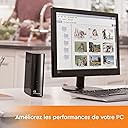
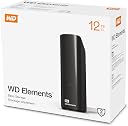
The Western Digital 12TB Elements Desktop External Hard Drive offers massive storage capacity with fast USB 3.0 connectivity, delivering up to 140 Mbps transfer speeds. Designed for easy plug-and-play use with Windows PCs, it features shock-resistant durability in a compact 3.5-inch form factor, making it the perfect solution for professionals needing reliable, high-capacity backup and storage.


| ASIN | B07VXKF1L4 |
| Additional Features | Shock Resistant |
| Best Sellers Rank | #24 in External Hard Drives |
| Brand | WD |
| Built-In Media | WD Elements Desktop hard drive,USB cable,AC adapter,Quick Install Guide |
| Cache Memory Installed Size | 12 |
| Color | Black |
| Compatible Devices | Desktop |
| Connectivity Technology | USB |
| Customer Package Type | Standard Packaging |
| Customer Reviews | 4.6 out of 5 stars 22,863 Reviews |
| Data Transfer Rate | 140 Megabits Per Second |
| Digital Storage Capacity | 12000 GB |
| Enclosure Material | Polycarbonate |
| Form Factor | 3.5-inch |
| Global Trade Identification Number | 00718037872155 |
| Hard Disk Description | Mechanical Hard Disk |
| Hard Disk Form Factor | 3.5 Inches |
| Hard Disk Interface | USB 2.0/3.0 |
| Hard Disk Rotational Speed | 5400 RPM |
| Hard-Drive Size | 12 TB |
| Hardware Connectivity | USB 3.0 |
| Installation Type | External Hard Drive |
| Item Dimensions L x W x Thickness | 13.5"L x 4.8"W x 16.58"Th |
| Item Type Name | standard |
| Item Weight | 0.87 Kilograms |
| Manufacturer | Western Digital |
| Media Speed | 100-150 MB/s |
| Model Name | WD Elements Desktop |
| Model Number | WDBWLG0120HBK-EESN |
| Number of Items | 1 |
| Special Feature | Shock Resistant |
| Specific Uses For Product | Personal |
| UPC | 718037872155 |
| Unit Count | 1.0 Count |
D**N
Excellent for expanding capacity of main drive
Plugged it into the fast USB port on my HP All in One Computer. Easy setup. Works great. Unloaded my big picture and video files from my main hard drive. Works great. Very fast.
M**S
Fast and compact (2.5 in x 2.5 in)
This is a big improvement from my 10-year old external hard drive. I was able to backup everything from my PC in just a few minutes instead of hours. This saved me a lot of time. It does get a little hot (so do my other external hard drives), but it is not an issue for me since I only use it for backing up my data. In short, it is compact (2.5”x2.5”) and fast. I am happy with the purchase!
C**N
Great miniature SSD drive - very fast when plugged into USB 3.2
Great little SSD drive! Very fast and easy to use. The size is smaller then a pack of gum. Easy to connect with the provided cable. Sleek design.
A**E
As advertised
What is there to say? It works. It's small and thin if that's a concern. I haven't tested for speed. Seems as fast, if not faster than a Samsung SSD I have. The only question is longevity and hopefully it'll be a few years before that question is answered.
R**R
Vibrates from spinning slow to spin up.
It's the fastest HDD I own although slowest to spin up complete it's self check and let you access it but at least it's not a horrible smr drive. it vibrates the surface it's on so I put it on a washcloth and it's a little better but I have it on the floor and I can hear it downstairs. The vibration is from spinning. the noise from head movements is not too bad. It's designed to stand up so the heat comes out the top vents but make sure you have it somewhere it won't topple over. Honestly i don't know why WD doesn't work with Microsoft to make the experience better. The engineers should be forced to use their own products. If it's always attached to your PC and you reboot if the drive is in standby it spins up to write data before shutting down. Now let's say you disable it so the bios doesn't try to access your drive well it doesn't matter cause windows will try upon booting so you have to wait for it to spin back up anyway. Anytime you have to reboot it will add minutes to the process and lots of extra spin ups which is not good for your drive. heaven forbid your doing updates and you have to reboot more than once. They need to speed up the spin up process (what's with that self check?) and don't have it spin down so much unnecessarily. anytime you try to access the drive if it's spun down the process trying to do so will freeze till it comes up. if you go into device manager for USB storage you can remove the checkmark for windows turning off the drive then it seems to actually do what you set in the power control settings. Despite these downsides the drive has been durable and trustworthy easy to install and bring your data with you and the cheapest way to have a lot of data and avoid the bit rot of an SSD. Just make sure you always safely remove it and keep it away from magnets. if you have a ups plug it in.
S**E
BEST VALUE EXTERNAL SSD
This seems to be the best value external ssd you can get at the moment. It's just the perfect sweet spot between convenience, storage space, speed, and of course, pricing. I bought one on sale at first, then got two more to replace all of my old external hard drives.
B**L
Small but mighty
This is my first SSD external hard drive, I’m shocked how small it is considering it’s a 2 TB capacity drive. Installation was quick and easy, it takes no space on my desktop, I hide it behind the computer. Since it runs on USB there’s no power cord, which is great. I’m using it with a 2017 iMac. So far so good I was able to transfer the data from a backup to the drive really fast with no hiccups.
N**I
Easy to use, convenient storage
This is our second purchase, so we can have a secondary backup of the first one, to keep at a different location. I've been nothing but happy with these little drives so far. Super convenient, easy to store, they function quickly and efficiently.
Trustpilot
3 weeks ago
2 weeks ago