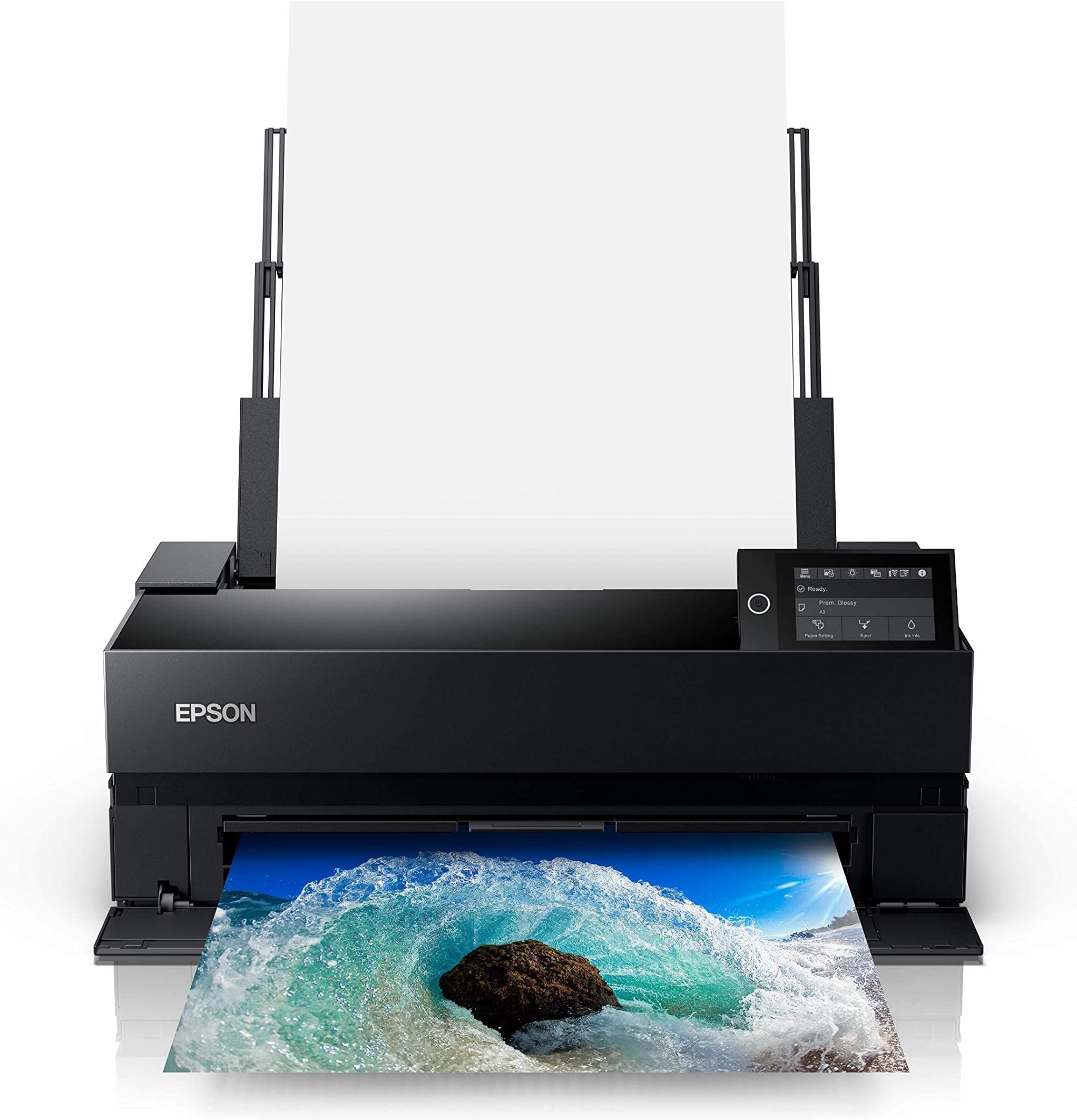
🖼️ Elevate your art with precision and vibrancy that commands attention.
The Epson SureColor P900 is a professional 17-inch desktop printer engineered for photographers and artists seeking exhibition-quality prints. Featuring UltraChrome PRO10 ink with Violet, dual black ink nozzles, and a 10-channel MicroPiezo AMC printhead, it delivers vibrant, accurate colors and deep blacks without ink switching delays. Its compact design includes wireless iOS printing, a customizable touchscreen, and supports thick media and roll paper. With industry-leading print permanence of up to 200 years, the P900 is designed to produce gallery-grade prints that stand the test of time.


| ASIN | B0875K6D4H |
| Additional Printer Functions | Scan |
| B&W Pages per Minute | 1 ppm |
| Best Sellers Rank | #45,352 in Office Products ( See Top 100 in Office Products ) #73 in Laser Computer Printers |
| Brand | Epson |
| Built-In Media | P900 Printer, Set of initial ink cartridges – Ten high-capacity (Photo Black, Cyan, Magenta, Yellow, Light Cyan, Light Magenta, Gray, Matte Black, Light Gray, Violet), Power cord, User Guide Kit (Printer basics guide, Start Here poster), Accessory box, CD/DVD tray |
| Color | Black |
| Color Depth | 24 bpp |
| Color Pages per Minute | 1 ppm |
| Compatible Devices | Laptops, PC, Smartphones |
| Connectivity Technology | Wi-Fi |
| Control Method | Touch |
| Controller Type | iOS |
| Customer Reviews | 3.7 out of 5 stars 458 Reviews |
| Display Type | LED |
| Dual-sided printing | Yes |
| Duplex | Simplex |
| Global Trade Identification Number | 08715946677996 |
| Hardware Interface | USB |
| Ink Color | Violet, Cyan, Magenta, Yellow, Black |
| Item Dimensions D x W x H | 14.7"D x 18.6"W x 29.3"H |
| Item Type Name | Epson SureColor P900 17-Inch Printer, Black |
| Item Weight | 35.3 Pounds |
| Manufacturer | Epson |
| Maximum Copy Resolution Black and White | 600 dpi |
| Maximum Copy Resolution Color | 5760 x 1440 dpi |
| Maximum Copy Speed Black and White | 10 ppm |
| Maximum Media Size | 11 x 17 inch |
| Maximum Print Resolution Black and White | 5760 x 1440 dpi |
| Maximum Sheet Capacity | 120 |
| Maximum print Resolution Color | 5760 x 1440 dpi |
| Model Name | P900 |
| Model Number | P900 |
| Model Series | SureColor P-Series |
| Number of Drivers | 1 |
| Number of Trays | 2 |
| Other Special Features of the Product | Wireless |
| Output sheet capacity | 120 |
| Paper Size | 17 |
| Power Consumption | 24 Watts |
| Print media | Paper (plain) |
| Printer Connectivity Type | Wi-Fi |
| Printer Output Type | Color |
| Printer Type | Inkjet |
| Printing Technology | Inkjet |
| Processor Count | 1 |
| Resolution | 5760 x 1440 |
| Scanner Type | Photo |
| Series Number | 900 |
| Special Feature | Wireless |
| Specific Uses For Product | professional photography |
| Total USB 2.0 Ports | 4 |
| Total Usb Ports | 2 |
| UPC | 010343954021 |
| Unit Count | 1.0 Count |
| Warranty Description | 2 year manufacturer |
| Warranty Type | limited warranty |
| Wattage | 50 watts |
A**5
Reliable Printer for Independent Artists and Illustrators
As an independent artist and business owner, getting my own printer was a huge goal of mine, and I'm so glad I took the plunge! The printer is a game-changer for me; I can now produce my own fine art prints in any size up to 16x20". I primarily print on 8x10", 11x14" and 12x16" matte fine art paper, using Premium Matte paper by Durico or Finestra Art. The first printer I ordered did not work, but I called Epson and they immediately sent me a new printer and set up an exchange. I've been printing on my new printer for 3 months, and here is a summary of my experience: The Upsides: -Quick and easy wireless communication with my laptop -Great customer service from Epson -The printer yields gorgeous, rich, and vibrant colors; high color accuracy -Each print takes just a few minutes to create -The Epson Print Layout program is straightforward and easy to use. I open this up every time I want to print something. Once I've selected the size and type of paper, I let the printer choose the colors. I find that this produces a better, brighter color quality than the color profiles listed. -Each print is 25-50% the cost of ordering from a fine art printing business -I've ordered ink once in 3 months -Fits perfectly on the alex drawers from Ikea The cons: -Sometimes the printer takes in a few pages at once instead of one at a time. You must keep an eye on it. -For some, the printer might feel slow -If you accidentally shut your laptop, or if your laptop unexpectedly dies, the printer will stop printing midway and you have to start over -Ink costs are high ($522 to replace all cartridges), so you must factor that into your print costs. I calculated my cost of ink per print using ChatGPT -Epson and Amazon ran out of ink recently, so I had to buy my ink from B&H Photo in NYC -The first printer didn't work, which was stressful -The ink isn't quite as vibrant as my the art prints that I used to order from a fine art printer, but it works well enough for me and my customers.
J**O
Cannot handle fine art paper
DO NOT buy this printer if you plan on making more than a few prints a week. I am a full-time artist and decided to transition from having a professional make my prints to making my own at home. This printer makes beautiful prints, but unfortunately it requires you to hand feed each piece of paper if you want to print on anything other than regular letter paper. I even bought the thinnest, most lightweight fine art paper and it still requires me to hand feed the paper. It has a "thick paper" setting but you REALLY have to fiddle with it to get it to accept each sheet. It requires a learned finessing. Pretty much every time it will say "out of paper" and then restart the entire process. Even more annoyingly, it will frequently say "paper jam" once the paper does feed, and then takes almost a whole minute to recover. I spoke with several different people at tech support and they just said that this printer can't really handle thick paper, which is unfortunate because if you're going to spend this much on a printer that has 10 ink cartridges and prints with such precision, you definitely want to print on good paper. For months I have been spending hours every week babysitting the printer and getting it to print. There are times when it simply will not accept paper at all. Really disappointed.
A**N
Bold beautiful color
I had a local printer doing my prints. And he’ll still have to do the large ones. But I am delighted with the quality of prints I’m getting out of this. I’m new to the whole photography art world, so figuring out the settings to a little trial & error for me. But I’m learning & getting gorgeous prints from this printer. And my only regret is that I didn’t go ahead and buy the bigger printer. When I first started using this printer it left a smudge on the white boarder of the prints. It stopped doing it after a few prints without me having to do anything. But it was disappointing at first. The ink almost immediately says it is very low. I have a whole new set ready to go. But the cartridges keep going…. *update - it will eventually tell you that you have to replace an individual ink to proceed, so that's when you need to change it. I use Moab Entrada Rag Bright 300 cotton paper. I print directly from photoshop. I've had zero problems with crashing & needing to restart like another review said. But I also own a nicer Epson flatbed scanner. I have to use non-Epson scanning softwear because it would crash all the time & I'd have to restart it. So maybe Epson just has crappy softwear? The only thing I don't love about this printer is that it is bad at doing multiple pages. It doesn't bend the paper while it is going through the printer, which is great! I was able to print the backs of some postcards for marketing material for me. But I had to individually initiate each print....
J**S
Great Printer
I'm a professional photographer. I use the P900 for my black and white printing needs. It's excellent. It does have a couple of drawbacks. One is ink choice. If you want deeper blacks, you have to use a certain paper. I like a heavy paper and often a heavy textured paper. I'm still experimenting with this, trying to figure out how to get more ink on certain papers. The other *major* drawback is the price for the ink cartridges. Granted you'll seldom have to buy all 10 cartridges at once, but if you do, it's going to cost you around $450 for all ten. Epson needs to furnish an initial 10 FULL cartridges that come with the printer, not the sorta 10 half-full ones. That's like buying a new car and the dealer puts enough gas in it for you to drive it home. Wouldn't hurt to lower the price on ink, either. I like the printer, though. I gave it Five Stars. So far, there isn't anything that makes me regret buying it. Really don't need the little pop-up LCD, but it's there just the same. Use it, don't use it...buyer's choice. This printer has a lot of good stuff going for it. Read the specs thoroughly before you buy. Read some dependable reviews. Make sure it's what you need.
W**N
Printer is very good, but getting replacement ink and quality Epson paper is quite the challenge
The printer itself is very good. I purchased one recently to replace a much older similar Epson large format printer. The print quality is outstanding and it is easy to set up. One thing to keep in mind is that the printer comes with starter ink cartridges that are 1/4 the normal size. The cost of the normal sized ink cartridges for genuine Epson one is around $48 per cartridge and for 10 cartridges, about $500. You should factor that into your purchase decision. You should also be aware that you can't buy the actual Epson cartridges on Amazon, as Amazon only appears to carry refurbished 3rd party ones, that most likely void the manufacturers warranty if you use them and may not offer the same quality of ink as the real deal. To add insult to injury, you can't get these cartridges from the Epson website either. They have the cartridges for the SureColor P700 but not the P900. You will have to go to another vendor to purchase them and hope they deliver them reasonably quickly. The same is true for the quality photographic paper that Epson makes. Amazon does not carry the 17 * 22 Metallic Luster or Gloss packs and you also can't get them on the Epson site. For those reasons, if I was a first time buyer of a large format color printer, I'd probably look at other options.
A**R
Boy does my wife love this printer
We purchased this to replace an old Epson 2200 that had seen better days. Thus far, the P900 has exceeded all expectations. Since we are using this for personal printing of photos rather than as a professional photographer would, the set-up was straightforward and we haven't needed to mess around with advanced settings. The Wi-Fi setup was simple and my wife can print from her multiple Apple devices and I can print from my Android phone and Windows based laptop. Three months in, we have had zero problems. Picture quality is as sharp as anything you could want. Colors are incredibly life-like and vivid. Blacks and Grey's are equally impressive. The printer also uses wide format paper up to 17 inches and that's without purchasing a paper-roll attachment for banner length printing. So my artist wife and her non-artistic spouse (me) couldn't be happier with this printer. It's admittedly a little expensive, but the printing results are as professional as anything I've seen.
T**L
I just tried two P900 printers and both had defects.
Upon receiving the P900 I printed an artwork on Ultra Premium Presentation Paper Matte and the print came out with what appeared to be a light haze over the image. The black title box was not black but a dark foggy grey. I compared the print to a print from the now obsolete Stylus Photo R1900 and the P900 was not acceptable. I spent three days working first the Asurion (Warranty) Tech support and after 3 hours they could not figure out the problem so I went to Epson support and spent at least 8 hours over two days trying everything they suggested until they declared the P900 I had to be defective. Thankfully this seller is refunding my money. I ordered another P900 this time from Epson directly and that printer has the same issue with the Ultra Premium Presentation Paper Matte. Unfortunately I had ordered almost $3,000 worth of inks (that only can be used on the P900) and papers of all sizes. And now because I will have to get a refund for the second printer and I don't feel I can trust Epson Quality I have to try to get refunds from JetLex for the inks I have no use for. The Stylus Photo R1900 was a great printer but is now obsolete. And the P900 was supposed to have replaced it. I cannot recommend the SureColor P900. What a shame. It appears the P900 line has some serious issues using the Premium Presentation Matte Paper. Epson must have known this. And I have a show coming up and won't have a supply of prints to sell. The refunds won't arrive until after the show so I am out of luck. Darn.
M**R
Prints as crisp and vibrant as photo labs
I'm a novice to high-quality printing, having sent off all my wall-hangers to professional labs. But those are pricey and time-consuming. I chose the P900 over Canon's PRO-1000 for the lone reason the Epson is a 2020 release and Canon's is getting up there in age. Not saying I wouldn't have been just as happy with the Canon; I've never used it, so I can't compare. Set-up was straightforward and from box to initial print was less than an hour. I'd caution new owners to follow the instructions to the letter, including shaking the ink cartridges a bit before insertion. I didn't and caught it just in time before it started charging the lines. I've been printing my favorite vacation photos on a variety of different Epson premium papers to find my preferred look. I printed a photo I took in Santorini (so lots of hard lines and vibrant colors) and it looks exactly as it did on my monitor. Lines are crisp, shading is smooth, and the colors pop. I wanted a desktop printer with photo lab quality and I'm not disappointed. If this helps anyone, I struggled with deciding on furniture to put it on. I ended up with an Ikea Besta TV stand that's 47.25"W X 16.5"D X 29"H. Depth was my main concern and it fits with about a half-inch to spare front and back. The dimensions for the unit are for the feed and output trays extended.
Trustpilot
2 months ago
5 days ago