๐ Mesh your home, master your speed โ Wi-Fi that keeps up with your hustle!
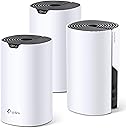
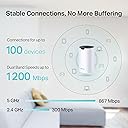
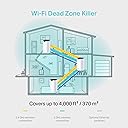
The TP-Link Deco S4 AC1200 Mesh Wi-Fi System delivers fast, reliable dual-band speeds up to 1167 Mbps and seamless coverage up to 4,000 sq.ft with a 3-pack setup. Featuring advanced mesh technology, it automatically switches devices to the strongest signal, supports up to 100 devices, and integrates with Alexa and the Deco app for easy management. Ideal for homes with 500Mbps+ broadband, it also offers robust parental controls and a 3-year warranty.


| ASIN | B0851D6MXY |
| Antenna Location | Home |
| Antenna Type | Internal |
| Best Sellers Rank | 1,489 in Computers & Accessories ( See Top 100 in Computers & Accessories ) 5 in Whole Home & Mesh Wi-Fi Systems |
| Box Contents | Deco S4(3-pack) |
| Brand | TP-Link |
| Brand Name | TP-Link |
| Colour | White |
| Compatible Devices | Gaming Console, Personal Computer, Security Camera, Smart Device, Smart Television, Smartphone, Tablet |
| Compatible devices | Gaming Console, Personal Computer, Security Camera, Smart Device, Smart Television, Smartphone, Tablet Compatible devices Gaming Console, Personal Computer, Security Camera, Smart Device, Smart Television, Smartphone, Tablet See more |
| Connectivity Protocol | Wi-Fi |
| Connectivity Range | 4000 Square Feet |
| Connectivity Technology | Ethernet |
| Control Method | App |
| Controller Type | Amazon Alexa |
| Coverage | Up to 4,000 square feet |
| Customer Reviews | 4.6 out of 5 stars 4,638 Reviews |
| Data Transfer Rate | 1167 Megabits Per Second |
| Frequency | 5 GHz |
| Frequency Band Class | Dual-Band |
| Frequency band class | Dual-Band |
| Has Internet Connectivity | Yes |
| Is Modem Compatible | Yes |
| Item Dimensions L x W x H | 9.1L x 9.1W x 16.2H centimetres |
| LAN Port Bandwidth | 1167 Mbps |
| Manufacturer | TP-Link |
| Manufacturer Part Number | Deco S4(3-pack) |
| Maximum Upstream Data Transfer Rate | 1167 Megabits Per Second |
| Model Name | Deco S4 |
| Model Number | Deco S4(3-pack) |
| Model name | Deco S4 |
| Number of Items | 3 |
| Number of Packs | 3 |
| Number of Ports | 2 |
| Operating System | Linux |
| Other Special Features of the Product | Beamforming,Parental Control,Alexa Compatible,Access Point Mode,Voice Assistant |
| Product Warranty | 3 year manufacturer |
| Router Firewall Security Level | Basic |
| Router Network Type | hybrid |
| Security Protocol | WPA2-PSK, WPA3-PSK, WPS |
| Special feature | Beamforming , Parental Control, Alexa Compatible, Access Point Mode, Voice Assistant |
| Unit Count | 1.0 count |
| Wi-Fi Generation | Wi-Fi 5 |
| Wireless Compability | 2.4 GHz Radio Frequency, 5 GHz Radio Frequency |
| Wireless communication standard | 2.4 GHz Radio Frequency , 5 GHz Radio Frequency |
I**H
Wow, amazing. I have complicated needs but Itโs a minefield - which one to choose?
This WiFi mesh system is superb - great range and easy to set up. I really was expecting to have to buy an additional unit, for the garage and garden, but this system knocks it out of the park. I have a 4-bed detached house, largish garden (220 sq meters) for a new build and a problem with WiFi signal strength around the house and outside. I particularly need WiFi in my garage and garden (see below), as well as the rooms, I have been using signal repeaters up until now which are largely rubbish - thatโs the reason I decided to try a mesh system. There are a lot of available products out there to choose from and itโs a bit of a minefield, particularly as I have some limitations as to where to site the units. Also I didnโt want to run an Ethernet cable between them, from the house to the garage. so I asked a popular AI system to make a recommendation - and WOW! it really works amazingly well. The package came the next day from Amazon and in the meantime I had downloaded the Deco app and registered. The app walked me through the set up which took all of about two minutes, most of that was waiting for the unit to set itself up (for the light to turn blue). I added it to my Living Room group, stood it on a table beside the sofa) then I took the second unit to the garage around 25 maybe 30 meters away (unit to unit) through the house and the garage walls. Connected within two minutes again and the signal is perfect. I am delighted with the ease of installation of this unit. So what signal strength am I getting. I have a Virgin Media main router which gives me around 138 Mbps Download and 30.9 Mbps Upload. I donโt really use this WiFi as I have this connected via Ethernet into a second router which runs a VPN constantly for security. This is an express, off-the-shelf aircove product. This gives me 138/19.8, so Iโm sacrificing some upload here, but Iโm ok with that for the security. The Deco system is connected to the aircove by Ethernet and gives me 133/19.8 (sitting in the lounge in the same position as the first two readings). Around the property I get: Garage (second unit) 25 meters away 138/19.9. Patio (halfway between both units) 139/19.9 Bottom of garden 25 m from garage, 130/19.8 Side of house through four walls 62/17.8 For info, why do I need a good signal around the house and in the garage? Firstly on the garage wall, furthest from the house, Iโve just put up some additional solar panels, micro inverter and battery storage. I need WiFi for the data. This by the way is 2.4G only and it connects a treat! Plus in the garage I have an irrigation system timer for the garden. In the garage I have a secondary CCTV system which has been historically difficult to connect to, particularly when Iโm away - now itโs connected into the Deco by Ethernet and comes up straight away, Outside I have a tap timer for the irrigation which runs off a WiFi dongle in the kitchen (this isnโt connected to mesh as I havenโt changed it yet). I also have a fountain pump for the fish pond on a timed plug. The smart meter for the solar/battery system is in the main electricity box on the side of the house. Also I have a number of lights etc on smart plug in the house. The only issue I have (not with the Deco) is the main CCTV system in my study needs an Ethernet connection - I have reused an old WiFi repeater connected to the main router for this because I only have two mesh units but itโs a little slow at connecting. I may well add a third Deco if it doesnโt perform. The smart meter located in the outside electrical box directly behind the study is connected by WiFi to this system. In summary I am highly delighted with this Deco system. Yes it wasnโt cheap, but you get what you pay for. I had a lot of stress with the reliability of the WiFi repeaters, particularly going down while Iโm away and poor signal strength. I would recommend this 200%. Thank you AI for your recommendation.
C**S
TP-Link Deco BE65 Wi-Fi 7 Mesh - A Huge Improvement in Speed, Coverage and Reliability
I purchased this TP-Link Deco BE65 BE9300 Tri-Band Wi-Fi 7 Mesh System (2-pack) to replace the router and Wi-Fi booster supplied by my broadband provider. After a week of use, I can confidently say that it has completely transformed my home network. **Why I needed to replace my existing equipment** My broadband connection is FTTP, with advertised speeds of approximately 950 Mbps download and 150 Mbps upload. Unfortunately, achieving anything close to those figures using the provider's supplied equipment was something of a rarity. I had several ongoing problems. Firstly, Wi-Fi coverage upstairs was inconsistent at best. My house has thick brick walls and wooden beams, neither of which are particularly friendly to wireless signals. Even with the provider's booster installed, I was experiencing frequent connection dropouts and relatively poor speeds. Secondly, and perhaps more frustratingly, even my Ethernet-connected devices weren't achieving anything close to the speeds they should have been getting. The provider's router was delivering less than 300 Mbps download and around 20 Mbps upload over Ethernet. The provider's technical support insisted that the problem was with my setup. However, my previous broadband equipment hadn't suffered from these issues, so I wasn't particularly convinced by that explanation. Eventually, I bit the bullet and purchased this TP-Link mesh system. **Appearance and build** The Deco BE65 units have a rather understated appearance, which I actually appreciate. They're modern-looking without being overly conspicuous, and blend into a room quite easily. There's no collection of external aerials or unnecessarily aggressive styling. Both units are identical, which also makes positioning them around the house straightforward. **Setup - Surprisingly simple** I used the TP-Link Deco app to configure the system, and the entire process was remarkably straightforward. The only preparation I needed was obtaining my PPPoE connection details from my broadband provider, as I intended to connect the Deco directly to my existing ONT rather than continue using the provider's router. Setting up the first unit was essentially a case of connecting the WAN Ethernet cable from the ONT, plugging in the power supply, and following the instructions in the Deco app. The app detected the hardware, guided me through the configuration, and prompted me for my PPPoE credentials. Everything was intuitive, and the first unit was up and running in approximately five minutes. For the second unit, I already had a suitable location upstairs identified through previous Wi-Fi signal strength analysis. I positioned it there, connected the power, and added it through the Deco app. Again, approximately five minutes later, it was operational. For a relatively sophisticated networking system, I was impressed by just how little effort was required to get everything working. **Performance - The difference is enormous** This is where the Deco BE65 really impressed me. I tested the connection using speed-testing software, comparing the results against those obtained using my broadband provider's equipment. With the main Deco unit downstairs, my results were consistently: - Wi-Fi download: 940+ Mbps - Wi-Fi upload: 110+ Mbps - Ethernet download: Approximately 940+ Mbps - Ethernet upload: Approximately 110+ Mbps Both Ethernet-connected devices were achieving very similar speeds. Compare that with the provider's router, which had been delivering less than 300 Mbps download and around 20 Mbps upload over Ethernet, and the improvement is substantial. The upstairs results were arguably even more impressive. Previously, even with the provider's booster, I would frequently experience wireless dropouts. On a good day, I might achieve approximately 100 Mbps download and 20 Mbps upload. With the second Deco BE65 installed upstairs, I recorded: - Wi-Fi download: 854 Mbps - Wi-Fi upload: 97 Mbps That's a remarkable improvement, especially considering the construction of my house and the difficulties I'd previously experienced getting a reliable wireless signal upstairs. Of course, wireless performance will depend on your property, connected devices, placement and broadband connection, but these are the actual results I've obtained in my own home. It's also worth remembering that the advertised BE9300 speeds refer to the combined theoretical wireless capabilities of the system, not the internet speed that any individual device will necessarily achieve. **Reliability - A week without a single problem** Speed is one thing, but reliability is every bit as important to me. At the time of writing, I've been using this system for approximately a week, and the connection has been absolutely rock-solid. No Wi-Fi dropouts, no unexplained dips in performance, no devices suddenly losing their connection, and none of the frustrating problems that had become commonplace with my previous equipment. Everything has simply worked. It's a marked contrast to my previous experience, and frankly, it's exactly what I expected from a properly functioning home network in the first place. **The Deco app and additional features** The Deco app deserves some praise of its own. It's well laid out, easy to navigate, and offers a substantial range of networking and management features. There are far too many to cover individually here, so I'd recommend looking through TP-Link's specifications to see everything that's available. One feature I particularly appreciate is the ability to configure a VPN directly on the router. Previously, I had been configuring my VPN connections individually on the devices that required them. Being able to manage this through the Deco system instead is considerably more convenient, and it's a feature I actually use rather than something that simply looks good on the specifications. The app also makes managing the network and checking connected devices straightforward, without requiring you to delve into complicated router configuration pages. **Value for money** I purchased the two-pack on a deal for approximately ยฃ325. At the time of writing, the price has increased to ยฃ419.99, and from what I've seen, the pricing does fluctuate quite considerably. There's no getting away from the fact that this is an expensive mesh system, particularly compared with the equipment supplied by most broadband providers. However, value is about more than the initial purchase price. For my ยฃ325, I've gained dramatically improved Wi-Fi coverage, significantly faster wired and wireless connections, a stable network throughout the house, and a host of useful additional features. Most importantly, all the problems that prompted me to replace my existing equipment have disappeared. Would everyone need to spend this much on a mesh system? Certainly not. But if you're paying for a fast FTTP connection and your existing networking equipment is preventing you from making proper use of it, investing in something better can make an enormous difference. **Pros** - Excellent wireless performance, with 940+ Mbps downstairs and 854 Mbps upstairs in my testing. - Huge improvement in Ethernet speeds compared with my previous router. - Consistent Wi-Fi coverage despite thick brick walls and wooden beams. - Completely reliable throughout my first week of use. - Exceptionally straightforward installation using the Deco app. - Second mesh unit was equally easy to add and configure. - Useful router-level VPN functionality. - Plenty of additional network management features. - Understated design that blends into the home. **Cons** - Expensive, particularly at the current ยฃ419.99 price. - Pricing fluctuates, so it's worth watching for a deal. - Achieving the best wireless performance still requires sensible positioning of the mesh units. **Overall** The TP-Link Deco BE65 has been one of the most worthwhile upgrades I've made to my home network. My broadband connection hasn't changed, but the experience of using it certainly has. I'm finally getting speeds much closer to those I'm paying for, upstairs coverage is excellent, my wired devices are performing properly, and the connection has been completely stable. At the ยฃ325 I paid, I'm extremely happy with the purchase. Even at the higher current price, I can see the value, particularly for anyone experiencing the sort of problems I was having. A genuinely impressive mesh system that has delivered measurable improvements rather than simply promising them. 5/5 stars.
T**S
Excellent Mesh System, great price.
As a supposed introduction to a mesh system on a budget this is excellent. Bought this based on the reviews and I am not disappointed, provides an excellent signal through out the house now after having some drops from my current router/provider. Outdoors is fully covered also after location of the second box towards the rear of the house. The increase in speed is really noticeable and this was confirmed with a speed that doubled at least my previous best. Set up was really easy through the Deco App and was able to retain my current provider and password details so no apps or products had to be re set to the Mesh system. Excellent product at a great price, that should cover your needs.
B**N
Good with some caveats
First this is relatively easy to set up, even for the non-tech savvy. You get three hubs. Plug one into your fibre box (doesn't matter which network port you use), plug it in and you're away. It's worth noting that this is dual band (2.4/5GHz) - not a worry to most but if you really want something with an additional 6GHz band then this is not for you. I bought this to replace my EE router which is so hopelessly locked down it's ridiculous and while this one is much more configurable there are still one or two oversights. If you're doing the same you'll need to configure the network with a suitable username/password and this can normally be found in your provider's FAQ pages. You can set up an IoT (Internet of Things) network which runs parallel to your main network and has it's own SSID and password. This is typically used for smart home devices which, mostly, operate only on the aging 2.4GHz band. All good. Except when you're done adding devices there is no option to hide the IoT SSID from public view. This is bizarre. I mean, I understand that many smart devices don't have the option to connect to a non-broadcasting SSID but being able to hide/show the SSID at will would easily solve that. The best you can do is give it a name which doesn't make it stand out among your neighbours' router SSIDs. In other words don't go calling it "BobsSecretAlexaDeviceNetwork". The other thing is the hub's web interface - you can do virtually NOTHING from there. It might as well not exist. All configuration must be done via the Deco app on your phone. This is a ludicrous decision by TP-Link. Network management is so much easier via a laptop, but no, TP-Link apparently disagrees. Also a related comment on the Deco app - I found it very hit-and-miss adding TP-Link smartplugs - it just wouldn't connect to the network 90% of the time, and there was no option at all to add my TP-Link L430P smart bulbs. I had to do it via the original Tapo app in the end, for reasons of my sanity. Finally, the broadcast range is slightly disappointing. My EE router could be picked up at the bottom of my garden a good 25m away whereas the smartplug I have in my garage for outside lighting can only just see a weak signal from the nearest access point Deco barely five metres away (albeit through two single-brick walls) To summarise, the devices are OK, range could be better, the web interface might as well not be there, and the Deco app is average at best. For a WiFi 7 mesh system, though, I doubt you could get much better at this price point. Just be aware that there are a few "gotchas" along the way.
S**S
TP-Link DECO Mesh WiFi System
Upgraded my Broadband from Virgin (250MB) to Sky Ultrafast 900MB a couple of months ago. The Sky WiFi is terrible; consistent very low download speeds (10MB/s) if not next to the router and connection drop-outs (if I'm upstairs the 5G signal was cutting in on my mobile phone as the WiFi signal was so weak). After doing some research, I opted for the TP-Link Deco Mesh system and this has made a massive difference. WiFi performance is rock solid and I'm now getting consistent, healthy download speeds all round the house. Set-up was a doddle using the Deco App and the system was up and running in about 10 minutes. Really pleased with the difference this system has made. Highly recommended.
B**A
Say Goodbye to Wi-Fi Dead Zones! An Essential Upgrade for Any Home.
I purchased the TP-Link Deco M4 Whole Home Mesh Wi-Fi System in July 2025 for ยฃ125. While the price has since dropped to ยฃ99, even at what I paid, this system has proven to be an excellent investment and I highly recommend it! The packaging was straightforward and easy to open, and the product units looked good right out of the box. The main feature that attracted me was its promise to eliminate Wi-Fi blind spots and extend coverage throughout my home. And it delivered! Setting up the system was incredibly easy: you just plug one unit into your main router, place the other two strategically around your house, and follow the simple, intuitive steps in the Deco app. Previously, I had frustrating dead zones in about half of my house, but now I have a strong, fast connection even out in the garden! The Deco M4 also offers some fantastic secondary features. The app allows you to create multiple Wi-Fi networks (e.g., for personal use, guests, or a general "everybody else" network). In our home, we've set up three: 'this one' for my partner and me, 'the other one' for family and friends, and 'that one' for everyone else. This is incredibly convenient for managing access. Another useful feature is the age restriction capability for specific networks, which is great for households with children. You can also monitor the internet usage of each connected device through the app, which provides good insights into bandwidth consumption (though it doesn't track specific websites visited). The setup process was a breeze, taking less than 5 minutes to get internet flowing throughout the entire house thanks to the app's step-by-step guide. For multi-story buildings, a bit of strategic placement of the units is key. The first unit needs to be close to your main router, though you can use a longer Ethernet cable if needed for placement flexibility. It's important to note that you will end up with at least two Wi-Fi networks in your home โ your original provider's network and the new, superior network created by the TP-Link Deco system. The units themselves feel robust and well-made, crafted from strong plastic, indicating good build quality that should last. For the price, the value for money is excellent. My entire house now enjoys very fast and stable internet, which was previously only true when I was standing right next to the main router. Pros: Super Easy Setup: Quick and intuitive setup process via the app. Very Stable and Fast Internet: Eliminates dead zones and provides reliable high-speed Wi-Fi throughout the entire home. Multiple Network Creation: Ability to set up separate Wi-Fi networks for different users (e.g., family, guests). Useful App Features: Parental controls (age restrictions) and device internet usage monitoring are very handy. Cons: You will end up with at least two separate Wi-Fi networks in your house (your original and the Deco network). I wholeheartedly recommend the TP-Link Deco M4 Whole Home Mesh Wi-Fi System. It's a game-changer for home connectivity, resolving Wi-Fi issues effectively and providing robust, fast internet everywhere. Definitely a 5-star product!
M**X
Easy setup for secure mesh network
Bought this as an upgrade to my previous TP Link Deco system. Installation was very easy and created my mesh network to replicate my previous one. Speed is a massive improvement and also the range this kit covers has also increased which is very welcome. I have absolutely no drop out anywhere I need wifi so I'm happy. Totally secure and it gives reports on how its being used and what's connected. Connectivity is great and the User Interface is easy to scroll through. This is a massive improvement over my last kit and I also think its value for money.
P**M
Excellent
I bought these a few weeks ago. They were a breeze to install and have been stable since they were linked to the TP Link cellular modem I bought at the same time. Historically, broadband in my area has been, and remains, absolute garbage. No chance of any video stream, or working from home with BT super slug speed of 1.4 mb (no joke, and charged at full price too) so I ditched them after years of dreadful service and went with EE about 5 years ago. So much better, but access was limited in other rooms, and as more devices connected to the stock EE modem, things got more bogged down. so, I got these and hooked these up to a new router I got at the same time - again from TP Link. EE gave me a great speed, but limited connection ability from other parts of the house. So, I am very pleaded to say that I now have an average speed of over 70mb download and around 20 mb upload in every room...........not kidding. I have full access from anywhere in the house, full signal strength. I can now work from home, teams, zoom, stream, amazon 4k stick (needed to render the firestick resolution down to as low as possible because it eats data like a knife through butter at 4k, but that is another story about firestick with a data cap) Would highly recommend these for great coverage and speed anywhere in the house. Some items connect at 5ghz and other at 2.4ghz - lots of devices using them at the same time, with no disruption. Cheap enough to bin if they go wrong after 12 month warranty runs out.
S**B
Great internet
Internet reaches everywhere. Very easy set up
J**A
Funktioniert!
WLAN Signal ist nun einfach super. Je hรถher die Decos sitzen, desto besser die Reichweite.
B**E
So easy to set up and install. Would buy another and would recommend.
This set is awesome. We went from a 2br apartment to a large 5br house and needed more coverage than what was available with our last router. Setting this set up is a breeze. I plugged it directly into our NBN FTTP hookup in the house and was able to log in (with the help of my provider's customer service -- I would recommend calling them if you haven't already) and once I did, it came right up. It allows you to easily name and change your network name and password and for the creation of a guest network, if desired. Once the first was set up, I went upstairs and installed the second. It was even easier than the first. Not enough can be said about how convenient it is to have one signal that covers your entire house. I got to my parents' place who use repeaters and it can be a nightmare going from place to place around the house. You will not experience any drop in coverage, as it does exactly what it's advertised to do -- provide a wifi "mesh" throughout your home.
A**O
Ottimo collegamento wifi in tutta casa
Mi รจ stato consigliato ho voluto provarlo e devo dire di essere molto soddisfatta in tutta casa ora abbiamo collegato wifi che prima non si aveva.
A**N
very good
very good speed
Trustpilot
1 month ago
2 months ago