Buy anything from 5,000+ international stores. One checkout price. No surprise fees. Join 2M+ shoppers on Desertcart.
Desertcart purchases this item on your behalf and handles shipping, customs, and support to Panama.
🚀 Elevate your workspace with the ultimate 8-in-1 power hub—because your gear deserves the best.
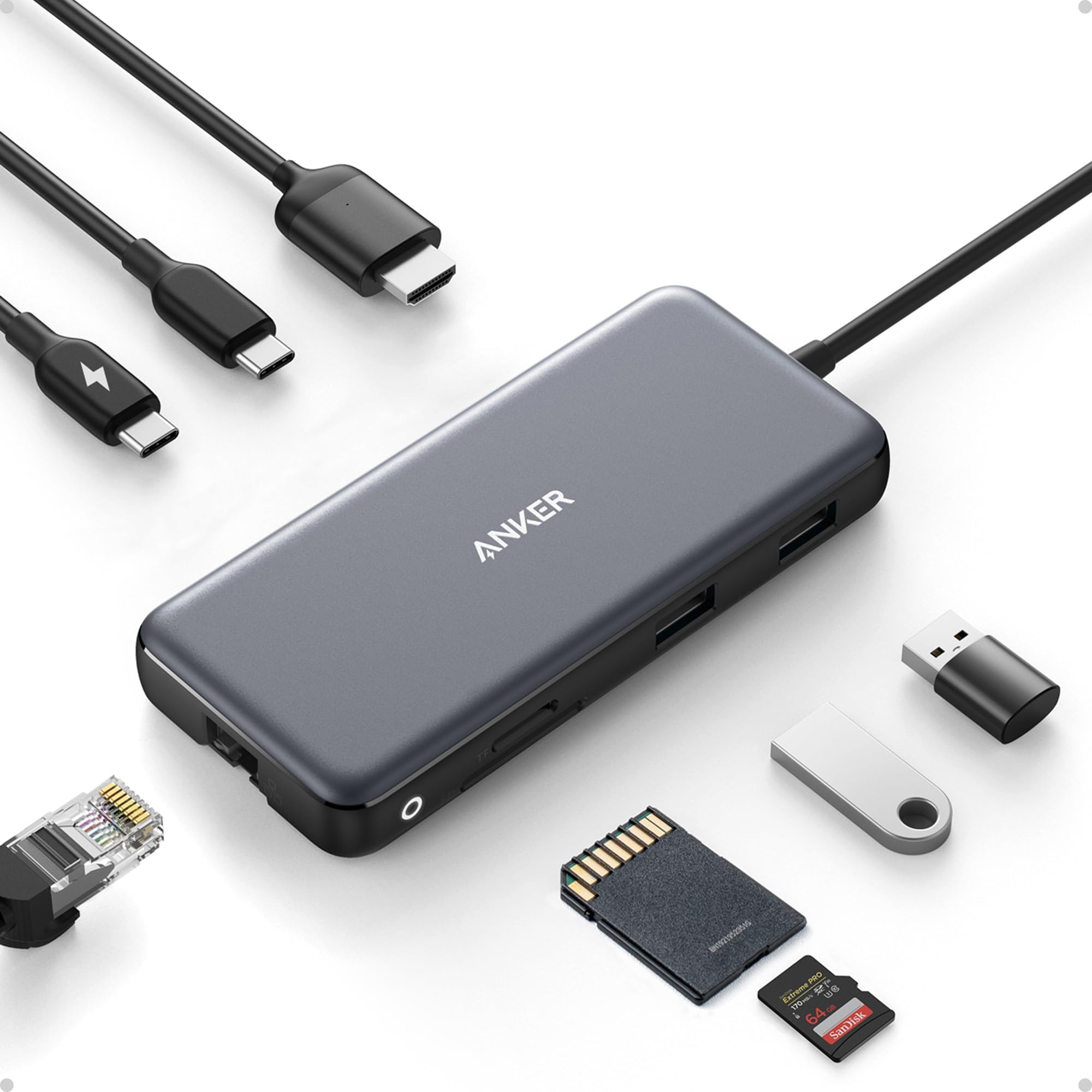
The Anker 8-in-1 USB-C Hub is a premium multiport adapter designed for professionals on the go. It delivers crystal-clear 4K@60Hz HDMI output, ultra-fast 10Gbps data transfer, and robust 85W power delivery pass-through. With Ethernet, microSD/SD card slots, and multiple USB ports, it seamlessly expands your MacBook, XPS, or iPad connectivity in a sleek, durable aluminum chassis. Perfect for multitasking millennials who demand speed, style, and reliability in one compact device.


| ASIN | B087QZVQJX |
| Additional Features | Fast Data Transfer, HDMI™️, Heat Resistant, Portable, Powered |
| Best Sellers Rank | #12 in USB Hubs |
| Brand | Anker |
| Color | Gray |
| Compatible Devices | Laptops, Macbook Air, Smartphones, Tablets |
| Customer Reviews | 4.3 4.3 out of 5 stars (9,130) |
| Data Transfer Rate | 10 Gigabits Per Second |
| Enclosure Material | Aluminum |
| Hardware Interface | Ethernet |
| Item Dimensions L x W x H | 4.76"L x 2.17"W x 0.6"H |
| Item Weight | 4.48 ounces |
| Manufacturer | Anker |
| Mfr Part Number | A83830A1 |
| Minimum Required Operating System Version | Mac OS 12 Monterey |
| Model Number | A83830A1 |
| Number of Ports | 8 |
| Operating System | iPadOS |
| Total Usb Ports | 3 |
| UPC | 194644032999 |
| Warranty Description | 18 months |
A**N
Great 10gbps USB-C Hub, worked with Anker support through compat issues with PD4 iteration 1
Original Review (updates below): ----- The moment I noticed this thing on Amazon, I bought it and it literally just arrived. Finally, 4K60 over just USB-C with other ports (including making up to 10Gbps available to them) for a reasonable price. Unfortunately, the first two things I've done with it were both disappointing. I'll cut to the chase, the power delivery pass through isn't working with one of their own chargers. The first device I tried connecting this with is my Anker PD4 with one USB-C cable as the only thing plugged into it so I can test the truly up to 100W (-15 for its own power) claims. I've tried connecting it with Apple's 2m USB-C charge cable (100w capable) and an equivalent CableMatters cable that also supports 100W. When plugged directly into my laptop, both of these cables immediately start charging it and show up as 100W power sources. When this Anker hub is plugged in and either of them is connected to the power delivery port on the side of it, the laptop does not charge (laptop is a 16" Macbook Pro, I've tried multiple ports just for the heck of it). My second complaint is that when absolutely nothing is plugged into it, it becomes fairly warm to the touch. Why, when it's doing nothing, is it hot? I'm clearly not running data or even power through it so I have low hopes for it under load. The fact that it doesn't work in exactly the scenario they want it to most (a MacBook Pro with one of their own chargers) seems like a pretty big fail. I've got lots of USB-C things though so I thought I'd grab a couple and try those. Using an Apple 96W USB-C charger, the device does pass through power delivery properly. It shows up as providing 79W to the laptop (siphoning off 17W in this instance). I also have a 56W Aukey charger that splits power between a USB-A port and a USB-C port that can provide 45W of power delivery. When plugged into that charger it does appear to work as well and appears in macOS as a 30W power source. Maybe the problem is the Anker PD4? But it works fine providing power to the laptop directly. Would love to hear from Anker about these two products working together and what I should actually expect. Having it be unreliable for power delivery isn't great, but power and heat aside (it is getting a little bit warmer now that it's providing power from the Apple power adapter, but still definitely holdable), the hardware looks and feels good and the cable feels durable. Worth also noting that there's a white LED ring on the side of it that appears to be always on when it's plugged in. Don't know why it needs an LED. ----- Update, June 22, 2020: I've done some more testing and Anker has reached out to me to investigate what might be the issue. I can say that the hub works as I would expect from a quick test with my iPad Pro 11" with the above functioning chargers. It was able to pass through power with the 96W Apple Charger on the other end to both the iPad port as well as a Magic Keyboard port. The ethernet adapter showed up in iOS settings and an external drive was functional. When connected via the Magic Keyboard, which is a power only connection, as expected it provided only power. Still no power passthrough of any kind when connected to the PD4. ----- Update July 1, 2020: I've written back and forth with Anker and they've sent me a replacement hub. It also doesn't work with the PD4. I've tried multiple USB-C cables but they have also shipped a cable to test with it. For now I'm increasing the review from 2 to 3 stars because I am more and more suspicious about the PD4 and less about this hub. They claim that they have tested the setup I have separately without issue, and I've sent video showing the problems I've encountered, so the troubleshooting is ongoing. Have had a chance to use Ethernet on it without issue. Still need to try to test out its throughput when trying to use a 10Gbps USB-C enclosure and a 4K60 monitor at the same time (+ ethernet). More updates to come. ----- Update July 10, 2020: I've continued to talk with Anker support and they shipped me a replacement PD4. The one I had was labeled as "Iteration 1" on its barcode, the one I got back was labeled "Iteration 2". I tested it out and it works perfectly with this hub, passing through the correct amount of power to multiple Macbook Pros and fast charging an iPad Pro. Clearly the fault doesn't lie with this hub and is instead an issue with the first iteration PD4, so I'm updating my review accordingly. Working with Anker support was great. I've also been able to test USB-C throughput (without driving a display as well so far) and it properly utilizes 10Gbps. I've attached some extra images showing various devices connected to it (keyboard dongle, SD card, USB-C 10Gbps external SSD enclosure, USB sound card, ethernet).
C**R
Does everything, super portable, robust construction
This is a super useful hub. I also used the Anker 341 7-in-1 hub for years, and it was very reliable for every feature, and the 555 8-in-1 looks to be of the same quality. The ethernet adapter is a great addition, and it works right away at 1G speeds on Linux 6.18 and even Android 16. I upgraded from the 341 to use this to connect to and configure devices from my desktop without having to drop my normal ethernet connection, and it is fantastic for that. It's a real swiss army hub, perfect travel size, and incredibly handy.
C**S
Great as long as you know its limitations; runs warm; monitor settings may need to be changed
I reluctantly gave up MagSafe and joined the USB-C future when my employer issued me a new 2019 16" MacBook Pro. Searching for a way to connect my various peripherals I settled on this hub as a reasonable way to connect a 4K display, pass power from the laptop charger (albeit not the full 96W; macOS reports 79W after hub losses—good enough most of the time), connect 1GigE, and provide a few spare USB ports and occasionally-used SD card slots. I've learned a few things: A port that looks like USB-C does not pass video unless it is a "Thunderbolt" port (look for the lightning bolt logo, apparently); connecting a USB-C-to-mini-DisplayPort adapter to the USB-C port on this hub did not allow my monitor to work. Lesson learned. The HDMI port did work, and did pass 4K@60Hz, but only after I adjusted my monitor settings. At first I was convinced either my HDMI cable or this hub were defective, because macOS would only allow me to select 4K@30Hz. I have an LG 4K display, and from reading forums, one must enable 60Hz in the on-screen display menu before the monitor will tell the computer it is capable of displaying 60Hz video. For my monitor, that meant changing "Ratio" in "Quick Settings" to "Original" (it defaulted to "Wide", with a separate configuration for each port), as well as turning on "HDMI ULTRA HD Deep Color" from "Picture" -> "Picture Adjust." After I changed those two settings, 60Hz was not available until I unplugged the HDMI cable from the hub and plugged it in again. After that I had buttery smooth 4K video at 60Hz. The hub works as advertised, at least for my configuration. The 1GigE port works well, and is equivalent to a direct USB-C to Ethernet adapter I tried. It does run warm to the touch as other reviewers have reported. That's not problematic, but I'd prefer it pass the missing 17W to the laptop rather than dissipate it as heat. Time will tell how well the hub holds up, but for now I'm happy. In summary: if you have a new Mac this hub will likely work for you, though you may need to adjust your monitor settings.
J**N
Handy Little Tool Does Require Power Supply for all port functions.
Great Device! Hub works well in Dell Laptops, HP Laptops, and Apple computers. Hub must be powered by the computers charger for use. Monitor display port will not work without it. Could be made better to be able to use it entirely without the additional Power supply requirement. If your computer requires more than 85W of power, it will not effectively charge your computer and work at the same time. Your computer may go into a lower Power mode to offset the Wattage difference. For example My MacBook Pro will not Charge effectively since it requires a larger Charger.
C**K
Easy and reliable
This is a great hub. I can use 2 external monitors, use USB drives, and also have a wired connection to my network and internet for better speeds. It was so simple to connect everything.
J**Z
Cuenta con múltiples puertos, como USB-A, HDMI y lector de tarjetas SD, lo que lo hace extremadamente versátil. La transferencia de datos es rápida y sin interrupciones, y la salida HDMI ofrece una calidad de imagen nítida, perfecta para presentaciones o ver contenido en alta definición. Algo que me encanta es lo bien que se integra al flujo de trabajo diario. Es increíblemente fácil de usar: simplemente conecta el adaptador al puerto USB-C, y todo está listo para funcionar. He probado otro tipo de adaptadores más económicos y después de probar este de Anker no los volvería a comprar ya que es una perdida de dinero. A veces lo barato sale caro.
K**E
Works well, feels like good quality - I needed this specific one because apparently it was one of the only ports I could use to hook up a Spyder colour calibration tool to calibrate my external monitor with my macbook pro - anyway it worked and did what I needed.
R**Y
Bisher nur ein Testlauf, läuft aber perfekt.
L**G
Estou usando para HDMI, internet (cabo) e mouse usb. Está me atendendo muito bem! Carrega também o iPhone na entrada usb-c, mas eu não uso, pois esquenta. Uso 1 porta apenas para carregar e a outra para o hub. Muito bom!
C**N
Conforme à la description, transfert rapide , le produit semble de bonne qualité.
Trustpilot
2 months ago
2 days ago